> ## Documentation Index
> Fetch the complete documentation index at: https://razorpay-881012b3.mintlify.site/llms.txt
> Use this file to discover all available pages before exploring further.
# Sub-Merchant Onboarding APIs Flow
> Seamlessly onboard merchants using the Sub-Merchant Onboarding APIs.
Available in
🇮🇳 India
To use the Sub-Merchant Onboarding APIs, you need to enroll in the Razorpay Partner Program.
The following illustration depicts the Sub-merchant Onboarding APIs flow to help Partners onboard merchants from their platform:
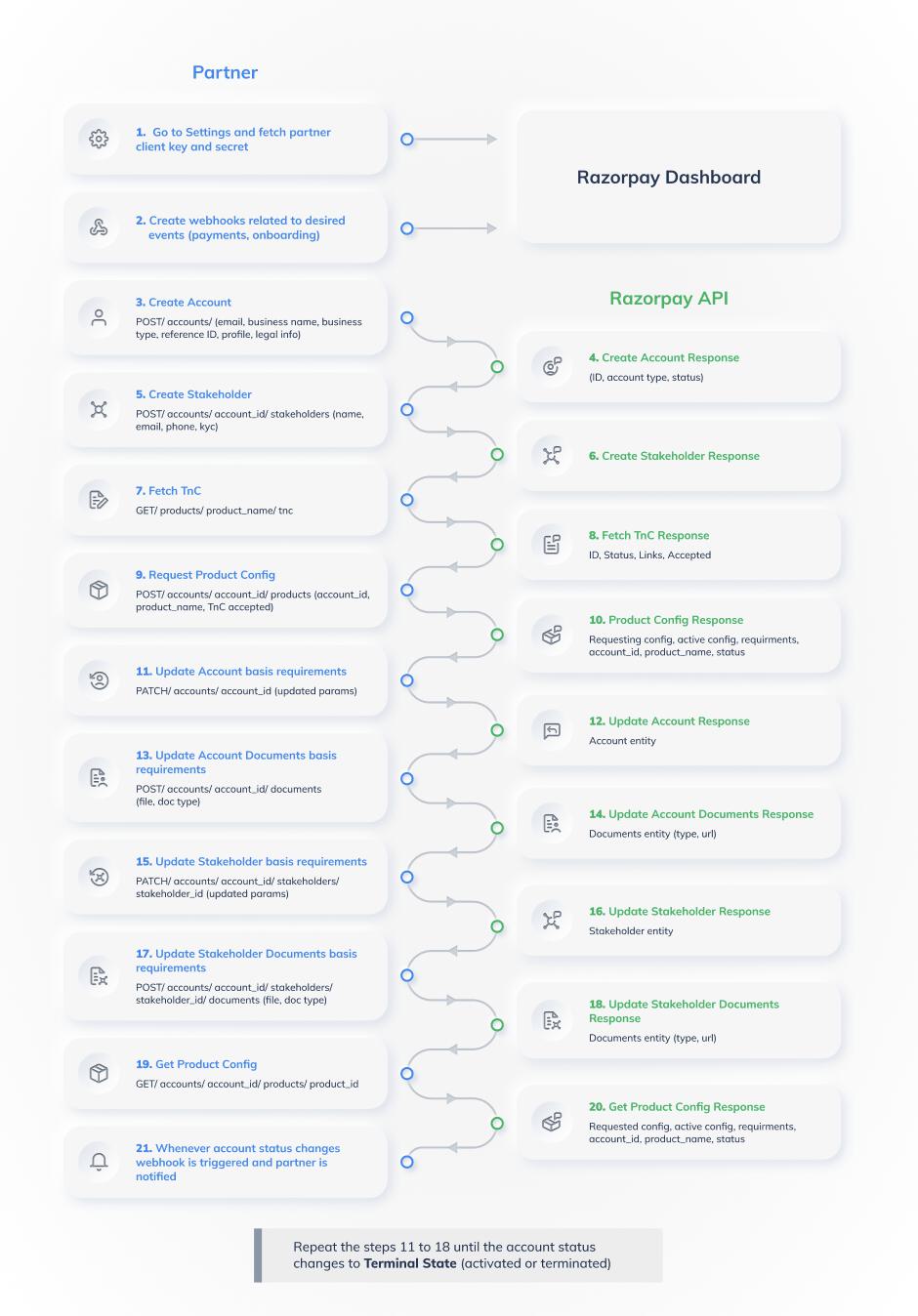 Follow the steps given below:
1. Sign in to your Partner Dashboard to obtain your `client_id` and `client_secret` to authenticate API calls. You can obtain `client_id` and `client_secret` depending on the test mode or live mode.
2. Create a webhook related to desired events such as payments, orders, invoices and so on.
3. Create an account for the sub-merchant using the [Create an Account API](/docs/api/partners/account-onboarding/create).
4. An account is created and the `account_id` is provided in the response. For example, `acc_Hbu4sC0O4GOGSN`. Use this `account_id` to fetch, update, delete the account and upload account documents.
5. Use the [Create a Stakeholder API](/docs/api/partners/stakeholder/create) to add a stakeholder for an account. Each stakeholder needs to update the KYC.
6. A `stakeholder_id` is provided in the response as a stakeholder is created. For example, `sth_Hbu4sC0O4GOGSK`. Use this stakeholder id to complete stakeholder-related KYC details while onboarding a product. Also, use this `stakeholder_id` to fetch and update a stakeholder.
7. Before activating the sub-merchant and requesting for relevant product configurations, the sub-merchant needs to view and accept Terms and Conditions. The partner can fetch Terms and Conditions links to show to the sub-merchant using [Fetch Terms and Conditions API](/docs/api/partners/terms-conditions/fetch).
8. As requested, the partner will get a link to the relevant Terms and Conditions.
9. Create a product (for example, `payment_gateway`) and accept Terms and Conditions for the sub-merchant using the [Request a Product Configuration API](/docs/api/partners/product-configuration/request). A product is created with default configurations. To update configurations, you can use the [Update a Product Configuration API](/docs/api/partners/product-configuration/update-settlement-account-details) (For Payment gateway product, settlement details (bank account) have to be sent in the Update Config API).
10. As the product is created, the `merchant_product_id` and the list of pending requirements are provided in the response.
11. Cater to the pending account requirements using the [Update an Account API](/docs/api/partners/account-onboarding/update).
12. As the requested account details criteria is met, an updated account response will be provided.
13. Using the [Documents APIs](/docs/api/partners/upload-document), upload the required sub-merchant's business documents.
14. Once the required documents are uploaded, the uploaded details of a document (S3 URL) are provided in the response based on the entity, that is, account.
15. Fill in the stakeholder requirements using the [Update a Stakeholder API](/docs/api/partners/stakeholder/update). For example, KYC requirements such as PAN is the type of document required to establish the stakeholder's identity.
16. After the KYC requirements for a stakeholder are met, the response for the stakeholder is updated.
17. Using the [Documents APIs](/docs/api/partners/upload-document), upload the required sub-merchant's stakeholder's signatory documents.
18. Once the required documents are uploaded, the uploaded document details (S3 URL) are provided in the response based on the entity, that is, stakeholder.
19. Using the [Product Configuration Request APIs](/docs/api/partners/product-configuration/fetch), fetch the account product.
20. The [product activation status](/docs/partners/aggregators/onboarding-api/product-activation) changes to `under_review` when all the requirements are met. At this point, the status for a Payment Gateway product changes to `under_review` and the webhook event `product.payment_gateway.under_review` is triggered.
21. When the [product status](/docs/partners/aggregators/onboarding-api/product-activation#product-activation-states) is changed to `needs_clarification`, the webhook event `product.payment_gateway.needs_clarification` is triggered.
**Handy Tips**
Repeat steps 11 to 18 till the account status changes to **Terminal state** (either activated or rejected).
22. The webhook event `product.payment_gateway.activated` is triggered when the Payment Gateway product status is `activated`.
**Watch Out!**
Currently, we do not support making concurrent requests to the following Onboarding APIs including their combination on the same `account_id`:
* [Update Account API](/docs/api/partners/account-onboarding/update)
* [Update Product Configuration API](/docs/api/partners/product-configuration/update-settlement-account-details)
* [Update Stakeholder API](/docs/api/partners/stakeholder/update)
Please wait for the response of these APIs before making subsequent requests.
### Related Information
* [Product Activation Status](/docs/partners/aggregators/onboarding-api/product-activation)
* [Sub-Merchant Onboarding APIs](/docs/partners/aggregators/onboarding-api)
* [Partners Account APIs](/docs/api/partners/account-onboarding)
* [Product Configuration APIs](/docs/api/partners/product-configuration)
* [Stakeholder APIs](/docs/api/partners/stakeholder)
* [Partners API Errors](/docs/api/partners/errors)
Follow the steps given below:
1. Sign in to your Partner Dashboard to obtain your `client_id` and `client_secret` to authenticate API calls. You can obtain `client_id` and `client_secret` depending on the test mode or live mode.
2. Create a webhook related to desired events such as payments, orders, invoices and so on.
3. Create an account for the sub-merchant using the [Create an Account API](/docs/api/partners/account-onboarding/create).
4. An account is created and the `account_id` is provided in the response. For example, `acc_Hbu4sC0O4GOGSN`. Use this `account_id` to fetch, update, delete the account and upload account documents.
5. Use the [Create a Stakeholder API](/docs/api/partners/stakeholder/create) to add a stakeholder for an account. Each stakeholder needs to update the KYC.
6. A `stakeholder_id` is provided in the response as a stakeholder is created. For example, `sth_Hbu4sC0O4GOGSK`. Use this stakeholder id to complete stakeholder-related KYC details while onboarding a product. Also, use this `stakeholder_id` to fetch and update a stakeholder.
7. Before activating the sub-merchant and requesting for relevant product configurations, the sub-merchant needs to view and accept Terms and Conditions. The partner can fetch Terms and Conditions links to show to the sub-merchant using [Fetch Terms and Conditions API](/docs/api/partners/terms-conditions/fetch).
8. As requested, the partner will get a link to the relevant Terms and Conditions.
9. Create a product (for example, `payment_gateway`) and accept Terms and Conditions for the sub-merchant using the [Request a Product Configuration API](/docs/api/partners/product-configuration/request). A product is created with default configurations. To update configurations, you can use the [Update a Product Configuration API](/docs/api/partners/product-configuration/update-settlement-account-details) (For Payment gateway product, settlement details (bank account) have to be sent in the Update Config API).
10. As the product is created, the `merchant_product_id` and the list of pending requirements are provided in the response.
11. Cater to the pending account requirements using the [Update an Account API](/docs/api/partners/account-onboarding/update).
12. As the requested account details criteria is met, an updated account response will be provided.
13. Using the [Documents APIs](/docs/api/partners/upload-document), upload the required sub-merchant's business documents.
14. Once the required documents are uploaded, the uploaded details of a document (S3 URL) are provided in the response based on the entity, that is, account.
15. Fill in the stakeholder requirements using the [Update a Stakeholder API](/docs/api/partners/stakeholder/update). For example, KYC requirements such as PAN is the type of document required to establish the stakeholder's identity.
16. After the KYC requirements for a stakeholder are met, the response for the stakeholder is updated.
17. Using the [Documents APIs](/docs/api/partners/upload-document), upload the required sub-merchant's stakeholder's signatory documents.
18. Once the required documents are uploaded, the uploaded document details (S3 URL) are provided in the response based on the entity, that is, stakeholder.
19. Using the [Product Configuration Request APIs](/docs/api/partners/product-configuration/fetch), fetch the account product.
20. The [product activation status](/docs/partners/aggregators/onboarding-api/product-activation) changes to `under_review` when all the requirements are met. At this point, the status for a Payment Gateway product changes to `under_review` and the webhook event `product.payment_gateway.under_review` is triggered.
21. When the [product status](/docs/partners/aggregators/onboarding-api/product-activation#product-activation-states) is changed to `needs_clarification`, the webhook event `product.payment_gateway.needs_clarification` is triggered.
**Handy Tips**
Repeat steps 11 to 18 till the account status changes to **Terminal state** (either activated or rejected).
22. The webhook event `product.payment_gateway.activated` is triggered when the Payment Gateway product status is `activated`.
**Watch Out!**
Currently, we do not support making concurrent requests to the following Onboarding APIs including their combination on the same `account_id`:
* [Update Account API](/docs/api/partners/account-onboarding/update)
* [Update Product Configuration API](/docs/api/partners/product-configuration/update-settlement-account-details)
* [Update Stakeholder API](/docs/api/partners/stakeholder/update)
Please wait for the response of these APIs before making subsequent requests.
### Related Information
* [Product Activation Status](/docs/partners/aggregators/onboarding-api/product-activation)
* [Sub-Merchant Onboarding APIs](/docs/partners/aggregators/onboarding-api)
* [Partners Account APIs](/docs/api/partners/account-onboarding)
* [Product Configuration APIs](/docs/api/partners/product-configuration)
* [Stakeholder APIs](/docs/api/partners/stakeholder)
* [Partners API Errors](/docs/api/partners/errors)