> ## Documentation Index
> Fetch the complete documentation index at: https://razorpay-881012b3.mintlify.site/llms.txt
> Use this file to discover all available pages before exploring further.
# About Merchant Onboarding UI
> Integrate with the Merchant Onboarding UI to build a seamless onboarding flow for your sub-merchants.
Available in
🇮🇳 India
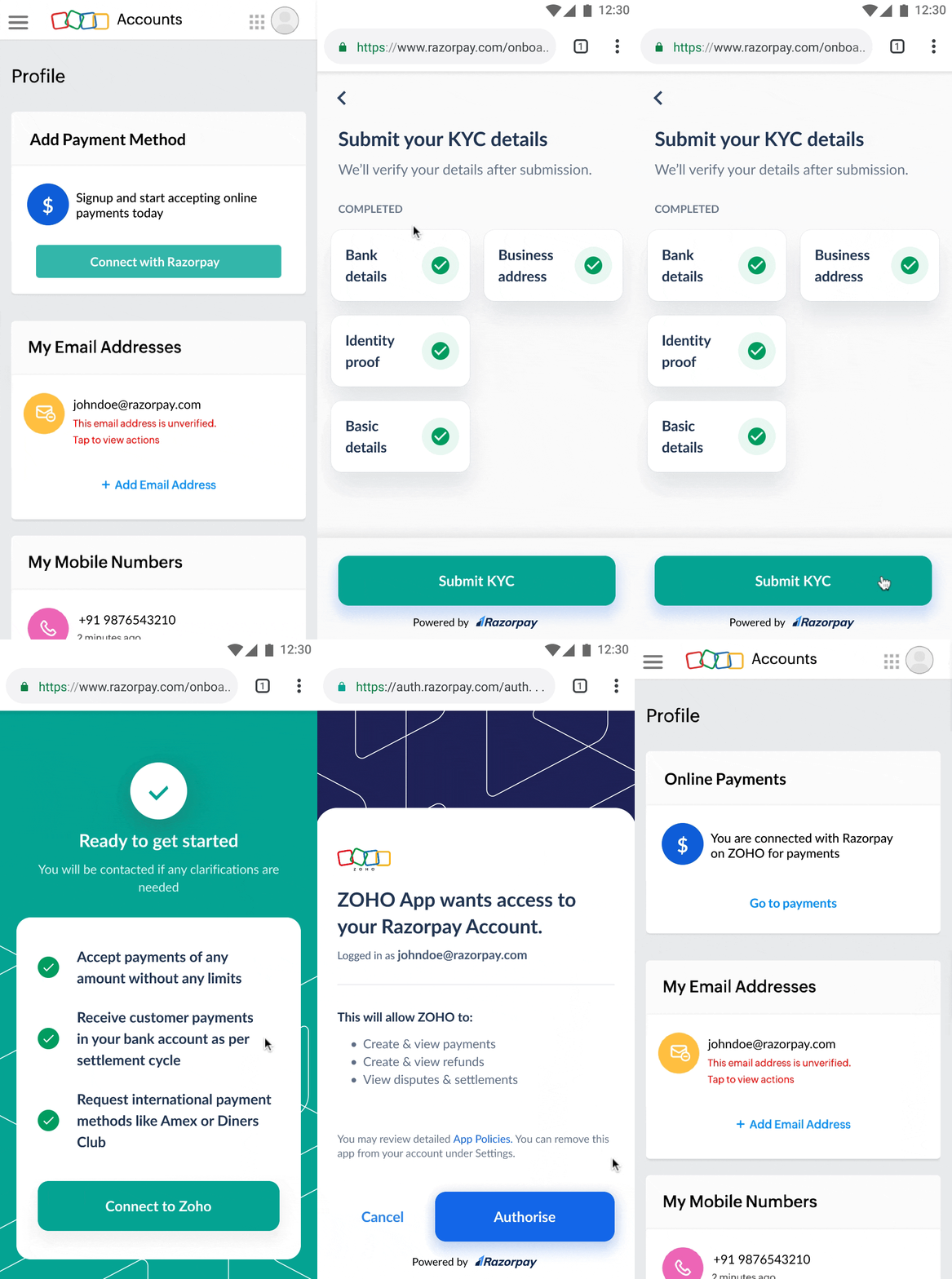
Merchant Onboarding UI is a set of pre-built UI components for Razorpay Partners that assists in building a native business onboarding flow. This allows Partners to onboard their sub-merchants to Razorpay right from their platform.
Merchant Onboarding UI offers customisation wherein Partners can configure colour theme, logo and brand name to mimic the platform theme.
**Feature Request**
This is an on-demand feature. Please raise a request with our [Support team](https://razorpay.com/support/#request) to get this feature activated on your Razorpay account.
## Prerequisites
* [Sign up as Partner](https://razorpay.com/partners/) and complete KYC to activate your account.
* Get the Merchant Onboarding UI capability enabled for your account.
* Keep a redirect URL ready. Razorpay will redirect users to this URL after they complete the onboarding process.
## How it Works
Given below is the workflow:
1. Sign up as a Razorpay partner.
2. Configure the merchant onboarding theme as per your platform branding.
3. Subscribe to account creation webhooks to receive real time notifications about merchant onboarding status.
4. Embed the signup link in your platform, to enable merchants to complete Razorpay onboarding and start accepting payments.
5. After the merchant authorises to connect your platform/account, we add the merchant as a sub-merchant under your Razorpay Partner account.
6. You can start managing the merchant account and payments on their behalf after the account is activated.
 ## Integration Steps
Follow these steps to complete the integration:
1. [Build Integration](/docs/partners/aggregators/onboarding-ui/build-integration): Perform the steps on your website/app and the Razorpay Dashboard.
2. [Test Integration](/docs/partners/aggregators/onboarding-ui/test-integration): Test the integration before going live with the integration.
### Related Information
* [Fetch Merchant Account Onboarding Status](/docs/partners/aggregators/onboarding-ui/status)
## Integration Steps
Follow these steps to complete the integration:
1. [Build Integration](/docs/partners/aggregators/onboarding-ui/build-integration): Perform the steps on your website/app and the Razorpay Dashboard.
2. [Test Integration](/docs/partners/aggregators/onboarding-ui/test-integration): Test the integration before going live with the integration.
### Related Information
* [Fetch Merchant Account Onboarding Status](/docs/partners/aggregators/onboarding-ui/status)