> ## Documentation Index
> Fetch the complete documentation index at: https://razorpay-881012b3.mintlify.site/llms.txt
> Use this file to discover all available pages before exploring further.
# Settlement Details
> Steps to view your settlement details on the Razorpay Dashboard.
Available in
🇮🇳 India
🇸🇬 Singapore
🇺🇸 United States
You can view details regarding your settlement cycle and next settlement date on the Dashboard.
## View Settlement Details
To view settlement details:
1. Log in to the Dashboard.
2. Click **Account & Settings** and navigate to **Settlement details** under **Business accounts and settlements** section.
3. You can view the following information:
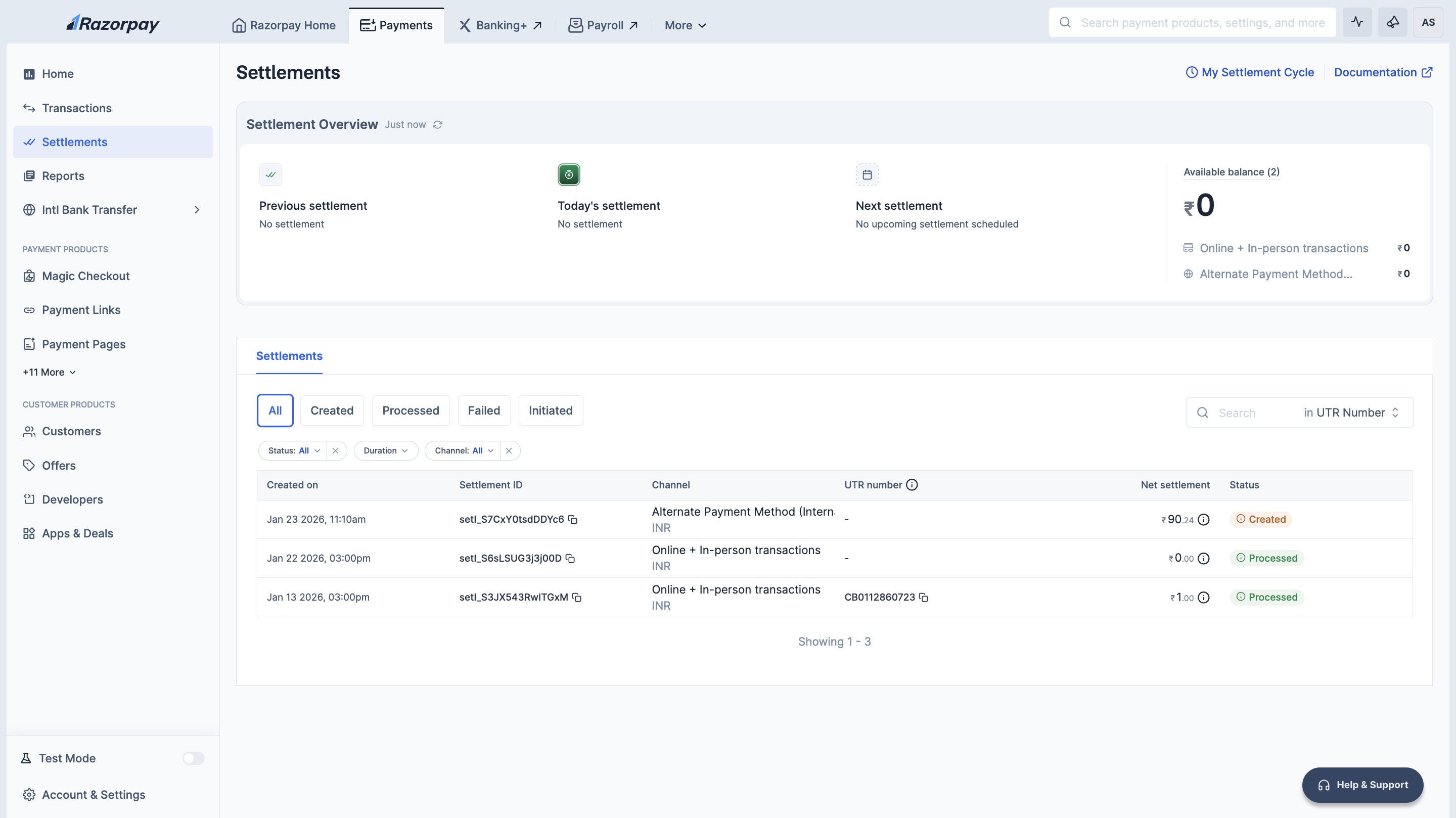
* **Settlement Details**: Click **View Settlement Cycle** to view default and other settlement cycles.
* **Available Balance**: After the deduction of fees and tax, the payments received from your customers are added to your Available Balance.
* **Next Settlement**: Date and time of next settlement.
 ## Segregated Balances
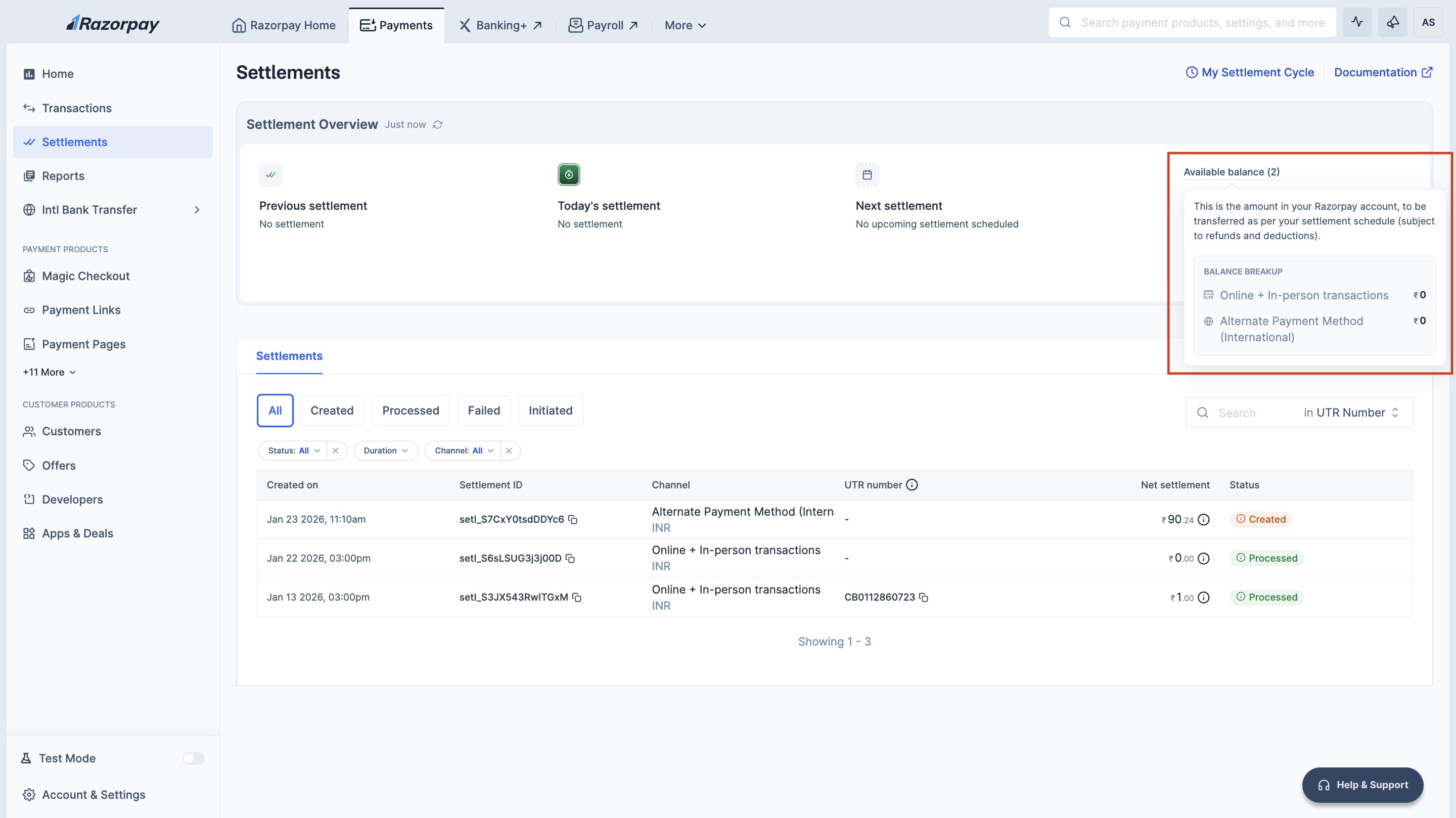
If you are an omni-channel business (using both Payment Gateway and POS) or a cross-border business, your balances are **segregated by channel type (Online (Domestic transactions + International Cards), In-person and Alternate Payment Method (International))**. This ensures complete fund isolation and regulatory compliance.
## Segregated Balances
If you are an omni-channel business (using both Payment Gateway and POS) or a cross-border business, your balances are **segregated by channel type (Online (Domestic transactions + International Cards), In-person and Alternate Payment Method (International))**. This ensures complete fund isolation and regulatory compliance.
 ### Types of Segregated Balances
Razorpay maintains separate balances based on your payment channels:
| Channel Type | Description | Transactions Included | Additional Details |
| ---------------------------------------------------- | -------------------------------------------------------------------------------------------------------- | ------------------------------------------------------------------------------------------ | ------------------------------------------------------------------------------------------------------------------ |
| Online (Domestic transactions + International Cards) | Domestic online payments and international card transactions | PG domestic transactions (cards, UPI, netbanking and wallets), international card payments | Supports Instant Settlements. |
| In-Person | POS terminal transactions | All POS/offline transactions | POS device rentals are automatically collected from this balance. Operates independently from online transactions. |
| Alternate Payment Method (International) | Balance from international payment methods such as PayPal, Stripe and other cross-border payment methods | International bank transfers, cross-border payments via supported APM providers | Settled separately from domestic balances. Subject to forex conversion and international settlement timelines. |
### View Channel-Wise Balances
To view your segregated balances:
1. Log in to the Dashboard.
2. Navigate to **Account & Settings → Settlement details**.
3. You will see balance cards for each channel type such as:
* **Online (Domestic transactions + International Cards)**: Balance from domestic online payments and international card transactions.
* **In-Person**: Balance from POS terminal transactions (all POS/offline transactions).
* **Alternate Payment Method (International)**: Balance from international bank transfers.
Each balance card displays:
* Current available balance.
* Next settlement date and amount.
* Settlement cycle applicable to that balance.
### How Segregated Settlements Work
With balance segregation:
* Each channel type (Online (Domestic transactions + International Cards), POS, Cross-border) maintains its own isolated balance.
* Settlements are processed separately for each balance account.
* Refunds and chargebacks are debited only from the respective channel balance.
* Instant Settlements can be enabled independently for each balance account.
**Handy Tips**
Balance segregation ensures that your POS settlements never fail due to online refunds consuming your funds and vice versa. Each channel operates independently.
### Types of Segregated Balances
Razorpay maintains separate balances based on your payment channels:
| Channel Type | Description | Transactions Included | Additional Details |
| ---------------------------------------------------- | -------------------------------------------------------------------------------------------------------- | ------------------------------------------------------------------------------------------ | ------------------------------------------------------------------------------------------------------------------ |
| Online (Domestic transactions + International Cards) | Domestic online payments and international card transactions | PG domestic transactions (cards, UPI, netbanking and wallets), international card payments | Supports Instant Settlements. |
| In-Person | POS terminal transactions | All POS/offline transactions | POS device rentals are automatically collected from this balance. Operates independently from online transactions. |
| Alternate Payment Method (International) | Balance from international payment methods such as PayPal, Stripe and other cross-border payment methods | International bank transfers, cross-border payments via supported APM providers | Settled separately from domestic balances. Subject to forex conversion and international settlement timelines. |
### View Channel-Wise Balances
To view your segregated balances:
1. Log in to the Dashboard.
2. Navigate to **Account & Settings → Settlement details**.
3. You will see balance cards for each channel type such as:
* **Online (Domestic transactions + International Cards)**: Balance from domestic online payments and international card transactions.
* **In-Person**: Balance from POS terminal transactions (all POS/offline transactions).
* **Alternate Payment Method (International)**: Balance from international bank transfers.
Each balance card displays:
* Current available balance.
* Next settlement date and amount.
* Settlement cycle applicable to that balance.
### How Segregated Settlements Work
With balance segregation:
* Each channel type (Online (Domestic transactions + International Cards), POS, Cross-border) maintains its own isolated balance.
* Settlements are processed separately for each balance account.
* Refunds and chargebacks are debited only from the respective channel balance.
* Instant Settlements can be enabled independently for each balance account.
**Handy Tips**
Balance segregation ensures that your POS settlements never fail due to online refunds consuming your funds and vice versa. Each channel operates independently.