> ## Documentation Index
> Fetch the complete documentation index at: https://razorpay-881012b3.mintlify.site/llms.txt
> Use this file to discover all available pages before exploring further.

# Integration Steps

> Steps to integrate the Razorpay Payment Gateway with Shopify - Appmaker on your Shopify store.

<div style={{display:"flex",flexWrap:"wrap",alignItems:"center",gap:"0.35rem 0.9rem",border:"1px solid rgba(128,128,128,0.28)",borderRadius:"0.5rem",padding:"0.45rem 0.75rem",margin:"0 0 1.25rem",fontSize:"0.875rem"}}>
  <span style={{fontWeight:600}}>Available in</span>
  <span>🇮🇳 India</span>
</div>

Appmaker allows you to create a custom mobile app for your Shopify store, providing a seamless shopping experience for your customers. Integrate with the Razorpay Shopify - Appmaker extension to offer a smooth payment experience to your customers on the app.

Follow the steps given below to integrate the Razorpay Payment Gateway with Shopify - Appmaker on your Shopify store.

<CardGroup cols={2}>
  <Card title="Standard Checkout" href="/docs/payments/ecommerce-plugins/shopify-appmaker#1-integrate-razorpay-appmaker-extension-with-shopify-for">
    Integrate Razorpay Appmaker Extension With Shopify for Standard Checkout.
  </Card>

  <Card title="Magic Checkout" href="/docs/payments/ecommerce-plugins/shopify-appmaker#2-integrate-razorpay-appmaker-extension-with-shopify-for">
    Integrate Razorpay Appmaker Extension With Shopify for Magic Checkout.
  </Card>
</CardGroup>

## Prerequisites

Before you proceed, make sure you have the following:

* Sign up for a [Razorpay account](https://dashboard.razorpay.com/signup).
* Sign up for a [Shopify account](https://www.shopify.in).
* Integrate [Appmaker](https://apps.shopify.com/appmaker) with Shopify.
* [Integrate Razorpay with Shopify](/docs/payments/payment-gateway/ecommerce-plugins/shopify).

## Integration Steps

Follow the steps given below:

<AccordionGroup>
  <Accordion title="Integrate Razorpay Appmaker Extension With Shopify for Standard Checkout">
    Follow these steps to proceed with the integration:

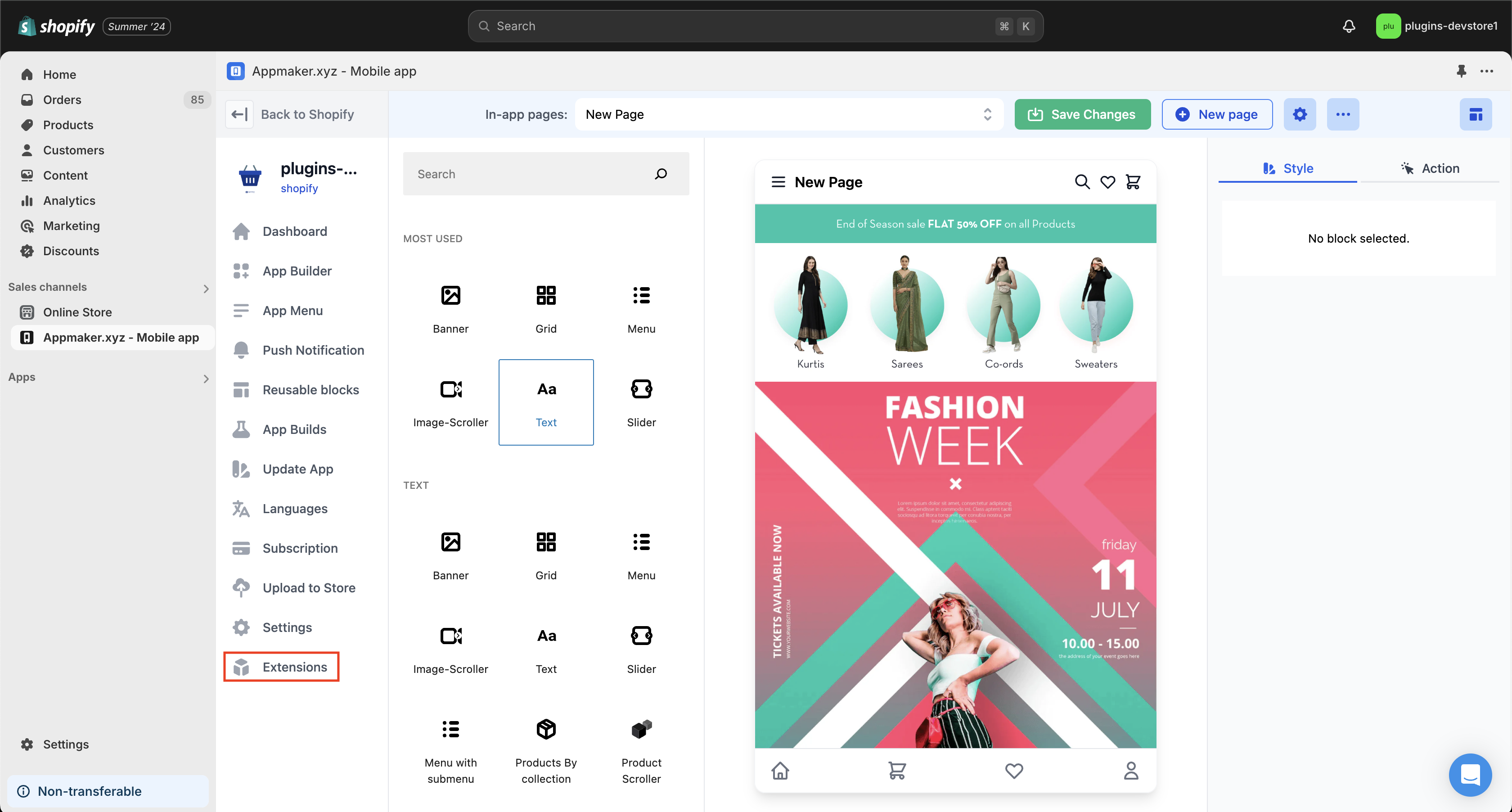
    1. After adding AppMaker to your Shopify store, navigate to the AppMaker window. Click **Extensions**.
           <img src="https://razorpay.com/docs/build/browser/assets/images/appmaker-extension.jpg" class="click-zoom" alt="Appmaker window extension" width="600" />
    2. On the Installed Extensions page, click **Explore Extensions**.
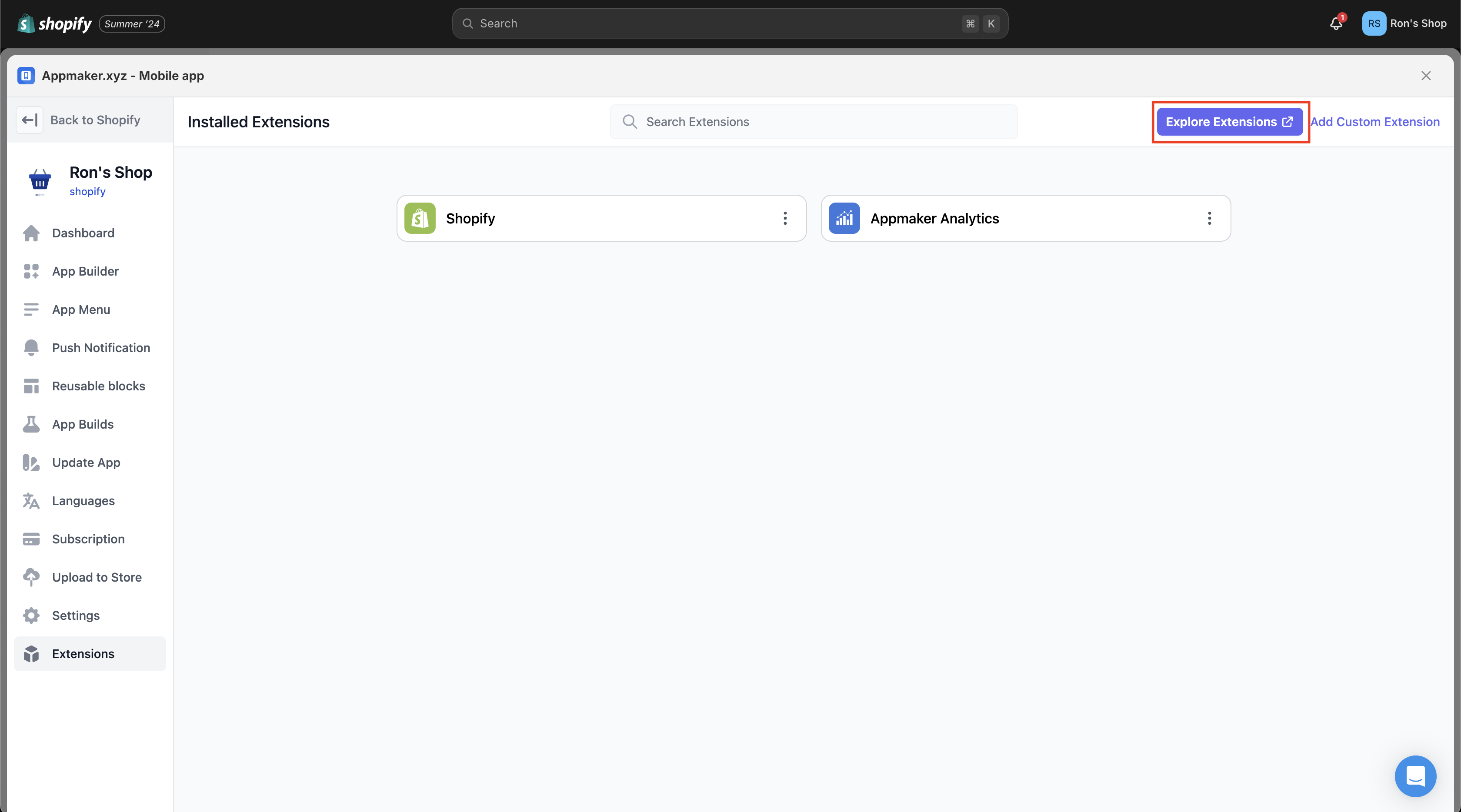
           <img src="https://razorpay.com/docs/build/browser/assets/images/explore-extension.jpg" class="click-zoom" alt="Explore extension" width="600" />
    3. Search for Razorpay in the search bar on the All Extensions page. Select **Razorpay-Shopify-Appmaker** and click **Next**.
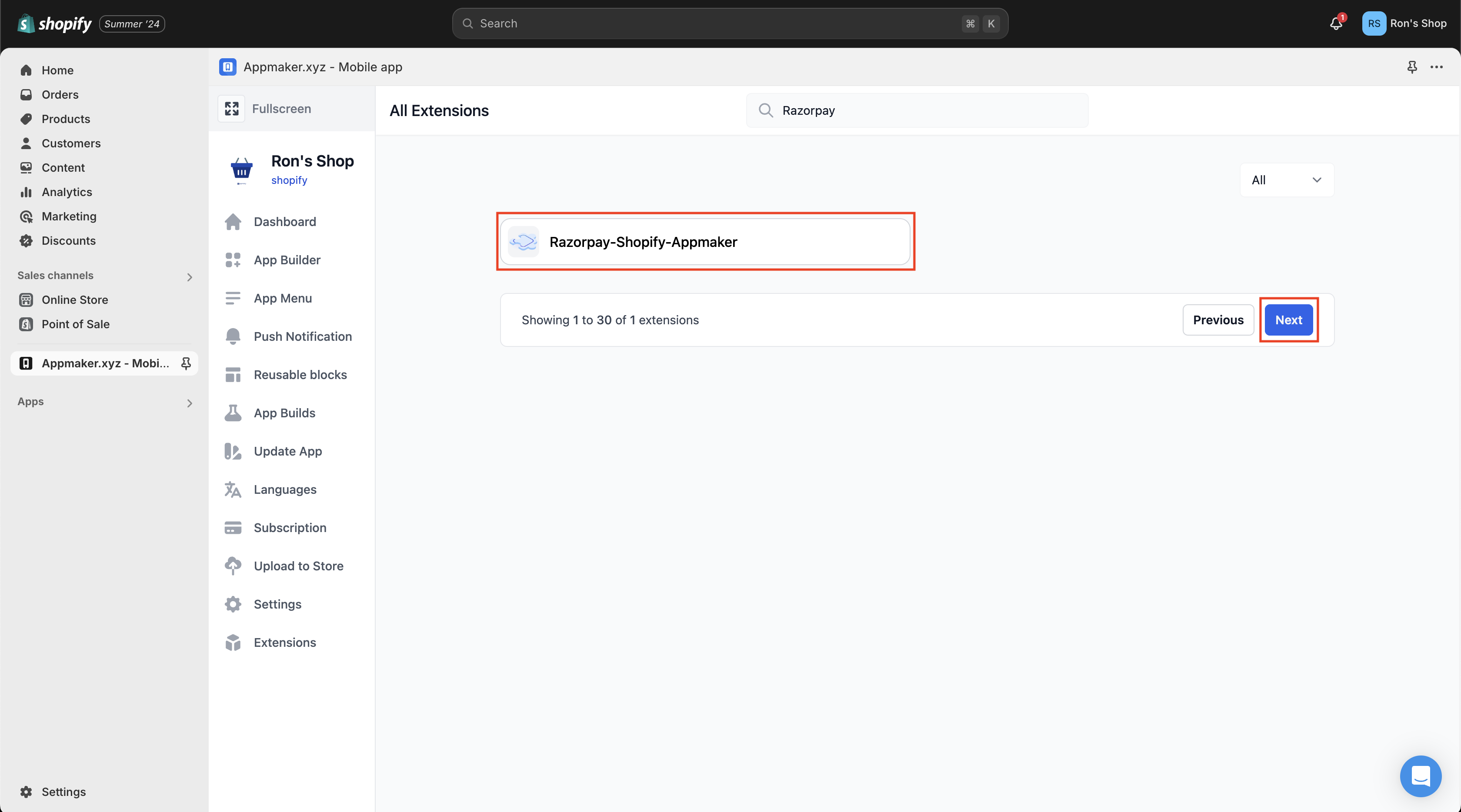
           <img src="https://razorpay.com/docs/build/browser/assets/images/razorpay-shopify-appmaker.jpg" class="click-zoom" alt="All extensions razorpay shopify appmaker" width="600" />
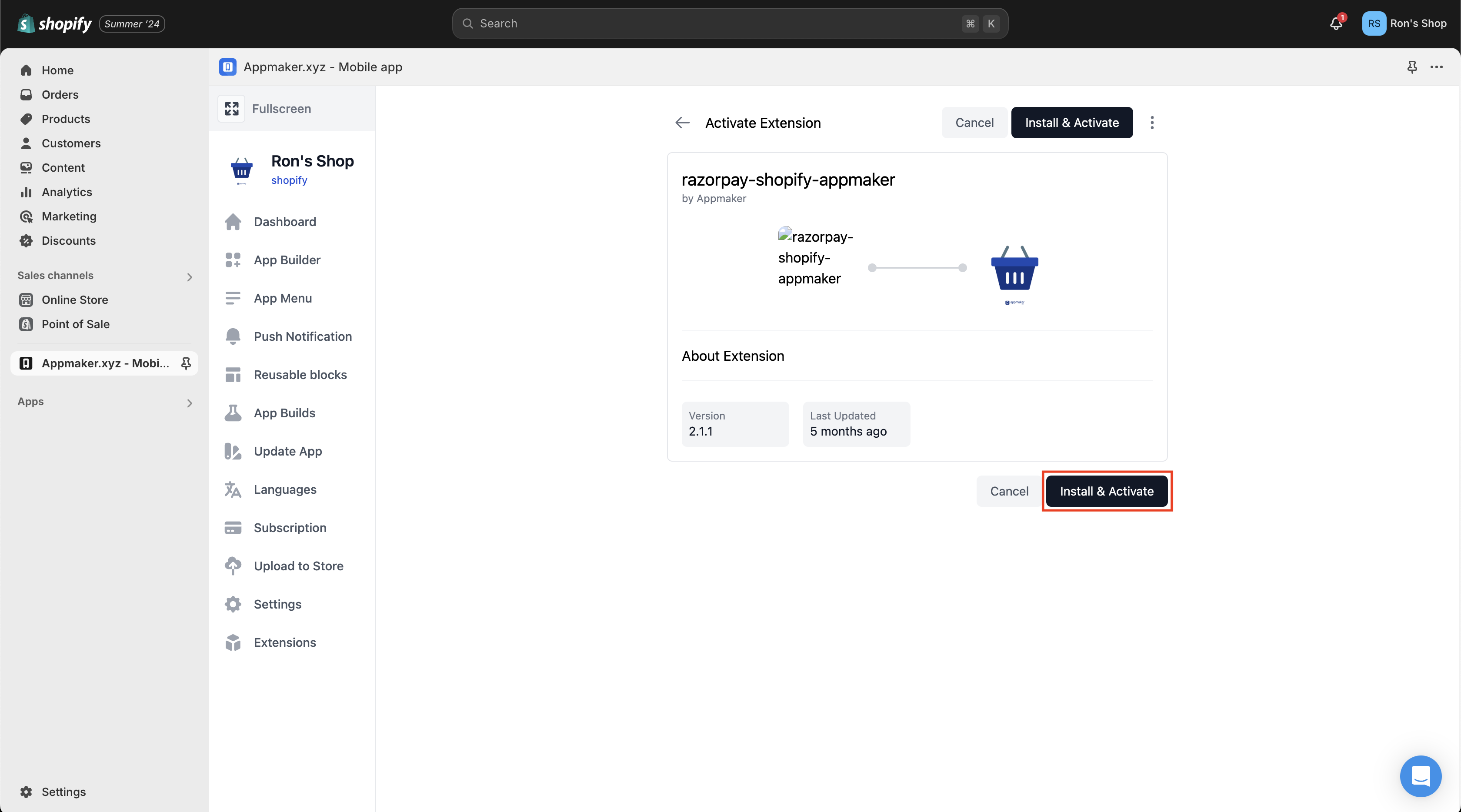
    4. Click **Install & Activate**.
           <img src="https://razorpay.com/docs/build/browser/assets/images/install-activate-rsa.jpg" class="click-zoom" alt="Install and activate razorpay shopify appmaker" width="600" />

    Appmaker extension is successfully installed and activated.
  </Accordion>

  <Accordion title="Integrate Razorpay Appmaker Extension With Shopify for Magic Checkout">
    Follow this step to proceed with the integration:

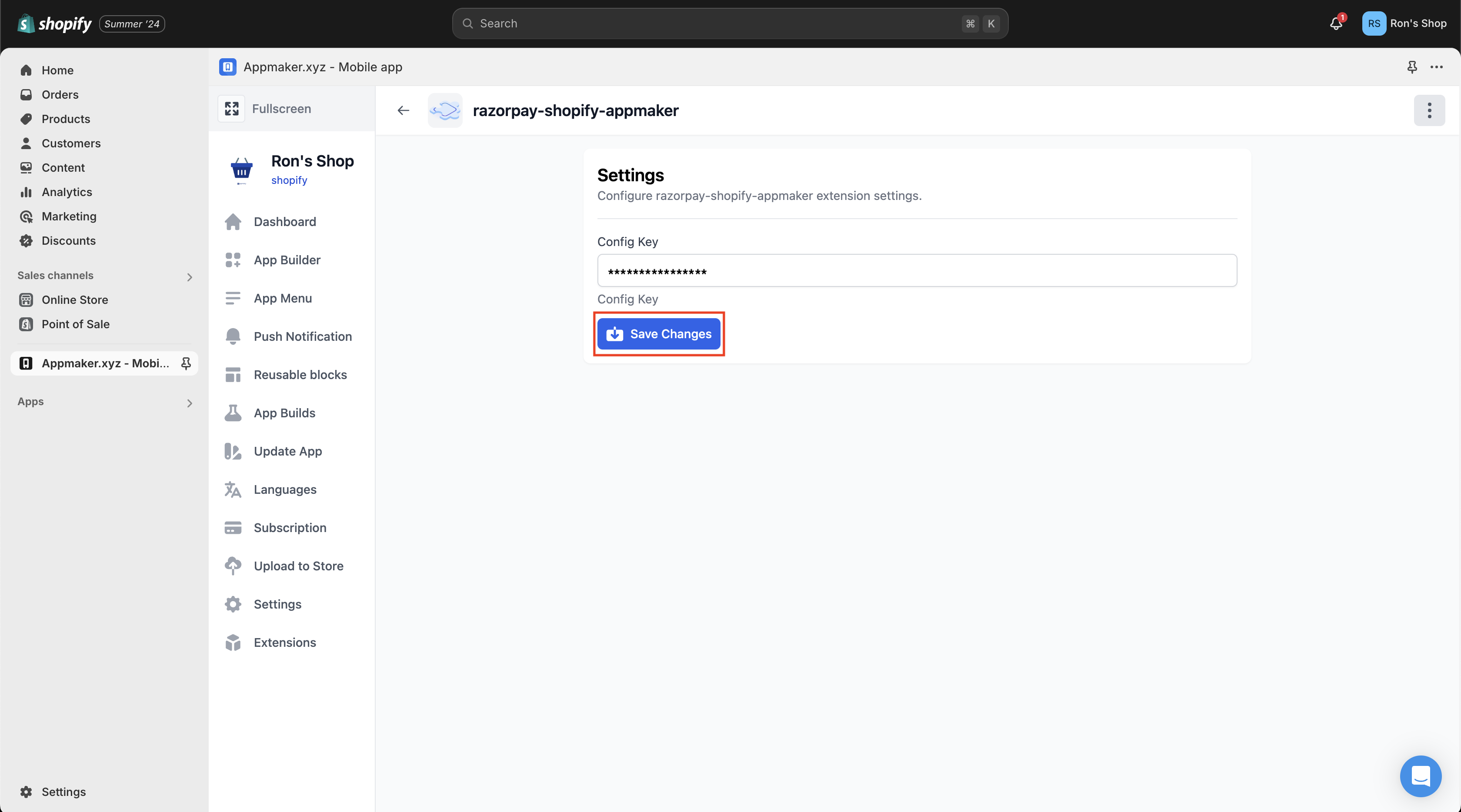
    You must do the [standard checkout integration](#1-integrate-razorpay-appmaker-extension-with-shopify-for) before proceeding with the Magic checkout integration. After you install the Razorpay Shopify Appmaker extension, navigate to **Settings** and enter the **Config Key**. Click **Save Changes**.

    <img src="https://razorpay.com/docs/build/browser/assets/images/rsa-config-key.jpg" class="click-zoom" alt="Razorpay shopify appmaker config key" width="600" />

    Once you save the changes, the Appmaker extension will be available with Magic Checkout on the Native SDKs.
  </Accordion>
</AccordionGroup>

## Support

If you have queries, raise a ticket on the [Razorpay Support Portal](https://razorpay.com/support/).

### Related Information

* [Razorpay Standard Checkout](/docs/payments/payment-gateway/web-integration/standard)
* [Razorpay Magic Checkout](/docs/payments/magic-checkout/shopify)