> ## Documentation Index
> Fetch the complete documentation index at: https://razorpay-881012b3.mintlify.site/llms.txt
> Use this file to discover all available pages before exploring further.
# 1. Build Integration
> Steps to integrate with Outward Remittance LRS Flow APIs for a seamless international payments solution for education and travel.
Available in
🇮🇳 India
Follow these steps to integrate with the Outward Remittance LRS Flow APIs.
**1.1** [Fetch Forex Rates](#1-1-fetch-forex-rates)
**1.2** [Create an Order](#1-2-create-an-order)
**1.3** [Collect Documents](#1-3-collect-documents)
**1.4** [Create a Payment](#1-4-create-a-payment)
**1.5** [Handle Payment Success and Error Events](#1-5-handle-payment-success-and-error-events)
**1.6** [Verify Payment Signature](#1-6-verify-payment-signature)
**1.7** [Verify Payment Status](#1-7-verify-payment-status)
## 1.1 Fetch Forex Rates
Use the following API to fetch the real-time conversion rate Razorpay will charge to facilitate the transaction. This includes additional charges within the LRS flow.
`GET /forex_charges`
```bash Curl theme={null}
curl -u [YOUR_KEY_ID]:[YOUR_KEY_SECRET] \
-X GET 'https://api.razorpay.com/v1/forex_charges?amount=1000&base_currency=USD&conversion_currency=INR
-H "Authorization: Bearer "
```
```json Success theme={null}
{
"amount": 1000,
"base_currency": "USD",
"converted_amount": 83000,
"conversion_currency": "INR",
"expiry_time": 1590604500,
"fee": [
{
"type": "bank",
"amount": "100"
},
{
"type": "miscellaneous",
"amount": "100"
}
],
"taxes": [
{
"type": "tcs",
"amount": "1000"
},
{
"type": "gst",
"amount": "1000"
}
]
}
```
```json Failure theme={null}
{
"error": {
"code": "BAD_REQUEST_ERROR",
"description": "The id provided does not exist",
"source": "business",
"reason": "input_validation_failed",
"step": "NA",
"metadata": {},
"field": "beneficiary_id"
}
}
```
`amount` *mandatory*
: `integer` The amount which needs to be converted in currency subunits. For example, for an amount of ₹295.00, enter 29500.
`base_currency` *mandatory*
: `string` Currency ISO code for the given amount. The default length is 3 characters. Refer to the [list of supported currencies](/docs/payments/international-payments#supported-currencies).
`conversion_currency` *mandatory*
: `string` ISO code for the currency to which the given amount should be converted, specified in currency subunits. If left blank, the conversion amount is provided for all supported currencies as a list. Otherwise, provides the conversion amount only for the requested currency. Refer to the [list of supported currencies](/docs/payments/international-payments#supported-currencies).
`amount`
: `string` The amount which needs to be converted in currency subunits.
`base_currency`
: `string` Currency ISO code for the given amount.
`converted_amount`
: `string` Converted amount in the requested currency.
`conversion_currency`
: `string` ISO code for the currency to which the given amount should be converted, specified in currency subunits.
`expiry_time`
: `integer` Unix timestamp at which the conversion rate will expire.
`fee`
: `integer` Fee charged by the bank.
`type`
: `string` Type of identity information collected. Possible value is `bank`.
`amount`
: `string` The amount which needs to be converted in currency subunits.
`taxes`
: `integer` Taxes collected for the remittance.
`type`
: `string` Type of identity information collected. Possible value is `tcs`.
`amount`
: `string` The amount which needs to be converted in currency subunits.
| Error | Cause | Solution |
| ------------------------------ | ----------------------------- | --------------------------------------------------- |
| `` is missing. | A mandatory field is missing. | Ensure all mandatory fields and values are present. |
## 1.2 Create an Order
Create an order using the following API and send additional information such as customer details, identity and bank account details.
### Prerequisites
* The Bank Account of the Payer/Remitter is mandatory as TPV (Third Party Validation) needs to be done.
* You are required to provided the PAN details of the payer (PAN number of the payer from whose bank account the amount will be debited).
* Debit Card TPV is mandatory.
* Partial payments are not permitted.
`POST /orders`
```bash Curl theme={null}
curl -u [YOUR_KEY_ID]:[YOUR_KEY_SECRET] \
-X POST https://api.razorpay.com/v1/orders \
-H "content-type: application/json" \
-d '{
"amount": 1000,
"currency": "INR",
"receipt": "receipt#1",
"customer_details": {
"name": "Gaurav Kumar",
"contact": "9000090000",
"email": "gaurav.kumar@example.com",
"identity": [
{
"type": "tax_id",
"id": "AVOJB1111K"
}
]
},
"bank_account": {
"account_number": "765432123456789",
"name": "Gaurav Kumar",
"ifsc": "HDFC0000053"
},
"notes": {
"key1": "value3",
"key2": "value2"
}
}'
```
```json Success theme={null}
{
"id": "order_GAWRjlWkVcRh0V",
"entity": "order",
"amount": 1000,
"amount_paid": 0,
"amount_due": 1000,
"currency": "INR",
"receipt": "BILL13375649",
"offer_id": null,
"status": "created",
"attempts": 0,
"notes": [],
"created_at": 1573044206
}
```
```json Failure theme={null}
{
"error": {
"code": "BAD_REQUEST_ERROR",
"description": "The id provided does not exist",
"source": "business",
"reason": "input_validation_failed",
"step": "NA",
"metadata": {},
"field": "beneficiary_id"
}
}
```
`amount` *mandatory*
: `integer` The amount for which the order is created, in currency subunits. For example, for an amount of ₹295, enter `29500`. Payment can only be made for this amount against the Order.
`currency` *mandatory*
: `string` ISO code for the currency in which you want to accept the payment. The default length is 3 characters. Refer to the [list of supported currencies](/docs/payments/international-payments#supported-currencies).
`receipt` *optional*
: `string` Receipt number that corresponds to this order, set for your internal reference. Can have a maximum length of 40 characters and has to be unique.
`customer_details` *mandatory*
: `json_object` Contains the customer details of the order.
`name` *mandatory*
: `string` Customer's name. Alphanumeric, with period (.), apostrophe (') and parentheses allowed. The name must be between 3-50 characters in length. For example, `Gaurav Kumar`.
`contact` *mandatory*
: `string` The customer's phone number. A maximum length of 15 characters including country code. For example, `+919876543210`.
`email` *mandatory*
: `string` The customer's email address. A maximum length of 64 characters. For example, `gaurav.kumar@example.com`.
`identity` *mandatory*
: `array` Collect identity-related information from the customer.
**Watch Out!**
This field is mandatory for all businesses using LRS, as we must collect PAN information to obtain TCS rates from the bank associated with that PAN.
`type` *mandatory*
: `string` Type of identity information collected. Possible value is `tax_id`.
`id` *mandatory*
: `string` Unique identifier of the identity type. For example, for tax\_id, the id is PAN Number, say, `AVOJB1111K`.
`bank_account`
: `json_object` Details of the bank account to be passed in the request. Required if the method is `emandate`.
`account_number` *mandatory*
: `string` Bank account number used to initiate the payment.
`ifsc` *mandatory*
: `string` IFSC of the bank used to initiate the payment.
`name` *mandatory*
: `string` Name associated with the bank account used to initiate the payment.
`notes` *optional*
: `json object` Key-value pair used to store additional information about the entity. Holds 15 key-value pairs, 256 characters (maximum) each. For example, `"note_key": "Beam me up Scotty”`.
`amount`
: `integer` The amount for which the order was created, in currency subunits. For example, for an amount of ₹295, enter `29500`.
`amount_due`
: `integer` The amount pending against the order.
`amount_paid`
: `integer` The amount paid against the order.
`attempts`
: `integer` The number of payment attempts, successful and failed, that have been made against this order.
`created_at`
: `integer` Indicates the Unix timestamp when this order was created.
`currency`
: `string` ISO code for the currency in which you want to accept the payment. The default length is 3 characters.
`entity`
: `string` Name of the entity. Here, it is `order`.
`id`
: `string` The unique identifier of the order.
`notes`
: `object` Key-value pair used to store additional information about the entity. Holds 15 key-value pairs, 256 characters (maximum) each. For example, `"note_key": "Beam me up Scotty”`.
`offer_id`
: `string` The unique identifier of the offer. For example, `offer_JHD834hjbxzhd38d`.
`receipt`
: `string` Receipt number that corresponds to this order. Can have a maximum length of 40 characters and has to be unique.
`status`
: `string` The status of the order. Possible values:
* `created`: When you create an order, it is in the `created` state. It stays in this state till a payment is attempted on it.
* `attempted`: An order changes to the `attempted` state following the first payment attempt and remains in this state until at least one payment is successfully processed and captured.
* `paid`: After the successful capture of the payment, the order moves to the `paid` state. No further payment requests are permitted once the order moves to this state.
The order stays in the `paid` state even if the payment associated with the order is refunded.
| Error | Cause | Solution |
| ------------------------------------------- | ----------------------------------------------------------------------------------------------------------------------------------------------------------------------------------------------------- | ---------------------------------------------------------------------------------------------- |
| `` is missing. | A mandatory field is missing. | Ensure all mandatory fields and values are present. |
| The beneficiary id provided does not exist. | The beneficiary id provided is incorrect. | Use the correct `beneficiary_id`. |
| The API `` provided is invalid. | The API credentials passed in the API call differ from the ones generated on the Dashboard. Possible reasons: - Different keys for test mode and live modes.
- Expired API key.
| The API keys must be active and entered correctly with no whitespace before or after the keys. |
| The amount must be at least INR 1.00. | The amount specified is less than the minimum amount. Currency subunits, such as paise (in the case of INR), should always be greater than 100. | Enter an amount equal to or greater than the minimum amount, that is 100. |
| The **field name** is required. | A mandatory field is missing. | Ensure all mandatory fields and values are present. |
## 1.3 Collect Documents
Collect the necessary documents in the LRS flow to facilitate the processing and settlement of payments by our AD Partner Bank.
`POST /order/:id/documents`
```bash Curl theme={null}
curl -u [YOUR_KEY_ID]:[YOUR_KEY_SECRET] \
-X POST 'https://api.razorpay.com/v1/order/:id/documents' \
-H "Content-Type: multipart/form-data" \
-F 'purpose=lrs_education' \
-F 'file=@/Users/your_name/sample_uploaded.jpeg' \
-F 'document_type=passport_front' \
```
```json Success theme={null}
{
"id": "doc_EsyWjHrfzb59Re",
"entity": "document",
"purpose": "lrs_education",
"name": "doc_19_12_2020.jpg",
"mime_type": "image/png",
"size": 2863,
"created_at": 1590604200
}
```
```json Failure theme={null}
{
"error": {
"code": "BAD_REQUEST_ERROR",
"description": "The id provided does not exist",
"source": "business",
"reason": "input_validation_failed",
"step": "NA",
"metadata": {},
"field": "order_id"
}
}
```
`document_type` *mandatory*
: `string` Type of document corresponding to the flow of LRS, that is Education or Travel. For example, it is `admission_letter` when the student’s admission letter is uploaded. Possible values:
* `admission_letter`
* `passport_front`
* `passport_back`
* `loan_sanction_letter`
* `booking_invoice`
`purpose` *mandatory*
: `string` The reason you are uploading this document. Possible values:
* `lrs_education`
* `lrs_travel`
`id`
: `string` The unique identifier of the document.
`entity`
: `string` Name of the entity. Here, it is `document`.
`purpose`
: `string` The reason you are uploading this document. Here, it is `lrs_education`. Possible values:
* `lrs_education`
* `lrs_travel`
`size`
: `integer` Indicates the size of the document in bytes.
`mime_type`
: `string` Indicates the nature and format in which the document is uploaded. Possible values include:
* `image/jpg`
* `image/jpeg`
* `image/png`
* `application/pdf`
`created_at`
: `integer` Unix timestamp at which the document was uploaded.
| Error | Cause | Solution |
| ------------------------------- | ----------------------------------- | --------------------------------------------------- |
| `` is missing. | A mandatory field is missing. | Ensure all mandatory fields and values are present. |
| The id provided does not exist. | The Order id provided is incorrect. | Use the correct `order_id`. |
## 1.4 Create a Payment
Create a payment using the S2S JSON Payments API. In this sample, a payment is created with the `netbanking` payment method.
**Watch Out!**
Ensure all valid documents are in place before initiating a payment.
`POST /payments/create/json`
```bash Curl theme={null}
curl -u [YOUR_KEY_id]:[YOUR_KEY_SECRET] \
-X POST https://api.razorpay.com/v1/payments/create/json \
-H "Content-Type: application/json" \
-d '{
"amount": "1000",
"currency": "INR",
"email": "gaurav.kumar@example.com",
"contact": "9000090000",
"customer_id": "cust_MpINfSkdEvtdxb",
"order_id": "order_NGrgEcmYJsfUyl",
"ip": "192.168.0.103",
"method": "netbanking",
"bank": "YESB",
"notes": {
"payment_reason": "Tuition Fee",
}
}'
```
```php PHP theme={null}
$api = new Api($key_id, $secret);
$api->payment->createPaymentJson(array('amount' => 1000,'currency' => 'INR','email' => 'gaurav.kumar@example.com','contact' => '9000090000','order_id' => 'order_I6LVPRQ6upW3uh','method' => 'netbanking','bank' => 'YESB','ip' => '192.168.0.103','referer' => 'http','user_agent' => 'Mozilla/5.0','description' => 'Test payment','notes' => array('goods_description' => 'Tuition Fee')));
```
```javascript Node.js theme={null}
var instance = new Razorpay({ key_id: 'YOUR_KEY_ID', key_secret: 'YOUR_SECRET' })
instance.payments.createPaymentJson({
amount: 1000,
currency: "INR",
order_id: "order_NGrgEcmYJsfUyl",
email: "gaurav.kumar@example.com",
contact: "9000090000",
method: "netbanking",
bank: "YESB",
ip: "192.168.0.103",
referer: "http",
user_agent: "Mozilla/5.0",
description: "Test payment",
notes: {
goods_description: "Tuition Fee",
}
})
```
```python Python theme={null}
import razorpay
client = razorpay.Client(auth=("YOUR_ID", "YOUR_SECRET"))
client.payment.createPaymentJson({
"amount": 1000,
"currency": "INR",
"order_id": "order_NGrgEcmYJsfUyl",
"email": "gaurav.kumar@example.com",
"contact": "9000090000",
"method": "netbanking",
"bank": "YESB",
"ip": "192.168.0.103",
"referer": "http",
"user_agent": "Mozilla/5.0",
"description": "Test payment",
"notes": {
"goods_description": "Tuition Fee",
}
})
```
```json Response theme={null}
{
"razorpay_payment_id": "pay_Myff1gPuKp3035",
"next": [
{
"action": "redirect",
"url": "https://api.razorpay.com/v1/payments/Myff1gPuKp3035/authenticate"
}
]
}
```
`amount` *mandatory*
: `integer` Payment amount in the smallest currency sub-unit. For example, if the amount to be charged is ₹299, then pass `29900` in this field.
`currency` *mandatory*
: `string` Currency code for the currency in which you want to accept the payment. For example, `INR`. Refer to the [list of supported currencies](/docs/payments/international-payments/outward-remittances/s2s-integration/supported-currencies). Length must be of 3 characters.
`email` *mandatory*
: `string` Email address of the customer. Maximum length supported is 40 characters.
`contact` *mandatory*
: `string` Phone number of the customer. For example, 9000090000.
`order_id` *mandatory*
: `string` Unique identifier of the Order.
Know more about [Orders API](#1-2-create-an-order).
`ip` *optional*
: `string` Customer's IP address.
`method` *mandatory*
: `string` Name of the payment method. Possible values are:
* `card`
* `netbanking`
* `upi`
`notes` *optional*
: `object` Key-value pair that can be used to store additional information about the entity. Maximum 15 key-value pairs, 256 characters (maximum) each. For example, `"note_key": "Beam me up Scotty”`.
`payment_reason` *optional*
: `string` The reason you are making this payment. For example, `Tuition Fee`.
If the payment request is valid, the response contains the following fields.
`razorpay_payment_id`
: `string` Unique identifier of the payment. Present for all responses.
`next`
: `array` A list of action objects available to you to continue the payment process. Present when the payment requires further processing.
`action`
: `string` An indication of the next step available to you to continue the payment process. The value here is `redirect`. Use this URL to redirect customer to the bank page.
`url`
: `string` URL to be used for the action indicated.
**Watch Out!**
Refer to the [Payment Methods](/docs/payments/payment-gateway/s2s-integration/payment-methods) section for other payment options request parameters.
## 1.5 Handle Payment Success and Error Events
Once the payment is completed by the customer, a `POST` request is made to the `callback_url` provided in the payment request. The data contained in this request will depend on whether the payment was a **success** or a **failure**.
### Success Callback
If the payment made by the customer is successful, the following fields are sent:
* `razorpay_payment_id`
* `razorpay_order_id`
* `razorpay_signature`
```json Callback Example theme={null}
{
"razorpay_payment_id": "pay_29QQoUBi66xm2f",
"razorpay_order_id": "order_9A33XWu170gUtm",
"razorpay_signature": "9ef4dffbfd84f1318f6739a3ce19f9d85851857ae648f114332d8401e0949a3d"
}
```
### Failure Callback
If the payment has failed, the callback will contain details of the error. Refer to [Errors](/docs/errors) for details.
## 1.6 Verify Payment Signature
Signature verification is a mandatory step to ensure that the callback is sent by Razorpay. The `razorpay_signature` contained in the callback can be regenerated by your system and verified as follows.
Create a string for hashing by combining the "razorpay\_payment\_id" from the callback and the Order id generated in the initial step, separated by a `|`. Proceed to hash this string using SHA256 alongside your API Secret.
```javascript Signature theme={null}
generated_signature = hmac_sha256(order_id + "|" + razorpay_payment_id, secret);
if (generated_signature == razorpay_signature) {
payment is successful
}
```
### Generate Signature on your Server
```java Java theme={null}
/**
* This class defines common routines for generating
* authentication signatures for Razorpay Webhook requests.
*/
public class Signature
{
private static final String HMAC_SHA256_ALGORITHM = "HmacSHA256";
/**
* Computes RFC 2104-compliant HMAC signature.
* * @param data
* The data to be signed.
* @param key
* The signing key.
* @return
* The Base64-encoded RFC 2104-compliant HMAC signature.
* @throws
* java.security.SignatureException when signature generation fails
*/
public static String calculateRFC2104HMAC(String data, String secret)
throws java.security.SignatureException
{
String result;
try {
// get an hmac_sha256 key from the raw secret bytes
SecretKeySpec signingKey = new SecretKeySpec(secret.getBytes(), HMAC_SHA256_ALGORITHM);
// get an hmac_sha256 Mac instance and initialize with the signing key
Mac mac = Mac.getInstance(HMAC_SHA256_ALGORITHM);
mac.init(signingKey);
// compute the hmac on input data bytes
byte[] rawHmac = mac.doFinal(data.getBytes());
// base64-encode the hmac
result = DatatypeConverter.printHexBinary(rawHmac).toLowerCase();
} catch (Exception e) {
throw new SignatureException("Failed to generate HMAC : " + e.getMessage());
}
return result;
}
}
```
```php PHP theme={null}
use Razorpay\Api\Api;
$api = new Api($key_id, $key_secret);
$attributes = array('razorpay_signature' => '23233', 'razorpay_payment_id' => '332' , 'razorpay_order_id' => '12122');
$order = $api->utility->verifyPaymentSignature($attributes)
```
```ruby Ruby theme={null}
require 'razorpay'
Razorpay.setup('key_id', 'key_secret')
payment_response = {
'razorpay_order_id': '12122',
'razorpay_payment_id': '332',
'razorpay_signature': '23233'
}
Razorpay::Utility.verify_payment_signature(payment_response)
```
```python Python theme={null}
import razorpay
client = razorpay.Client(auth=("YOUR_ID", "YOUR_SECRET"))
client.utility.verify_payment_signature({
'razorpay_order_id': razorpay_order_id,
'razorpay_payment_id': razorpay_payment_id,
'razorpay_signature': razorpay_signature
})
```
```c .NET theme={null}
Dictionary attributes = new Dictionary();
attributes.Add("razorpay_payment_id", paymentId);
attributes.Add("razorpay_order_id", Request.Form["razorpay_order_id"]);
attributes.Add("razorpay_signature", Request.Form["razorpay_signature"]);
Utils.verifyPaymentSignature(attributes);
```
```javascript Node.js theme={null}
var { validatePaymentVerification } = require('./dist/utils/razorpay-utils');
validatePaymentVerification({"order_id": razorpayOrderId, "payment_id": razorpayPaymentId }, signature, secret);
```
```go Go theme={null}
import (
"crypto/hmac"
"crypto/sha256"
"crypto/subtle"
"encoding/hex"
"fmt"
)
func main() {
signature := "b888a492cb9abb6cb9be1c915f68f4c2a55665464181725f90fcb46cdadd1e13"
secret := "sampleKeySecret000000001"
data := "order_J2AeF1ZpvfqRGH|pay_J2AfAxNHgqqBiI"
//fmt.Printf("Secret: %s Data: %s\n", secret, data)
// Create a new HMAC by defining the hash type and the key (as byte array)
h := hmac.New(sha256.New, []byte(secret))
// Write Data to it
_, err := h.Write([]byte(data))
if err != nil {
panic(err)
}
// Get result and encode as hexadecimal string
sha := hex.EncodeToString(h.Sum(nil))
fmt.Printf("Result: %s\n", sha)
if subtle.ConstantTimeCompare([]byte(sha), []byte(signature)) == 1 {
fmt.Println("Works")
}
}
```
## 1.7 Verify Payment Status
**Handy Tips**
On the Razorpay Dashboard, ensure that the payment status is `captured`. Refer to the payment capture settings page to know how to [capture payments automatically](/docs/payments/payments/capture-settings).
To verify the payment status from the Razorpay Dashboard:
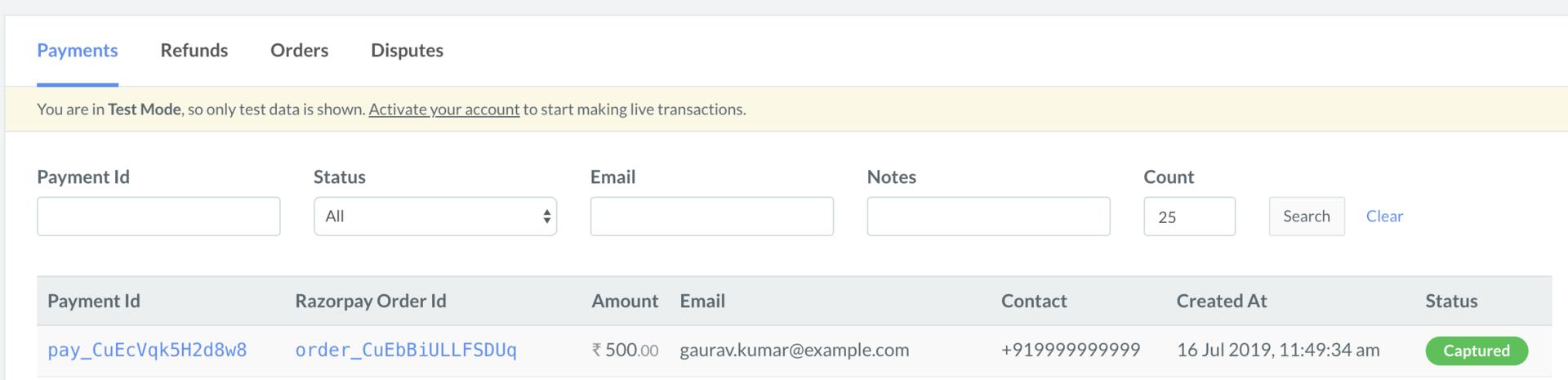
1. Log in to the Razorpay Dashboard and navigate to **Transactions** → **Payments**.
2. Check if a **Payment Id** has been generated and note the status. In case of a successful payment, the status is marked as **Captured**.
 You can use Razorpay webhooks to configure and receive notifications when a specific event occurs. When one of these events is triggered, we send an HTTP POST payload in JSON to the webhook's configured URL. Know how to [set up webhooks.](/docs/webhooks/setup-edit-payments)
#### Example
If you have subscribed to the `order.paid` webhook event, you will receive a notification every time a customer pays you for an order.
[Poll Payment APIs](/docs/api/payments/fetch-all-payments) to check the payment status.
## Next Steps
[Step 2: Test Integration](/docs/payments/international-payments/outward-remittances/s2s-integration/test-integration)
You can use Razorpay webhooks to configure and receive notifications when a specific event occurs. When one of these events is triggered, we send an HTTP POST payload in JSON to the webhook's configured URL. Know how to [set up webhooks.](/docs/webhooks/setup-edit-payments)
#### Example
If you have subscribed to the `order.paid` webhook event, you will receive a notification every time a customer pays you for an order.
[Poll Payment APIs](/docs/api/payments/fetch-all-payments) to check the payment status.
## Next Steps
[Step 2: Test Integration](/docs/payments/international-payments/outward-remittances/s2s-integration/test-integration)