> ## Documentation Index
> Fetch the complete documentation index at: https://razorpay-881012b3.mintlify.site/llms.txt
> Use this file to discover all available pages before exploring further.
# Search an Invoice
> Search for an Invoice.
Available in
🇮🇳 India
You can search for invoices (except those marked **Deleted**) on the Dashboard by specifying various filters. Know more about [invoice states](/docs/payments/invoices/states).
## Search an Invoice From Dashboard
1. Log in to the Dashboard.
2. Select **Invoices** from the left menu and search for an invoice under **Invoices** by specifying filters.
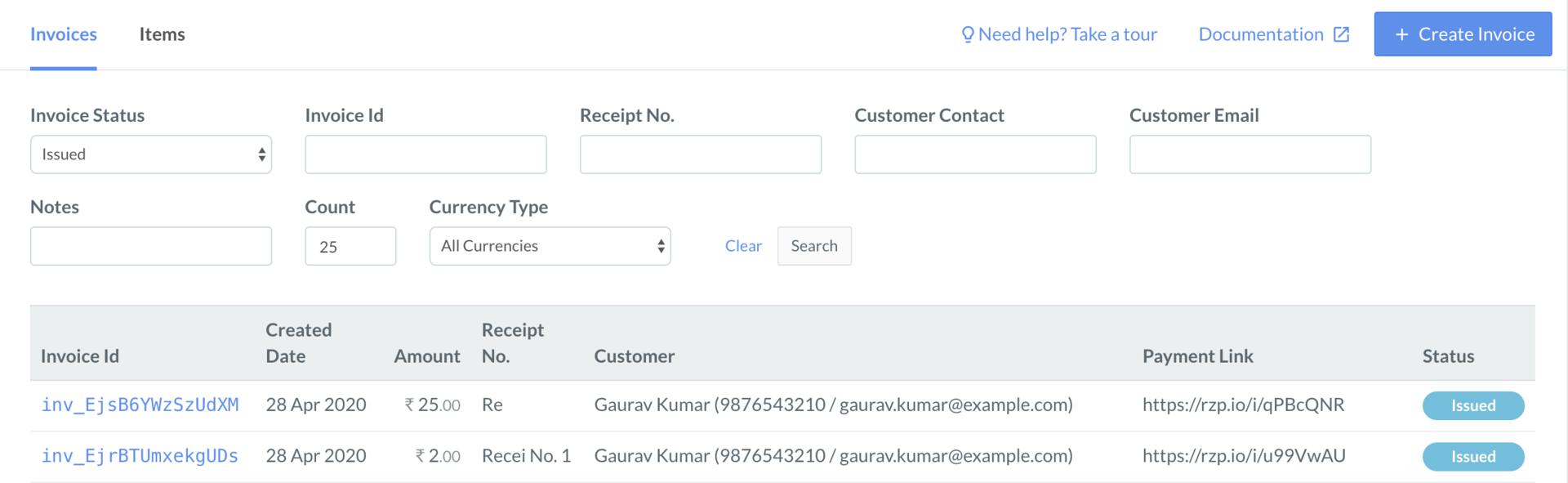 | Filter | Description |
| ---------------- | --------------------------------------------------------------------------------------------------- |
| Invoice Status | The status of the invoice |
| Invoice Id | Unique identifier of the invoice |
| Receipt No. | Receipt number of the invoice |
| Customer Contact | Registered contact of the customer |
| Customer Email | Email address of the customer |
| Notes | Additional information stored in the `Customer Notes` field while creating the invoice. |
| Currency Type | The type of currency used for creating an invoice.
| Filter | Description |
| ---------------- | --------------------------------------------------------------------------------------------------- |
| Invoice Status | The status of the invoice |
| Invoice Id | Unique identifier of the invoice |
| Receipt No. | Receipt number of the invoice |
| Customer Contact | Registered contact of the customer |
| Customer Email | Email address of the customer |
| Notes | Additional information stored in the `Customer Notes` field while creating the invoice. |
| Currency Type | The type of currency used for creating an invoice.
Indian Rupee or an international currency |
## Search an Invoice Using API
* View the list of all the invoices or the invoices raised for a customer using the [Fetch Multiple Invoices API](/docs/api/payments/invoices#fetch-multiple-invoices).
* View the details of an invoice by providing the invoice id using the [Fetch an Invoice API](/docs/api/payments/invoices#fetch-an-invoice).
### Related Information
* [Invoices](/docs/payments/invoices)
* [Invoices States](/docs/payments/invoices/states)
* [Create an Invoice](/docs/payments/invoices/create)
* [Update an Invoice](/docs/payments/invoices/update)
* [Duplicate an Invoice](/docs/payments/invoices/duplicate)
* [Delete an Invoice](/docs/payments/invoices/delete)
* [Cancel an Invoice](/docs/payments/invoices/cancel)
* [Download and Print an Invoice](/docs/payments/invoices/download-print)
* [Invoice APIs](/docs/payments/invoices/apis)