> ## Documentation Index
> Fetch the complete documentation index at: https://razorpay-881012b3.mintlify.site/llms.txt
> Use this file to discover all available pages before exploring further.
# Invoice States
> List of various Invoice states and their significance.
Available in
🇮🇳 India
An invoice starts in the `draft` state and moves through several different states in its life cycle.
## Invoice States and Descriptions
Given below is an illustration of the life cycle of an invoice.
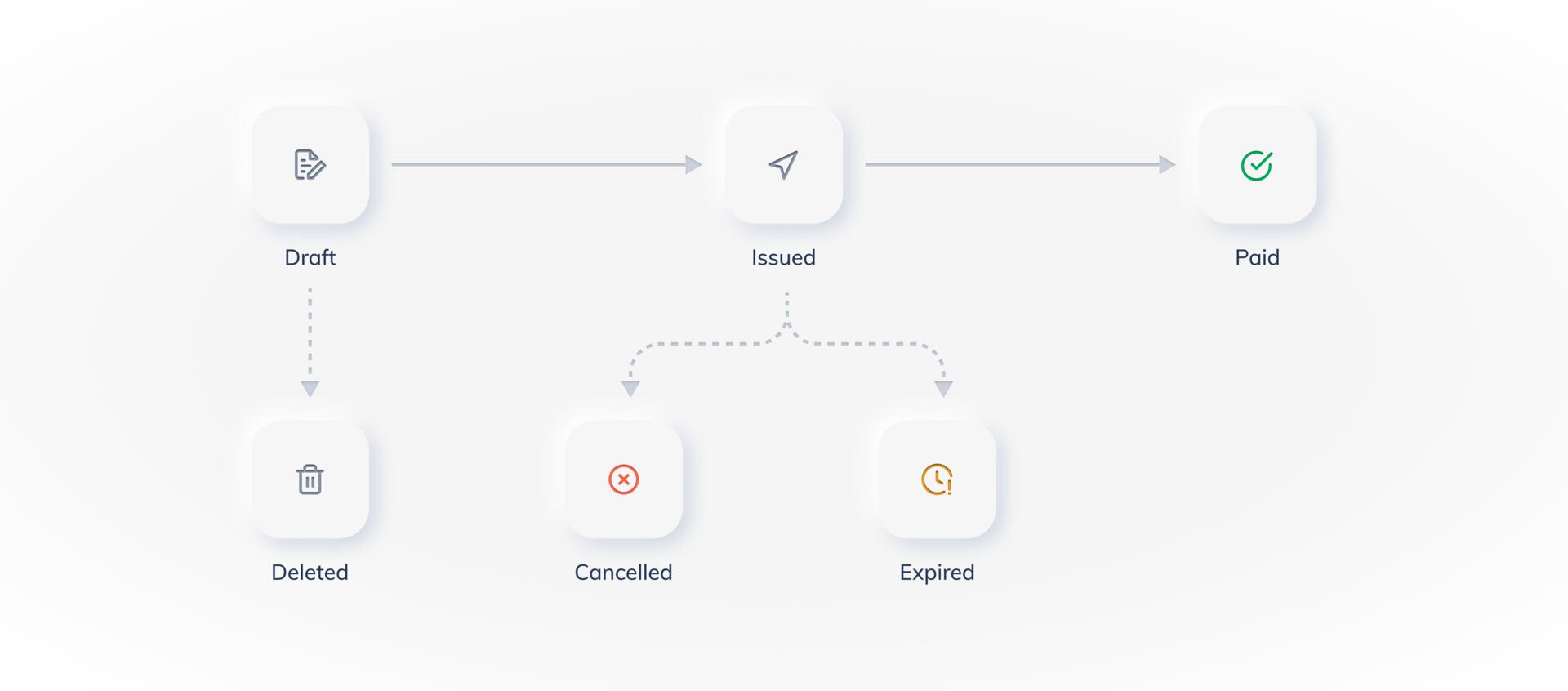 The table below lists the various states of an invoice and gives a brief description of each state:
| Status | Description |
| ---------------- | ---------------------------------------------------------------------------------------------------------------------------------------------------------------------------------------------------------------------------------------------------------------------------------------------------------------------------------------------------------------------------------------------------------------------------- |
| `draft` | Indicates that the invoice has been created and saved. An invoice in this state is not issued and can be edited later.
The table below lists the various states of an invoice and gives a brief description of each state:
| Status | Description |
| ---------------- | ---------------------------------------------------------------------------------------------------------------------------------------------------------------------------------------------------------------------------------------------------------------------------------------------------------------------------------------------------------------------------------------------------------------------------- |
| `draft` | Indicates that the invoice has been created and saved. An invoice in this state is not issued and can be edited later.
`Customer` and `item` fields are required to save an invoice. A saved invoice can be deleted. You cannot view a deleted draft invoice. Know more about [creating an invoice](/docs/payments/invoices/create). |
| `issued` | Indicates that an invoice has been finalized and issued to the customer. An issued invoice cannot be deleted, but can be cancelled.
You can edit the following information even after sending it to the customer:
- Invoice #
- Expiry Date
- Customer Notes
- Terms and Conditions
- Enable or disable partial payment. Know more about [issuing an Invoice](/docs/payments/invoices/issue). |
| `partially paid` | Indicates that the customer has made a partial payment against an invoice. After a payment has been made, you can neither delete nor cancel the invoice. You can only view the invoice and add internal notes to it. |
| `paid` | Indicates that the customer has fully paid the invoice amount. `Paid` is the final state of an invoice. A `paid` invoice can only be viewed. You can neither delete nor cancel it. |
| `expired` | Indicates that an invoice has expired. Once expired, the customer cannot make any payments against the invoice, and you cannot cancel or delete the invoice. You can view an expired invoice. |
| `cancelled` | Indicates that you have cancelled the invoice. Though you can view the cancelled invoice, the customer cannot view the invoice or make payments against the invoice. You can only cancel an unpaid issued invoice. Know more about [cancelling an invoice](/docs/payments/invoices/cancel). |
| `deleted` | This state indicates that the invoice has been deleted. You can only delete an invoice in the **draft** state and not in any other state. Know more about [deleting an invoice](/docs/payments/invoices/delete). |
### Related Information
* [Invoices](/docs/payments/invoices)
* [How Invoices Work](/docs/payments/invoices/how-it-works)
* [Create an Invoice](/docs/payments/invoices/create)
* [Issue an Invoice](/docs/payments/invoices/issue)
* [Delete an Invoice](/docs/payments/invoices/delete)
* [Cancel an Invoice](/docs/payments/invoices/cancel)
* [Subscribe to Webhooks](/docs/payments/invoices/subscribe-to-webhooks)
* [Download and Print an Invoice](/docs/payments/invoices/download-print)
* [Invoice APIs](/docs/payments/invoices/apis)