> ## Documentation Index
> Fetch the complete documentation index at: https://razorpay-881012b3.mintlify.site/llms.txt
> Use this file to discover all available pages before exploring further.
# QuickBuy
> Streamline checkout with QuickBuy’s 1-click payment and order placement. Minimise steps and speed up transactions for a fast, seamless customer experience.
Available in
🇮🇳 India
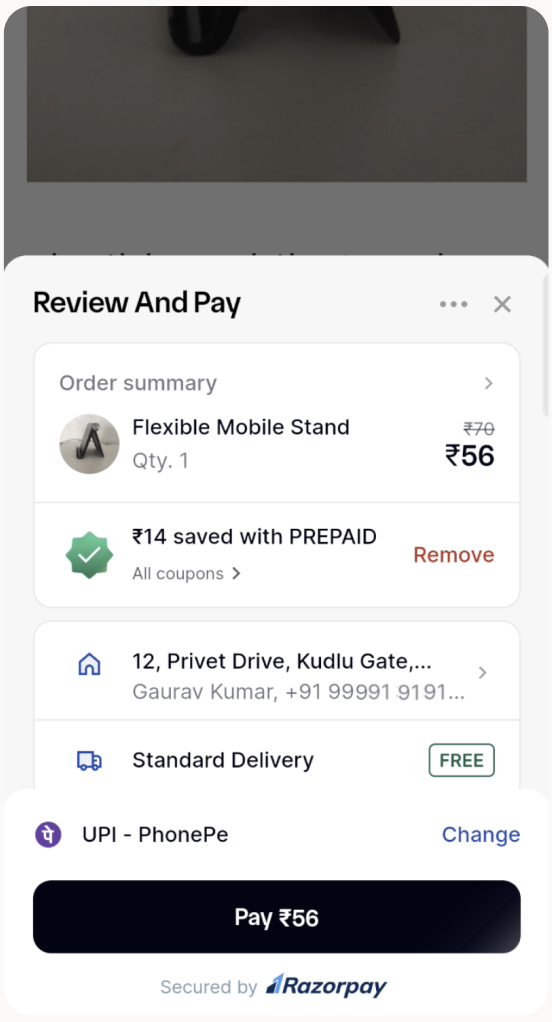
QuickBuy is a one-click payment solution that streamlines checkout for returning customers. With a compact half-page interface, it intelligently displays preferred payment methods based on past transactions and automatically applies the best available offers, reducing friction and decision-making.
This results in a faster, more efficient checkout experience that boosts conversion rates and enhances satisfaction for both customers and businesses.
 **Handy Tips**
This feature is currently available only on mobile.
## Features
* **Quick Transactions**: 1-click payment process for returning users with minimal steps for faster checkouts, enhanced by a half-page overlay that provides a streamlined experience.
* **Clear Payment Details**: Transparent display of payment information, including savings and discounts.
* **Automatic Offer Application**: Automatic application of offers with visible savings to enhance customer satisfaction.
* **Smart Address and Shipping Method Selection**: Automatically selects the most suitable address and shipping option, minimising customer effort and ensuring a seamless checkout process.
**Handy Tips**
* Customers can use UPI intent, UPI Saved VPAs and Saved Cards through QuickBuy.
* QuickBuy displays recommended payment methods based on past transactions for a faster checkout. If no recommendations exist, the full checkout flow is shown.
## Advantages
* **Improved Conversion Rates**: Reduces drop-offs with minimal steps and pre-selected payment methods.
* **Enhanced User Experience**: Provides a faster, simpler payment process that encourages repeat transactions.
* **Efficient Checkout Process**: Offers advanced features like 1-click purchases, improving overall efficiency.
* **Simplified Payments**: Pre-selection of preferred payment methods for quicker transactions.
* **Automatic Offer Application:** Automatically applies the best available offers for cost savings.
## How it Works
QuickBuy is ideal for returning users who are logged into Razorpay Checkout and making repeat purchases. The workflow includes:
1. **Automatic coupon application**: The best available coupon is applied to the total. If they change the coupon, the system recalculates and updates the total amount.
2. **Default address selection**: The most recently used address is automatically selected.
3. **Pre-selected shipping method**: The default shipping method is free if available; otherwise, the lowest-cost option is chosen, with the option to change it if required.
4. **Preferred payment method**: The most frequently used payment method is pre-selected. If the user changes their payment method, the system recalculates and applies the best available offer to the new method, notifying them of the updated total.
5. **Single-click purchase**: Customers complete their purchases in a single click.
**Disable QuickBuy**
To disable QuickBuy on checkout, contact our [Support team](https://razorpay.com/support/#request).
**Handy Tips**
This feature is currently available only on mobile.
## Features
* **Quick Transactions**: 1-click payment process for returning users with minimal steps for faster checkouts, enhanced by a half-page overlay that provides a streamlined experience.
* **Clear Payment Details**: Transparent display of payment information, including savings and discounts.
* **Automatic Offer Application**: Automatic application of offers with visible savings to enhance customer satisfaction.
* **Smart Address and Shipping Method Selection**: Automatically selects the most suitable address and shipping option, minimising customer effort and ensuring a seamless checkout process.
**Handy Tips**
* Customers can use UPI intent, UPI Saved VPAs and Saved Cards through QuickBuy.
* QuickBuy displays recommended payment methods based on past transactions for a faster checkout. If no recommendations exist, the full checkout flow is shown.
## Advantages
* **Improved Conversion Rates**: Reduces drop-offs with minimal steps and pre-selected payment methods.
* **Enhanced User Experience**: Provides a faster, simpler payment process that encourages repeat transactions.
* **Efficient Checkout Process**: Offers advanced features like 1-click purchases, improving overall efficiency.
* **Simplified Payments**: Pre-selection of preferred payment methods for quicker transactions.
* **Automatic Offer Application:** Automatically applies the best available offers for cost savings.
## How it Works
QuickBuy is ideal for returning users who are logged into Razorpay Checkout and making repeat purchases. The workflow includes:
1. **Automatic coupon application**: The best available coupon is applied to the total. If they change the coupon, the system recalculates and updates the total amount.
2. **Default address selection**: The most recently used address is automatically selected.
3. **Pre-selected shipping method**: The default shipping method is free if available; otherwise, the lowest-cost option is chosen, with the option to change it if required.
4. **Preferred payment method**: The most frequently used payment method is pre-selected. If the user changes their payment method, the system recalculates and applies the best available offer to the new method, notifying them of the updated total.
5. **Single-click purchase**: Customers complete their purchases in a single click.
**Disable QuickBuy**
To disable QuickBuy on checkout, contact our [Support team](https://razorpay.com/support/#request).