> ## Documentation Index
> Fetch the complete documentation index at: https://razorpay-881012b3.mintlify.site/llms.txt
> Use this file to discover all available pages before exploring further.
# Single Reconciliation View
> View settlement and transaction details of external payment gateways on Optimizer.
Available in
🇮🇳 India
On the Dashboard, you can view:
* [Transaction details for payments and refunds](/docs/payments/optimizer/reconciliation#transactions-details).
* [Settlement details of the external payment gateways](/docs/payments/optimizer/reconciliation#settlement-details).
## Transactions Details
### Payments
You can view the payment details on the Dashboard by specifying various filters.
| Filter | Description |
| ------------ | ------------------------------------------------------------------------------------------------------- |
| Payment Id | The ID of the payment done. |
| Processed by | Payment gateway through which the payment was processed. |
| Duration | The time period for which you want to view the payments. |
| Status | The state of the payment. Know more about [Payment states](/docs/payments/payments#payment-life-cycle). |
| Email | The email id linked to the payment. |
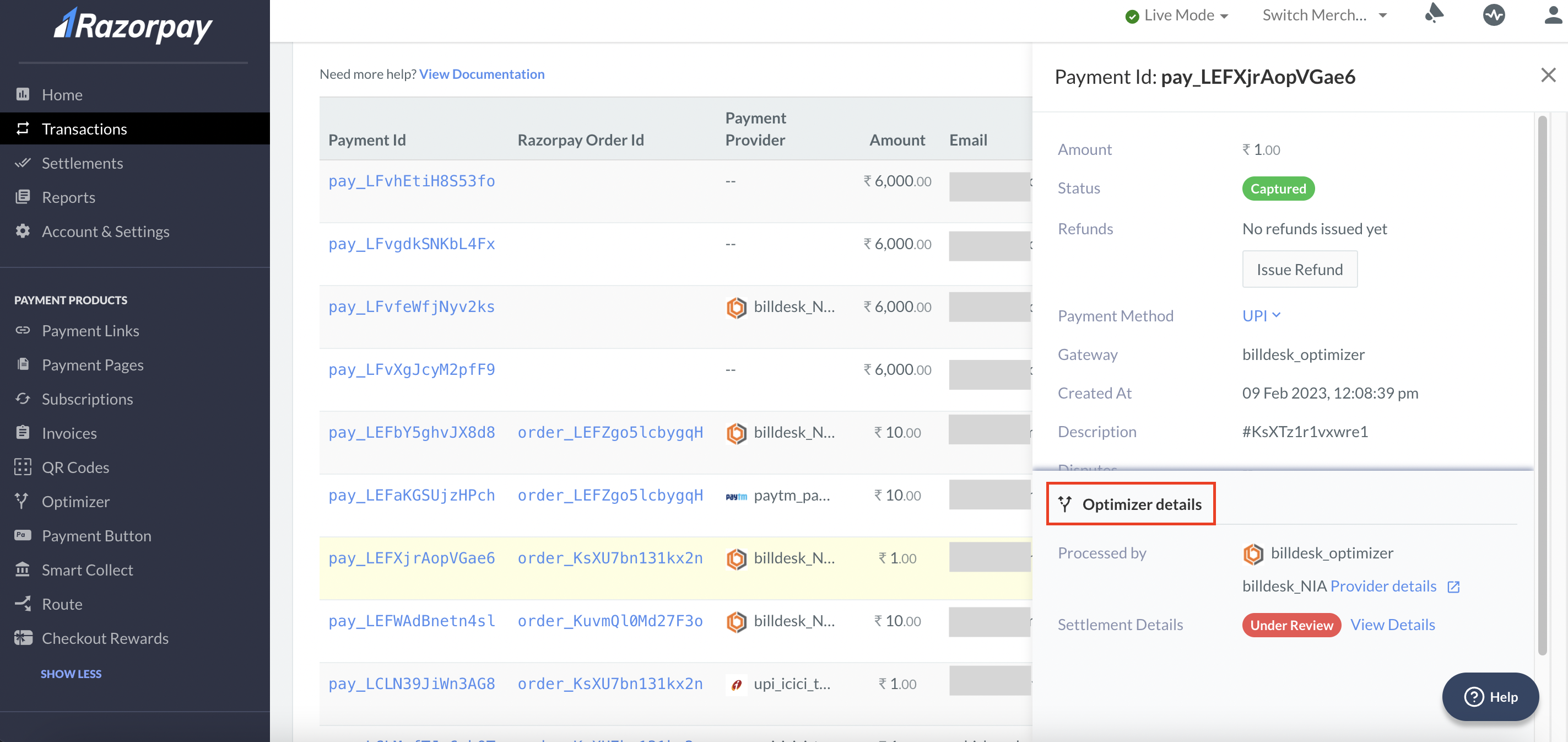
To view the transaction details of Payments:
1. Log in to the Dashboard.
2. Select **Transactions** from the left menu and click **Payments**.
3. Select the Payment Id to view the:
* Payment details
* Fee collected
* Tax collected
* Settlement id within which the transaction was settled.
* Optimizer Details
 ### Refunds
You can view the refund details on the Dashboard by specifying various filters.
| Filter | Description |
| ------------ | ----------------------------------------------------------- |
| Payment Id | The ID of the payment done. |
| Processed by | List of gateways through which the payment was processed. |
| Status | The state of the refund (processed, processing and failed). |
| Refund Id | The unique id of the processed refund. |
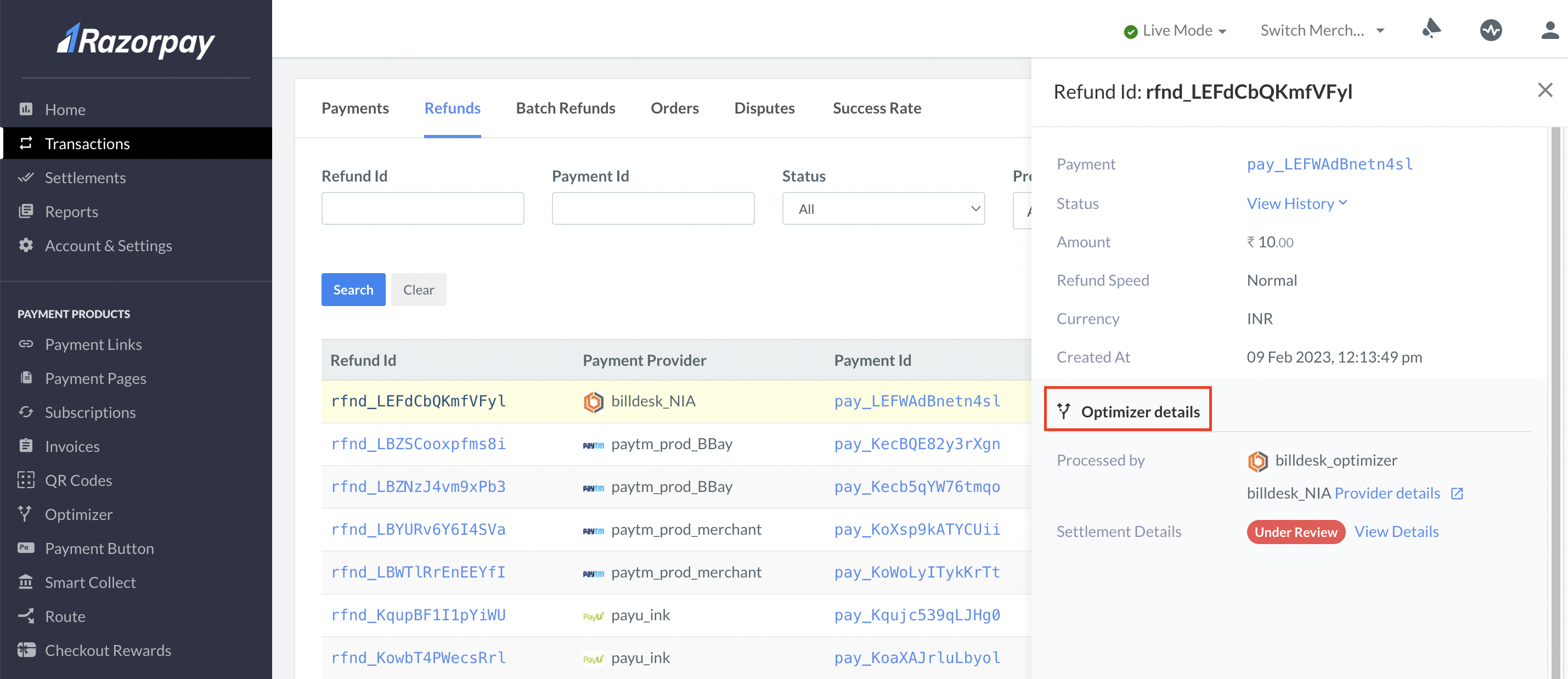
To view the transactions details of Refunds:
1. Log in to the Dashboard.
2. Select **Transactions** from the left menu and click **Refunds**.
3. Select the Refund Id to view the:
* Status and history of the refund
* Amount
* Refund type
* Optimizer Details
### Refunds
You can view the refund details on the Dashboard by specifying various filters.
| Filter | Description |
| ------------ | ----------------------------------------------------------- |
| Payment Id | The ID of the payment done. |
| Processed by | List of gateways through which the payment was processed. |
| Status | The state of the refund (processed, processing and failed). |
| Refund Id | The unique id of the processed refund. |
To view the transactions details of Refunds:
1. Log in to the Dashboard.
2. Select **Transactions** from the left menu and click **Refunds**.
3. Select the Refund Id to view the:
* Status and history of the refund
* Amount
* Refund type
* Optimizer Details
 ## Settlement Details
You can [download](/docs/payments/dashboard/reports#download-reports) or [schedule](/docs/payments/dashboard/reports#schedule-reports) the **Optimizer Single View Recon Report** from the Dashboard to view the settlement details.
**Handy Tips**
You can contact the [Support team](https://razorpay.com/support/#request) for a customised report that meets your business requirements.
## Supported Payment Gateways
| Payment Gateway | Availability |
| --------------- | ------------ |
| PayU | Live |
| Paytm | Live |
| Billdesk | Live |
| Cashfree | Live |
| PineLabs | Coming Soon |
### Related Information
* [Add Payment Providers](/docs/payments/optimizer/add-payment-providers)
* [SR Analytics Dashboard](/docs/payments/optimizer/success-rate)
* [Roles and Permissions](/docs/payments/optimizer/roles-and-permissions)
* [Tokenisation for Optimizer](/docs/payments/optimizer/tokenisation)
* [Supported Gateways and Aggregators](/docs/payments/optimizer/supported-gateways-aggregators)
* [FAQs](/docs/payments/optimizer/faqs)
## Settlement Details
You can [download](/docs/payments/dashboard/reports#download-reports) or [schedule](/docs/payments/dashboard/reports#schedule-reports) the **Optimizer Single View Recon Report** from the Dashboard to view the settlement details.
**Handy Tips**
You can contact the [Support team](https://razorpay.com/support/#request) for a customised report that meets your business requirements.
## Supported Payment Gateways
| Payment Gateway | Availability |
| --------------- | ------------ |
| PayU | Live |
| Paytm | Live |
| Billdesk | Live |
| Cashfree | Live |
| PineLabs | Coming Soon |
### Related Information
* [Add Payment Providers](/docs/payments/optimizer/add-payment-providers)
* [SR Analytics Dashboard](/docs/payments/optimizer/success-rate)
* [Roles and Permissions](/docs/payments/optimizer/roles-and-permissions)
* [Tokenisation for Optimizer](/docs/payments/optimizer/tokenisation)
* [Supported Gateways and Aggregators](/docs/payments/optimizer/supported-gateways-aggregators)
* [FAQs](/docs/payments/optimizer/faqs)