> ## Documentation Index
> Fetch the complete documentation index at: https://razorpay-881012b3.mintlify.site/llms.txt
> Use this file to discover all available pages before exploring further.
# 1. Initiate Mandate Registration
> Set up a UPI Autopay mandate using Razorpay APIs or a Registration Link.
Available in
🇮🇳 India
**UPI Collect Flow Deprecated**
According to NPCI guidelines, the UPI Collect flow is being deprecated for new UPI Autopay registrations effective 28 February 2026.
* Customers can no longer register UPI mandates by manually entering VPA/UPI id/mobile numbers.
* Subsequent debits for existing mandates created via UPI Collect will continue to be executed without change.
**Exemptions**
UPI Collect will continue to be supported for:
* MCC 6012 & 6211 (IPO and secondary market transactions).
* iOS mobile app and mobile web transactions.
* UPI Mandates (execute/modify/revoke operations only).
* eRupi vouchers.
* PACB businesses (cross-border/international payments).
**Action Required**
* If you are a new Razorpay user, use UPI Intent.
* If you are an existing Razorpay user not covered by exemptions, you must remove the UPI Collect flow parameters from your Create Authorization Payment API request and migrate to UPI Intent or UPI QR code to continue accepting UPI Autopay registrations. For detailed migration steps, refer to the [migration documentation](/docs/announcements/upi-collect-migration/recurring-payments/s2s-integration).
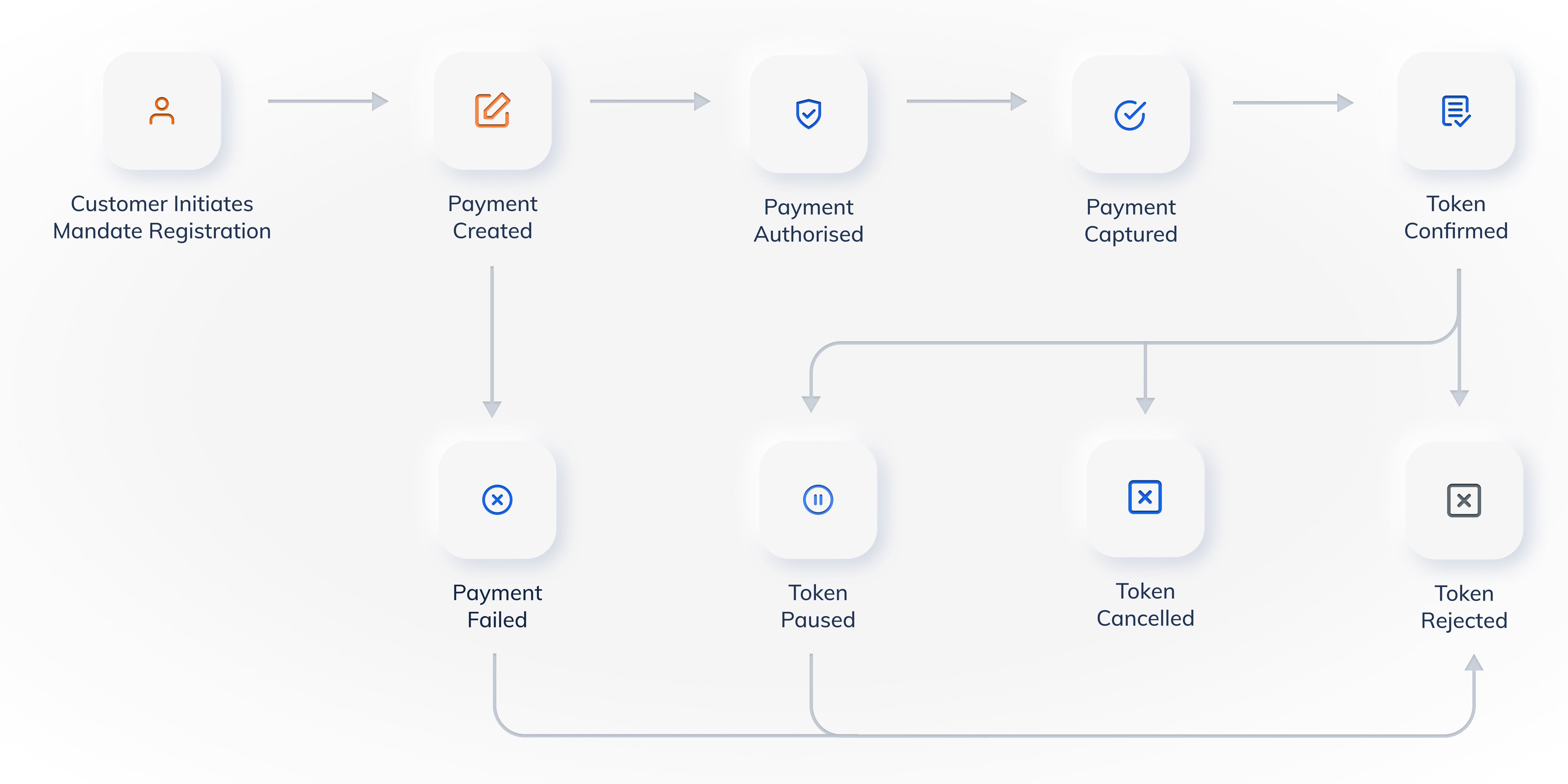
You can initiate mandate registration using the [Razorpay APIs](#1-1-using-razorpay-apis) or a [Registration Link](#1-2-using-a-registration-link).
The following state diagram depicts the mandate registration flow and token lifecycle:
 ## 1.1 Using Razorpay APIs
You can use APIs to set up mandate registrations on UPI Autopay inside the customer's checkout journey. To do this, you need to create customer identifiers and then initiate the checkout process. Here are the steps:
1. [Create a Customer](#1-1-1-create-a-customer) - This allows Razorpay to uniquely identify the customer and store UPI Autopay tokens against the customer ID.
2. [Create an Order](#1-1-2-create-an-order) - Send the token details required to set up UPI Autopay on the customer ID.
3. [Create an Authorisation Payment](#1-1-3-create-an-authorisation-payment) - Initialise the authorisation journey where the actual mandate registration happens.
### 1.1.1 Create a Customer
Razorpay links recurring tokens to customers using a unique identifier generated through the Customer API. You can create customers with basic details such as `email` and `contact` and use them for various Razorpay offerings. Know more about [Customers](/docs/api/customers).
The following endpoint creates a customer.
`POST /customers`
```bash Curl theme={null}
curl -u [YOUR_KEY_ID]:[YOUR_KEY_SECRET] \
-X POST https://api.razorpay.com/v1/customers \
-H "Content-Type: application/json" \
-d '{
"name": "Gaurav Kumar",
"email": "gaurav.kumar@example.com",
"contact": "9123456780",
"notes":{
"note_key_1": "September",
"note_key_2": "Make it so."
}
}'
```
```java Java theme={null}
RazorpayClient razorpay = new RazorpayClient("[YOUR_KEY_ID]", "[YOUR_KEY_SECRET]");
JSONObject customerRequest = new JSONObject();
customerRequest.put("name","Gaurav Kumar");
customerRequest.put("contact","9123456780");
customerRequest.put("email","gaurav.kumar@example.com");
customerRequest.put("gstin","29XAbbA4369J1PA");
JSONObject notes = new JSONObject();
notes.put("notes_key_1","Tea, Earl Grey, Hot");
notes.put("notes_key_2","Tea, Earl Grey… decaf.");
customerRequest.put("notes",notes);
Customer customer = razorpay.customers.create(customerRequest);
```
```python Python theme={null}
import razorpay
client = razorpay.Client(auth=("YOUR_ID", "YOUR_SECRET"))
client.customer.create({
'name': 'Gaurav Kumar',
'email': 'gaurav.kumar@example.com',
'contact': '9123456780',
'notes': {'note_key_1': 'September', 'note_key_2': 'Make it so.'}
})
```
```go Go theme={null}
import ( razorpay "github.com/razorpay/razorpay-go" )
client := razorpay.NewClient("YOUR_KEY_ID", "YOUR_SECRET")
data := map[string]interface{}{
"name": "Gaurav Kumar",
"contact": 9123456780,
"email": "gaurav.kumar@example.com",
"notes": map[string]interface{}{
"notes_key_1": "Tea, Earl Grey, Hot",
"notes_key_2": "Tea, Earl Grey… decaf.",
},
}
body, err := client.Customer.Create(data, nil)
```
```php PHP theme={null}
$api = new Api($key_id, $secret);
$api->customer->create(array('name' => 'Gaurav Kumar', 'email' => 'gaurav.kumar@example.com','contact'=>'9123456780','notes'=> array('notes_key_1'=> 'Tea, Earl Grey, Hot','notes_key_2'=> 'Tea, Earl Grey… decaf'));
```
```csharp .NET theme={null}
RazorpayClient client = new RazorpayClient("[YOUR_KEY_ID]", "[YOUR_KEY_SECRET]");
Dictionary options = new Dictionary();
options.Add("name", "Gaurav Kumar");
options.Add("contact", "9123456780");
options.Add("email", "gaurav.kumar@example.com");
Customer customer = Customer.Create(options);
```
```ruby Ruby theme={null}
require "razorpay"
Razorpay.setup('YOUR_KEY_ID', 'YOUR_SECRET')
para_attr = {
"name": "Gaurav Kumar",
"contact": 9123456780,
"email": "gaurav.kumar@example.com",
"gstin": "29XAbbA4369J1PA",
"notes": {
"notes_key_1": "Tea, Earl Grey, Hot",
"notes_key_2": "Tea, Earl Grey… decaf."
}
}
Razorpay::Customer.create(para_attr)
```
```javascript Node.js theme={null}
var instance = new Razorpay({ key_id: 'YOUR_KEY_ID', key_secret: 'YOUR_SECRET' })
instance.customers.create({
name: "Gaurav Kumar",
contact: 9123456780,
email: "gaurav.kumar@example.com",
gstin: "29XAbbA4369J1PA",
notes: {
notes_key_1: "Tea, Earl Grey, Hot",
notes_key_2: "Tea, Earl Grey… decaf."
}
})
```
```json Response theme={null}
{
"id":"cust_1Aa00000000001",
"entity":"customer",
"name":"Gaurav Kumar",
"email":"gaurav.kumar@example.com",
"contact":"9123456780",
"gstin":null,
"notes":{
"note_key_1":"September",
"note_key_2":"Make it so."
},
"created_at ":1234567890
}
```
Once you create a customer, you can create an order for the mandate registration.
`name` *mandatory*
: `string` The customer's name. For example, `Gaurav Kumar`.
`email ` *optional*
: `string` The customer's email address. For example, `gaurav.kumar@example.com`.
`contact ` *optional*
: `string` The customer's phone number. For example, `9876543210`.
`notes` *optional*
: `object` Key-value pair that is used to store additional information about the entity. Maximum 15 key-value pairs, 256 characters (maximum) each. For example, `"note_key": "Beam me up Scotty"`.
### 1.1.2 Create an Order
Use the [Orders API](/docs/api/orders) to create a unique Razorpay `order_id` that is associated with the mandate registration. The following endpoint creates an order.
`POST /orders`
```bash Curl theme={null}
curl -u : \
-X POST https://api.razorpay.com/v1/orders \
-H "Content-Type: application/json" \
-d '{
"amount": 100,
"currency": "INR",
"customer_id": "cust_4xbQrmEoA5WJ01",
"method": "upi",
"token": {
"max_amount": 200000,
"expire_at": 2709971120,
"frequency": "monthly"
},
"receipt": "Receipt No. 1",
"notes": {
"notes_key_1": "Tea, Earl Grey, Hot",
"notes_key_2": "Tea, Earl Grey… decaf."
}
}'
```
```java Java theme={null}
RazorpayClient razorpay = new RazorpayClient("[YOUR_KEY_ID]", "[YOUR_KEY_SECRET]");
JSONObject orderRequest = new JSONObject();
orderRequest.put("amount", 100);
orderRequest.put("currency", "INR");
orderRequest.put("customer_id", "cust_4xbQrmEoA5WJ01");
orderRequest.put("method", "upi");
orderRequest.put("receipt", "receipt#1");
JSONObject token = new JSONObject();
token.put("max_amount","200000");
token.put("expire_at","2709971120");
token.put("frequency","monthly");
orderRequest.put("token", token);
JSONObject notes = new JSONObject();
notes.put("notes_key_1","Tea, Earl Grey, Hot");
notes.put("notes_key_2","Tea, Earl Grey… decaf.");
orderRequest.put("notes", notes);
Order order = razorpay.orders.create(orderRequest);
```
```php PHP theme={null}
$api = new Api($key_id, $secret);
$api->order->create(array('amount' => 0,'currency' => 'INR','method' => 'upi','customer_id' => 'cust_4xbQrmEoA5WJ01', 'token' => array('max_amount' => 200000, 'expire_at' => 2709971120, 'frequency' => 'monthly'),'receipt' => 'Receipt No. 1' ,'notes' => array('notes_key_1' => 'Beam me up Scotty','notes_key_2' => 'Engage')));
```
```javascript Node.js theme={null}
var instance = new Razorpay({ key_id: 'YOUR_KEY_ID', key_secret: 'YOUR_SECRET' })
instance.orders.create({
amount: 100,
currency: "INR",
method: "upi",
customer_id: "cust_1Aa00000000001",
receipt: "Receipt No. 1",
notes: {
notes_key_1: "Beam me up Scotty",
notes_key_2: "Engage"
},
token: {
max_amount: 200000,
expire_at: 2709971120,
frequency: "monthly"
}
})
```
```python Python theme={null}
client = razorpay.Client(auth=("YOUR_ID", "YOUR_SECRET"))
client.order.create({
"amount":100,
"currency":"INR",
"method":"upi",
"customer_id":"cust_1Aa00000000001",
"receipt":"Receipt No. 1",
"notes":{
"notes_key_1":"Beam me up Scotty",
"notes_key_2":"Engage"
},
"token":{
"max_amount":200000,
"expire_at":2709971120,
"frequency":"monthly"
}
})
```
```ruby Ruby theme={null}
require "razorpay"
Razorpay.setup('YOUR_KEY_ID', 'YOUR_SECRET')
para_attr = {
"amount": 100,
"currency": "INR",
"method": "upi",
"customer_id": "cust_1Aa00000000001",
"receipt": "Receipt No. 1",
"notes": {
"notes_key_1": "Beam me up Scotty",
"notes_key_2": "Engage"
},
"token": {
"max_amount": 200000,
"expire_at": 2709971120,
"frequency": "monthly"
}
}
Razorpay.Order.create(para_attr)
```
```go Go theme={null}
import ( razorpay "github.com/razorpay/razorpay-go" )
client := razorpay.NewClient("YOUR_KEY_ID", "YOUR_SECRET")
data := map[string]interface{}{
"amount":100,
"currency":"INR",
"customer_id":"",
"method":"upi",
"token":map[string]interface{}{
"max_amount":5000,
"expire_at":2709971120,
"frequency":"monthly",
},
"receipt":"Receipt No. 1",
"notes":map[string]interface{}{
"notes_key_1":"Tea, Earl Grey, Hot",
"notes_key_2":"Tea, Earl Grey… decaf.",
},
}
body, err := client.Order.Create(data, nil)
```
```json Response theme={null}
{
"id": "order_1Aa00000000002",
"entity": "order",
"amount": 100,
"amount_paid": 0,
"amount_due": 100,
"currency": "INR",
"receipt": "Receipt No. 1",
"offer_id": null,
"status": "created",
"attempts": 0,
"notes": {
"notes_key_1": "Tea, Earl Grey, Hot",
"notes_key_2": "Tea, Earl Grey… decaf."
}
"created_at": 1565172642
}
```
**Handy Tips**
The `token.max_amount` value must respect the limits defined by NPCI for your merchant category. For regular industries, the maximum is ₹99,999. For lending and investment categories (MCCs 6211, 6300, 7322, 6529, 5960), the maximum is ₹2,00,000. Refer to the [UPI Autopay overview](/docs/payments/payment-gateway/s2s-integration/recurring-payments/upi) for the complete limits table.
`amount` *mandatory*
: `integer` Amount, in paise.
`currency` *mandatory*
: `string` The 3-letter ISO currency code for the payment. Currently, we only support `INR`.
`method` *mandatory*
: `string` Payment method for the mandate registration. Here, the value should be `upi`.
`receipt` *optional*
: `string` Unique identifier for the order entered by you. For example, `Receipt No. 1`. This parameter should be mapped to the `order_id` sent by Razorpay.
`notes`*optional*
: `object` Key-value pair that can be used to store additional information about the entity. Maximum 15 key-value pairs, 256 characters (maximum) each. For example, `"note_key": "Beam me up Scotty"`.
`token`
: Details related to the mandate such as max amount, frequency and expiry information.
`max_amount` *optional*
: `integer` The maximum amount that can be debited in a single charge.
| MCC | Category | Min Value | Max Value |
| ---- | ------------------ | ---------- | ---------------------- |
| 6211 | Financial Services | `100` (₹1) | `20000000` (₹2,00,000) |
| 6300 | Financial Services | `100` (₹1) | `20000000` (₹2,00,000) |
| 7322 | Financial Services | `100` (₹1) | `20000000` (₹2,00,000) |
| 6529 | Financial Services | `100` (₹1) | `20000000` (₹2,00,000) |
| 5960 | Services | `100` (₹1) | `20000000` (₹2,00,000) |
For other categories and MCCs, the minimum value is `100` (₹1) and maximum value is 9999900 (₹99,999).
`expire_at` *optional*
: `integer` The Unix timestamp that indicates when the mandate must expire. Defaults to 10 years.
`frequency` *mandatory*
: `string` The frequency at which you can charge your customer. Possible values:
* `weekly`
* `monthly`
* `quarterly`
* `yearly`
* `as_presented`
`recurring_value` *optional*
: `integer` Determines the exact date or range of dates for recurring debits. Possible values are:
* 1-7 for `weekly` frequency
* 1-31 for `monthly` frequency
* 1-31 for `quarterly` frequency
* 1-31 for `yearly` frequency and is not applicable for the `as_presented` frequency.
**Watch Out!**
If the date entered for the recurring debit is not available for a month, then the last day of the month is considered by default. For example, if the date entered is 31 and the month has only 28 days, then the date 28 is considered.
`recurring_type` *optional*
: `string` Determines when the recurring debit can be done. Possible values are:
* `on`: Recurring debit happens on the exact day of every month.
**Handy Tips**
For creating an order with `recurring_type`=`on`, set the `recurring_value` parameter to the current date.
* `before`: Recurring debit can happen any time before the specified date.
* `after`: Recurring debit can happen any time after the specified date.
For example, if the frequency is `monthly`, recurring\_value is `17` and recurring\_type is `before`, recurring debit can happen between the month's 1st and 17th. Similarly, if recurring\_type is `after`, recurring debit can only happen on or after the 17th of the month.
### 1.1.3 Create an Authorisation Payment
Once an order is created, your next step is to create a payment to initiate the mandate registration on the customer's UPI app. The UPI payment flow you use determines how the customer approves the mandate:
* **UPI Intent** (recommended): The customer is redirected to their preferred UPI app (or scans a QR code on desktop) to approve the mandate. This is the default flow.
* **UPI Collect** (deprecated): A collect request is sent to the customer's VPA (UPI ID). This flow is being deprecated for new UPI Autopay registrations effective 28 February 2026. For iOS users, you may continue to use the Collect flow as a fallback.
Use the below endpoint to create a payment with payment method `upi`.
`POST /payments/create/upi`
```bash Request theme={null}
curl -u : \
-X POST https://api.razorpay.com/v1/payments/create/upi \
-H "Content-Type: application/json" \
-d '{
"amount":10000,
"currency":"INR",
"order_id":"order_1Aa00000000002",
"customer_id":"cust_1Aa00000000001",
"recurring":"1",
"method":"upi",
"upi":{
"flow":"intent"
},
"notes":{
"address":"note value"
}
}'
```
```json Response theme={null}
{
"razorpay_payment_id": "pay_R1D5dVYdY67f7M",
"link": "upi://mandate?mc=5045&amrule=MAX&am=1.00&fam=1.00&tr=EZM2025080415061922323116&validitystart=04082025&pn=Demo&rev=Y&pa=demotestrzp.rzp@icici&tn=Demo&cu=INR&txnType=CREATE&block=N&orgid=400011&mode=04&recur=ASPRESENTED&purpose=14&validityend=03072035"
}
```
Before creating the collect payment, validate the customer's UPI ID using the `/payments/validate/vpa` endpoint.
```bash Validate VPA Request theme={null}
curl -u : \
-X POST https://api.razorpay.com/v1/payments/validate/vpa \
-H "Content-Type: application/json" \
-d '{
"vpa": "gauravkumar@exampleupi"
}'
```
```json Validate VPA Response theme={null}
{
"vpa": "gauravkumar@exampleupi",
"success": true,
"customer_name": "Gaurav Kumar"
}
```
Once the UPI ID is validated, create the authorisation payment with `upi.flow` set to `collect`.
```bash Request theme={null}
curl -u : \
-X POST https://api.razorpay.com/v1/payments/create/upi \
-H "Content-Type: application/json" \
-d '{
"amount": 200,
"currency": "INR",
"order_id": "order_Ee0biRtLOqzRjP",
"email": "gaurav.kumar@example.com",
"contact": "9000090000",
"customer_id": "cust_EIW4T2etiweBmG",
"recurring": "1",
"method": "upi",
"upi": {
"flow": "collect",
"vpa": "gauravkumar@exampleupi",
"expiry_time": 5
},
"ip": "192.168.0.103",
"referer": "http",
"user_agent": "Mozilla/5.0",
"description": "Test flow",
"save": true,
"notes": {
"note_key": "value1"
}
}'
```
```json Response theme={null}
{
"razorpay_payment_id": "pay_EAm09NKReXi2e0"
}
```
`amount` *mandatory*
: `integer` The amount associated with the payment in smallest unit of the supported currency. For example, `2000` means ₹20. Must match the amount in order created [previously](#1-1-2-create-an-order).
`currency` *mandatory*
: `string` The 3-letter ISO currency code for the payment. Currently, we support only INR.
`order_id` *mandatory*
: `string` The unique identifier of the order created in the [previous step](#1-1-2-create-an-order).
`customer_id` *mandatory*
: `string` Unique identifier of the customer, obtained from the response of [Step 1.1.1: Create a Customer](#1-1-1-create-a-customer).
`recurring` *mandatory*
: `string` Determines if the payment is recurring or one-time. Possible values:
* `1`: Recurring payment is enabled.
* `preferred`: Use this when you want to support recurring payments and one-time payment in the same flow.
`method` *mandatory*
: `string` The payment method selected by the customer. Here, the value must be `upi`.
`upi`
: `object` Details of the UPI payment flow.
`flow` *mandatory*
: `string` Specify the type of the UPI payment flow.
## 1.1 Using Razorpay APIs
You can use APIs to set up mandate registrations on UPI Autopay inside the customer's checkout journey. To do this, you need to create customer identifiers and then initiate the checkout process. Here are the steps:
1. [Create a Customer](#1-1-1-create-a-customer) - This allows Razorpay to uniquely identify the customer and store UPI Autopay tokens against the customer ID.
2. [Create an Order](#1-1-2-create-an-order) - Send the token details required to set up UPI Autopay on the customer ID.
3. [Create an Authorisation Payment](#1-1-3-create-an-authorisation-payment) - Initialise the authorisation journey where the actual mandate registration happens.
### 1.1.1 Create a Customer
Razorpay links recurring tokens to customers using a unique identifier generated through the Customer API. You can create customers with basic details such as `email` and `contact` and use them for various Razorpay offerings. Know more about [Customers](/docs/api/customers).
The following endpoint creates a customer.
`POST /customers`
```bash Curl theme={null}
curl -u [YOUR_KEY_ID]:[YOUR_KEY_SECRET] \
-X POST https://api.razorpay.com/v1/customers \
-H "Content-Type: application/json" \
-d '{
"name": "Gaurav Kumar",
"email": "gaurav.kumar@example.com",
"contact": "9123456780",
"notes":{
"note_key_1": "September",
"note_key_2": "Make it so."
}
}'
```
```java Java theme={null}
RazorpayClient razorpay = new RazorpayClient("[YOUR_KEY_ID]", "[YOUR_KEY_SECRET]");
JSONObject customerRequest = new JSONObject();
customerRequest.put("name","Gaurav Kumar");
customerRequest.put("contact","9123456780");
customerRequest.put("email","gaurav.kumar@example.com");
customerRequest.put("gstin","29XAbbA4369J1PA");
JSONObject notes = new JSONObject();
notes.put("notes_key_1","Tea, Earl Grey, Hot");
notes.put("notes_key_2","Tea, Earl Grey… decaf.");
customerRequest.put("notes",notes);
Customer customer = razorpay.customers.create(customerRequest);
```
```python Python theme={null}
import razorpay
client = razorpay.Client(auth=("YOUR_ID", "YOUR_SECRET"))
client.customer.create({
'name': 'Gaurav Kumar',
'email': 'gaurav.kumar@example.com',
'contact': '9123456780',
'notes': {'note_key_1': 'September', 'note_key_2': 'Make it so.'}
})
```
```go Go theme={null}
import ( razorpay "github.com/razorpay/razorpay-go" )
client := razorpay.NewClient("YOUR_KEY_ID", "YOUR_SECRET")
data := map[string]interface{}{
"name": "Gaurav Kumar",
"contact": 9123456780,
"email": "gaurav.kumar@example.com",
"notes": map[string]interface{}{
"notes_key_1": "Tea, Earl Grey, Hot",
"notes_key_2": "Tea, Earl Grey… decaf.",
},
}
body, err := client.Customer.Create(data, nil)
```
```php PHP theme={null}
$api = new Api($key_id, $secret);
$api->customer->create(array('name' => 'Gaurav Kumar', 'email' => 'gaurav.kumar@example.com','contact'=>'9123456780','notes'=> array('notes_key_1'=> 'Tea, Earl Grey, Hot','notes_key_2'=> 'Tea, Earl Grey… decaf'));
```
```csharp .NET theme={null}
RazorpayClient client = new RazorpayClient("[YOUR_KEY_ID]", "[YOUR_KEY_SECRET]");
Dictionary options = new Dictionary();
options.Add("name", "Gaurav Kumar");
options.Add("contact", "9123456780");
options.Add("email", "gaurav.kumar@example.com");
Customer customer = Customer.Create(options);
```
```ruby Ruby theme={null}
require "razorpay"
Razorpay.setup('YOUR_KEY_ID', 'YOUR_SECRET')
para_attr = {
"name": "Gaurav Kumar",
"contact": 9123456780,
"email": "gaurav.kumar@example.com",
"gstin": "29XAbbA4369J1PA",
"notes": {
"notes_key_1": "Tea, Earl Grey, Hot",
"notes_key_2": "Tea, Earl Grey… decaf."
}
}
Razorpay::Customer.create(para_attr)
```
```javascript Node.js theme={null}
var instance = new Razorpay({ key_id: 'YOUR_KEY_ID', key_secret: 'YOUR_SECRET' })
instance.customers.create({
name: "Gaurav Kumar",
contact: 9123456780,
email: "gaurav.kumar@example.com",
gstin: "29XAbbA4369J1PA",
notes: {
notes_key_1: "Tea, Earl Grey, Hot",
notes_key_2: "Tea, Earl Grey… decaf."
}
})
```
```json Response theme={null}
{
"id":"cust_1Aa00000000001",
"entity":"customer",
"name":"Gaurav Kumar",
"email":"gaurav.kumar@example.com",
"contact":"9123456780",
"gstin":null,
"notes":{
"note_key_1":"September",
"note_key_2":"Make it so."
},
"created_at ":1234567890
}
```
Once you create a customer, you can create an order for the mandate registration.
`name` *mandatory*
: `string` The customer's name. For example, `Gaurav Kumar`.
`email ` *optional*
: `string` The customer's email address. For example, `gaurav.kumar@example.com`.
`contact ` *optional*
: `string` The customer's phone number. For example, `9876543210`.
`notes` *optional*
: `object` Key-value pair that is used to store additional information about the entity. Maximum 15 key-value pairs, 256 characters (maximum) each. For example, `"note_key": "Beam me up Scotty"`.
### 1.1.2 Create an Order
Use the [Orders API](/docs/api/orders) to create a unique Razorpay `order_id` that is associated with the mandate registration. The following endpoint creates an order.
`POST /orders`
```bash Curl theme={null}
curl -u : \
-X POST https://api.razorpay.com/v1/orders \
-H "Content-Type: application/json" \
-d '{
"amount": 100,
"currency": "INR",
"customer_id": "cust_4xbQrmEoA5WJ01",
"method": "upi",
"token": {
"max_amount": 200000,
"expire_at": 2709971120,
"frequency": "monthly"
},
"receipt": "Receipt No. 1",
"notes": {
"notes_key_1": "Tea, Earl Grey, Hot",
"notes_key_2": "Tea, Earl Grey… decaf."
}
}'
```
```java Java theme={null}
RazorpayClient razorpay = new RazorpayClient("[YOUR_KEY_ID]", "[YOUR_KEY_SECRET]");
JSONObject orderRequest = new JSONObject();
orderRequest.put("amount", 100);
orderRequest.put("currency", "INR");
orderRequest.put("customer_id", "cust_4xbQrmEoA5WJ01");
orderRequest.put("method", "upi");
orderRequest.put("receipt", "receipt#1");
JSONObject token = new JSONObject();
token.put("max_amount","200000");
token.put("expire_at","2709971120");
token.put("frequency","monthly");
orderRequest.put("token", token);
JSONObject notes = new JSONObject();
notes.put("notes_key_1","Tea, Earl Grey, Hot");
notes.put("notes_key_2","Tea, Earl Grey… decaf.");
orderRequest.put("notes", notes);
Order order = razorpay.orders.create(orderRequest);
```
```php PHP theme={null}
$api = new Api($key_id, $secret);
$api->order->create(array('amount' => 0,'currency' => 'INR','method' => 'upi','customer_id' => 'cust_4xbQrmEoA5WJ01', 'token' => array('max_amount' => 200000, 'expire_at' => 2709971120, 'frequency' => 'monthly'),'receipt' => 'Receipt No. 1' ,'notes' => array('notes_key_1' => 'Beam me up Scotty','notes_key_2' => 'Engage')));
```
```javascript Node.js theme={null}
var instance = new Razorpay({ key_id: 'YOUR_KEY_ID', key_secret: 'YOUR_SECRET' })
instance.orders.create({
amount: 100,
currency: "INR",
method: "upi",
customer_id: "cust_1Aa00000000001",
receipt: "Receipt No. 1",
notes: {
notes_key_1: "Beam me up Scotty",
notes_key_2: "Engage"
},
token: {
max_amount: 200000,
expire_at: 2709971120,
frequency: "monthly"
}
})
```
```python Python theme={null}
client = razorpay.Client(auth=("YOUR_ID", "YOUR_SECRET"))
client.order.create({
"amount":100,
"currency":"INR",
"method":"upi",
"customer_id":"cust_1Aa00000000001",
"receipt":"Receipt No. 1",
"notes":{
"notes_key_1":"Beam me up Scotty",
"notes_key_2":"Engage"
},
"token":{
"max_amount":200000,
"expire_at":2709971120,
"frequency":"monthly"
}
})
```
```ruby Ruby theme={null}
require "razorpay"
Razorpay.setup('YOUR_KEY_ID', 'YOUR_SECRET')
para_attr = {
"amount": 100,
"currency": "INR",
"method": "upi",
"customer_id": "cust_1Aa00000000001",
"receipt": "Receipt No. 1",
"notes": {
"notes_key_1": "Beam me up Scotty",
"notes_key_2": "Engage"
},
"token": {
"max_amount": 200000,
"expire_at": 2709971120,
"frequency": "monthly"
}
}
Razorpay.Order.create(para_attr)
```
```go Go theme={null}
import ( razorpay "github.com/razorpay/razorpay-go" )
client := razorpay.NewClient("YOUR_KEY_ID", "YOUR_SECRET")
data := map[string]interface{}{
"amount":100,
"currency":"INR",
"customer_id":"",
"method":"upi",
"token":map[string]interface{}{
"max_amount":5000,
"expire_at":2709971120,
"frequency":"monthly",
},
"receipt":"Receipt No. 1",
"notes":map[string]interface{}{
"notes_key_1":"Tea, Earl Grey, Hot",
"notes_key_2":"Tea, Earl Grey… decaf.",
},
}
body, err := client.Order.Create(data, nil)
```
```json Response theme={null}
{
"id": "order_1Aa00000000002",
"entity": "order",
"amount": 100,
"amount_paid": 0,
"amount_due": 100,
"currency": "INR",
"receipt": "Receipt No. 1",
"offer_id": null,
"status": "created",
"attempts": 0,
"notes": {
"notes_key_1": "Tea, Earl Grey, Hot",
"notes_key_2": "Tea, Earl Grey… decaf."
}
"created_at": 1565172642
}
```
**Handy Tips**
The `token.max_amount` value must respect the limits defined by NPCI for your merchant category. For regular industries, the maximum is ₹99,999. For lending and investment categories (MCCs 6211, 6300, 7322, 6529, 5960), the maximum is ₹2,00,000. Refer to the [UPI Autopay overview](/docs/payments/payment-gateway/s2s-integration/recurring-payments/upi) for the complete limits table.
`amount` *mandatory*
: `integer` Amount, in paise.
`currency` *mandatory*
: `string` The 3-letter ISO currency code for the payment. Currently, we only support `INR`.
`method` *mandatory*
: `string` Payment method for the mandate registration. Here, the value should be `upi`.
`receipt` *optional*
: `string` Unique identifier for the order entered by you. For example, `Receipt No. 1`. This parameter should be mapped to the `order_id` sent by Razorpay.
`notes`*optional*
: `object` Key-value pair that can be used to store additional information about the entity. Maximum 15 key-value pairs, 256 characters (maximum) each. For example, `"note_key": "Beam me up Scotty"`.
`token`
: Details related to the mandate such as max amount, frequency and expiry information.
`max_amount` *optional*
: `integer` The maximum amount that can be debited in a single charge.
| MCC | Category | Min Value | Max Value |
| ---- | ------------------ | ---------- | ---------------------- |
| 6211 | Financial Services | `100` (₹1) | `20000000` (₹2,00,000) |
| 6300 | Financial Services | `100` (₹1) | `20000000` (₹2,00,000) |
| 7322 | Financial Services | `100` (₹1) | `20000000` (₹2,00,000) |
| 6529 | Financial Services | `100` (₹1) | `20000000` (₹2,00,000) |
| 5960 | Services | `100` (₹1) | `20000000` (₹2,00,000) |
For other categories and MCCs, the minimum value is `100` (₹1) and maximum value is 9999900 (₹99,999).
`expire_at` *optional*
: `integer` The Unix timestamp that indicates when the mandate must expire. Defaults to 10 years.
`frequency` *mandatory*
: `string` The frequency at which you can charge your customer. Possible values:
* `weekly`
* `monthly`
* `quarterly`
* `yearly`
* `as_presented`
`recurring_value` *optional*
: `integer` Determines the exact date or range of dates for recurring debits. Possible values are:
* 1-7 for `weekly` frequency
* 1-31 for `monthly` frequency
* 1-31 for `quarterly` frequency
* 1-31 for `yearly` frequency and is not applicable for the `as_presented` frequency.
**Watch Out!**
If the date entered for the recurring debit is not available for a month, then the last day of the month is considered by default. For example, if the date entered is 31 and the month has only 28 days, then the date 28 is considered.
`recurring_type` *optional*
: `string` Determines when the recurring debit can be done. Possible values are:
* `on`: Recurring debit happens on the exact day of every month.
**Handy Tips**
For creating an order with `recurring_type`=`on`, set the `recurring_value` parameter to the current date.
* `before`: Recurring debit can happen any time before the specified date.
* `after`: Recurring debit can happen any time after the specified date.
For example, if the frequency is `monthly`, recurring\_value is `17` and recurring\_type is `before`, recurring debit can happen between the month's 1st and 17th. Similarly, if recurring\_type is `after`, recurring debit can only happen on or after the 17th of the month.
### 1.1.3 Create an Authorisation Payment
Once an order is created, your next step is to create a payment to initiate the mandate registration on the customer's UPI app. The UPI payment flow you use determines how the customer approves the mandate:
* **UPI Intent** (recommended): The customer is redirected to their preferred UPI app (or scans a QR code on desktop) to approve the mandate. This is the default flow.
* **UPI Collect** (deprecated): A collect request is sent to the customer's VPA (UPI ID). This flow is being deprecated for new UPI Autopay registrations effective 28 February 2026. For iOS users, you may continue to use the Collect flow as a fallback.
Use the below endpoint to create a payment with payment method `upi`.
`POST /payments/create/upi`
```bash Request theme={null}
curl -u : \
-X POST https://api.razorpay.com/v1/payments/create/upi \
-H "Content-Type: application/json" \
-d '{
"amount":10000,
"currency":"INR",
"order_id":"order_1Aa00000000002",
"customer_id":"cust_1Aa00000000001",
"recurring":"1",
"method":"upi",
"upi":{
"flow":"intent"
},
"notes":{
"address":"note value"
}
}'
```
```json Response theme={null}
{
"razorpay_payment_id": "pay_R1D5dVYdY67f7M",
"link": "upi://mandate?mc=5045&amrule=MAX&am=1.00&fam=1.00&tr=EZM2025080415061922323116&validitystart=04082025&pn=Demo&rev=Y&pa=demotestrzp.rzp@icici&tn=Demo&cu=INR&txnType=CREATE&block=N&orgid=400011&mode=04&recur=ASPRESENTED&purpose=14&validityend=03072035"
}
```
Before creating the collect payment, validate the customer's UPI ID using the `/payments/validate/vpa` endpoint.
```bash Validate VPA Request theme={null}
curl -u : \
-X POST https://api.razorpay.com/v1/payments/validate/vpa \
-H "Content-Type: application/json" \
-d '{
"vpa": "gauravkumar@exampleupi"
}'
```
```json Validate VPA Response theme={null}
{
"vpa": "gauravkumar@exampleupi",
"success": true,
"customer_name": "Gaurav Kumar"
}
```
Once the UPI ID is validated, create the authorisation payment with `upi.flow` set to `collect`.
```bash Request theme={null}
curl -u : \
-X POST https://api.razorpay.com/v1/payments/create/upi \
-H "Content-Type: application/json" \
-d '{
"amount": 200,
"currency": "INR",
"order_id": "order_Ee0biRtLOqzRjP",
"email": "gaurav.kumar@example.com",
"contact": "9000090000",
"customer_id": "cust_EIW4T2etiweBmG",
"recurring": "1",
"method": "upi",
"upi": {
"flow": "collect",
"vpa": "gauravkumar@exampleupi",
"expiry_time": 5
},
"ip": "192.168.0.103",
"referer": "http",
"user_agent": "Mozilla/5.0",
"description": "Test flow",
"save": true,
"notes": {
"note_key": "value1"
}
}'
```
```json Response theme={null}
{
"razorpay_payment_id": "pay_EAm09NKReXi2e0"
}
```
`amount` *mandatory*
: `integer` The amount associated with the payment in smallest unit of the supported currency. For example, `2000` means ₹20. Must match the amount in order created [previously](#1-1-2-create-an-order).
`currency` *mandatory*
: `string` The 3-letter ISO currency code for the payment. Currently, we support only INR.
`order_id` *mandatory*
: `string` The unique identifier of the order created in the [previous step](#1-1-2-create-an-order).
`customer_id` *mandatory*
: `string` Unique identifier of the customer, obtained from the response of [Step 1.1.1: Create a Customer](#1-1-1-create-a-customer).
`recurring` *mandatory*
: `string` Determines if the payment is recurring or one-time. Possible values:
* `1`: Recurring payment is enabled.
* `preferred`: Use this when you want to support recurring payments and one-time payment in the same flow.
`method` *mandatory*
: `string` The payment method selected by the customer. Here, the value must be `upi`.
`upi`
: `object` Details of the UPI payment flow.
`flow` *mandatory*
: `string` Specify the type of the UPI payment flow.
Possible values are:
* `intent` (default, recommended)
* `collect`: Deprecated effective 28 February 2026. For iOS users, you may continue to use the Collect flow as a fallback.
`vpa` *mandatory for `collect`*
: `string` VPA of the customer where the collect request will be sent. Applicable only to the UPI Collect flow.
`expiry_time` *optional*
: `integer` Period of time (in minutes) after which the collect request will expire. The default value is **5**. Applicable only to the UPI Collect flow.
`email` *mandatory for `collect`*
: `string` The customer's email address. For example, `gaurav.kumar@example.com`.
`contact` *mandatory for `collect`*
: `string` The customer's contact number. For example, `9123456780`.
`ip` *mandatory for `collect`*
: `string` Client's browser IP address. For example, **117.217.74.98**.
`referer` *mandatory for `collect`*
: `string` Value of `referer` header passed by the client's browser. For example, **[https://example.com/](https://example.com/)**
`user_agent` *mandatory for `collect`*
: `string` Value of `user_agent` header passed by the client's browser.
For example, **Mozilla/5.0 (Windows NT 6.1) AppleWebKit/537.36 (KHTML, like Gecko) Chrome/79.0.3945.130 Safari/537.36**
`save` *optional*
: `boolean` Applicable only to the UPI Collect flow. Specifies if the VPA should be stored as a token. Possible values:
* `true`: Saves the VPA details.
* `false`(default): Does not save the VPA details.
`notes` *optional*
: `json object` Key-value pairs that can hold additional information about the payment.
If the payment request is valid, the response contains the following fields. Refer to the [UPI Intent Flow document](/docs/payments/payment-gateway/s2s-integration/payment-methods/upi/intent) or the [UPI Collect Flow document](/docs/payments/payment-gateway/s2s-integration/payment-methods/upi/collect#step-4-initiate-a-payment) for more details.
`razorpay_payment_id`
: `string` Unique reference for the payment created. For example, `pay_EAm09NKReXi2e0`.
`link`
: `string` Returned only for the UPI Intent flow. The UPI intent link to redirect the customer to their UPI app for mandate approval. Use this as a deeplink on mobile or convert it to a QR code for desktop.
### Next Steps by Platform
For the **UPI Intent** flow, use the `link` returned in the response to take the customer to their UPI app:
Use the `link` returned in the response as a deeplink to redirect the customer to their preferred UPI app to complete the mandate registration.
UPI Intent is not supported on Desktop Web. Convert the `link` returned in the response into a QR code and display it on your checkout UI for the customer to scan with their preferred UPI app.
For the **UPI Collect** flow, a collect request is sent to the customer's VPA. The customer must open their UPI app and approve the mandate request before it expires.
## 1.2 Using a Registration Link
Registration Links are an alternate way of initiating mandate registration. If you create a registration link, you need not create a customer or an order separately.
When you create a registration link, an [invoice](/docs/payments/invoices) is automatically issued to the customer. The customer can use the invoice to complete the mandate registration.
Know how to [create Registration Links](/docs/payments/recurring-payments/create) using the Dashboard.
**Handy Tips**
You can use webhooks to get notifications about successful payments against a registration link. Know more about [Webhooks](/docs/api/payments/recurring-payments/webhooks#check-authorization-link-status-using-webhooks).
A registration link must always have the amount (in paise) that the customer will be charged when making the authorisation payment. For UPI, the amount must be a minimum of `₹1`.
### 1.2.1 Create a Registration Link
The following endpoint creates a registration link.
`POST /subscription_registration/auth_links`
```bash Curl theme={null}
curl -u :
-X POST https://api.razorpay.com/v1/subscription_registration/auth_links
-H "Content-Type: application/json" \
-d '{
"customer": {
"name": "Gaurav Kumar",
"email": "gaurav.kumar@example.com",
"contact": "9123456780"
},
"type": "link",
"amount": "100",
"currency": "INR",
"description": "Registration Link for Gaurav Kumar",
"subscription_registration": {
"method": "upi",
"max_amount": "500",
"expire_at": 4102444799,
"frequency": "monthly",
"recurring_value": 25,
"recurring_type": "on"
},
"receipt": "Receipt No. 23",
"email_notify": true,
"sms_notify": true,
"expire_by": 4102444799,
"notes":{
"note_key 1":"Beam me up Scotty",
"note_key 2":"Tea. Earl Gray. Hot."
}
}'
```
```java Java theme={null}
RazorpayClient razorpay = new RazorpayClient("[YOUR_KEY_ID]", "[YOUR_KEY_SECRET]");
JSONObject registrationLinkRequest = new JSONObject();
JSONObject customer = new JSONObject();
customer.put("name","Gaurav Kumar");
customer.put("email","gaurav.kumar@example.com");
customer.put("contact","9123456780");
registrationLinkRequest.put("customer", customer);
registrationLinkRequest.put("type", "link");
registrationLinkRequest.put("amount", 100);
registrationLinkRequest.put("currency", "INR");
registrationLinkRequest.put("description", "Registration Link for Gaurav Kumar");
JSONObject subscriptionRegistration = new JSONObject();
subscriptionRegistration.put("method","upi");
subscriptionRegistration.put("max_amount",50000);
subscriptionRegistration.put("expire_at",1609423824);
subscriptionRegistration.put("frequency","monthly");
subscriptionRegistration.put("recurring_value","25");
subscriptionRegistration.put("recurring_type","on");
registrationLinkRequest.put("subscription_registration", subscriptionRegistration);
registrationLinkRequest.put("receipt", "Receipt No. #112");
registrationLinkRequest.put("email_notify", true);
registrationLinkRequest.put("sms_notify", true);
registrationLinkRequest.put("expire_by", 1580479824);
JSONObject notes = new JSONObject();
notes.put("notes_key_1","Tea, Earl Grey, Hot");
notes.put("notes_key_2","Tea, Earl Grey… decaf.");
registrationLinkRequest.put("notes", notes);
Invoice invoice = razorpay.invoices.createRegistrationLink(registrationLinkRequest);
```
```php PHP theme={null}
$api = new Api($key_id, $secret);
$api->subscription->createSubscriptionRegistration(array('customer'=>array('name'=>'Gaurav Kumar','email'=>'gaurav.kumar@example.com','contact'=>'9123456780'),'type'=>'link','amount'=>100,'currency'=>'INR','description'=>'Registration Link for Gaurav Kumar','subscription_registration'=>array('method'=>'upi','max_amount'=>'500','expire_at'=>'1634215992','frequency'=>'monthly','recurring_value'=>'25','recurring_type'=>'on'),'receipt'=>'Receipt No. 5','email_notify'=>true,'sms_notify'=>true,'expire_by'=>1634215992,'notes' => array('note_key 1' => 'Beam me up Scotty','note_key 2' => 'Tea. Earl Gray. Hot.')));
```
```javascript Node.js theme={null}
var instance = new Razorpay({ key_id: 'YOUR_KEY_ID', key_secret: 'YOUR_SECRET' })
instance.subscriptions.createRegistrationLink({
customer: {
name: "Gaurav Kumar",
email: "gaurav.kumar@example.com",
contact: 9123456780
},
type: "link",
amount: 100,
currency: "INR",
description: "Registration Link for Gaurav Kumar",
subscription_registration: {
method: "upi",
max_amount: 500,
expire_at: 1634215992,
frequency: "monthly",
recurring_value: 25,
recurring_type: "on"
},
receipt: "Receipt No. 5",
email_notify: true,
sms_notify: true,
expire_by: 1634215992,
notes: {
"note_key 1": "Beam me up Scotty",
"note_key 2": "Tea. Earl Gray. Hot."
}
})
```
```ruby Ruby theme={null}
require "razorpay"
Razorpay.setup('YOUR_KEY_ID', 'YOUR_SECRET')
para_attr = {
"customer": {
"name": "Gaurav Kumar",
"email": "gaurav.kumar@example.com",
"contact": 9123456780
},
"type": "link",
"amount": 100,
"currency": "INR",
"description": "Registration Link for Gaurav Kumar",
"subscription_registration": {
"method": "upi",
"max_amount": 500,
"expire_at": 1634215992,
"frequency": "monthly",
"recurring_value": 25,
"recurring_type": "on"
},
"receipt": "Receipt No. 5",
"email_notify": 1,
"sms_notify": 1,
"expire_by": 1634215992,
"notes": {
"note_key 1": "Beam me up Scotty",
"note_key 2": "Tea. Earl Gray. Hot."
}
}
Razorpay::SubscriptionRegistration.create(para_attr)
```
```python Python theme={null}
client = razorpay.Client(auth=("YOUR_ID", "YOUR_SECRET"))
client.registration_link.create({
"customer":{
"name":"Gaurav Kumar",
"email":"gaurav.kumar@example.com",
"contact":9123456780
},
"type":"link",
"amount":100,
"currency":"INR",
"description":"12 p.m. Meals",
"subscription_registration":{
"method":"upi",
"expire_at":1580480689,
"max_amount":500,
"frequency":"monthly",
"recurring_value": 25,
"recurring_type": "on"
},
"receipt":"Receipt no. 1",
"expire_by":1880480689,
"sms_notify": True,
"email_notify": True,
"notes":{
"note_key 1":"Beam me up Scotty",
"note_key 2":"Tea. Earl Gray. Hot."
}
})
```
```go Go theme={null}
import ( razorpay "github.com/razorpay/razorpay-go" )
client := razorpay.NewClient("YOUR_KEY_ID", "YOUR_SECRET")
data:= map[string]interface{}{
"customer":map[string]interface{}{
"name":"Gaurav Kumar",
"email":"gaurav.kumar@example.com",
"contact":"9123456780",
},
"type":"link",
"amount":"100",
"currency":"INR",
"description":"Registration Link for Gaurav Kumar",
"subscription_registration":map[string]interface{}{
"method":"upi",
"max_amount":"500",
"expire_at":1609423824,
"frequency": "monthly",
"recurring_value": 25,
"recurring_type": "on"
},
"receipt":"Receipt No. 1",
"email_notify":true,
"sms_notify":true,
"expire_by":1681987284,
"notes":map[string]interface{}{
"note_key 1":"Beam me up Scotty",
"note_key 2":"Tea. Earl Gray. Hot.",
},
}
body, err := client.Invoice.CreateRegistrationLink(data, nil)
```
```json Response theme={null}
{
"id": "inv_FHr1ekX0r2VCVK",
"entity": "invoice",
"receipt": "Receipt No. 23",
"invoice_number": "Receipt No. 23",
"customer_id": "cust_BMB3EwbqnqZ2EI",
"customer_details": {
"id": "cust_BMB3EwbqnqZ2EI",
"name": "Gaurav Kumar",
"email": "gaurav.kumar@example.com",
"contact": "9123456780",
"gstin": null,
"billing_address": null,
"shipping_address": null,
"customer_name": "Gaurav Kumar",
"customer_email": "gaurav.kumar@example.com",
"customer_contact": "9123456780"
},
"order_id": "order_FHr1ehR3nmNeXo",
"line_items": [],
"payment_id": null,
"status": "issued",
"expire_by": 4102444799,
"issued_at": 1595489219,
"paid_at": null,
"cancelled_at": null,
"expired_at": null,
"sms_status": "pending",
"email_status": "pending",
"date": 1595489219,
"terms": null,
"partial_payment": false,
"gross_amount": 100,
"tax_amount": 0,
"taxable_amount": 0,
"amount": 100,
"amount_paid": 0,
"amount_due": 100,
"currency": "INR",
"currency_symbol": "₹",
"description": "Registration Link for Gaurav Kumar",
"notes": {
"note_key 1": "Beam me up Scotty",
"note_key 2": "Tea. Earl Gray. Hot."
},
"comment": null,
"short_url": "https://rzp.io/i/ak1WxDB",
"view_less": true,
"billing_start": null,
"billing_end": null,
"type": "link",
"group_taxes_discounts": false,
"created_at": 1595489219,
"idempotency_key": null
}
```
`customer`
: `object` Details of the customer to whom the registration link is sent.
`name` *mandatory*
: `string` Customer's name.
`email` *mandatory*
: `string` Customer's email address.
`contact`*mandatory*
: `integer` Customer's contact number.
`type` *mandatory*
: `string` In this case, the value is `link`.
`amount` *mandatory*
: `integer` The payment amount in the smallest currency sub-unit.
`currency` *mandatory*
: `string` The 3-letter ISO currency code for the payment.
`description` *mandatory*
: `string` A description that appears on the hosted page.
`subscription_registration`
: Details of the mandate registration.
`method` *mandatory*
: `string` The payment method used for mandate registration. Here, it is `upi`.
`max_amount` *mandatory*
: `integer` Use to set the maximum amount (in paise) per debit request.
| MCC | Category | Min Value | Max Value |
| ---- | ------------------ | ---------- | ---------------------- |
| 6211 | Financial Services | `100` (₹1) | `20000000` (₹2,00,000) |
| 6300 | Financial Services | `100` (₹1) | `20000000` (₹2,00,000) |
| 7322 | Financial Services | `100` (₹1) | `20000000` (₹2,00,000) |
| 6529 | Financial Services | `100` (₹1) | `20000000` (₹2,00,000) |
| 5960 | Services | `100` (₹1) | `20000000` (₹2,00,000) |
For other categories and MCCs, the minimum value is `100` (₹1) and maximum value is 9999900 (₹99,999).
`expire_at` *optional*
: `integer` The Unix timestamp till when you can use the token to charge the customer subsequent payments. The default value is 10 years and the maximum value allowed is 30 years.
`frequency` *mandatory*
: `string` The frequency at which you can charge your customer. Possible values:
* `daily`
* `weekly`
* `fortnightly`
* `bimonthly`
* `monthly`
* `quarterly`
* `half_yearly`
* `yearly`
* `as_presented`
`recurring_value` *optional*
: `integer` Determines the exact date or range of dates for recurring debits. Possible values are:
* 1-7 for `weekly` frequency
* 1-31 for `fortnightly` frequency
* 1-31 for `bimonthly` frequency
* 1-31 for `monthly` frequency
* 1-31 for `quarterly` frequency
* 1-31 for `half_yearly` frequency
* 1-31 for `yearly` frequency and is not applicable for the `as_presented` frequency.
**Watch Out!**
If the date entered for the recurring debit is not available for a month, then the last day of the month is considered by default. For example, if the date entered is 31 and the month has only 28 days, then the date 28 is considered.
`recurring_type` *optional*
: `string` Determines when the recurring debit can be done. Possible values are:
* `on`: recurring debit happens on the exact day of every month.
* `before`: recurring debit can happens any time before the specified date.
* `after`: recurring debit can happens any time after the specified date.
For example, if the frequency is `monthly`, recurring\_value is `17` and recurring\_type is `before`, recurring debit can happen between the month's 1st and 17th. Similarly, if recurring\_type is `after`, recurring debit can only happen on or after the 17th of the month.
`sms_notify` *optional*
: `boolean` Indicates if SMS notifications are to be sent by Razorpay. Possible values:
* `true` (default): Notifications are sent by Razorpay .
* `false`: Notifications are not sent by Razorpay.
`email_notify` *optional*
: `boolean` Indicates if email notifications are to be sent by Razorpay. Possible values:
* `true` (default): Notifications are sent by Razorpay .
* `false`: Notifications are not sent by Razorpay.
`expire_by` *optional*
: `integer` The Unix timestamp indicates the expiry of the registration link.
`receipt` *optional*
: `string` A unique identifier entered by you for the order. For example, `Receipt No. 1`. You should map this parameter to the `order_id` sent by Razorpay.
`notes` *optional*
: `object` This is a key-value pair that is used to store additional information about the entity. Maximum 15 key-value pairs, 256 characters (maximum) each. For example, `"note_key": "Beam me up Scotty"`.
### 1.2.2 Send/Resend Notifications
The following endpoint sends/resends notifications with the short URL to the customer:
`POST /invoices/:id/notify_by/:medium`
```bash Curl theme={null}
curl -u [YOUR_KEY_ID]:[YOUR_KEY_SECRET]
-X POST https://api.razorpay.com/v1/invoices/inv_1Aa00000000001/notify_by/sms
```
```java Java theme={null}
RazorpayClient razorpay = new RazorpayClient("[YOUR_KEY_ID]", "[YOUR_KEY_SECRET]");
String invoiceId = "inv_1Aa00000000001";
String medium = "sms";
Invoice invoice = razorpay.invoices.notifyBy(invoiceId, medium);
```
```php PHP theme={null}
$api = new Api($key_id, $secret);
$api->invoice->fetch($invoiceId)->notify($medium);
```
```javascript Node.js theme={null}
var instance = new Razorpay({ key_id: 'YOUR_KEY_ID', key_secret: 'YOUR_SECRET' })
instance.invoices.notifyBy(invoiceId, medium)
```
```python Python theme={null}
client = razorpay.Client(auth=("YOUR_ID", "YOUR_SECRET"))
client.invoice.notify_by(invoiceId, medium)
```
```ruby Ruby theme={null}
require "razorpay"
Razorpay.setup('YOUR_KEY_ID', 'YOUR_SECRET')
invoiceId = "inv_JDdNb4xdf4gxQ7"
medium = "email"
Razorpay::Invoice.notify_by(invoiceId, medium)
```
```go Go theme={null}
import ( razorpay "github.com/razorpay/razorpay-go" )
client := razorpay.NewClient("YOUR_KEY_ID", "YOUR_SECRET")
body, err := client.Invoice.Notify("", "", nil, nil)
```
```csharp .NET theme={null}
RazorpayClient client = new RazorpayClient("[YOUR_KEY_ID]", "[YOUR_KEY_SECRET]");
string invoiceId = "inv_Z6t7VFTb9xHeOs";
string medium = "sms";
Invoice invoice = client.Invoice.Fetch(invoiceId).NotifyBy(medium);
```
```json Response theme={null}
{
"success": true
}
```
`id`*mandatory*
: `string` The unique identifier of the invoice linked to the registration link for which you want to send the notification. For example, `inv_1Aa00000000001`.
`medium` *mandatory*
: `string` Determines through which medium you want to resend the notification. Possible values:
* `sms`
* `email`
### 1.2.3 Cancel a Registration Link
The following endpoint cancels a registration link.
`POST /invoices/:id/cancel`
**Handy Tips**
You can only cancel registration link in the `issued` state.
```bash Curl theme={null}
curl -u [YOUR_KEY_ID]:[YOUR_KEY_SECRET]
-X POST https://api.razorpay.com/v1/invoices/inv_1Aa00000000001/cancel
```
```java Java theme={null}
RazorpayClient razorpay = new RazorpayClient("[YOUR_KEY_ID]", "[YOUR_KEY_SECRET]");
String invoiceId = "inv_1Aa00000000001";
Invoice invoice = razorpay.invoices.cancel(invoiceId);
```
```php PHP theme={null}
$api = new Api($key_id, $secret);
$api->invoice->fetch($invoiceId)->cancel();
```
```javascript Node.js theme={null}
var instance = new Razorpay({ key_id: 'YOUR_KEY_ID', key_secret: 'YOUR_SECRET' })
instance.invoices.cancel(invoiceId)
```
```python Python theme={null}
client = razorpay.Client(auth=("YOUR_ID", "YOUR_SECRET"))
client.invoice.cancel(invoiceId)
```
```ruby Ruby theme={null}
require "razorpay"
Razorpay.setup('YOUR_KEY_ID', 'YOUR_SECRET')
invoiceId = "inv_1Aa00000000001"
Razorpay::Invoice.cancel(invoiceId)
```
```go Go theme={null}
import ( razorpay "github.com/razorpay/razorpay-go" )
client := razorpay.NewClient("YOUR_KEY_ID", "YOUR_SECRET")
body, err := client.Invoice.Cancel("", nil, nil)
```
```csharp .NET theme={null}
RazorpayClient client = new RazorpayClient("[YOUR_KEY_ID]", "[YOUR_KEY_SECRET]");
string invoiceId = "inv_Z6t7VFTb9xHeOs";
Invoice invoice = client.Invoice.Fetch(invoiceId).Cancel();
```
```json Response theme={null}
{
"id": "inv_FHrfRupD2ouKIt",
"entity": "invoice",
"receipt": "Receipt No. 1",
"invoice_number": "Receipt No. 1",
"customer_id": "cust_BMB3EwbqnqZ2EI",
"customer_details": {
"id": "cust_BMB3EwbqnqZ2EI",
"name": "",
"email": "",
"contact": "",
"gstin": null,
"billing_address": null,
"shipping_address": null,
"customer_name": "",
"customer_email": "",
"customer_contact": ""
},
"order_id": "order_FHrfRw4TZU5Q2L",
"line_items": [],
"payment_id": null,
"status": "cancelled",
"expire_by": 4102444799,
"issued_at": 1595491479,
"paid_at": null,
"cancelled_at": 1595491488,
"expired_at": null,
"sms_status": "sent",
"email_status": "sent",
"date": 1595491479,
"terms": null,
"partial_payment": false,
"gross_amount": 100,
"tax_amount": 0,
"taxable_amount": 0,
"amount": 100,
"amount_paid": 0,
"amount_due": 100,
"currency": "INR",
"currency_symbol": "₹",
"description": "Registration Link for Gaurav Kumar",
"notes": {
"note_key 1": "Beam me up Scotty",
"note_key 2": "Tea. Earl Gray. Hot."
},
"comment": null,
"short_url": "https://rzp.io/i/QlfexTj",
"view_less": true,
"billing_start": null,
"billing_end": null,
"type": "link",
"group_taxes_discounts": false,
"created_at": 1595491480,
"idempotency_key": null
}
```
#### Path Parameter
`id` *mandatory*
: `string` The unique identifier for the invoice linked to the registration link that you want to cancel. For example, `inv_1Aa00000000001`.