> ## Documentation Index
> Fetch the complete documentation index at: https://razorpay-881012b3.mintlify.site/llms.txt
> Use this file to discover all available pages before exploring further.
# CVV-less Flow for Card Payments
> Save customer card details as tokens and enable CVV-less payment flows for customers via Razorpay.
Available in🇮🇳 India
CVV-less card payments are recently introduced for saved cards where the card-holder can complete a payment without the card CVV. CVV-less card payments are simple, fast and secure, and do not require a memory test of your customers.
## Recommended Checkout Experience
To provide your customers with a faster and more seamless payment experience, we recommend removing the CVV field from your checkout flow.
* Removing the CVV field encourages customers to use their saved (tokenised) cards, making payments more convenient and frictionless.
* Alternatively, you can also make CVV optional. You can choose to retain the CVV box and mark it as optional, with a clear message such as “CVV not required for tokenised cards”.
**Note**
If you are already integrated with Razorpay Standard Checkout, these UI changes are handled automatically and no additional action is required on your part.
**Handy Tips**
Offering CVV-less saved card flows to your customers can increase the conversion rate by 4%.
## Saved Card Payment without CVV
```java Java theme={null}
```
#### Request Parameters
`card` *optional*
: `string` The card’s CVV.
**Handy Tips**
CVV-less payments on RuPay is an on-demand feature for standard checkout merchants. Reach out to our [support team](https://razorpay.com/support/#request) for more information.
### Related information
* [FAQs](/docs/payments/payment-methods/cards/features/cvv-less-flow#frequently-asked-questions-faqs)
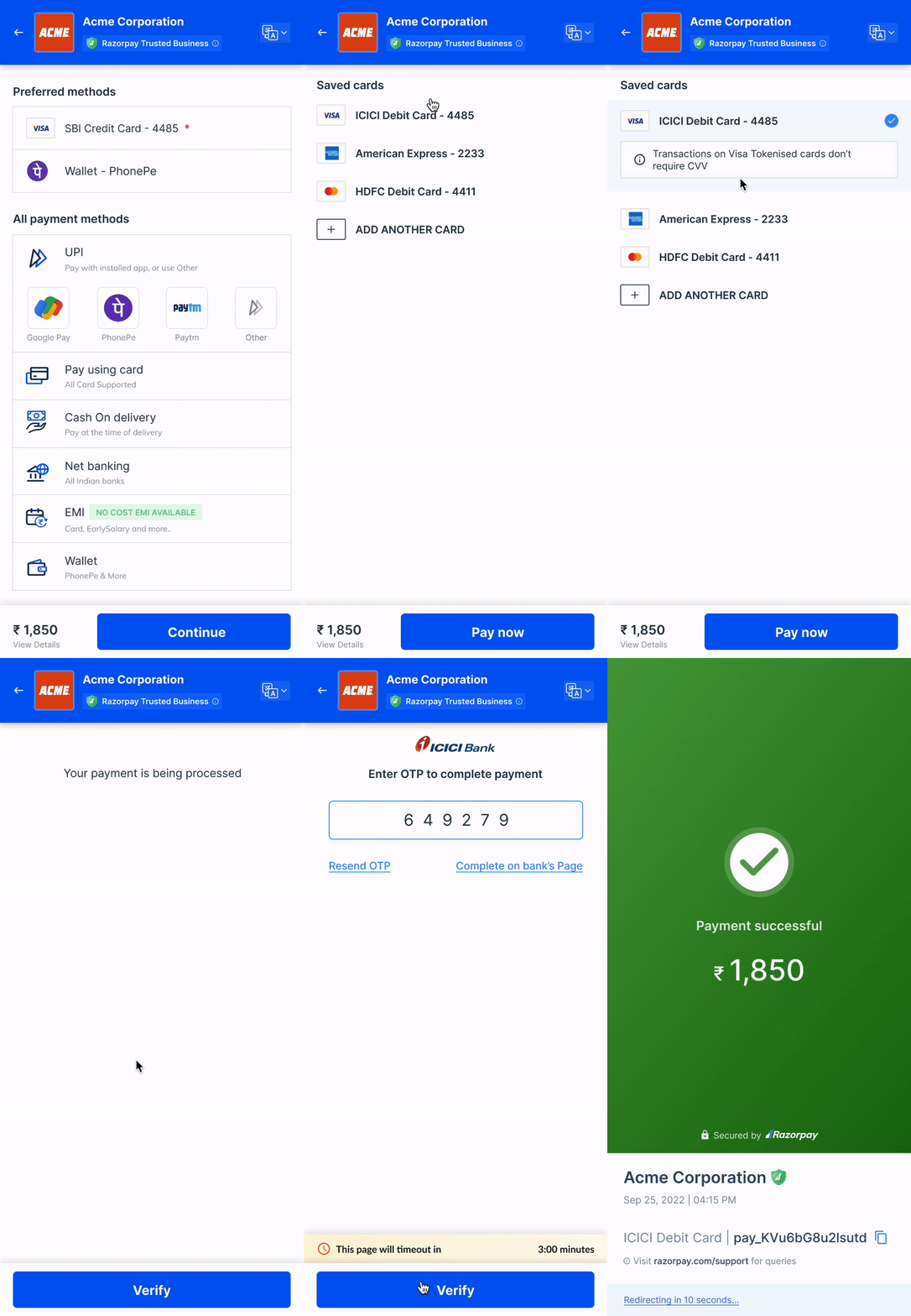 ## Saved Card Payment without CVV