> ## Documentation Index
> Fetch the complete documentation index at: https://razorpay-881012b3.mintlify.site/llms.txt
> Use this file to discover all available pages before exploring further.
# Understand the Configuration
> Understand the building blocks that are required to build a configuration of your choice.
Available in
🇮🇳 India
🇸🇬 Singapore
Let us understand the building blocks that are required to build a configuration of your choice:
1. [Payment Methods](#payment-methods)
2. [Payment Instruments](#payment-instruments)
3. [Blocks](#blocks)
4. [Sequence](#sequence)
5. [Preferences](#preferences)
## Payment Methods
Before deciding the payment methods or payment instruments that you want to configure on the Checkout, refer to the [payment methods](/docs/payments/payment-methods) supported by Razorpay.
## Payment Instruments
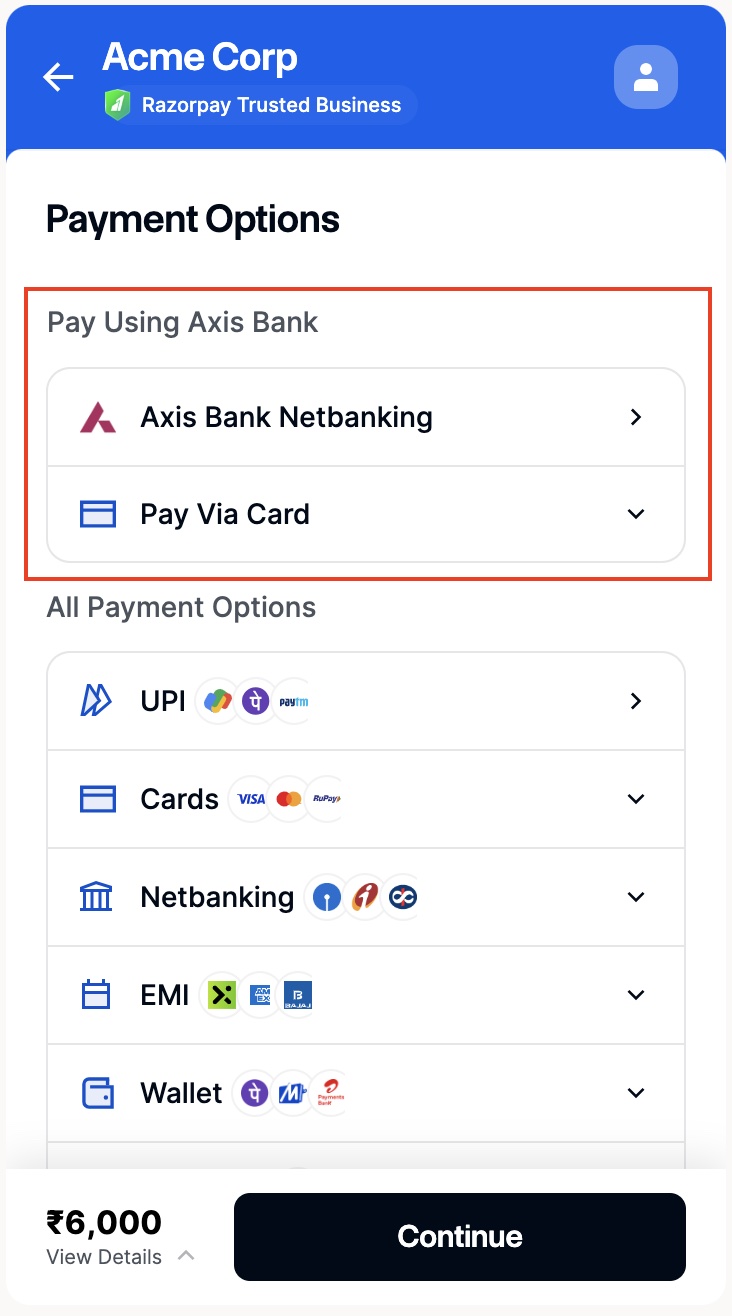
A payment instrument is a combination of the payment method and its associated properties. For example, a payment instrument can be an **AXIS Debit card**, where **card** is the payment method and the issuer (AXIS bank) is the associated **instrument**.
An instrument is a JSON object with a key named `method`. Each method and its associated properties are described in the sections below:
### Card
Payment instruments for the `method: card` are listed below:
| Name | Type | Description | Values | Examples |
| -------- | ----- | ----------------------------------- | ----------------------------------------------------------------------------------------------------------------------------------------------- | ---------------------------------- |
| issuers | array | List of issuers that are allowed | [Any bank code](/docs/payments/payment-gateway/web-integration/standard/configure-payment-methods/supported-methods#supported-banks) | `issuers: ["HDFC", "ICIC"]` |
| networks | array | List networks that are allowed | [Any card network](/docs/payments/payment-gateway/web-integration/standard/configure-payment-methods/supported-methods#supported-card-networks) | `networks: ["Visa", "MasterCard"]` |
| types | array | List of card types that are allowed | [Any card type](/docs/payments/payment-gateway/web-integration/standard/configure-payment-methods/supported-methods#supported-cards) | `types: ["credit", "debit"]` |
```javascript JavaScript theme={null}
// beginning of the code
....
card: { \\name for cards
name: "Pay Via Cards"
instruments: [
{
method: "card",
issuers: ["HDFC"],
networks: ["Visa"],
types: ["debit","credit"]
}
]
},
...
//rest of the code
```
### Netbanking
Payment instruments for the `method: netbanking` are listed below:
| Name | Type | Description | Values | Examples |
| ----- | --------------- | ---------------------------------- | ------------------------------------------------------------------------------------------------------------------------------------ | ------------------------- |
| banks | array`` | List of all banks that are allowed | [Any bank code](/docs/payments/payment-gateway/web-integration/standard/configure-payment-methods/supported-methods#supported-banks) | `banks: ["HDFC", "ICIC"]` |
### Wallet
Payment instruments for the `method: wallet` are listed below:
| Name | Type | Description | Values | Examples |
| ------- | ------ | --------------------- | ---------------------------------------------------------------------------------------------------------------------------------------- | ---------------------- |
| wallets | string | Wallets to be allowed | [Any wallet code](/docs/payments/payment-gateway/web-integration/standard/configure-payment-methods/supported-methods#supported-wallets) | `wallets: ["payzapp"]` |
### UPI
Payment instruments for the `method: upi` are listed below:
| Name | Type | Description | Values | Examples |
| ----- | ------ | ------------------------ | ------------------------------------------------------------------------------------------------------------------------------------------------- | --------------------------------- |
| flows | string | Flows to show | [Any supported UPI flow](/docs/payments/payment-gateway/web-integration/standard/configure-payment-methods/supported-methods#supported-upi-flows) | `flows: [ "qr"]` |
| apps | string | Apps to show, for intent | [Any supported UPI apps](/docs/payments/payment-gateway/web-integration/standard/configure-payment-methods/supported-methods#supported-upi-apps) | `apps: ["google_pay", "phonepe"]` |
### EMI
Payment instruments for the `method: emi` are listed below:
| Name | Type | Description | Values | Examples |
| ------- | --------------- | ----------------------- | ----------------------------------------------------------------------------------------------------------------------------------------------------------------------------------------------------------------------------------------------------------------------------------------------------------------------- | -------------------------- |
| issuers | array`` | Providers to be allowed | [Any EMI issuers](/docs/payments/payment-gateway/web-integration/standard/configure-payment-methods/supported-methods#supported-emi-providers) | `issuers: ["HDFC, ICIC"]` |
| types | array`` | Providers to be allowed | Any [credit](/docs/payments/payment-gateway/web-integration/standard/configure-payment-methods/supported-methods#supported-credit-card-emi-providers) and [debit](/docs/payments/payment-gateway/web-integration/standard/configure-payment-methods/supported-methods#supported-debit-card-emi-providers) card EMI type | `types: ["debit, credit"]` |
| iins | array`` | Providers to be allowed | [Any EMI IIN](/docs/payments/payment-gateway/web-integration/standard/configure-payment-methods/supported-methods#supported-emi-providers) | `iins: ["438600"]` |
### Cardless EMI
Payment instruments for the `method: cardless_emi` are listed below:
| Name | Type | Description | Values | Examples |
| --------- | ------ | ----------------------- | ----------------------------------------------------------------------------------------------------------------------------------------------------------------- | -------------------------- |
| providers | string | Providers to be allowed | [Any Cardless EMI provider](/docs/payments/payment-gateway/web-integration/standard/configure-payment-methods/supported-methods#supported-cardless-emi-providers) | `providers: ["zestmoney"]` |
### Pay Later
For the method: `paylater`, the payment instruments are listed below:
| Name | Type | Description | Values | Examples |
| --------- | ------ | ----------------------- | ---------------------------------------------------------------------------------------------------------------------------------------------------------- | --------------------- |
| providers | string | Providers to be allowed | [Any paylater provider](/docs/payments/payment-gateway/web-integration/standard/configure-payment-methods/supported-methods#supported-pay-later-providers) | `providers: ["hdfc"]` |
### Apps
For the method `app`, the payment instrument is listed below:
| Name | Type | Description | Values | Examples |
| --------- | ------ | ----------------------- | -------------------------------------------------------------------------------------------------------------------------------------- | --------------------- |
| providers | string | Providers to be allowed | [Any app provider](/docs/payments/payment-gateway/web-integration/standard/configure-payment-methods/supported-methods#supported-apps) | `providers: ["cred"]` |
```javascript JavaScript theme={null}
// beginning of the code
....
{
"custom": {
"name": "Pay with Apps",
"instruments": [
{
"method": "app",
"providers": [
"cred"
]
}
]
}
}
...
//rest of the code
```
## Blocks
A block is a collection of one or more payment instruments. Each block has a `name` and `code` associated as shown below:
```javascript JavaScript theme={null}
// Block creation
let myPayments = {
name: "My Custom Block",
instruments: ["gpay"]
};
// Usage in config
let config = {
display: {
blocks: {
highlighted: myPayments
}
}
};
```
Here, `highlighted` is the code associated with `myPayments`. Multiple blocks can be added to the config at the same time.
## Sequence
You can specify the `sequence`, that is the order, in which the payment methods should be displayed on the Checkout.
A sequence is an `array` of strings, where each string is the name of the payment method or a `block`.
In a sequence, you can include any block using the `block.${code}` format. The block with code **highlighted** should be represented as `block.highlighted` as shown below:
```javascript JavaScript theme={null}
let sequence = ["block.highlighted", "upi", "netbanking"];
```
The above sequence will place the code `highlighted` first followed by the payment methods `upi` and `netbanking` in that particular order.
**Handy Tips**
Every block defined has to be present in the sequence. If you do not wish to reorder the methods and want to place your block, the sequence should contain `block.highlighted` with just one item in it.
## Preferences
Using the `preferences` object, you can enhance the configuration of the Checkout. By setting this value, you can decide whether the default list of payment methods should be displayed or not.
Possible values are:
`true`
: Checkout will display the sequence of the payment methods configured by you alongside with the default order of payment methods available in the Checkout.
`false`
: Checkout will only show the sequence of the payment methods configured by you.
## Hide Payment Instruments
You can also hide or remove certain instruments from the Checkout.
This is an `array` containing the `method` key used to hide either the payment method and/or the payment instrument associated with that payment method. For example, you can hide the methods, `card` and `HDFC netbanking` on the Checkout.
```javascript JavaScript theme={null}
let cardInstrument = {
method: "card"
};
let instrumentOfSomeBank = {
method: "netbanking",
banks: ["HDFC"]
};
let hiddenInstruments = [cardInstrument, instrumentOfSomeBank];
```
This is an `array` containing the `method` key used to hide either the payment method and/or the payment instrument associated with that payment method. For example, you can hide the methods, `card` and `Axis netbanking` on the Checkout.
```javascript JavaScript theme={null}
let cardInstrument = {
method: "card"
};
let instrumentOfSomeBank = {
method: "netbanking",
banks: ["UTIB"]
};
let hiddenInstruments = [cardInstrument, instrumentOfSomeBank];
```
**Handy Tips**
Hiding any instrument using `hide` does not affect the similar instrument defined in `blocks`. So, if you want to hide `UTIB` bank from `netbanking` and have defined the same instrument in one of your blocks, Axis bank will still be displayed in that block.
 ## Next Steps
[Display the Configuration](/docs/payments/payment-gateway/web-integration/standard/configure-payment-methods/display-configuration)
### Related Information
* [Supported Methods](/docs/payments/payment-gateway/web-integration/standard/configure-payment-methods/supported-methods)
* [Sample Codes](/docs/payments/payment-gateway/web-integration/standard/configure-payment-methods/sample-code)
## Next Steps
[Display the Configuration](/docs/payments/payment-gateway/web-integration/standard/configure-payment-methods/display-configuration)
### Related Information
* [Supported Methods](/docs/payments/payment-gateway/web-integration/standard/configure-payment-methods/supported-methods)
* [Sample Codes](/docs/payments/payment-gateway/web-integration/standard/configure-payment-methods/sample-code)