> ## Documentation Index
> Fetch the complete documentation index at: https://razorpay-881012b3.mintlify.site/llms.txt
> Use this file to discover all available pages before exploring further.
# Search a Payment Link
> Search for a Payment Link using the various search filters.
Available in
🇮🇳 India
🇸🇬 Singapore
🇺🇸 United States
You can search for Payment Links on the Dashboard by specifying various filters. Know more about [Payment Link states](/docs/payments/payment-links/states).
## Search a Payment Link From Dashboard
To search a Payment Link:
1. Log in to the Dashboard.
2. Go to the **PAYMENT PRODUCTS** section and click **Payment Links**.
3. In the list of Payment Links that appears, search for the link by specifying filters.
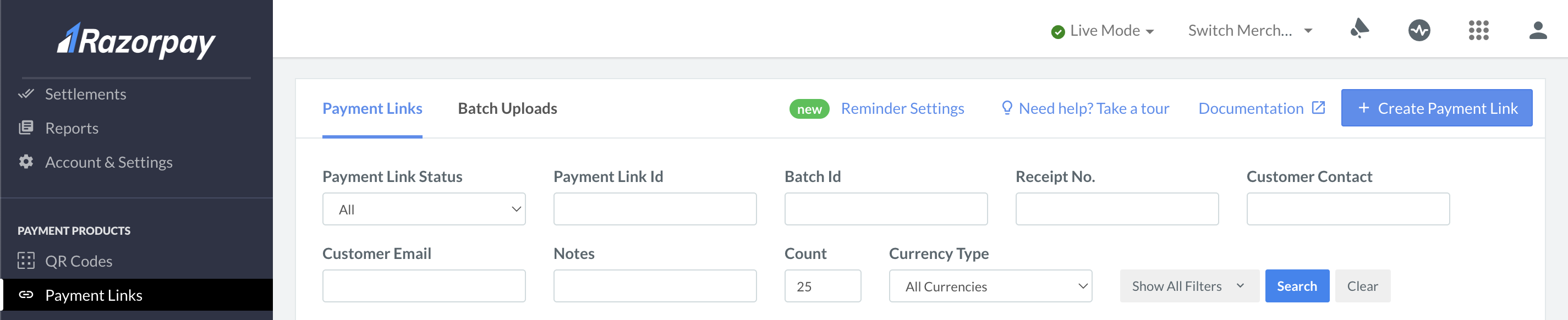 | Filter | Description |
| ------------------- | ---------------------------------------------------------------------------------------------- |
| Payment Link Status | The status of the Payment Link. |
| Payment Link ID | Unique identifier of the Payment Link. |
| Batch Id | Unique identifier of the batch as part of which you created the Payment Link. |
| Reference Id | Unique reference number of the Payment Link. |
| Customer Contact | Registered contact of the customer. |
| Customer Email | Email address of the customer. |
| Notes | Additional information stored in the Customer Notes field while creating the Payment Link. |
| Payment Link Type | The type of Payment Link. You can use this filter to search for Standard or UPI Payment Links. |
| Duration | The time range within which the Payment Link was created. |
## Search a Payment Link Using API
* [View the list of all Payment Links API](/docs/api/payments/payment-links/fetch-all-standard)
* [View the details of a Payment Link using Payment Link Id API](/docs/api/payments/payment-links/fetch-id-standard)
#### Related Information
* [Payment Links States](/docs/payments/payment-links/states)
* [Create a Payment Link](/docs/payments/payment-links/create)
* [FAQs](/docs/payments/payment-links/faqs)
| Filter | Description |
| ------------------- | ---------------------------------------------------------------------------------------------- |
| Payment Link Status | The status of the Payment Link. |
| Payment Link ID | Unique identifier of the Payment Link. |
| Batch Id | Unique identifier of the batch as part of which you created the Payment Link. |
| Reference Id | Unique reference number of the Payment Link. |
| Customer Contact | Registered contact of the customer. |
| Customer Email | Email address of the customer. |
| Notes | Additional information stored in the Customer Notes field while creating the Payment Link. |
| Payment Link Type | The type of Payment Link. You can use this filter to search for Standard or UPI Payment Links. |
| Duration | The time range within which the Payment Link was created. |
## Search a Payment Link Using API
* [View the list of all Payment Links API](/docs/api/payments/payment-links/fetch-all-standard)
* [View the details of a Payment Link using Payment Link Id API](/docs/api/payments/payment-links/fetch-id-standard)
#### Related Information
* [Payment Links States](/docs/payments/payment-links/states)
* [Create a Payment Link](/docs/payments/payment-links/create)
* [FAQs](/docs/payments/payment-links/faqs)