> ## Documentation Index
> Fetch the complete documentation index at: https://razorpay-881012b3.mintlify.site/llms.txt
> Use this file to discover all available pages before exploring further.
# About Card Payments
> Accept payments from your customers using cards. Check the Payment Flow and supported card network.
Available in
🇮🇳 India
🇸🇬 Singapore
🇺🇸 United States
You can accept payments from your customers using debit or credit cards from all international providers. Check the various capabilities we offer with Cards:
* [3D Secure 2.0 Authentication Protocol (3DS2)](/docs/payments/payment-methods/cards/features/3ds2.0)
* [Saved Cards](/docs/payments/payment-methods/cards/features/saved-cards)
* [CVV-less Flow](/docs/payments/payment-methods/cards/features/cvv-less-flow)
* [Card Tap & Read](/docs/payments/payment-methods/cards/features/card-tap-and-read)
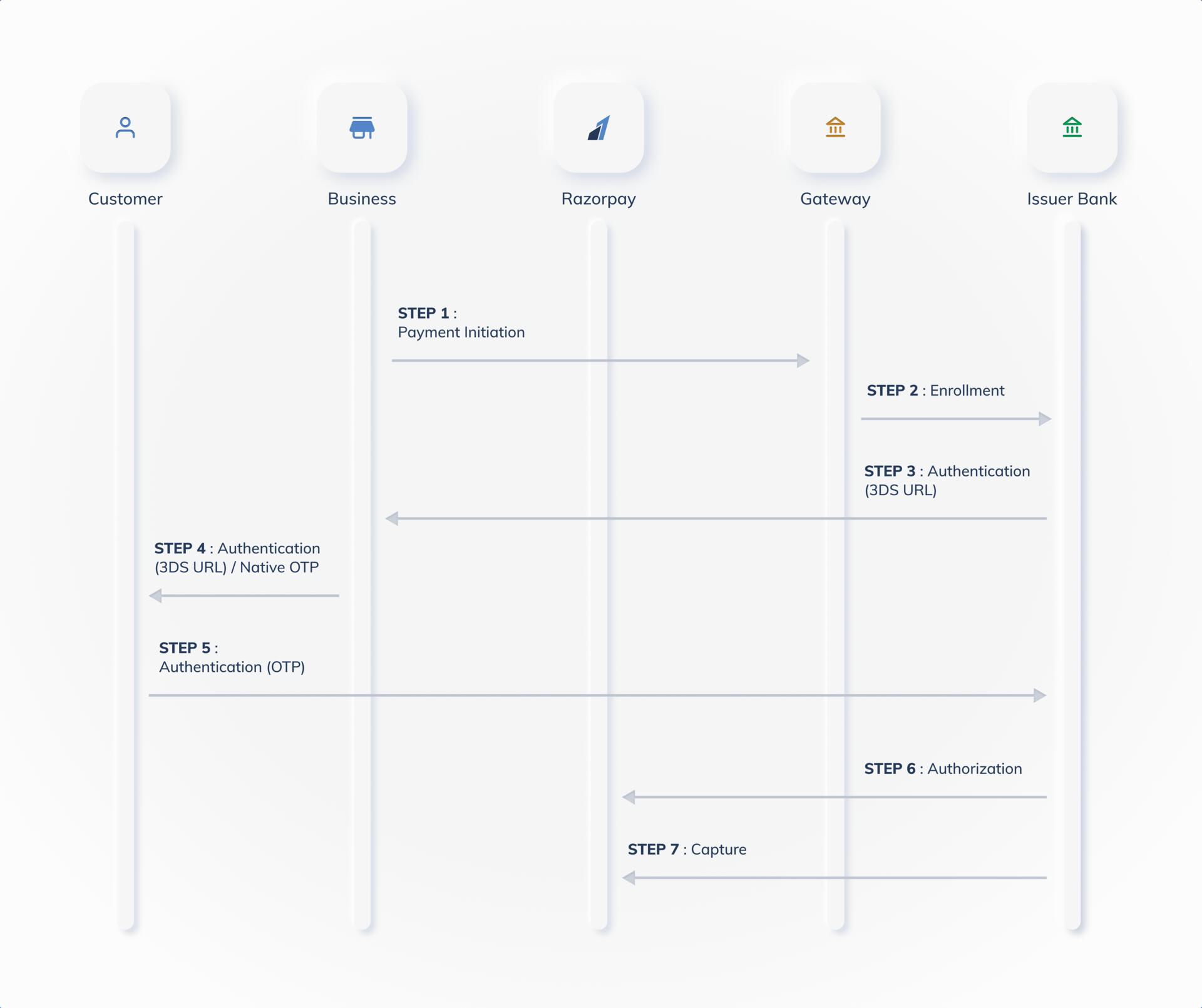
## Payment Flow for Cards
The diagram given below represents the payment flow for cards:
 ## Supported Card Networks
Razorpay supports the following card networks:
* Visa
* Mastercard
* American Express
* BAJAJ
* Maestro
* Rupay
* Diners (Only available for private limited and registered businesses)
## Test Cards
Use test cards to test your payment integration before going live. The test cards simulate different payment scenarios and error conditions for all supported card networks. Know more about [Test Cards](/docs/payments/payments/test-card-details).
### Related Information
[Cards Error Codes](/docs/errors/payments/cards)
## Supported Card Networks
Razorpay supports the following card networks:
* Visa
* Mastercard
* American Express
* BAJAJ
* Maestro
* Rupay
* Diners (Only available for private limited and registered businesses)
## Test Cards
Use test cards to test your payment integration before going live. The test cards simulate different payment scenarios and error conditions for all supported card networks. Know more about [Test Cards](/docs/payments/payments/test-card-details).
### Related Information
[Cards Error Codes](/docs/errors/payments/cards)