> ## Documentation Index
> Fetch the complete documentation index at: https://razorpay-881012b3.mintlify.site/llms.txt
> Use this file to discover all available pages before exploring further.
# Prepaid Wallets on UPI
> Offer Prepaid Wallets on UPI as a payment method to your customers.
Available in🇮🇳 India
Leverage the full potential of UPI Payments by integrating Prepaid Payment Instruments.
Watch this video to know more about Prepaid Wallets on UPI.
### Advantages
* Increased touch points to make payments via their prepaid wallets irrespective of the wallets integrated with your business.
* Ease of completing wallet payments with better reach on UPI.
* Store money in their wallet without worrying about the amount being stuck in the wallet.
* Accept prepaid digital wallet payments without the costs of integration with a wallet issuer.
* Experience a high success rate of one-step wallet transactions on UPI.
* Enhance the payment experience for customers, ensuring a smoother process.
## Frequently Asked Questions (FAQs)
To link a wallet to UPI, customers need to:
1. Head over to the wallet issuer app (Amazon Pay, PhonePe) on their smartphone.
2. Secure a VPA address issued by the wallet issuer through mobile number verification.
3. Once the VPA address is assigned, the registration of the wallet on UPI is complete.
**Handy Tips**
Only those who have completed the KYC verification process can link their wallets with UPI.
To make a payment via digital wallets on UPI:
1. The customer can scan the UPI QR through their wallet app and make wallet payments on UPI. No UPI PIN is required while making a wallet transaction on UPI.
2. The customer can also enter the VPA address or the phone number linked to their registered wallet on the checkout page to make UPI payments.
**Watch Out!**
The mobile number linked to UPI should be in use on the smartphone and should be the same number linked to the wallet.
You can retrieve the details of the account type (bank account or credit card) used for UPI payments through the Payment Webhook, Fetch Payment API, and the Dashboard.
* **Payment Webhook**: The payment entity will now include the payer account type details. Refer to the [Payment Authorized Payload](/docs/webhooks/payments#payment-authorized).
* **Fetch Payment API**: The payment entity will now include the payer account type details. Refer to the [Fetch API sample code](/docs/api/payments#expanded-upi).
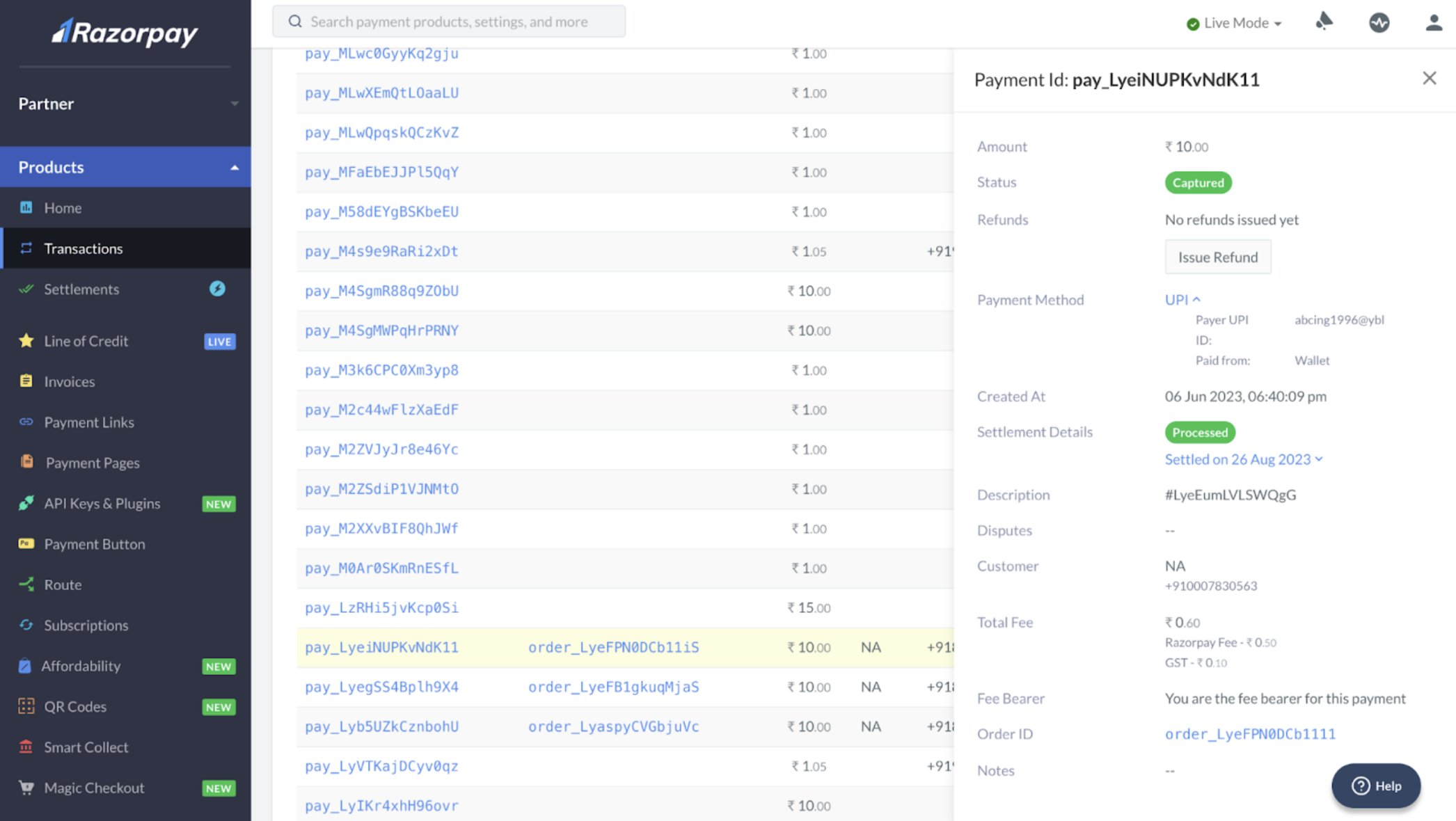
* **On the Dashboard** :
1. Click on a UPI payment to look at the payment details.
2. The payment drawer will display the following information for wallet payments on UPI:
1. Payment Method: UPI
2. Paid from: Wallet
The following wallet issuers support linking wallets to UPI:
* Amazon Pay
* PhonePe
* Fampay
* OneCard
In terms of bank coverage, the following banks will identify wallet transactions on UPI from **30th August 2023**:
* Axis Bank
* HDFC Bank
* Yes Bank
* ICICI Bank
Razorpay will take care of enabling this feature for you.
A Platform fee of 2% is levied for all wallet transactions via UPI. This pricing is determined by rates shared by banks and a wallet issuer service charge.
You will not be able to accept wallet payments on UPI if you fall under the [**businesses on Customer fee bearer (CFB)**](/docs/payments/dashboard/account-settings/configuration/convenience-fees) category.