> ## Documentation Index
> Fetch the complete documentation index at: https://razorpay-881012b3.mintlify.site/llms.txt
> Use this file to discover all available pages before exploring further.
# Frequently Asked Questions (FAQs)
> Find answers to frequently asked questions about Recurring Payments using Paper NACH.
Available in
🇮🇳 India
## Registration
You can generate and submit physical mandates from the [Dashboard](/docs/payments/recurring-payments/create) or [using our APIs](/docs/api/payments/recurring-payments).
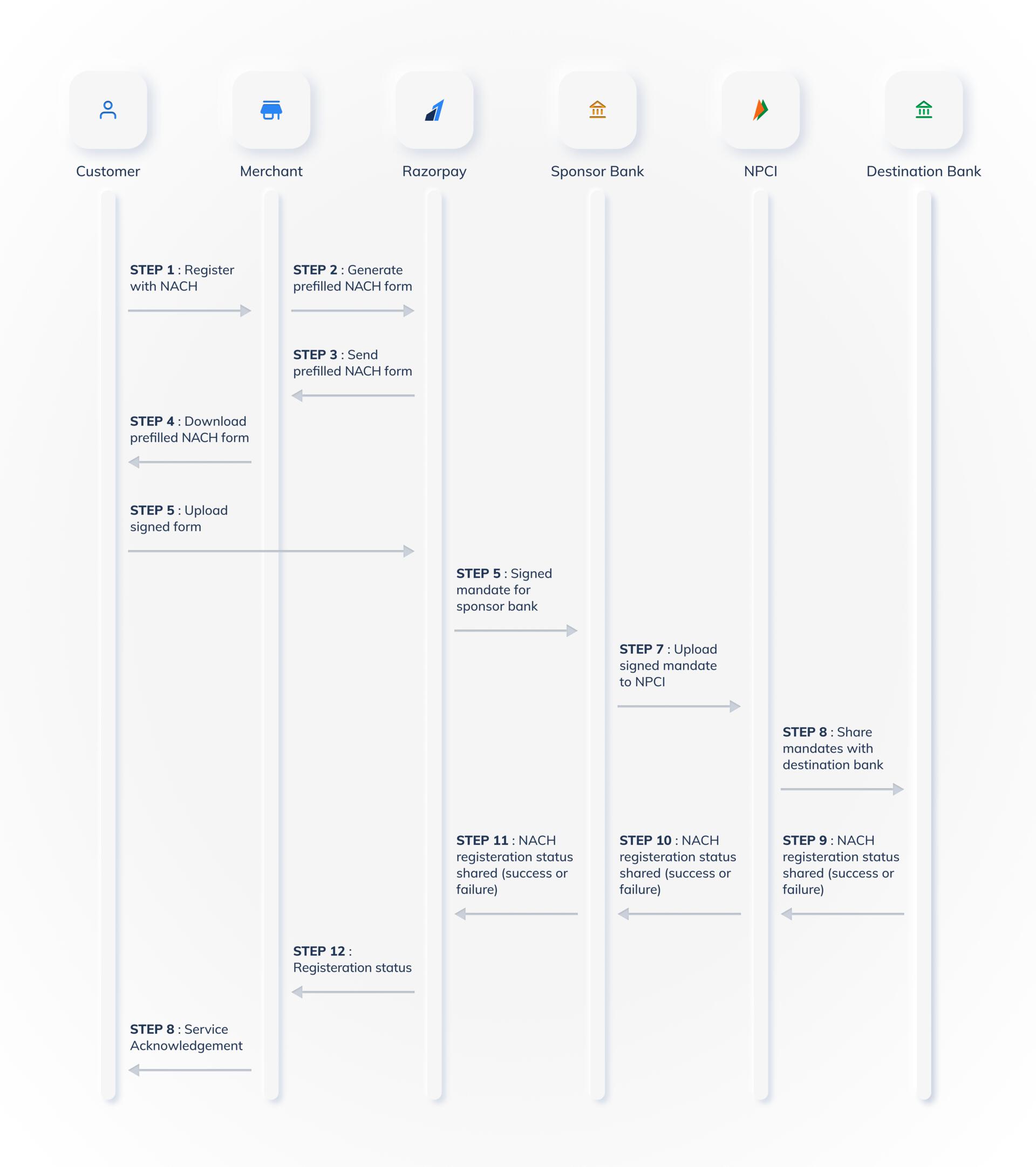
Following is the registration flow of the NACH:
 Following are the account types supported for Paper NACH:
* `savings` (default)
* `current`
* `cc` (Cash Credit)
* `nre` (SB-NRE)
* `nro` (SB-NRO)
The signed NACH form can only be uploaded as an image. We support the following file formats:
* .JPG
* .JPEG
* .PNG
If you get an error while uploading the NACH form, you can try to upload the form again. You can retry the upload as many times as you want, until a successful upload.
**Handy Tips**
A few things to keep in mind when uploading the signed NACH form:
* Do not change or write over any of the fields on the form.
* Do not crop the border.
* Review the information, sign and upload the form.
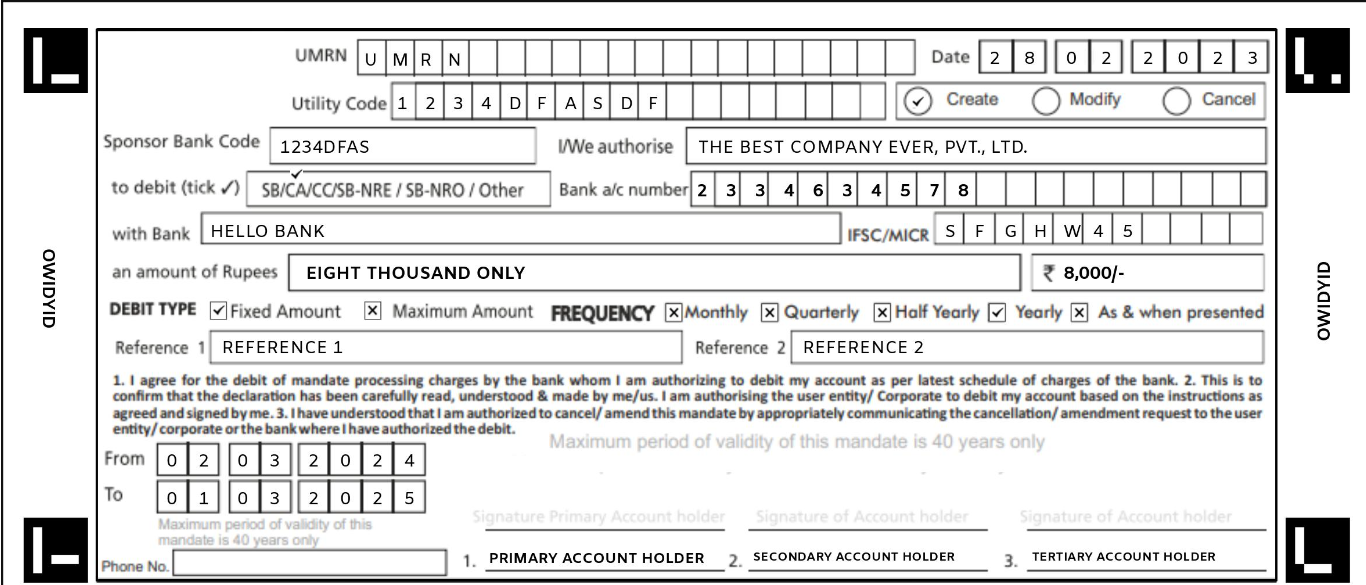
Below is a sample NACH form.
Following are the account types supported for Paper NACH:
* `savings` (default)
* `current`
* `cc` (Cash Credit)
* `nre` (SB-NRE)
* `nro` (SB-NRO)
The signed NACH form can only be uploaded as an image. We support the following file formats:
* .JPG
* .JPEG
* .PNG
If you get an error while uploading the NACH form, you can try to upload the form again. You can retry the upload as many times as you want, until a successful upload.
**Handy Tips**
A few things to keep in mind when uploading the signed NACH form:
* Do not change or write over any of the fields on the form.
* Do not crop the border.
* Review the information, sign and upload the form.
Below is a sample NACH form.
 If you want to set up recurring payments on a current account via Paper NACH, you might be required to add your company seal on the NACH form. Use the blank space available for the 2nd and 3rd signatory to add the seal.
The following table indicates the time required to update the token status from `initiated` state to the `confirmed` state for the physical mandates:
| Bank | Expected Time to Complete |
| --------- | ------------------------- |
| All Banks | T+5 working days. |
**Handy Tips**
The registration token confirmation can take up to 5 to 7 days in some cases.
All banks support Recurring Payments through Paper NACH. You can get the exhaustive list of banks [here](https://www.npci.org.in/what-we-do/nach/live-members/live-banks).
You can raise a ticket with our support team by mentioning the registered mandate's `token id` or the `payment id` used for registration. Our team will share the corresponding signed copies with you.
If you do not receive an update for more than 30 days, the mandate registration has most likely failed. You can share the payment IDs with Razorpay support to enquire about these cases and we will get the payment status checked and updated.
To improve the Emandate registration user experience for your customers:
* Before customers proceed with the authorisation transaction, you can display a message asking your customers to keep their netbanking credentials handy. This will help prevent time-out at the checkout.
* Inform your customers that there might be a ₹1 or ₹2 deduction during the authorisation transaction. This amount will be refunded to your customer in 3-5 bank working days.
Yes. You can use the cancel a physical mandate by deleting the token from the [Dashboard](/docs/payments/recurring-payments/create#delete-the-token) or [using APIs](/docs/api/payments/recurring-payments/paper-nach/tokens#2-4-delete-tokens).
The below table lists the errors that may appear while uploading the NACH file, the reason, explanation and next steps:
| Reason | Explanation | Next Steps |
| ------------------------- | ------------------------------------------------------------------------------------------------------------------------------ | ---------------------------------------------------------------------------------------------------------------------------------------------------------- |
| `unknown_file_type` | The file type of the image is not supported. | Upload an image that is in either of `.jpeg`, `.jpg` or `.jpg` formats. |
| `file_size_exceeds_limit` | The file size exceeds the permissible limits. | Upload an image of smaller size. |
| `image_not_clear` | The uploaded image is not clear. This can either be due to poor resolution or because part of the image is cropped. | Upload an image with better quality without any cropping of the form. |
| `form_mismatch` | The ID of the uploaded form does not match with that in our records. | Check that the form is uploaded against the correct order ID. |
| `form_signature_missing` | The signature of the customer is either missing or could not be detected. | Check that the customer has signed in the appropriate box and that the image uploaded is clear. For current account, a company stamp may also be required. |
| `form_data_mismatch` | One or more of the fields on the NACH form do not match with that in our records. | Check that the image is clear and that the data has not been tampered with before uploading again. |
| `form_status_pending` | A form against this order is pending action on the destination bank. A new form cannot be submitted till a status is received. | Wait for an update from the destination bank on the approval/rejection of the mandate. |
Debits can be initiated once the token status changes to `confirmed`. There is no additional waiting or cooling period required.
## Debits Presentments
Payments have to be `captured` for the corresponding settlement to take place. You can manually capture the payment from the Dashboard.
Alternatively, to avoid manual dependency, you can enable Auto Capture for all your payments from the Dashboard.
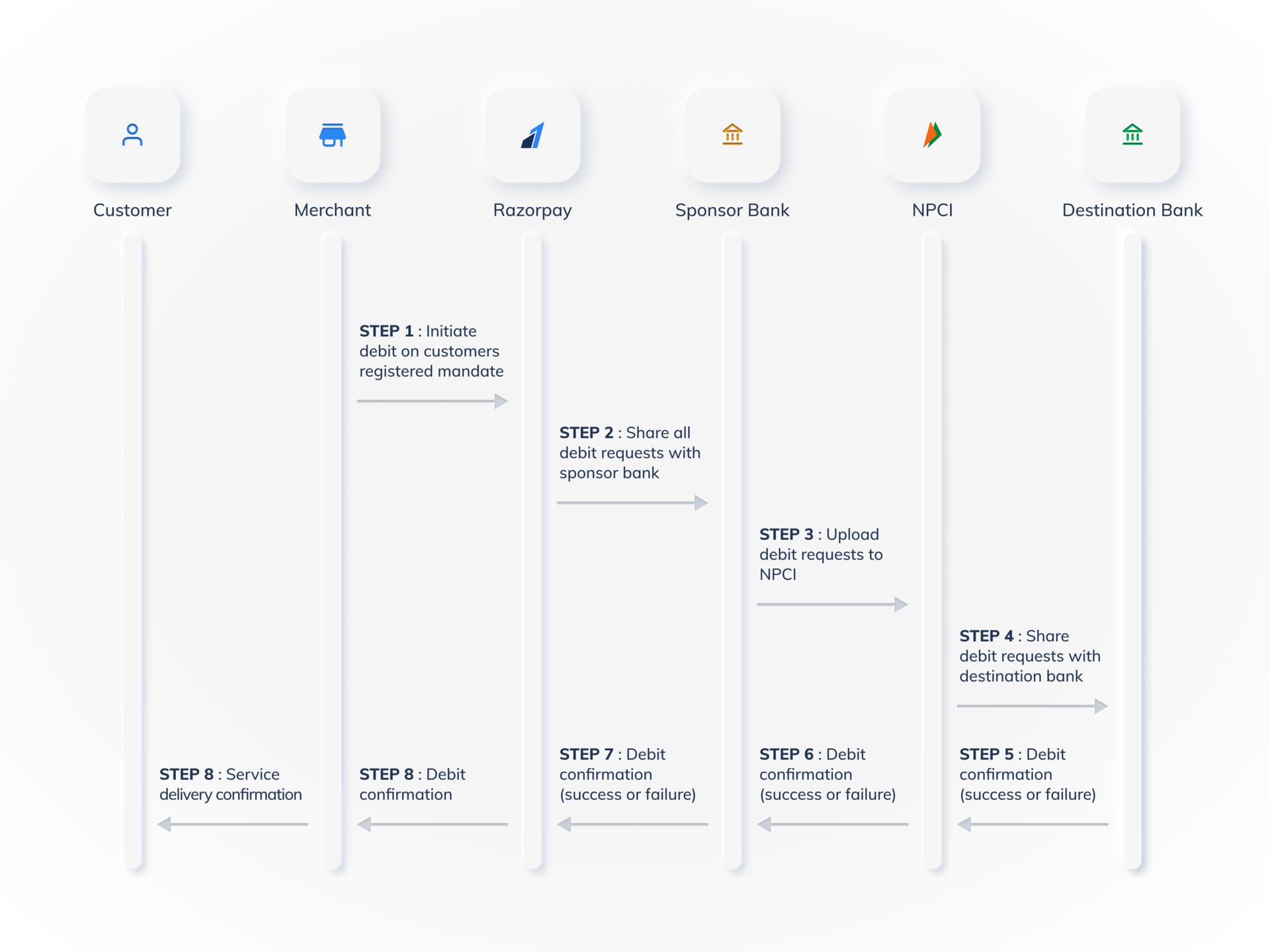
Following is the debit presentment flow of the NPCI ENACH:
If you want to set up recurring payments on a current account via Paper NACH, you might be required to add your company seal on the NACH form. Use the blank space available for the 2nd and 3rd signatory to add the seal.
The following table indicates the time required to update the token status from `initiated` state to the `confirmed` state for the physical mandates:
| Bank | Expected Time to Complete |
| --------- | ------------------------- |
| All Banks | T+5 working days. |
**Handy Tips**
The registration token confirmation can take up to 5 to 7 days in some cases.
All banks support Recurring Payments through Paper NACH. You can get the exhaustive list of banks [here](https://www.npci.org.in/what-we-do/nach/live-members/live-banks).
You can raise a ticket with our support team by mentioning the registered mandate's `token id` or the `payment id` used for registration. Our team will share the corresponding signed copies with you.
If you do not receive an update for more than 30 days, the mandate registration has most likely failed. You can share the payment IDs with Razorpay support to enquire about these cases and we will get the payment status checked and updated.
To improve the Emandate registration user experience for your customers:
* Before customers proceed with the authorisation transaction, you can display a message asking your customers to keep their netbanking credentials handy. This will help prevent time-out at the checkout.
* Inform your customers that there might be a ₹1 or ₹2 deduction during the authorisation transaction. This amount will be refunded to your customer in 3-5 bank working days.
Yes. You can use the cancel a physical mandate by deleting the token from the [Dashboard](/docs/payments/recurring-payments/create#delete-the-token) or [using APIs](/docs/api/payments/recurring-payments/paper-nach/tokens#2-4-delete-tokens).
The below table lists the errors that may appear while uploading the NACH file, the reason, explanation and next steps:
| Reason | Explanation | Next Steps |
| ------------------------- | ------------------------------------------------------------------------------------------------------------------------------ | ---------------------------------------------------------------------------------------------------------------------------------------------------------- |
| `unknown_file_type` | The file type of the image is not supported. | Upload an image that is in either of `.jpeg`, `.jpg` or `.jpg` formats. |
| `file_size_exceeds_limit` | The file size exceeds the permissible limits. | Upload an image of smaller size. |
| `image_not_clear` | The uploaded image is not clear. This can either be due to poor resolution or because part of the image is cropped. | Upload an image with better quality without any cropping of the form. |
| `form_mismatch` | The ID of the uploaded form does not match with that in our records. | Check that the form is uploaded against the correct order ID. |
| `form_signature_missing` | The signature of the customer is either missing or could not be detected. | Check that the customer has signed in the appropriate box and that the image uploaded is clear. For current account, a company stamp may also be required. |
| `form_data_mismatch` | One or more of the fields on the NACH form do not match with that in our records. | Check that the image is clear and that the data has not been tampered with before uploading again. |
| `form_status_pending` | A form against this order is pending action on the destination bank. A new form cannot be submitted till a status is received. | Wait for an update from the destination bank on the approval/rejection of the mandate. |
Debits can be initiated once the token status changes to `confirmed`. There is no additional waiting or cooling period required.
## Debits Presentments
Payments have to be `captured` for the corresponding settlement to take place. You can manually capture the payment from the Dashboard.
Alternatively, to avoid manual dependency, you can enable Auto Capture for all your payments from the Dashboard.
Following is the debit presentment flow of the NPCI ENACH:
 You can set the maximum amount while initiating registrations for your customers. The maximum limit you can set for NACH mandates is ₹1,00,00,000.
If you do not set a limit for the mandate, the maximum limit defaults to ₹1,00,00,000 for NACH.
The following table indicates the time required to update the token status from `created` state to the `authorized` state for the physical mandates:
| Bank | TAT Guidelines | Details |
| --------- | ---------------- | -------------------------------------------------------------------------------------------------------------------------------------------------------------------------- |
| All Banks | T+2 working days | Debit requests created between **T-1 day 9 AM** and **T day 9 AM** are processed on **T by end of the day**. Requests after **T day 9 AM** are processed in **T+1 cycle**. |
**Handy Tips**
To ensure same-day debit authorisation, Razorpay must receive the request by 8:59 am on a bank working day.
Customer account debits for Emandates registered with Paper NACH will be done on all days, including weekends and public holidays.
However, settlements for the debit payments captured on weekends and public holidays will only be made on the next working day as per your settlement schedule.
You can set the maximum amount while initiating registrations for your customers. The maximum limit you can set for NACH mandates is ₹1,00,00,000.
If you do not set a limit for the mandate, the maximum limit defaults to ₹1,00,00,000 for NACH.
The following table indicates the time required to update the token status from `created` state to the `authorized` state for the physical mandates:
| Bank | TAT Guidelines | Details |
| --------- | ---------------- | -------------------------------------------------------------------------------------------------------------------------------------------------------------------------- |
| All Banks | T+2 working days | Debit requests created between **T-1 day 9 AM** and **T day 9 AM** are processed on **T by end of the day**. Requests after **T day 9 AM** are processed in **T+1 cycle**. |
**Handy Tips**
To ensure same-day debit authorisation, Razorpay must receive the request by 8:59 am on a bank working day.
Customer account debits for Emandates registered with Paper NACH will be done on all days, including weekends and public holidays.
However, settlements for the debit payments captured on weekends and public holidays will only be made on the next working day as per your settlement schedule.