> ## Documentation Index
> Fetch the complete documentation index at: https://razorpay-881012b3.mintlify.site/llms.txt
> Use this file to discover all available pages before exploring further.
# Frequently Asked Questions (FAQs)
> Find answers to frequently asked questions about Recurring Payments using UPI.
Available in
🇮🇳 India
The maximum transaction amount allowed is ₹15,000 when using UPI as a recurring payment method. Any auto debit above ₹15,000 undergoes an additional authorisation from the customer.
Refer to the [NPCI list of banks and apps supported for UPI Autopay](https://www.npci.org.in/product/autopay/all-members).
The below table gives information about the frequently used intent-supported PSP apps on different platforms and checkout integrations.
| PSP Apps | mWeb | Android SDK | iOS SDK |
| ---------- | ---- | ----------- | ------- |
| GPay | x | ✓ | ✓ |
| PhonePe | ✓ | ✓ | ✓ |
| Paytm | ✓ | ✓ | ✓ |
| Amazon Pay | x | x | x |
| BHIM | x | ✓ | x |
| PSP Apps | mWeb | Android SDK | iOS SDK |
| ---------- | ---- | ----------- | ------- |
| GPay | ✓ | ✓ | x |
| PhonePe | ✓ | ✓ | x |
| Paytm | ✓ | ✓ | x |
| Amazon Pay | x | ✓ | x |
| BHIM | x | ✓ | x |
| PSP Apps | mWeb | Android SDK | iOS SDK |
| ---------- | ---- | ----------- | ------- |
| GPay | ✓ | ✓ | x |
| PhonePe | ✓ | ✓ | x |
| Paytm | ✓ | ✓ | x |
| Amazon Pay | ✓ | ✓ | x |
| BHIM | ✓ | ✓ | x |
**Watch Out!**
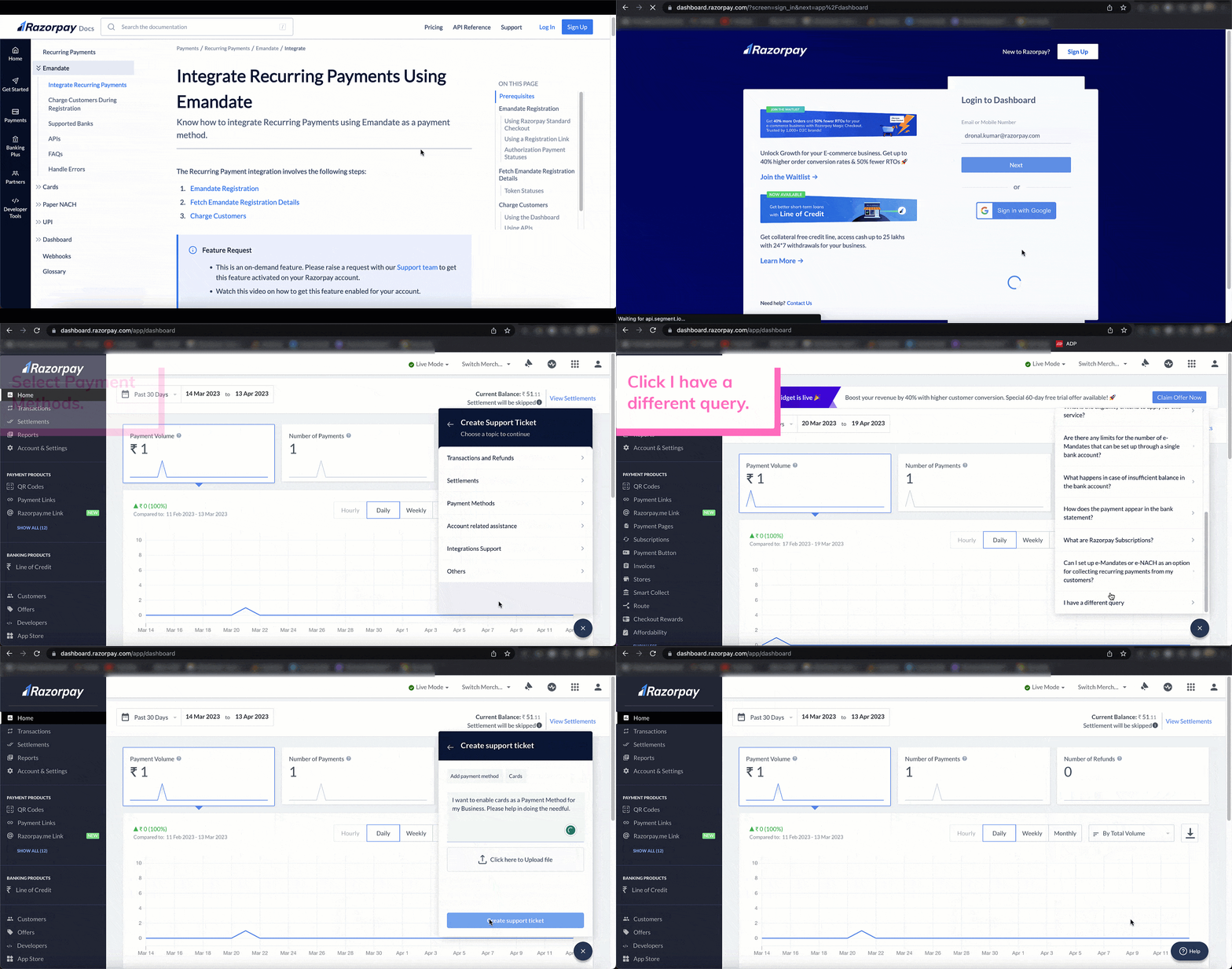
* You should contact our [Support team](https://razorpay.com/support/#request) to enable UPI Intent on standard checkout. Watch this video on how to get it enabled.
 * UPI Intent is not supported for @okaxis handle.
The below table gives information about the frequently used intent-supported PSP apps for TPV on different platforms and checkout integrations.
| PSP Apps | mWeb | Android SDK | iOS SDK |
| ---------- | ---- | ----------- | ------- |
| GPay | ✓ | ✓ | ✓ |
| PhonePe | ✓ | ✓ | x |
| Paytm | ✓ | ✓ | ✓ |
| Amazon Pay | x | ✓ | x |
| BHIM | x | ✓ | x |
| PSP Apps | mWeb | Android SDK | iOS SDK |
| ---------- | ---- | ----------- | ------- |
| GPay | ✓ | ✓ | ✓ |
| PhonePe | ✓ | ✓ | x |
| Paytm | ✓ | ✓ | ✓ |
| Amazon Pay | x | ✓ | x |
| BHIM | x | ✓ | x |
| PSP Apps | mWeb | Android SDK | iOS SDK |
| ---------- | ---- | ----------- | ------- |
| GPay | ✓ | ✓ | x |
| PhonePe | ✓ | ✓ | x |
| Paytm | ✓ | ✓ | x |
| Amazon Pay | ✓ | ✓ | x |
| BHIM | ✓ | ✓ | x |
**Watch Out!**
* You should contact our [Support team](https://razorpay.com/support/#request) to enable PSP apps other than PhonePe and Paytm on Standard Checkout for UPI TPV. Watch this video on how to get it enabled.
* UPI Intent TPV is not supported for @okaxis handle.
Mandate registrations occur in real time. Once the customer enters the MPIN, the mandate is authorised and a token is created on the customer. You can then use this token for subsequent debits on the customer's account.
No, you cannot charge customer payments in international currencies. UPI mandates only support `INR` payments.
For UPI mandates, the token status is updated from `initiated` state to the `confirmed` state in real-time.
| Method | Bank | Expected Time to Complete |
| ------ | ------------------- | ------------------------- |
| UPI | All supported banks | Real-time. |
For UPI mandates, subsequent charges are initiated **25 hours after the Pre Debit notification** is sent to the customer. Once initiated,
* For amount \< ₹15,000: Authorisation is instant as the debit call is made directly to the customer’s bank.
* For amount > ₹15,000: An additional authorisation is requested of the customer. Once received, the amount is debited from the customer's bank.
Pre-debit notifications are notifications sent to consumers 24 hours prior to the payment. These notices intimate the customer ahead of the actual debit, allowing them the option to pause or cancel the e-mandate.
Yes, you can cancel a UPI mandate from the Dashboard.
You can revoke a UPI mandate directly from the Dashboard. To do so, cancel the mandate first and then delete it.
No, you cannot pause a UPI mandate.
No, it is not possible to modify or update a UPI mandate. However, you can cancel the UPI mandate.
Yes, your customers can cancel a UPI mandate from their UPI app.
Yes, your customers can pause a UPI mandate from their UPI app.
No, it is not possible to modify or update a UPI mandate. However, your customers can pause or cancel the UPI mandate from their UPI app.
For UPI, **do not** create subsequent payments on the last day of the cycle. This will cause the payment to fail.
| PSP apps | Mandate Maximum Amount \< = ₹15,000 | Mandate Maximum Amount > ₹15,000 |
| ---------------------- | ----------------------------------- | -------------------------------- |
| PhonePe | Yes | No |
| GooglePay - okhdfcbank | Yes | Yes |
| GooglePay - okaxis | Yes | Yes |
| GooglePay - okicici | Yes | Yes |
| GooglePay - oksbi | Yes | Yes |
| BHIM | Yes | No |
| Paytm | Yes | Yes |
| Amazon Pay | Yes | Yes |
Yes, [QR Code](/docs/payments/recurring-payments/upi/qr-codes) is supported on Standard Checkout to collect Recurring Paymennts. The customers can scan the QR using any PSP app and make the payment.
Yes, you can restrict your customers from pausing and cancelling the mandate by enabling OC125 functionality. After enabling, the **Pause** and **Cancel** mandate buttons are not available on PSP apps as shown in the image below.
* UPI Intent is not supported for @okaxis handle.
The below table gives information about the frequently used intent-supported PSP apps for TPV on different platforms and checkout integrations.
| PSP Apps | mWeb | Android SDK | iOS SDK |
| ---------- | ---- | ----------- | ------- |
| GPay | ✓ | ✓ | ✓ |
| PhonePe | ✓ | ✓ | x |
| Paytm | ✓ | ✓ | ✓ |
| Amazon Pay | x | ✓ | x |
| BHIM | x | ✓ | x |
| PSP Apps | mWeb | Android SDK | iOS SDK |
| ---------- | ---- | ----------- | ------- |
| GPay | ✓ | ✓ | ✓ |
| PhonePe | ✓ | ✓ | x |
| Paytm | ✓ | ✓ | ✓ |
| Amazon Pay | x | ✓ | x |
| BHIM | x | ✓ | x |
| PSP Apps | mWeb | Android SDK | iOS SDK |
| ---------- | ---- | ----------- | ------- |
| GPay | ✓ | ✓ | x |
| PhonePe | ✓ | ✓ | x |
| Paytm | ✓ | ✓ | x |
| Amazon Pay | ✓ | ✓ | x |
| BHIM | ✓ | ✓ | x |
**Watch Out!**
* You should contact our [Support team](https://razorpay.com/support/#request) to enable PSP apps other than PhonePe and Paytm on Standard Checkout for UPI TPV. Watch this video on how to get it enabled.
* UPI Intent TPV is not supported for @okaxis handle.
Mandate registrations occur in real time. Once the customer enters the MPIN, the mandate is authorised and a token is created on the customer. You can then use this token for subsequent debits on the customer's account.
No, you cannot charge customer payments in international currencies. UPI mandates only support `INR` payments.
For UPI mandates, the token status is updated from `initiated` state to the `confirmed` state in real-time.
| Method | Bank | Expected Time to Complete |
| ------ | ------------------- | ------------------------- |
| UPI | All supported banks | Real-time. |
For UPI mandates, subsequent charges are initiated **25 hours after the Pre Debit notification** is sent to the customer. Once initiated,
* For amount \< ₹15,000: Authorisation is instant as the debit call is made directly to the customer’s bank.
* For amount > ₹15,000: An additional authorisation is requested of the customer. Once received, the amount is debited from the customer's bank.
Pre-debit notifications are notifications sent to consumers 24 hours prior to the payment. These notices intimate the customer ahead of the actual debit, allowing them the option to pause or cancel the e-mandate.
Yes, you can cancel a UPI mandate from the Dashboard.
You can revoke a UPI mandate directly from the Dashboard. To do so, cancel the mandate first and then delete it.
No, you cannot pause a UPI mandate.
No, it is not possible to modify or update a UPI mandate. However, you can cancel the UPI mandate.
Yes, your customers can cancel a UPI mandate from their UPI app.
Yes, your customers can pause a UPI mandate from their UPI app.
No, it is not possible to modify or update a UPI mandate. However, your customers can pause or cancel the UPI mandate from their UPI app.
For UPI, **do not** create subsequent payments on the last day of the cycle. This will cause the payment to fail.
| PSP apps | Mandate Maximum Amount \< = ₹15,000 | Mandate Maximum Amount > ₹15,000 |
| ---------------------- | ----------------------------------- | -------------------------------- |
| PhonePe | Yes | No |
| GooglePay - okhdfcbank | Yes | Yes |
| GooglePay - okaxis | Yes | Yes |
| GooglePay - okicici | Yes | Yes |
| GooglePay - oksbi | Yes | Yes |
| BHIM | Yes | No |
| Paytm | Yes | Yes |
| Amazon Pay | Yes | Yes |
Yes, [QR Code](/docs/payments/recurring-payments/upi/qr-codes) is supported on Standard Checkout to collect Recurring Paymennts. The customers can scan the QR using any PSP app and make the payment.
Yes, you can restrict your customers from pausing and cancelling the mandate by enabling OC125 functionality. After enabling, the **Pause** and **Cancel** mandate buttons are not available on PSP apps as shown in the image below.
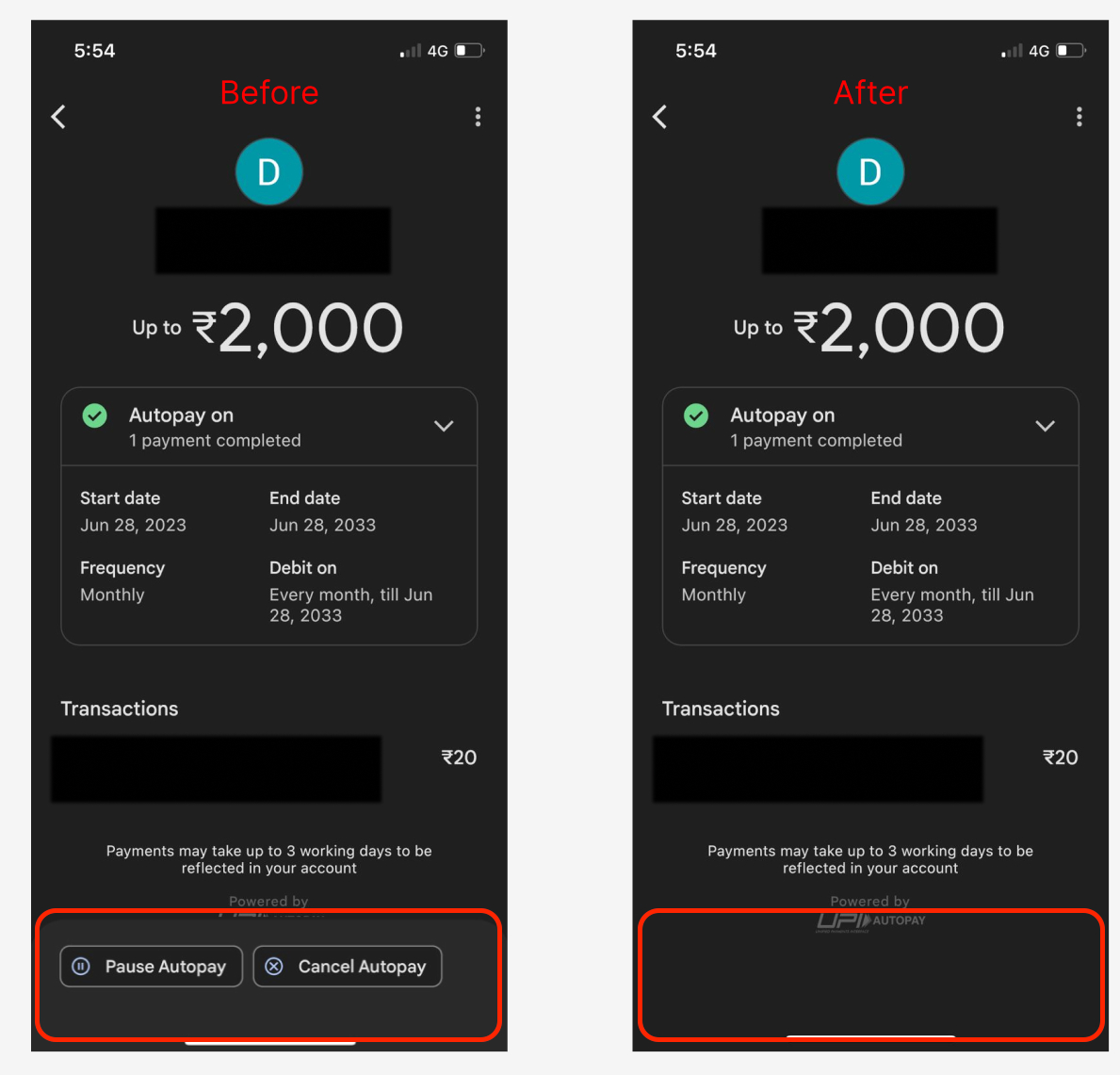 This functionality is supported only for lending businesses. Please contact our [Support team](https://razorpay.com/support/#request) for more information.