> ## Documentation Index
> Fetch the complete documentation index at: https://razorpay-881012b3.mintlify.site/llms.txt
> Use this file to discover all available pages before exploring further.
# Frequently Asked Questions (FAQs)
> Find answers to frequently asked questions about Razorpay Payment Settlements.
Available in
🇮🇳 India
🇸🇬 Singapore
🇺🇸 United States
## Settlements
Settlement is the process in which the money received from your customers is settled to your bank account. Settlements for all payments will be done in INR (Indian Rupees), irrespective of the currency in which the payment was made by the customer. Settlement cycle is subject to bank approval and can vary based on your business vertical, risk factor, and so on. Each settlement generated has a unique settlement id attached to it along with the amount settled. Know more about [Settlements](/docs/payments/settlements).
Our standard settlement cycle is T+2 working days, T being the date of transaction capture. This means that the captured payments are settled within 2 working days from the date of capture. This applies to domestic payments. International payments follow a longer settlement cycle of T+7 working days. For details, see FAQ 9.
**Handy Tips**
Working days do not include second and fourth Saturdays, Sundays and bank holidays. For details on how holidays affect your settlement date, see FAQ 7.
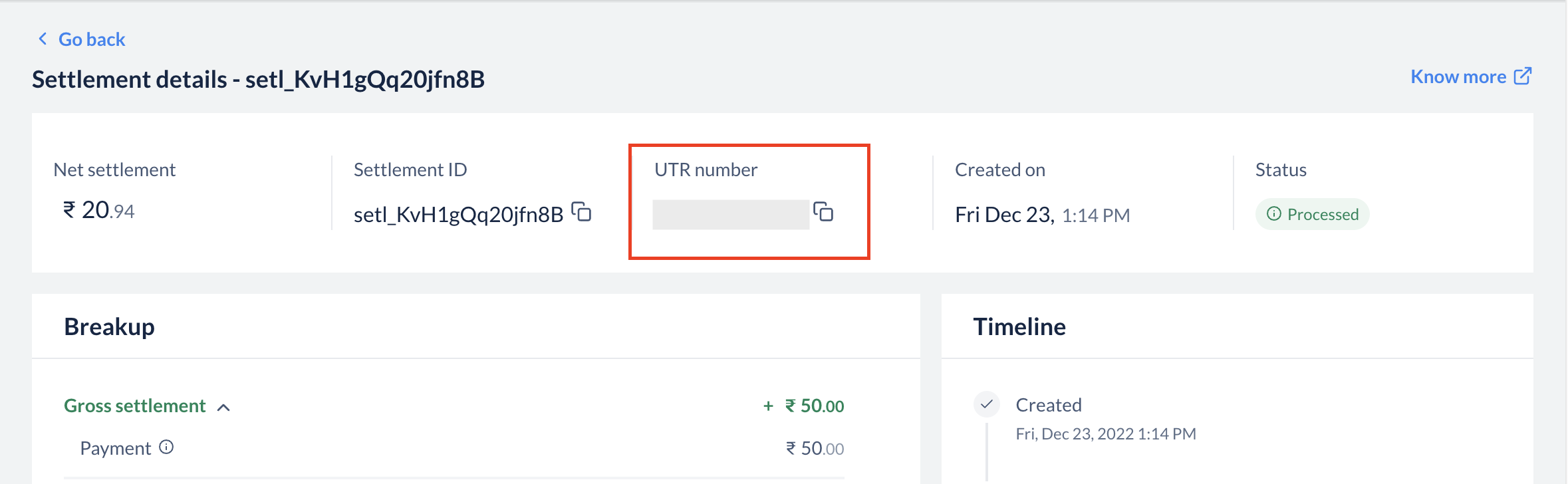
Each settlement has a Unique Transaction Reference (UTR) number, which is provided by our banking partners. You can see this number in the settlement section when you click on a particular settlement id. You can also download **Settlement Reports** from the **Reports** section to view UTR. This is a unique reference number available across banks, which can be used to track a specific settlement in your bank account.
 Razorpay sends emails regarding blocked or failed settlements to your registered email address. Please revert to the email with the necessary details. If you have not received any email from Razorpay, please contact our [Support Team](https://razorpay.com/support/#request) for assistance.
You can [download a daily or a monthly report](/docs/payments/magic-checkout/analytics/reports#generate-reports) for the **Settlement Reconciliation Report** from the **Reports** section on the Dashboard. The report contains transactions and the corresponding settlement ids.
Razorpay sends emails regarding blocked or failed settlements to your registered email address. Please revert to the email with the necessary details. If you have not received any email from Razorpay, please contact our [Support Team](https://razorpay.com/support/#request) for assistance. If your settlements are paused due to a bank holiday or weekend, see FAQ 7.
No. Settlements to your bank account are processed only on **bank working days**. They are not processed on Sundays, the second and fourth Saturdays, and public or bank holidays, and are credited on the next working day.
**Why does this happen even when UPI, IMPS, NEFT and RTGS operate 24x7?**
Although consumer payment rails operate round-the-clock, settlements to businesses depend on the **inter-bank settlement and fund-flow process** between the issuing banks, Razorpay's nodal/escrow account, and your bank. This process follows the banking calendar and RBI fund-flow norms, which do not operate on bank holidays. As a result, the standard settlement cycle is paused on those days.
If your business requires funds on a holiday or weekend, you can use [Instant Settlements or Smart Settlements](/docs/payments/settlements/instant) to settle your available balance 24x7, including holidays, for a small fee.
Yes. The T+2 cycle counts only working days. When holidays fall back-to-back (for example, a Saturday–Sunday–public-holiday stretch), the credit date moves to the next available working day, which can compound into a multi-day delay. You can check the expected credit date against the settlement schedule on your Dashboard, or settle immediately via [Instant Settlements](/docs/payments/settlements/instant).
International payments follow a longer settlement cycle than domestic payments. While domestic payments are settled on a **T+2 working day** cycle, the standard cycle for international payments is **T+7 working days**, where **T** is the date the payment is captured. The exact cycle is subject to applicable laws and is shown on your Razorpay Dashboard.
As with domestic settlements, international settlements are processed only on bank working days. If the settlement date falls on a weekend or bank holiday, the credit moves to the next working day. International payments are settled in INR (Indian Rupees), irrespective of the currency in which the payment was made, using the exchange rate at the time of payment creation. Know more about [International Settlements](/docs/payments/settlements#international-settlements).
## Balance Segregation
Balance Segregation is a feature that maintains separate balances for each payment channel type.
Instead of having one combined balance, you now have multiple isolated balances:
* **Online (Domestic transactions + International Cards)**: Domestic PG transactions and international card payments.
* **In-Person**: POS terminal transactions.
* **Alternate Payment Method (International)**: Balances from international bank transfer.
This ensures complete fund isolation, regulatory compliance and eliminates cross-channel settlement failures.
If you are an omni-channel business (using both PG and POS) or a cross-border business, your balances are automatically segregated by channel type. This is to ensure compliance with RBI guidelines that prohibit co-mingling of funds across different payment channels and to provide you with better visibility and control over your funds.
The Online (Domestic transactions + International Cards) balance includes:
* All domestic PG transactions (cards, UPI, netbanking, domestic wallets).
* International card transactions.
This balance is separate from your In-Person (POS) and APM International balances.
The In-Person balance includes all transactions processed through POS terminals. This balance is used for:
* POS transaction settlements.
* POS device rental deductions (if applicable).
* Refunds for POS transactions.
It operates completely independently from your Online (Domestic transactions + International Cards) balance.
The Alternate Payment Method (International) balance includes cross-border transactions made through international bank transfers.
This is separate from international card transactions, which are included in the Online (Domestic transactions + International Cards) balance.
**With Balance Segregation**:
* Settlements are processed separately for each balance account (Online (Domestic transactions + International Cards), In-Person, APM International).
* Each balance has its own settlement schedule.
* Refunds and chargebacks are debited only from the respective channel balance.
* You can enable Instant Settlements independently for each balance.
* Settlement failures due to cross-channel fund usage are eliminated.
Yes. With Balance Segregation, Instant Settlements is now available for omni-channel businesses. You can enable Instant Settlements on your PG Online balance independently of your POS balance. This was previously restricted to prevent cross-channel fund utilisation issues, which are now resolved with segregated balances.
For cross-border businesses, Balance Segregation provides:
* Separate balance for APM (International) transactions.
* International card transactions tracked in your Online (Domestic transactions + International Cards) balance.
* Instant Settlements enabled for your Online (Domestic transactions + International Cards) balance.
* Clear visibility of domestic vs international transaction funds.
Refunds are now processed from the same channel balance where the original payment was received:
* Online payment refund → debited from Online (Domestic transactions + International Cards) balance
* In-Person (POS) payment refund → debited from In-Person balance
* APM International payment refund → debited from APM International balance
This ensures that refunds in one channel never impact settlements in another channel.
No, existing balances are not migrated. Balance Segregation applies to new transactions going forward. Your current combined balance will continue to be settled as per your existing settlement cycle, while new transactions will be credited to the appropriate segregated balance based on channel type.
You can view your segregated balances in multiple places on the Dashboard:
* **Home Page**: Separate balance cards for each channel type (Online (Domestic transactions + International Cards), In-Person, APM International).
* **Settlements Page**: Filter settlements by balance type.
* **Account & Settings → Balances**: Detailed view of all your balance accounts.
Each balance card shows the current amount, next settlement date and settlement cycle.
No, inter-channel fund transfers are not currently supported. Each balance operates independently to maintain fund isolation and regulatory compliance. If you have specific requirements, please contact our [Support Team](https://razorpay.com/support/#request).
With Balance Segregation, POS device rentals are automatically collected from your POS (In-Person) balance only. This ensures that rental deductions never impact your PG Online balance or cause settlement failures. The collection is automated through the Meter Pricing Platform for businesses enrolled in the program.
Yes, settlement reports now include additional fields:
* **Channel Type**: Identifies the source channel (Online (Domestic transactions + International Cards), In-Person, APM International).
* **Balance Account id**: Unique identifier for the balance account.
You can filter reports by channel type to reconcile each balance separately. The Settlement Reconciliation Report will show transactions grouped by their respective balance accounts.
If you only use PG Online for domestic transactions, you will typically see just one balance account (Online (Domestic transactions + International Cards)). Multiple balances appear only when you have:
* Both PG Online and POS enabled (In-person).
* International bank transfers (APM International balance).
* International card payments (included in Online (Domestic transactions + International Cards) balance).
If you believe there is an error in your balance configuration, please contact our [Support Team](https://razorpay.com/support/#request).
No, they are in separate balances:
* **International card transactions** are included in the **Online (Domestic transactions + International Cards)** balance along with domestic transactions.
* **International APM transactions** (international bank transfers) are in the separate **APM (International)** balance.
This separation ensures proper fund isolation for different payment method types.
## Instant Settlements
By default, the settlement cycle is T+2 days for domestic payments and T+7 days for international payments, where `T` is the date the payment was captured.
Razorpay sends emails regarding blocked or failed settlements to your registered email address. Please revert to the email with the necessary details. If you have not received any email from Razorpay, please contact our [Support Team](https://razorpay.com/support/#request) for assistance.
You can [download a daily or a monthly report](/docs/payments/magic-checkout/analytics/reports#generate-reports) for the **Settlement Reconciliation Report** from the **Reports** section on the Dashboard. The report contains transactions and the corresponding settlement ids.
Razorpay sends emails regarding blocked or failed settlements to your registered email address. Please revert to the email with the necessary details. If you have not received any email from Razorpay, please contact our [Support Team](https://razorpay.com/support/#request) for assistance. If your settlements are paused due to a bank holiday or weekend, see FAQ 7.
No. Settlements to your bank account are processed only on **bank working days**. They are not processed on Sundays, the second and fourth Saturdays, and public or bank holidays, and are credited on the next working day.
**Why does this happen even when UPI, IMPS, NEFT and RTGS operate 24x7?**
Although consumer payment rails operate round-the-clock, settlements to businesses depend on the **inter-bank settlement and fund-flow process** between the issuing banks, Razorpay's nodal/escrow account, and your bank. This process follows the banking calendar and RBI fund-flow norms, which do not operate on bank holidays. As a result, the standard settlement cycle is paused on those days.
If your business requires funds on a holiday or weekend, you can use [Instant Settlements or Smart Settlements](/docs/payments/settlements/instant) to settle your available balance 24x7, including holidays, for a small fee.
Yes. The T+2 cycle counts only working days. When holidays fall back-to-back (for example, a Saturday–Sunday–public-holiday stretch), the credit date moves to the next available working day, which can compound into a multi-day delay. You can check the expected credit date against the settlement schedule on your Dashboard, or settle immediately via [Instant Settlements](/docs/payments/settlements/instant).
International payments follow a longer settlement cycle than domestic payments. While domestic payments are settled on a **T+2 working day** cycle, the standard cycle for international payments is **T+7 working days**, where **T** is the date the payment is captured. The exact cycle is subject to applicable laws and is shown on your Razorpay Dashboard.
As with domestic settlements, international settlements are processed only on bank working days. If the settlement date falls on a weekend or bank holiday, the credit moves to the next working day. International payments are settled in INR (Indian Rupees), irrespective of the currency in which the payment was made, using the exchange rate at the time of payment creation. Know more about [International Settlements](/docs/payments/settlements#international-settlements).
## Balance Segregation
Balance Segregation is a feature that maintains separate balances for each payment channel type.
Instead of having one combined balance, you now have multiple isolated balances:
* **Online (Domestic transactions + International Cards)**: Domestic PG transactions and international card payments.
* **In-Person**: POS terminal transactions.
* **Alternate Payment Method (International)**: Balances from international bank transfer.
This ensures complete fund isolation, regulatory compliance and eliminates cross-channel settlement failures.
If you are an omni-channel business (using both PG and POS) or a cross-border business, your balances are automatically segregated by channel type. This is to ensure compliance with RBI guidelines that prohibit co-mingling of funds across different payment channels and to provide you with better visibility and control over your funds.
The Online (Domestic transactions + International Cards) balance includes:
* All domestic PG transactions (cards, UPI, netbanking, domestic wallets).
* International card transactions.
This balance is separate from your In-Person (POS) and APM International balances.
The In-Person balance includes all transactions processed through POS terminals. This balance is used for:
* POS transaction settlements.
* POS device rental deductions (if applicable).
* Refunds for POS transactions.
It operates completely independently from your Online (Domestic transactions + International Cards) balance.
The Alternate Payment Method (International) balance includes cross-border transactions made through international bank transfers.
This is separate from international card transactions, which are included in the Online (Domestic transactions + International Cards) balance.
**With Balance Segregation**:
* Settlements are processed separately for each balance account (Online (Domestic transactions + International Cards), In-Person, APM International).
* Each balance has its own settlement schedule.
* Refunds and chargebacks are debited only from the respective channel balance.
* You can enable Instant Settlements independently for each balance.
* Settlement failures due to cross-channel fund usage are eliminated.
Yes. With Balance Segregation, Instant Settlements is now available for omni-channel businesses. You can enable Instant Settlements on your PG Online balance independently of your POS balance. This was previously restricted to prevent cross-channel fund utilisation issues, which are now resolved with segregated balances.
For cross-border businesses, Balance Segregation provides:
* Separate balance for APM (International) transactions.
* International card transactions tracked in your Online (Domestic transactions + International Cards) balance.
* Instant Settlements enabled for your Online (Domestic transactions + International Cards) balance.
* Clear visibility of domestic vs international transaction funds.
Refunds are now processed from the same channel balance where the original payment was received:
* Online payment refund → debited from Online (Domestic transactions + International Cards) balance
* In-Person (POS) payment refund → debited from In-Person balance
* APM International payment refund → debited from APM International balance
This ensures that refunds in one channel never impact settlements in another channel.
No, existing balances are not migrated. Balance Segregation applies to new transactions going forward. Your current combined balance will continue to be settled as per your existing settlement cycle, while new transactions will be credited to the appropriate segregated balance based on channel type.
You can view your segregated balances in multiple places on the Dashboard:
* **Home Page**: Separate balance cards for each channel type (Online (Domestic transactions + International Cards), In-Person, APM International).
* **Settlements Page**: Filter settlements by balance type.
* **Account & Settings → Balances**: Detailed view of all your balance accounts.
Each balance card shows the current amount, next settlement date and settlement cycle.
No, inter-channel fund transfers are not currently supported. Each balance operates independently to maintain fund isolation and regulatory compliance. If you have specific requirements, please contact our [Support Team](https://razorpay.com/support/#request).
With Balance Segregation, POS device rentals are automatically collected from your POS (In-Person) balance only. This ensures that rental deductions never impact your PG Online balance or cause settlement failures. The collection is automated through the Meter Pricing Platform for businesses enrolled in the program.
Yes, settlement reports now include additional fields:
* **Channel Type**: Identifies the source channel (Online (Domestic transactions + International Cards), In-Person, APM International).
* **Balance Account id**: Unique identifier for the balance account.
You can filter reports by channel type to reconcile each balance separately. The Settlement Reconciliation Report will show transactions grouped by their respective balance accounts.
If you only use PG Online for domestic transactions, you will typically see just one balance account (Online (Domestic transactions + International Cards)). Multiple balances appear only when you have:
* Both PG Online and POS enabled (In-person).
* International bank transfers (APM International balance).
* International card payments (included in Online (Domestic transactions + International Cards) balance).
If you believe there is an error in your balance configuration, please contact our [Support Team](https://razorpay.com/support/#request).
No, they are in separate balances:
* **International card transactions** are included in the **Online (Domestic transactions + International Cards)** balance along with domestic transactions.
* **International APM transactions** (international bank transfers) are in the separate **APM (International)** balance.
This separation ensures proper fund isolation for different payment method types.
## Instant Settlements
By default, the settlement cycle is T+2 days for domestic payments and T+7 days for international payments, where `T` is the date the payment was captured.
The Instant Settlement feature allows you to settle your current balance to your bank account instantly 24x7 for a small fee. You can either settle your current balance in full or choose to settle a portion of it as per your needs.
Yes. We charge a [small fee](https://razorpay.com/capital/instant-settlements/#capital-pricing-section) to process Instant Settlements.
The fees and tax for an Instant Settlement is deducted from the request settlement amount.
For example, you place a request for ₹2000. Fees of ₹3 and tax of ₹1 is deducted from the requested amount and the remaining amount, ₹1995 is settled to your bank account.
We have introduced the limits on Instant Settlements to make the settlement process more predictable for your daily needs. With limits, you can:
* Settle a definite amount from the assigned limit until the next working day.
* Enjoy a quicker and higher success rate throughout the working day.
For any queries, [contact support](https://razorpay.com/support/#request) or your Relationship Manager.
No. You can create an Instant Settlement request when you need the money. If you do not create an Instant Settlement, your current balance is settled to your bank account as per your settlement cycle.
Your current balance is settled to your bank account as per your settlement cycle.
No. You will only be charged for the Instant settlements you create. You will not be charged for settlements that happen according to your settlement cycle.
Instant settlements is an on-demand feature. [Raise a request](https://razorpay.com/support/#request) with our support team to get this feature activated on your account. Know more about [initiating instant settlements](/docs/payments/settlements/instant#initiate-instant-settlements).
## Smart Settlements
[Smart Settlement](/docs/payments/settlements/instant#initiate-smart-settlements) is an extended form of [Instant Settlement](/docs/payments/settlements/instant#initiate-instant-settlements) that allows you to settle amounts above ₹ 5 L in one shot using the RTGS channel. A settlement done via Smart Settlements reflects as a single entry in your bank statement making reconciliation much easier.
You can initiate a Smart Settlement if the amount is abover ₹ 5 L. The maximum ceiling is ₹ 50 Cr per settlement.
No, Smart Settlement is a recommended option for amounts > 5 L and \< 5 Cr because it settles the amount as one credit in your bank statement. You can still use the Instant Settlement option for this range, but it will appear as multiple entries in your bank statement.
**However, amounts > 5 Cr are settled through Smart Settlements only. Instant Settlement option is automatically disabled for amounts > 5Cr.**
Find out more about [Instant Vs Smart Settlements](/docs/payments/settlements/instant#instant-vs-smart-settlements)
No, Smart Settlement feature is automatically enabled if the Instant Settlement feature is activated for your dashboard. However, Instant Settlement is an on-demand feature. [Contact support](https://razorpay.com/support/#request) to get this feature enabled.
No, Smart Settlements follow the same fee structure as Instant Settlements. Click to know more about [Instant Settlement pricing.](https://razorpay.com/capital/instant-settlements/#capital-pricing-section)
The fees and taxes for Smart Settlements are deducted from the requested settlement amount.
For example, you place a request for ₹2000, fees of ₹3 and tax of ₹1 is deducted from the requested amount and the remaining amount, ₹1995 is settled to your bank account.
The settlement cycle is **T+0** for Smart Settlements. Since Smart Settlements are routed through RTGS channel, the transaction usually happens real-time. However, depending on bank channel traffic, it may sometimes take up to 1 hour.