> ## Documentation Index
> Fetch the complete documentation index at: https://razorpay-881012b3.mintlify.site/llms.txt
> Use this file to discover all available pages before exploring further.
# Subscriptions Settings
> Configure payment method settings for Razorpay Subscriptions.
Available in
🇮🇳 India
🇸🇬 Singapore
🇺🇸 United States
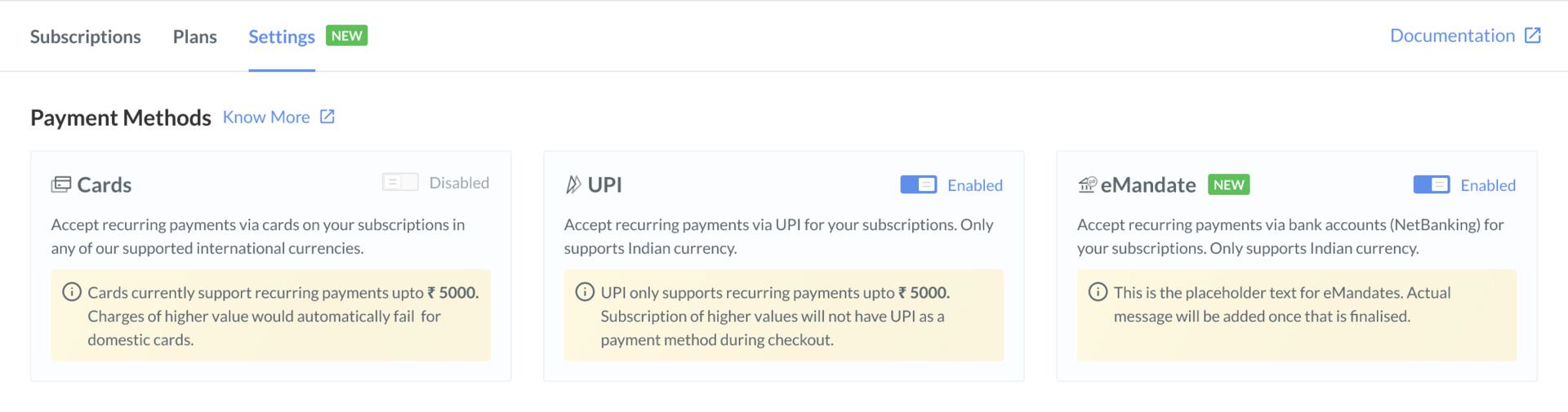
You can configure the payment methods (Cards, UPI and Emandate) using which you would like to accept subscription payments from your customers.
**Handy Tips**
Cards and UPI currently support recurring payments up to ₹15,000. Charges of higher value would automatically fail for domestic cards.
## Enable Payment Methods
To enable payment methods:
1. Log in to the Dashboard and click **Subscriptions** under **PAYMENT PRODUCTS** in the left menu.
2. Go to **Settings**.
3. Enable the payment methods.
- **Card**: Enable this to accept recurring payments via cards for your Subscriptions.
- **UPI**: Enable this to accept UPI payments when a recurring charge is less than ₹15,000. Only INR is supported.
- **eMandate**: Enable this to accept recurring payments via Emandate (NetBanking) for your Subscriptions only in INR. This payment method will be enabled by default. You can disable it whenever required.
 ### Related Information
* [Create and View Plans](/docs/payments/subscriptions/create-plans)
* [Create Subscriptions via Links](/docs/payments/subscriptions/create-subscription-links)
* [Charge a Card Manually](/docs/payments/subscriptions/manually-charge-card)
* [Update a Subscription](/docs/payments/subscriptions/update)
### Related Information
* [Create and View Plans](/docs/payments/subscriptions/create-plans)
* [Create Subscriptions via Links](/docs/payments/subscriptions/create-subscription-links)
* [Charge a Card Manually](/docs/payments/subscriptions/manually-charge-card)
* [Update a Subscription](/docs/payments/subscriptions/update)