> ## Documentation Index
> Fetch the complete documentation index at: https://razorpay-881012b3.mintlify.site/llms.txt
> Use this file to discover all available pages before exploring further.
# Subscriptions States
> List of various Subscription states and their meanings.
Available in
🇮🇳 India
🇸🇬 Singapore
🇺🇸 United States
You can track a Subscription through its various stages from creation to completion. While the life cycle for a Subscription includes creation, authentication, active and then completion, you also have the option to cancel a Subscription.
## Subscriptions States and Descriptions
During its life cycle, a Subscription can go through the following states:
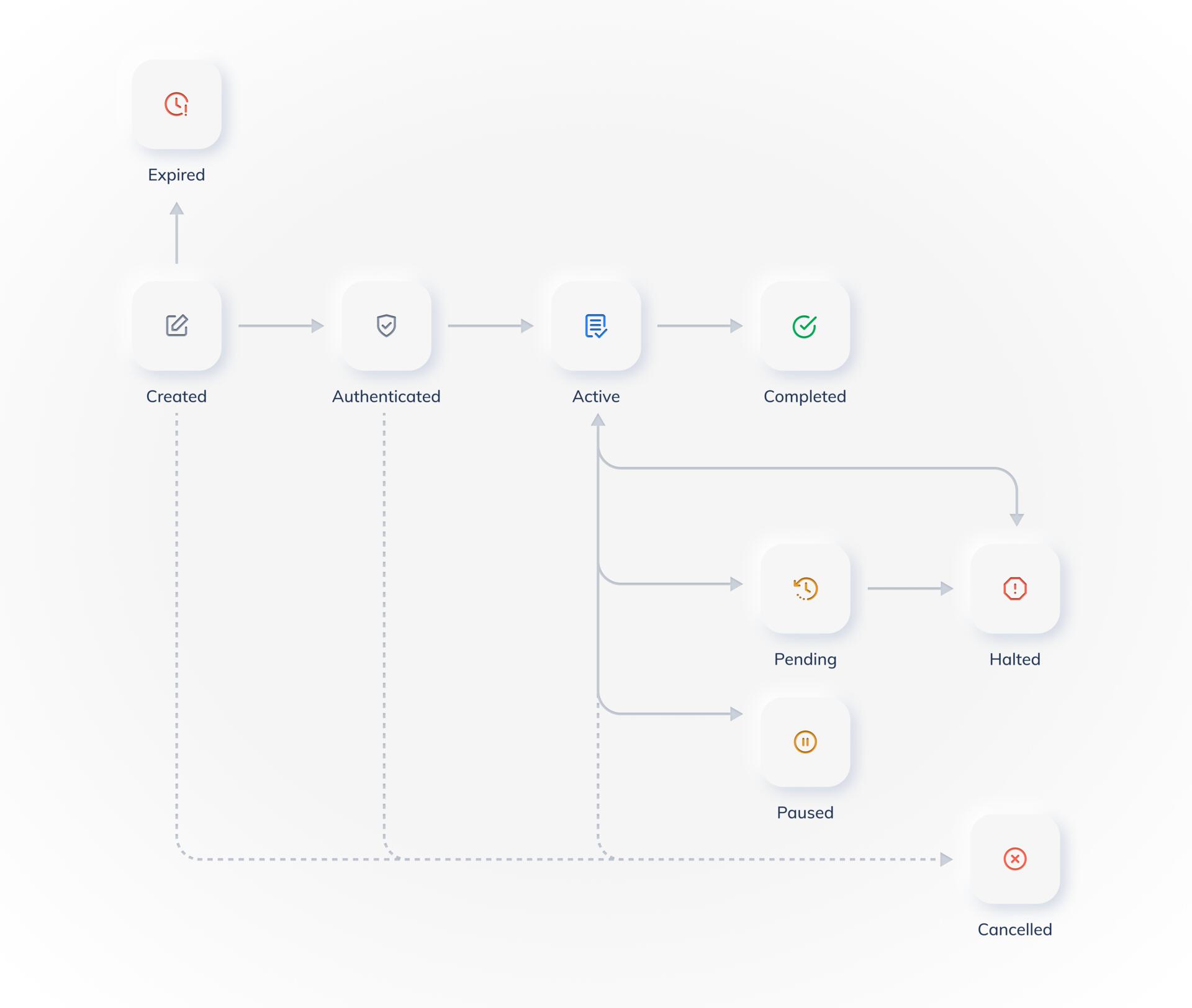 A Subscription attains the `created` state once it is created.
A Subscription goes to the `authenticated` state when the customer completes the authentication transaction.
**Subscriptions with an Immediate Start Date**
The Subscription with an immediate start date remains in the `created` state till the first charge is made and moves to the `active` state after the first charge.
**Subscriptions with a Trial Period**
* The Subscription with an add-on amount remains in the `created` state and moves to the `authenticated` state after the add-on amount is processed.
* The Subscription without an add-on amount moves to the `authenticated` state when the customer completes the authentication transaction.
A Subscription goes to the `active` state when the billing cycle for the Subscription starts.
##### Action on Razorpay
When a Subscription moves to the `active` state from the `authenticated` state, we attempt to charge the authorized card against the invoice amount.
* A Subscription goes to the `pending` state when an auto-charge on a payment is unsuccessful. We continue to retry the payment while it is in this state. In the meanwhile, you can ask the customer to authenticate another card, if required.
* After all the retry attempts have been exhausted, the Subscription moves to the `halted` state.
**Action on Razorpay**
* When the Subscription moves to the `halted` state from the `pending` state, invoices continue to be generated as per the billing cycles. However, no auto-charge is attempted. It is important to note that once the Subscription moves back to the `active` state, the previous charges **will not be** re-attempted. Only future billing cycles are charged automatically.
* When the Subscription moves to the `pending` state from the `active` state, you are notified about the failed attempt via our webhooks. For Subscriptions authenticated via cards, we continue to automatically process a retry without you having to take any action. We also send the customer an email notifying them about the failure. This email has a call-to-action from the customer to change the card that is associated with the Subscription.
**Action on Business or Customer**
To move the Subscription back to the `active` state from the `pending` state, the customer needs to authenticate another card. This enables us to successfully perform a charge on it. You or the customer can also manually attempt a charge on the same card by attempting to charge any of the older unpaid invoices. If they go through successfully, the Subscription moves back to the `active` state.
The Subscription goes to the `halted` state when the last auto-charge is unsuccessful and all retries are exhausted.
**Handy Tips**
It is possible for the Subscription to continue to remain in the `halted` state for more than one billing cycle. In such scenarios:
* Invoices are generated for all billing cycles, but no auto-charge is attempted.
* The customer needs to authenticate another card or you or the customer needs to manually attempt a charge on an older unpaid invoice. If the older invoice is successfully charged, the Subscription will automatically move to the `active` state.
The Subscription moves to the `active` state once the customer changes their card details and we are able to successfully perform a charge on it. It can also move to the `active` state if a charge on an older invoice is attempted and it goes through successfully.
**Watch Out!**
Once the Subscription moves to the `active` state from the `halted` state, the previous charges are not re-attempted. Only future payments are charged automatically.
* When you cancel a Subscription, it moves to the `cancelled` state. Once cancelled, a Subscription cannot be restarted.
* A Subscription can be cancelled using the [Cancel API](/docs/api/payments/subscriptions/cancel-subscription) or from the [Dashboard](/docs/payments/subscriptions/pause-resume-cancel#cancel-a-subscription-via-the-dashboard).
* Only Subscriptions in the `active` state can be paused.
* You can pause a Subscription.
* From the [Dashboard](/docs/payments/subscriptions/pause-resume-cancel#pause-a-subscription-via-the-dashboard).
* Using [API](/docs/api/payments/subscriptions/pause-subscription).
**Watch Out!**
If you pause a Subscription in the `authenticated` state, the Subscription goes to the `cancelled` state.
If the `start_at` time for the Subscription has been set and the authentication transaction has not been done by the `start_at` time, the Subscription moves to the `expired` state and cannot be used again.
A Subscription moves to the `completed` state when it reaches the end of its life cycle as per the `end_date` set for the Subscription.
### Related Information
* [Subscriptions](/docs/payments/subscriptions)
* [Subscription Workflow](/docs/payments/subscriptions/workflow)
* [Create Subscriptions](/docs/payments/subscriptions/create)
* [Test Subscriptions](/docs/payments/subscriptions/test)
* [Subscriptions APIs](/docs/payments/subscriptions/apis)
A Subscription attains the `created` state once it is created.
A Subscription goes to the `authenticated` state when the customer completes the authentication transaction.
**Subscriptions with an Immediate Start Date**
The Subscription with an immediate start date remains in the `created` state till the first charge is made and moves to the `active` state after the first charge.
**Subscriptions with a Trial Period**
* The Subscription with an add-on amount remains in the `created` state and moves to the `authenticated` state after the add-on amount is processed.
* The Subscription without an add-on amount moves to the `authenticated` state when the customer completes the authentication transaction.
A Subscription goes to the `active` state when the billing cycle for the Subscription starts.
##### Action on Razorpay
When a Subscription moves to the `active` state from the `authenticated` state, we attempt to charge the authorized card against the invoice amount.
* A Subscription goes to the `pending` state when an auto-charge on a payment is unsuccessful. We continue to retry the payment while it is in this state. In the meanwhile, you can ask the customer to authenticate another card, if required.
* After all the retry attempts have been exhausted, the Subscription moves to the `halted` state.
**Action on Razorpay**
* When the Subscription moves to the `halted` state from the `pending` state, invoices continue to be generated as per the billing cycles. However, no auto-charge is attempted. It is important to note that once the Subscription moves back to the `active` state, the previous charges **will not be** re-attempted. Only future billing cycles are charged automatically.
* When the Subscription moves to the `pending` state from the `active` state, you are notified about the failed attempt via our webhooks. For Subscriptions authenticated via cards, we continue to automatically process a retry without you having to take any action. We also send the customer an email notifying them about the failure. This email has a call-to-action from the customer to change the card that is associated with the Subscription.
**Action on Business or Customer**
To move the Subscription back to the `active` state from the `pending` state, the customer needs to authenticate another card. This enables us to successfully perform a charge on it. You or the customer can also manually attempt a charge on the same card by attempting to charge any of the older unpaid invoices. If they go through successfully, the Subscription moves back to the `active` state.
The Subscription goes to the `halted` state when the last auto-charge is unsuccessful and all retries are exhausted.
**Handy Tips**
It is possible for the Subscription to continue to remain in the `halted` state for more than one billing cycle. In such scenarios:
* Invoices are generated for all billing cycles, but no auto-charge is attempted.
* The customer needs to authenticate another card or you or the customer needs to manually attempt a charge on an older unpaid invoice. If the older invoice is successfully charged, the Subscription will automatically move to the `active` state.
The Subscription moves to the `active` state once the customer changes their card details and we are able to successfully perform a charge on it. It can also move to the `active` state if a charge on an older invoice is attempted and it goes through successfully.
**Watch Out!**
Once the Subscription moves to the `active` state from the `halted` state, the previous charges are not re-attempted. Only future payments are charged automatically.
* When you cancel a Subscription, it moves to the `cancelled` state. Once cancelled, a Subscription cannot be restarted.
* A Subscription can be cancelled using the [Cancel API](/docs/api/payments/subscriptions/cancel-subscription) or from the [Dashboard](/docs/payments/subscriptions/pause-resume-cancel#cancel-a-subscription-via-the-dashboard).
* Only Subscriptions in the `active` state can be paused.
* You can pause a Subscription.
* From the [Dashboard](/docs/payments/subscriptions/pause-resume-cancel#pause-a-subscription-via-the-dashboard).
* Using [API](/docs/api/payments/subscriptions/pause-subscription).
**Watch Out!**
If you pause a Subscription in the `authenticated` state, the Subscription goes to the `cancelled` state.
If the `start_at` time for the Subscription has been set and the authentication transaction has not been done by the `start_at` time, the Subscription moves to the `expired` state and cannot be used again.
A Subscription moves to the `completed` state when it reaches the end of its life cycle as per the `end_date` set for the Subscription.
### Related Information
* [Subscriptions](/docs/payments/subscriptions)
* [Subscription Workflow](/docs/payments/subscriptions/workflow)
* [Create Subscriptions](/docs/payments/subscriptions/create)
* [Test Subscriptions](/docs/payments/subscriptions/test)
* [Subscriptions APIs](/docs/payments/subscriptions/apis)