> ## Documentation Index
> Fetch the complete documentation index at: https://razorpay-881012b3.mintlify.site/llms.txt
> Use this file to discover all available pages before exploring further.
# TPV S2S Integration - UPI Collect Flow
> Integrate TPV using S2S integration with UPI Collect Flow.
Available in
🇮🇳 India
With UPI payments, your customers can make payments using a Virtual Payment Address (VPA) without the need to enter the bank account details. In the UPI Collect flow, customers enter their registered VPA at checkout, open the UPI PSP app and complete the payment.
**UPI Collect Flow Deprecated**
According to NPCI guidelines, the UPI Collect flow is being deprecated effective 28 February 2026. Customers can no longer make payments or register UPI mandates by manually entering VPA/UPI id/mobile numbers.
**Exemptions:** UPI Collect will continue to be supported for:
* MCC 6012 & 6211 (IPO and secondary market transactions).
* iOS mobile app and mobile web transactions.
* UPI Mandates (execute/modify/revoke operations only)
* eRupi vouchers.
* PACB businesses (cross-border/international payments).
**Action Required:**
* If you are a new Razorpay user, use [UPI Intent](/docs/payments/payment-gateway/s2s-integration/payment-methods/upi/intent).
* If you are an existing Razorpay user not covered by exemptions, you must migrate to UPI Intent or UPI QR code to continue accepting UPI payments. For detailed migration steps, refer to the [migration documentation](/docs/announcements/upi-collect-migration/s2s-integration).
**NPCI Restrictions for UPI Collect Flow**
As per NPCI guidelines, the following MCC codes are restricted and cannot accept UPI Collect payments:
| MCC Code | Category |
| -------- | ----------------------------------------------- |
| 5816 | Digital Goods: Games |
| 6540 | POI Funding Transactions (excluding MoneySend) |
| 4812 | Telecommunication Equipment and Telephone Sales |
| 4814 | Telecommunication Services |
| 7408 | Lending Platform |
| 6513 | Real Estate Agents and Managers - Rentals |
| 7995 | Betting/Lottery |
| 5412 | Grocery Stores, Supermarkets |
| 5413 | Grocery Stores, Supermarkets |
## Best Practices
Following are a few of the best practices to be followed to accept online payments using UPI Collect Flow:
1. You should validate the VPA before initiating the payment request. Know more about[VPA Validation](/docs/payments/payment-gateway/web-integration/custom/features/validate-vpa).
2. You should add a custom UPI Collect expiry based on the business requirement to provide enough time for the customer to complete the payment.
3. You should use the [Saved VPA](/docs/payments/payment-methods/upi/saved-vpa) feature provided by Razorpay to provide a better customer experience and have a better conversion.
## Prerequisites
* Contact our [Support Team](https://razorpay.com/support/#raise-a-request) to get this feature enabled for your account.
* Keep the API key (combination of `Key_Id` and `Key_Secret`) handy for integration.
* [Generate API Keys from the Dashboard](/docs/api/authentication#generate-api-keys) if you have not done already.
* Configure the [payment capture settings](/docs/payments/payments/capture-settings) on the Dashboard.
## UPI Collect Flow
Following is the process for accepting payments using the UPI Collect Flow:
1. The customer selects UPI as the payment method and enters their VPA on your app or website. Razorpay validates the VPA.
2. The customer saves the entered VPA details while completing the payment. Razorpay saves the valid VPA details as **tokens**.
3. The next time the customer wants to make a payment using VPA, the customer can select the saved VPA and complete the payment.
## Integration Steps
1. [Create a Payment and a VPA Token](#1-create-a-payment-and-a-vpa-token)
2. [Create Payments Using Tokens](#2-create-payments-using-tokens)
### 1. Create a Payment and a VPA Token
Follow these steps to create and save valid VPA tokens in the payment flow:
1. [Create a customer or fetch the customer for whom VPA should be saved.](#step-1-1-create-a-customer)
2. [Create an order.](#step-1-2-create-an-order)
3. [Validate the VPA entered by the customer.](#step-1-3-validate-the-vpa)
4. [Initiate a payment.](#step-1-4-initiate-a-payment)
### Step 1.1: Create a Customer
Skip this step if the customer is already created for your account.
Create a customer whose VPAs should be saved with details such as `email` and `contact`.
The following endpoint creates or add a customer with basic details such as name and contact details. You can use this API for various Razorpay Solution offerings.
`POST /customers`
```bash Curl theme={null}
curl -u [YOUR_KEY_ID]:[YOUR_KEY_SECRET] \
-X POST https://api.razorpay.com/v1/customers \
-H "Content-Type: application/json" \
-d '{
"name": "",
"contact": "",
"email": "",
"fail_existing": "0",
"notes": {
"notes_key_1": "Tea, Earl Grey, Hot",
"notes_key_2": "Tea, Earl Grey… decaf."
}
}'
```
```java Java theme={null}
RazorpayClient razorpay = new RazorpayClient("[YOUR_KEY_ID]", "[YOUR_KEY_SECRET]");
JSONObject customerRequest = new JSONObject();
customerRequest.put("name","");
customerRequest.put("contact","");
customerRequest.put("email","");
customerRequest.put("fail_existing", "0");
JSONObject notes = new JSONObject();
notes.put("notes_key_1","Tea, Earl Grey, Hot");
notes.put("notes_key_2","Tea, Earl Grey… decaf.");
customerRequest.put("notes",notes);
Customer customer = razorpay.customers.create(customerRequest);
```
```python Python theme={null}
import razorpay
client = razorpay.Client(auth=("YOUR_ID", "YOUR_SECRET"))
client.customer.create({
"name": "",
"contact": "",
"email": "",
"fail_existing": "0",
"notes": {
"notes_key_1": "Tea, Earl Grey, Hot",
"notes_key_2": "Tea, Earl Grey… decaf."
}
})
```
```go Go theme={null}
import ( razorpay "github.com/razorpay/razorpay-go" )
client := razorpay.NewClient("YOUR_KEY_ID", "YOUR_SECRET")
data := map[string]interface{}{
"name": "",
"contact": "",
"email": "",
"fail_existing": "0",
"notes": map[string]interface{}{
"notes_key_1": "Tea, Earl Grey, Hot",
"notes_key_2": "Tea, Earl Grey… decaf.",
},
}
body, err := client.Customer.Create(data, nil)
```
```php PHP theme={null}
$api = new Api($key_id, $secret);
$api->customer->create(array('name' => '', 'email' => '','contact'=>'','notes'=> array('notes_key_1'=> 'Tea, Earl Grey, Hot','notes_key_2'=> 'Tea, Earl Grey… decaf'));
```
```csharp .NET theme={null}
RazorpayClient client = new RazorpayClient("[YOUR_KEY_ID]", "[YOUR_KEY_SECRET]");
Dictionary options = new Dictionary();
options.Add("name", "");
options.Add("contact", "");
options.Add("email", "");
options.Add("fail_existing", "0");
Customer customer = Customer.Create(options);
```
```ruby Ruby theme={null}
require "razorpay"
Razorpay.setup('YOUR_KEY_ID', 'YOUR_SECRET')
Razorpay::Customer.create({
"name": "",
"contact": "",
"email": "",
"fail_existing": "0",
"notes": {
"notes_key_1": "Tea, Earl Grey, Hot",
"notes_key_2": "Tea, Earl Grey… decaf."
}
})
```
```javascript Node.js theme={null}
var instance = new Razorpay({ key_id: 'YOUR_KEY_ID', key_secret: 'YOUR_SECRET' })
instance.customers.create({
name: "",
contact: "",
email: "",
fail_existing: "0",
notes: {
notes_key_1: "Tea, Earl Grey, Hot",
notes_key_2: "Tea, Earl Grey… decaf."
}
})
```
```json Success Response theme={null}
{
"id" : "cust_1Aa00000000004",
"entity": "customer",
"name" : "",
"email" : "",
"contact" : "",
"gstin": null,
"notes": {
"notes_key_1":"Tea, Earl Grey, Hot",
"notes_key_2":"Tea, Earl Grey… decaf."
},
"created_at ": 1234567890
}
```
```json Failure Response theme={null}
{
"error": {
"code": "BAD_REQUEST_ERROR",
"description": "Contact number should be at least 8 digits, including country code",
"source": "business",
"step": "NA",
"reason": "invalid_contact_number",
"metadata": {},
"field": "contact"
}
}
```
#### Request Parameters
`name` *optional*
: `string` Customer's name. Alphanumeric value with period (.), apostrophe ('), forward slash (/), at (@) and parentheses are allowed. The name must be between 3-50 characters in length. For example, `Gaurav Kumar`.
`contact ` *optional*
: `string` The customer's phone number. A maximum length of 15 characters including country code. For example, `+919876543210`.
`email ` *optional*
: `string` The customer's email address. A maximum length of 64 characters. For example, `gaurav.kumar@example.com`.
`fail_existing` *optional*
: `string` Possible values:
* `1` (default): If a customer with the same details already exists, throws an error.
* `0`: If a customer with the same details already exists, fetches details of the existing customer.
`gstin` *optional*
: `string` Customer's GST number, if available. For example, `29XAbbA4369J1PA`.
`notes` *optional*
: `object` This is a key-value pair that can be used to store additional information about the entity. It can hold a maximum of 15 key-value pairs, 256 characters (maximum) each. For example, `"note_key": "Beam me up Scotty”`.
### Step 1.2: Create an Order
You need to create an order before initiating the payment.
`POST /orders`
Given below is the sample code when `method` is `upi`.
```bash Curl theme={null}
curl -u : \
-X POST https://api.razorpay.com/v1/orders \
-H "Content-Type: application/json" \
-d '{
"amount": 100,
"method": "upi",
"receipt": "BILL13375649",
"currency": "INR",
"bank_account": {
"account_number": "765432123456789",
"name": "Gaurav Kumar",
"ifsc": "HDFC0000053"
}
}'
```
```java Java theme={null}
RazorpayClient razorpay = new RazorpayClient("[YOUR_KEY_ID]", "[YOUR_KEY_SECRET]");
JSONObject orderRequest = new JSONObject();
orderRequest.put("amount", 100); // amount in the smallest currency unit
orderRequest.put("currency", "INR");
orderRequest.put("receipt", "BILL13375649");
orderRequest.put("method", "upi");
JSONObject bank_account = new JSONObject();
bank_account.put("account_number", "765432123456789");
bank_account.put("name", "Gaurav Kumar");
bank_account.put("ifsc, "HDFC0000053");
orderRequest.put("bank_account", bank_account);
Order order = razorpayclient.orders.create(orderRequest);
System.out.print(order);
```
```python Python theme={null}
import razorpay
client = razorpay.Client(auth=("YOUR_ID", "YOUR_SECRET"))
client.order.create({
{
"amount": 100,
"method": "upi",
"receipt": "BILL13375649",
"currency": "INR",
"bank_account": {
"account_number": "765432123456789",
"name": "Gaurav Kumar",
"ifsc": "HDFC0000053"
}
})
```
```php PHP theme={null}
$api = new Api($key_id, $secret);
$api->order->create(array('amount' => 100, 'receipt' => 'BILL13375649', 'method' => 'upi', 'currency' => 'INR', 'bank_account'=> array('account_number'=> '765432123456789','name'=> 'Gaurav Kumar','ifsc'=>'HDFC0000053')));
```
```csharp .NET theme={null}
RazorpayClient client = new RazorpayClient("[YOUR_KEY_ID]", "[YOUR_KEY_SECRET]");
Dictionary orderRequest = new Dictionary();
orderRequest.Add("amount", 100);
orderRequest.Add("method", "upi");
orderRequest.Add("currency", "INR");
orderRequest.Add("receipt", "receipt#1");
Dictionary bankAccount = new Dictionary();
bankAccount.Add("account_number","765432123456789");
bankAccount.Add("name","Gaurav Kumar");
bankAccount.Add("ifsc","HDFC0000053");
orderRequest.Add("bank_account", bankAccount);
Order order = client.Order.Create(orderRequest);
```
```ruby Ruby theme={null}
require "razorpay"
Razorpay.setup('YOUR_KEY_ID', 'YOUR_SECRET')
para_attr = {
"amount": 100,
"method": "upi",
"receipt": "BILL13375649",
"currency": "INR",
"bank_account": {
"account_number": "765432123456789",
"name": "Gaurav Kumar",
"ifsc": "HDFC0000053"
}
}
Razorpay::Order.create(para_attr)
```
```javascript Node.js theme={null}
var instance = new Razorpay({ key_id: 'YOUR_KEY_ID', key_secret: 'YOUR_SECRET' })
instance.orders.create({
"amount": 100,
"method": "upi",
"receipt": "BILL13375649",
"currency": "INR",
"bank_account": {
"account_number": "765432123456789",
"name": "Gaurav Kumar",
"ifsc": "HDFC0000053"
}
})
```
```go Go theme={null}
import ( razorpay "github.com/razorpay/razorpay-go" )
client := razorpay.NewClient("YOUR_KEY_ID", "YOUR_SECRET")
data := map[string]interface{}{
"amount": 100,
"method": "upi",
"receipt": "BILL13375649",
"currency": "INR",
"bank_account": map[string]interface{}{
"account_number": "765432123456789",
"name": "Gaurav Kumar",
"ifsc": "HDFC0000053",
},
}
body, err := client.Order.Create(data, nil)
```
```json Response theme={null}
{
"id": "order_GAWN9beXgaqRyO",
"entity": "order",
"amount": 100,
"amount_paid": 0,
"amount_due": 500,
"currency": "INR",
"receipt": "BILL13375649",
"offer_id": null,
"status": "created",
"attempts": 0,
"notes": [],
"created_at": 1573044247
}
```
If the user selects the payment method within the Razorpay UI, there is no need to include the `method` field. Below is a sample code for reference.
```bash Curl theme={null}
curl -u : \
-X POST https://api.razorpay.com/v1/orders \
-H "Content-Type: application/json" \
-d '{
"amount": 100,
"receipt": "BILL13375649",
"currency": "INR",
"bank_account": {
"account_number": "765432123456789",
"name": "Gaurav Kumar",
"ifsc": "HDFC0000053"
}
}'
```
```java Java theme={null}
RazorpayClient razorpay = new RazorpayClient("[YOUR_KEY_ID]", "[YOUR_KEY_SECRET]");
JSONObject orderRequest = new JSONObject();
orderRequest.put("amount",100);
orderRequest.put("currency","INR");
orderRequest.put("receipt", "receipt#1");
JSONObject notes = new JSONObject();
notes.put("notes_key_1","Tea, Earl Grey, Hot");
notes.put("notes_key_1","Tea, Earl Grey, Hot");
orderRequest.put("notes",notes);
Order order = instance.orders.create(orderRequest);
```
```python Python theme={null}
import razorpay
client = razorpay.Client(auth=("YOUR_ID", "YOUR_SECRET"))
client.order.create({
"amount": 100,
"currency": "INR",
"receipt": "receipt#1",
"partial_payment":False,
"notes": {
"key1": "value3",
"key2": "value2"
}
})
```
```php PHP theme={null}
$api = new Api($key_id, $secret);
$api->order->create(array('receipt' => '123', 'amount' => 100, 'currency' => 'INR', 'notes'=> array('key1'=> 'value3','key2'=> 'value2')));
```
```csharp .NET theme={null}
RazorpayClient client = new RazorpayClient("[YOUR_KEY_ID]", "[YOUR_KEY_SECRET]");
Dictionary orderRequest = new Dictionary();
orderRequest.Add("amount", 100);
orderRequest.Add("currency", "INR");
orderRequest.Add("receipt", "receipt#1");
Dictionary notes = new Dictionary();
notes.Add("notes_key_1", "Tea, Earl Grey, Hot");
notes.Add("notes_key_2", "Tea, Earl Grey, Hot");
orderRequest.Add("notes", notes);
Order order = client.Order.Create(orderRequest);
```
```ruby Ruby theme={null}
require "razorpay"
Razorpay.setup('YOUR_KEY_ID', 'YOUR_SECRET')
para_attr = {
"amount": 100,
"currency": "INR",
"receipt": "receipt#1",
"notes": {
"key1": "value3",
"key2": "value2"
}
}
Razorpay::Order.create(para_attr)
```
```javascript Node.js theme={null}
var instance = new Razorpay({ key_id: 'YOUR_KEY_ID', key_secret: 'YOUR_SECRET' })
instance.orders.create({
"amount": 100,
"currency": "INR",
"receipt": "receipt#1",
"partial_payment": false,
"notes": {
"key1": "value3",
"key2": "value2"
}
})
```
```go Go theme={null}
import ( razorpay "github.com/razorpay/razorpay-go" )
client := razorpay.NewClient("YOUR_KEY_ID", "YOUR_SECRET")
data := map[string]interface{}{
"amount": 100,
"currency": "INR",
"receipt": "some_receipt_id",
"partial_payment": false,
"notes": map[string]interface{}{
"key1": "value1",
"key2": "value2",
},
}
body, err := client.Order.Create(data, nil)
```
```json Response theme={null}
{
"id": "order_GAWRjlWkVcRh0V",
"entity": "order",
"amount": 100,
"amount_paid": 0,
"amount_due": 100,
"currency": "INR",
"receipt": "BILL13375649",
"offer_id": null,
"status": "created",
"attempts": 0,
"notes": [],
"created_at": 1573044206
}
```
`amount` *mandatory*
: `integer` The transaction amount expressed in paise (currency supported is INR). For example, for an actual amount of ₹1, the value of this field should be `100`.
`currency` *mandatory*
: `string` The currency in which the transaction should be made. You can create orders in **INR** only.
`receipt` *optional*
: `string` Receipt number that corresponds to this order, set for your internal reference. Maximum length is 40 characters.
`notes` *optional*
: `json object` Key-value pair that can be used to store additional information about the entity. Maximum 15 key-value pairs, 256 characters (maximum) each. For example, `"note_key": "Beam me up Scotty”`.
`method` *mandatory*
: `string` The payment method used to make the payment. If this parameter is not passed, investors will be able to make payments using both netbanking and UPI payment methods. Possible values:
* `netbanking`: Investors can make payments only using netbanking.
* `card`: Investors can make payments using debit card.
* `upi`: Investors can make payments only using UPI.
`bank_account` *mandatory*
: `object` Details of the bank account that the investor has provided at the time of registration.
`account_number` *mandatory*
: `string` The bank account number from which the investor should make the payment. For example, `765432123456789` Payments will not be processed for an incorrect account number.
`name` *mandatory*
: `string` The name linked to the bank account. For example, `Gaurav Kumar`.
`ifsc` *mandatory*
: `string` The bank IFSC. For example, `HDFC0000053`.
### Step 1.3: Validate the VPA
Collect the VPA details of the customer and validate it as follows:
`POST /payments/validate/vpa`
```bash Curl theme={null}
curl -u : \
-X POST https://api.razorpay.com/v1/payments/validate/vpa \
-H "Content-Type: application/json" \
-d '{
"vpa": "gauravkumar@exampleupi"
}'
```
```python Python theme={null}
import razorpay
client = razorpay.Client(auth=("YOUR_ID", "YOUR_SECRET"))
client.payment.validateVpa({
"vpa": "gauravkumar@exampleupi"
})
```
```java Java theme={null}
RazorpayClient razorpay = new RazorpayClient("[YOUR_KEY_ID]", "[YOUR_KEY_SECRET]");
JSONObject paymentRequest = new JSONObject();
paymentRequest.put("vpa", "gauravkumar@exampleupi");
Payment payment = instance.payments.validateUpi(paymentRequest);
```
```php PHP theme={null}
$api = new Api($key_id, $secret);
$api->payment->validateVpa(array('vpa'=>'gauravkumar@exampleupi'));
```
```csharp .NET theme={null}
RazorpayClient client = new RazorpayClient("[YOUR_KEY_ID]", "[YOUR_KEY_SECRET]");
Dictionary paymentRequest = new Dictionary();
paymentRequest.Add("vpa", "gauravkumar@exampleupi");
Payment payment = client.Payment.ValidateUpi(paymentRequest)
```
```ruby Ruby theme={null}
require "razorpay"
Razorpay.setup('YOUR_KEY_ID', 'YOUR_SECRET')
para_attr = {
"vpa": "gauravkumar@exampleupi"
}
Razorpay::Payment.validate_vpa(para_attr)
```
```javascript Node.js theme={null}
var instance = new Razorpay({ key_id: 'YOUR_KEY_ID', key_secret: 'YOUR_SECRET' })
instance.payments.validateVpa({
"vpa": "gauravkumar@exampleupi"
});
```
```go Go theme={null}
import ( razorpay "github.com/razorpay/razorpay-go" )
client := razorpay.NewClient("YOUR_KEY_ID", "YOUR_SECRET")
para_attr: = map[string] interface {} {
"vpa": "gauravkumar@exampleupi",
}
body, err: = client.Payment.ValidateVpa(para_attr, nil)
```
```json Response theme={null}
{
"vpa": "gauravkumar@exampleupi",
"success": true,
"customer_name": "Gaurav Kumar"
}
```
#### Request Parameters
`vpa` *mandatory*
: `string` The virtual payment address (VPA) you want to validate. For example, `gauravkumar@exampleupi`.
**Deprecation Notice**
UPI Collect is deprecated effective 28 February 2026. This tab is applicable only for exempted businesses. If you are not covered by the exemptions, refer to the [migration documentation](/docs/announcements/upi-collect-migration/s2s-integration) to switch to UPI Intent.
### Step 1.4: Initiate a Payment
Once validated, save the VPA provided by the customer. Create a payment with the valid `vpa` as follows:
`POST /payments/create/upi`
```bash Curl theme={null}
curl -u : \
-X POST https://api.razorpay.com/v1/payments/create/upi \
-H "Content-Type: application/json" \
-d '{
"amount": 100,
"currency": "INR",
"order_id": "order_GAWRjlWkVcRh0V",
"email": "gaurav.kumar@example.com",
"contact": "9000090000",
"method": "upi",
"customer_id": "cust_EIW4T2etiweBmG",
"save": true,
"ip": "192.168.0.103",
"referer": "http",
"user_agent": "Mozilla/5.0",
"description": "Test flow",
"notes": {
"note_key": "value1"
},
"upi": {
"flow": "collect",
"vpa": "gauravkumar@exampleupi",
"expiry_time": 5
}
}'
```
```java Java theme={null}
RazorpayClient razorpay = new RazorpayClient("[YOUR_KEY_ID]", "[YOUR_KEY_SECRET]");
JSONObject paymentRequest = new JSONObject();
paymentRequest.put("amount", 100);
paymentRequest.put("currency", "INR");
paymentRequest.put("order_id", "order_JZluwjknyWdhnU");
paymentRequest.put("email", "gaurav.kumar@example.com");
paymentRequest.put("contact", "9000090000");
paymentRequest.put("method", "upi");
paymentRequest.put("customer_id", "cust_EIW4T2etiweBmG");
paymentRequest.put("save", true);
paymentRequest.put("ip", "192.168.0.103");
paymentRequest.put("referer", "http");
paymentRequest.put("user_agent", "Mozilla/5.0");
paymentRequest.put("description", "Test flow");
JSONObject notes = new JSONObject();
notes.put("note_key", "value1");
JSONObject upi = new JSONObject();
upi.put("flow", "collect");
upi.put("vpa", "gauravkumar@exampleupi");
upi.put("expiry_time", 5);
paymentRequest.put("notes", notes);
paymentRequest.put("upi", upi);
Payment payment = instance.payments.createUpi(paymentRequest);
```
```php PHP theme={null}
$api = new Api($key_id, $secret);
$api->payment->createUpi(array("amount" => 100,"currency" => "INR","order_id" => "order_Jhgp4wIVHQrg5H","email" => "gaurav.kumar@example.com","contact" => "9000090000","method" => "upi","customer_id" => "cust_EIW4T2etiweBmG","save" => true,"ip" => "192.168.0.103","referer" => "http","user_agent" => "Mozilla/5.0","description" => "Test flow","notes" => array("note_key" => "value1"),"upi" => array("flow" => "collect","vpa" => "gauravkumar@exampleupi","expiry_time" => 5)));
```
```python Python theme={null}
import razorpay
client = razorpay.Client(auth=("YOUR_ID", "YOUR_SECRET"))
client.payment.createUpi({
'amount': 100,
'currency': 'INR',
'order_id': 'order_GAWRjlWkVcRh0V',
'email': 'gaurav.kumar@example.com',
'contact': '9000090000',
'method': 'upi',
'customer_id': 'cust_EIW4T2etiweBmG',
'save': True,
'ip': '192.168.0.103',
'referer': 'http',
'user_agent': 'Mozilla/5.0',
'description': 'Test flow',
'notes': {'note_key': 'value1'},
'upi': {
'flow': 'collect',
'vpa': 'gauravkumar@exampleupi',
'expiry_time': 5},
})
```
```csharp .NET theme={null}
RazorpayClient client = new RazorpayClient(your_key_id, your_secret);
Dictionary paymentRequest = new Dictionary();
paymentRequest.Add("amount", 100);
paymentRequest.Add("currency", "INR");
paymentRequest.Add("order_id", "order_MSd9LNbSEB2Gnv");
paymentRequest.Add("email", "gaurav.kumar@example.com");
paymentRequest.Add("contact", "9000090000");
paymentRequest.Add("method", "upi");
paymentRequest.Add("customer_id", "cust_Z6t7VFTb9xHeOs");
paymentRequest.Add("save", true);
paymentRequest.Add("ip", "192.168.0.103");
paymentRequest.Add("referer", "http");
paymentRequest.Add("user_agent", "Mozilla/5.0");
paymentRequest.Add("description", "Test flow");
Dictionary notes = new Dictionary();
notes.Add("note_key", "value1");
Dictionary upi = new Dictionary();
upi.Add("flow", "collect");
upi.Add("vpa", "gauravkumar@exampleupi");
upi.Add("expiry_time", 5);
paymentRequest.Add("notes", notes);
paymentRequest.Add("upi", upi);
Payment payment = client.Payment.CreateUpi(paymentRequest);
```
```ruby Ruby theme={null}
require "razorpay"
Razorpay.setup('YOUR_KEY_ID', 'YOUR_SECRET')
para_attr = {
"amount": 100,
"currency": "INR",
"order_id": "order_GAWRjlWkVcRh0V",
"email": "gaurav.kumar@example.com",
"contact": "9000090000",
"method": "upi",
"customer_id": "cust_EIW4T2etiweBmG",
"save": 1,
"ip": "192.168.0.103",
"referer": "http",
"user_agent": "Mozilla/5.0",
"description": "Test flow",
"notes": {
"note_key": "value1"
},
"upi": {
"flow": "collect",
"vpa": "gauravkumar@exampleupi",
"expiry_time": 5
}
}
Razorpay::Payment.create_upi(para_attr)
```
```javascript Node.js theme={null}
var instance = new Razorpay({ key_id: 'YOUR_KEY_ID', key_secret: 'YOUR_SECRET' })
instance.payments.createUpi({
"amount": 100,
"currency": "INR",
"order_id": "order_GAWRjlWkVcRh0V",
"email": "gaurav.kumar@example.com",
"contact": "9000090000",
"method": "upi",
"customer_id": "cust_EIW4T2etiweBmG",
"save": true,
"ip": "192.168.0.103",
"referer": "http",
"user_agent": "Mozilla/5.0",
"description": "Test flow",
"notes": {
"note_key": "value1"
},
"upi": {
"flow": "collect",
"vpa": "gauravkumar@exampleupi",
"expiry_time": 5
}
});
```
```go Go theme={null}
import ( razorpay "github.com/razorpay/razorpay-go" )
client := razorpay.NewClient("YOUR_KEY_ID", "YOUR_SECRET")
para_attr: = map[string] interface {} {
"amount": 100,
"currency": "INR",
"order_id": "order_GAWRjlWkVcRh0V",
"email": "gaurav.kumar@example.com",
"contact": "9000090000",
"method": "upi",
"customer_id": "cust_EIW4T2etiweBmG",
"save": true,
"ip": "192.168.0.103",
"referer": "http",
"user_agent": "Mozilla/5.0",
"description": "Test flow",
"notes": map[string] interface {} {
"note_key": "value1",
},
"upi": map[string] interface {} {
"flow": "collect",
"vpa": "gauravkumar@exampleupi",
"expiry_time": 5,
},
}
body, err: = client.Payment.CreateUpi(para_attr, nil)
```
```json Response theme={null}
{
"razorpay_payment_id": "pay_EAm09NKReXi2e0"
}
```
#### Request Parameters
`amount` *mandatory*
: `integer` The amount associated with the payment in the smallest unit of the supported currency. For example, 2000 means ₹20.
`currency` *mandatory*
: `string` ISO code of the currency associated with the payment amount. Only `INR` is supported.
`order_id` *mandatory*
: `string` Unique identifier of the order, obtained in the response of the previous step.
`notes` *optional*
: `json object` Key-value pairs that can hold additional information about the payment. Refer to the [Notes](/docs/api/understand#notes) section of the API Reference Guide.
`description` *optional*
: `string` Descriptive text of the payment.
`contact` *mandatory*
: `string` Phone number of the customer.
`email` *mandatory*
: `string` Email address of the customer.
`save`
: `boolean` Specifies if the VPA should be stored as tokens. Possible values:
* `true`: Saves the VPA details.
* `false`(default): Does not save the VPA details.
`customer_id` *mandatory*
: `string` Unique identifier of the customer, obtained from the response of [Step 1](#step-1-create-a-customer).
`callback_url` *optional*
: `string` URL where Razorpay will submit the final payment status.
`ip` *mandatory*
: `string` The client's browser IP address. For example, **117.217.74.98**
`referer` *mandatory*
: `string` Value of `referer` header passed by the client's browser. For example, **[https://example.com/](https://example.com/)**
`user_agent` *mandatory*
: `string` Value of `user_agent` header passed by the client's browser.
For example, **Mozilla/5.0 (Windows NT 6.1) AppleWebKit/537.36 (KHTML, like Gecko) Chrome/79.0.3945.130 Safari/537.36**
`upi`
: Details of the expiry of the UPI link
`flow` *mandatory*
: `string` Specify the type of the UPI payment flow.
Possible values:
* `collect` (default)
* `intent`
`vpa` *mandatory*
: `string` VPA of the customer where the collect request will be sent.
`expiry_time` *mandatory*
: `integer` Period of time (in minutes) after which the link will expire. The default value is **5**.
## 2. Create Payments Using Tokens
On a repeat transaction, customers can make payments using the VPA tokens, which were saved earlier. Follow these steps to create a payment using a saved token:
1. [Create an Order.](#step-2-1-create-an-order)
2. [Fetch all tokens of a customer.](#step-2-2-fetch-vpa-tokens-of-a-customer)
3. [Initiate a payment with the token selected by the customer.](#step-2-3-initiate-a-payment-using-vpa-token)
4. [Verify Payment Signature](#step-2-4-verify-the-payment-signature)
### Step 2.1: Create an Order
You need to create an order before initiating the payment.
`POST /orders`
Given below is the sample code when `method` is `upi`.
```bash Curl theme={null}
curl -u : \
-X POST https://api.razorpay.com/v1/orders \
-H "Content-Type: application/json" \
-d '{
"amount": 100,
"method": "upi",
"receipt": "BILL13375649",
"currency": "INR",
"bank_account": {
"account_number": "765432123456789",
"name": "Gaurav Kumar",
"ifsc": "HDFC0000053"
}
}'
```
```java Java theme={null}
RazorpayClient razorpay = new RazorpayClient("[YOUR_KEY_ID]", "[YOUR_KEY_SECRET]");
ArrayList Offer = new ArrayList();
Offer.add("offer_JTUADI4ZWBGWur");
JSONObject orderRequest = new JSONObject();
orderRequest.put("amount", 100); // amount in the smallest currency unit
orderRequest.put("currency", "INR");
orderRequest.put("receipt", "BILL13375649");
orderRequest.put("method", "upi");
JSONObject bank_account = new JSONObject();
bank_account.put("account_number", "765432123456789");
bank_account.put("name", "Gaurav Kumar");
bank_account.put("ifsc, "HDFC0000053");
orderRequest.put("bank_account", bank_account);
Order order = razorpayclient.orders.create(orderRequest);
System.out.print(order);
```
```python Python theme={null}
import razorpay
client = razorpay.Client(auth=("YOUR_ID", "YOUR_SECRET"))
client.order.create({
{
"amount": 100,
"method": "upi",
"receipt": "BILL13375649",
"currency": "INR",
"bank_account": {
"account_number": "765432123456789",
"name": "Gaurav Kumar",
"ifsc": "HDFC0000053"
}
})
```
```php PHP theme={null}
$api = new Api($key_id, $secret);
$api->order->create(array('amount' => 100, 'method' => 'upi', 'currency' => 'INR', bank_account => array( 'account_number' => '765432123456789', 'name' => 'Gaurav Kumar', 'ifsc' => 'HDFC0000053')));
```
```csharp .NET theme={null}
RazorpayClient client = new RazorpayClient("[YOUR_KEY_ID]", "[YOUR_KEY_SECRET]");
Dictionary options = new Dictionary();
options.Add("amount", 100); // amount in the smallest currency unit
options.Add("receipt", "receipt#1");
options.Add("currency", "INR");
options.Add("method", "upi");
bank_account.account_number="765432123456789";
bank_account.name="Gaurav Kumar";
bank_account.ifsc="HDFC0000053";
options.Add("bank_account", bank_account);
Order order = client.Order.Create(options);
```
```ruby Ruby theme={null}
require "razorpay"
Razorpay.setup('YOUR_KEY_ID', 'YOUR_SECRET')
order = Razorpay::Order.create amount: 100, currency: 'INR', receipt: 'receipt#1', method: 'upi', bank_account: { account_number: '765432123456789', name: 'Gaurav Kumar', ifsc: 'HDFC0000053'}
```
```javascript Node.js theme={null}
var instance = new Razorpay({ key_id: 'YOUR_KEY_ID', key_secret: 'YOUR_SECRET' })
instance.orders.create({
amount: 100,
currency: "INR",
receipt: "receipt#1",
method: 'upi',
bank_account: {
account_number: "765432123456789",
name: "Gaurav Kumar",
ifsc: "HDFC0000053"
}
})
```
```go Go theme={null}
import ( razorpay "github.com/razorpay/razorpay-go" )
client := razorpay.NewClient("YOUR_KEY_ID", "YOUR_SECRET")
data := map[string]interface{}{
"amount": 100,
"currency": "INR",
"receipt": "receipt#1",
"method": "upi",
"bank_account": {
"account_number": "765432123456789",
"name": "Gaurav Kumar",
"ifsc": "HDFC0000053"
}
}
body, err := client.Order.Create(data)
```
```json Response theme={null}
{
"id": "order_GAWRjlWkVcRh0V",
"entity": "order",
"amount": 100,
"amount_paid": 0,
"amount_due": 500,
"currency": "INR",
"receipt": "BILL13375649",
"offer_id": null,
"status": "created",
"attempts": 0,
"notes": [],
"created_at": 1573044206
}
```
If the user selects the payment method within the Razorpay UI, there is no need to include the `method` field. Below is a sample code for reference.
```bash Request theme={null}
curl -u : \
-X POST https://api.razorpay.com/v1/orders \
-H "Content-Type: application/json" \
-d '{
"amount": 100,
"receipt": "BILL13375649",
"currency": "INR",
"bank_account": {
"account_number": "765432123456789",
"name": "Gaurav Kumar",
"ifsc": "HDFC0000053"
}
}'
```
```json Response theme={null}
{
"id": "order_GAWRjlWkVcRh0V",
"entity": "order",
"amount": 100,
"amount_paid": 0,
"amount_due": 500,
"currency": "INR",
"receipt": "BILL13375649",
"offer_id": null,
"status": "created",
"attempts": 0,
"notes": [],
"created_at": 1573044206
}
```
#### Request Parameters
`amount` *mandatory*
: `integer` The transaction amount expressed in paise (currency supported is INR). For example, for an actual amount of ₹1, the value of this field should be `100`.
`currency` *mandatory*
: `string` The currency in which the transaction should be made. You can create orders in **INR** only.
`receipt` *optional*
: `string` Receipt number that corresponds to this order, set for your internal reference. Maximum length is 40 characters.
`notes` *optional*
: `json object` Key-value pair that can be used to store additional information about the entity. Maximum 15 key-value pairs, 256 characters (maximum) each. For example, `"note_key": "Beam me up Scotty”`.
`method` *mandatory*
: `string` The payment method used to make the payment. If this parameter is not passed, investors will be able to make payments using both netbanking and UPI payment methods. Possible values:
* `netbanking`: Investors can make payments only using netbanking.
* `card`: Investors can make payments using debit card.
* `upi`: Investors can make payments only using UPI.
`bank_account` *mandatory*
: `object` Details of the bank account that the investor has provided at the time of registration.
`account_number` *mandatory*
: `string` The bank account number from which the investor should make the payment. For example, `765432123456789` Payments will not be processed for an incorrect account number.
`name` *mandatory*
: `string` The name linked to the bank account. For example, `Gaurav Kumar`.
`ifsc` *mandatory*
: `string` The bank IFSC. For example, `HDFC0000053`.
### Step 2.2: Fetch VPA Tokens of a Customer
You can retrieve all the card and VPA tokens of a customer if they have been previously saved.
`GET /customers/:customer_id/tokens`
```bash Curl theme={null}
curl -u : \
-X GET https://api.razorpay.com/v1/customers/cust_EIW4T2etiweBmG/tokens
```
```java Java theme={null}
RazorpayClient razorpay = new RazorpayClient("[YOUR_KEY_ID]", "[YOUR_KEY_SECRET]");
String customerId = "cust_DtHaBuooGHTuyZ";
List < Token > token = instance.customers.fetchTokens(customerId);
```
```python Python theme={null}
import razorpay
client = razorpay.Client(auth=("YOUR_ID", "YOUR_SECRET"))
client.token.all(customerId)
```
```php PHP theme={null}
$api = new Api($key_id, $secret);
$api->customer->fetch($customerId)->tokens()->all();
```
```csharp .NET theme={null}
RazorpayClient client = new RazorpayClient(your_key_id, your_secret);
string customerId = "cust_DtHaBuooGHTuyZ";
List token = client.Customer.Fetch(customerId).Tokens();
```
```ruby Ruby theme={null}
require "razorpay"
Razorpay.setup('YOUR_KEY_ID', 'YOUR_SECRET')
Razorpay::Customer.fetch(customerId).fetchTokens
```
```javascript Node.js theme={null}
var instance = new Razorpay({ key_id: 'YOUR_KEY_ID', key_secret: 'YOUR_SECRET' })
instance.customers.fetchTokens(customerId)
```
```go Go theme={null}
import ( razorpay "github.com/razorpay/razorpay-go" )
client := razorpay.NewClient("YOUR_KEY_ID", "YOUR_SECRET")
body, err := client.Token.All("", nil, nil)
```
```json Response theme={null}
{
"entity": "collection",
"count": 2,
"items": [
{
"id": "token_EeO65VIv8BXZg5",
"entity": "token",
"token": "D7Qun28CcPwNVy",
"bank": null,
"wallet": null,
"method": "upi",
"vpa": {
"username": "gauravkumar",
"handle": "exampleupi",
"name": null,
"status": "valid",
"received_at": 1605620835
},
"recurring": false,
"recurring_details": {
"status": "not_applicable",
"failure_reason": null
},
"auth_type": null,
"mrn": null,
"used_at": 1586872080,
"created_at": 1586872080,
"start_time": null,
"dcc_enabled": false
},
{
"id": "token_EeroOjvOvorT5L",
"entity": "token",
"token": "4ydxm47GQjrIEx",
"bank": null,
"wallet": null,
"method": "card",
"card": {
"entity": "card",
"name": "Gaurav Kumar",
"last4": "8430",
"network": "Visa",
"type": "credit",
"issuer": "HDFC",
"international": false,
"emi": true,
"expiry_month": 12,
"expiry_year": 2022,
"flows": {
"otp": true,
"recurring": true
}
},
"vpa": null,
"recurring": false,
"auth_type": null,
"mrn": null,
"used_at": 1586976724,
"created_at": 1586976724,
"expired_at": 1672511399,
"dcc_enabled": false
}
]
}
```
### Step 2.3: Initiate a Payment Using VPA Token
To initiate a payment using a VPA token, pass the `customer_id` and `token` parameters instead of the `vpa` parameter.
`POST /payments/create/upi`
```bash Curl theme={null}
curl -u : \
-X POST https://api.razorpay.com/v1/payments/create/upi \
-H "Content-Type: application/json" \
-d '{
"amount": 100,
"currency": "INR",
"order_id": "order_ExhN1Y0100Dkjw",
"email": "gaurav.kumar@example.com",
"contact": "9000090000",
"method": "upi",
"customer_id": "cust_EIW4T2etiweBmG",
"token": "token_EeO65VIv8BXZg5"
"ip": "192.168.0.103",
"referer": "http",
"user_agent": "Mozilla/5.0",
"description": "Test flow",
"notes": {
"note_key": "value1"
}
}'
```
```java Java theme={null}
RazorpayClient razorpay = new RazorpayClient("[YOUR_KEY_ID]", "[YOUR_KEY_SECRET]");
JSONObject paymentRequest = new JSONObject();
paymentRequest.put("amount", 100);
paymentRequest.put("currency", "INR");
paymentRequest.put("order_id", "order_JZluwjknyWdhnU");
paymentRequest.put("email", "gaurav.kumar@example.com");
paymentRequest.put("contact", "9123456789");
paymentRequest.put("method", "upi");
paymentRequest.put("customer_id", "cust_EIW4T2etiweBmG");
paymentRequest.put("token", "token_EeO65VIv8BXZg5");
paymentRequest.put("ip", "192.168.0.103");
paymentRequest.put("referer", "http");
paymentRequest.put("user_agent", "Mozilla/5.0");
paymentRequest.put("description", "Test flow");
JSONObject notes = new JSONObject();
notes.put("note_key", "value1");
paymentRequest.put("notes", notes);
Payment payment = instance.payments.createUpi(paymentRequest);
```
```python Python theme={null}
import razorpay
client = razorpay.Client(auth=("YOUR_ID", "YOUR_SECRET"))
client.payment.createUpi({
"amount": 100,
"currency": "INR",
"order_id": "order_ExhN1Y0100Dkjw",
"email": "gaurav.kumar@example.com",
"contact": "9000090000",
"method": "upi",
"customer_id": "cust_EIW4T2etiweBmG",
"token": "token_EeO65VIv8BXZg5"
"ip": "192.168.0.103",
"referer": "http",
"user_agent": "Mozilla/5.0",
"description": "Test flow",
"notes": {
"note_key": "value1"
}
})
```
```php PHP theme={null}
$api = new Api($key_id, $secret);
$paymentData = [
"amount" => 100,
"currency" => "INR",
"order_id" => "order_Jhgp4wIVHQrg5H",
"email" => "gaurav.kumar@example.com",
"contact" => "9123456789",
"method" => "upi",
"customer_id" => "cust_EIW4T2etiweBmG",
"token" => "token_EeO65VIv8BXZg5",
"ip" => "192.168.0.103",
"referer" => "http",
"user_agent" => "Mozilla/5.0",
"description" => "Test flow",
"notes" => [
"note_key" => "value1"
],
];
$response = $api->payment->createUpi($paymentData);
```
```csharp .NET theme={null}
RazorpayClient client = new RazorpayClient(your_key_id, your_secret);
Dictionary paymentRequest = new Dictionary();
paymentRequest.Add("amount", 100);
paymentRequest.Add("currency", "INR");
paymentRequest.Add("order_id", "order_MSd9LNbSEB2Gnv");
paymentRequest.Add("email", "gaurav.kumar@example.com");
paymentRequest.Add("contact", "9999999999");
paymentRequest.Add("method", "upi");
paymentRequest.Add("customer_id", "cust_Z6t7VFTb9xHeOs");
paymentRequest.Add("token", "token_EeO65VIv8BXZg5");
paymentRequest.Add("ip", "192.168.0.103");
paymentRequest.Add("referer", "http");
paymentRequest.Add("user_agent", "Mozilla/5.0");
paymentRequest.Add("description", "Test flow");
Dictionary notes = new Dictionary();
notes.Add("note_key", "value1");
paymentRequest.Add("notes", notes);
Payment payment = client.Payment.CreateUpi(paymentRequest);
```
```ruby Ruby theme={null}
require "razorpay"
Razorpay.setup('YOUR_KEY_ID', 'YOUR_SECRET')
para_attr = {
"amount": 100,
"currency": "INR",
"order_id": "order_GAWRjlWkVcRh0V",
"email": "gaurav.kumar@example.com",
"contact": "9123456789",
"method": "upi",
"customer_id": "cust_EIW4T2etiweBmG",
"token": "token_EeO65VIv8BXZg5",
"ip": "192.168.0.103",
"referer": "http",
"user_agent": "Mozilla/5.0",
"description": "Test flow",
"notes": {
"note_key": "value1"
},
}
Razorpay::Payment.create_upi(para_attr)
```
```javascript Node.js theme={null}
var instance = new Razorpay({
key_id: "YOUR_KEY_ID",
key_secret: "YOUR_SECRET",
});
instance.payments.createUpi({
amount: 100,
currency: "INR",
order_id: "order_GAWRjlWkVcRh0V",
email: "gaurav.kumar@example.com",
contact: "9123456789",
method: "upi",
customer_id: "cust_EIW4T2etiweBmG",
token: "token_EeO65VIv8BXZg5",
ip: "192.168.0.103",
referer: "http",
user_agent: "Mozilla/5.0",
description: "Test flow",
notes: {
note_key: "value1",
},
});
```
```go Go theme={null}
client := razorpay.NewClient("", "")
para_attr := map[string]interface{}{
"amount": 100,
"currency": "INR",
"order_id": "order_GAWRjlWkVcRh0V",
"email": "gaurav.kumar@example.com",
"contact": "9123456789",
"method": "upi",
"customer_id": "cust_EIW4T2etiweBmG",
"token": "token_EeO65VIv8BXZg5",
"ip": "192.168.0.103",
"referer": "http",
"user_agent": "Mozilla/5.0",
"description": "Test flow",
"notes": map[string]interface{}{
"note_key": "value1",
},
}
body, err := client.Payment.CreateUpi(para_attr, nil)
```
```json Response theme={null}
{
"razorpay_payment_id": "pay_ExjU9GqiYqobDq"
}
```
#### Request Parameters
`amount` *mandatory*
: `integer` The amount associated with the payment in the smallest unit of the supported currency. For example, 2000 means ₹20.
`currency` *mandatory*
: `string` ISO code of the currency associated with the payment amount. Only `INR` is supported.
`order_id` *mandatory*
: `string` Unique identifier of the order, obtained in the response of the previous step.
`customer_id` *mandatory*
: `string` Unique identifier of the customer.
`token` *mandatory*
: `string` Token of the saved VPA.
`notes` *optional*
: `json object` Key-value pairs that can hold additional information about the payment. Refer to the [Notes](/docs/api/understand#notes) section of the API Reference Guide.
`description` *optional*
: `string` Descriptive text of the payment.
`contact` *mandatory*
: `string` Phone number of the customer.
`email` *mandatory*
: `string` Email address of the customer.
`customer_id` *mandatory*
: `string` Unique identifier of the customer.
`callback_url` *optional*
: `string` URL where Razorpay will submit the final payment status.
`ip` *mandatory*
: `string` The client's browser IP address. For example, **117.217.74.98**
`referer` *mandatory*
: `string` Value of `referer` header passed by the client's browser. For example, **[https://example.com/](https://example.com/)**
`user_agent` *mandatory*
: `string` Value of `user_agent` header passed by the client's browser.
For example, **Mozilla/5.0 (Windows NT 6.1) AppleWebKit/537.36 (KHTML, like Gecko) Chrome/79.0.3945.130 Safari/537.36**
### Step 2.4: Verify the Payment Signature
This is a mandatory step to confirm the authenticity of the details returned to the Checkout form for successful payments.
1. Create a signature in your server using the following attributes:
* `order_id`: Retrieve the `order_id` from your server. Do not use the `razorpay_order_id` returned by Checkout.
* `razorpay_payment_id`: Returned by Checkout.
* `key_secret`: Available in your server. The `key_secret` that was generated from the [Dashboard](/docs/payments/dashboard/account-settings/api-keys#generate-api-keys).
2. Use the SHA256 algorithm, the `razorpay_payment_id` and the `order_id` to construct a HMAC hex digest as shown below:
```html HMAC Hex Digest theme={null}
generated_signature = hmac_sha256(order_id + "|" + razorpay_payment_id, secret);
if (generated_signature == razorpay_signature) {
payment is successful
}
```
3. If the signature you generate on your server matches the `razorpay_signature` returned to you by the Checkout form, the payment received is from an authentic source.
Given below is the sample code for payment signature verification:
```java Java theme={null}
RazorpayClient razorpay = new RazorpayClient("[YOUR_KEY_ID]", "[YOUR_KEY_SECRET]");
String secret = "EnLs21M47BllR3X8PSFtjtbd";
JSONObject options = new JSONObject();
options.put("razorpay_order_id", "order_IEIaMR65cu6nz3");
options.put("razorpay_payment_id", "pay_IH4NVgf4Dreq1l");
options.put("razorpay_signature", "0d4e745a1838664ad6c9c9902212a32d627d68e917290b0ad5f08ff4561bc50f");
boolean status = Utils.verifyPaymentSignature(options, secret);
```
```php PHP theme={null}
$api = new Api($key_id, $secret);
$api->utility->verifyPaymentSignature(array('razorpay_order_id' => $razorpayOrderId, 'razorpay_payment_id' => $razorpayPaymentId, 'razorpay_signature' => $razorpaySignature));
```
```ruby Ruby theme={null}
require "razorpay"
Razorpay.setup('YOUR_KEY_ID', 'YOUR_SECRET')
payment_response = {
razorpay_order_id: 'order_IEIaMR65cu6nz3',
razorpay_payment_id: 'pay_IH4NVgf4Dreq1l',
razorpay_signature: '0d4e745a1838664ad6c9c9902212a32d627d68e917290b0ad5f08ff4561bc50f'
}
Razorpay::Utility.verify_payment_signature(payment_response)
```
```python Python theme={null}
import razorpay
client = razorpay.Client(auth=("YOUR_ID", "YOUR_SECRET"))
client.utility.verify_payment_signature({
'razorpay_order_id': razorpay_order_id,
'razorpay_payment_id': razorpay_payment_id,
'razorpay_signature': razorpay_signature
})
```
```c .NET theme={null}
RazorpayClient client = new RazorpayClient("[YOUR_KEY_ID]", "[YOUR_KEY_SECRET]");
Dictionary options = new Dictionary();
options.Add("razorpay_order_id", "order_IEIaMR65cu6nz3");
options.Add("razorpay_payment_id", "pay_IH4NVgf4Dreq1l");
options.Add("razorpay_signature", "0d4e745a1838664ad6c9c9902212a32d627d68e917290b0ad5f08ff4561bc50f");
Utils.verifyPaymentSignature(options);
```
```javascript Node.js theme={null}
var instance = new Razorpay({ key_id: 'YOUR_KEY_ID', key_secret: 'YOUR_SECRET' })
var { validatePaymentVerification, validateWebhookSignature } = require('./dist/utils/razorpay-utils');
validatePaymentVerification({"order_id": razorpayOrderId, "payment_id": razorpayPaymentId }, signature, secret);
```
```go Go theme={null}
import ( razorpay "github.com/razorpay/razorpay-go" )
client := razorpay.NewClient("YOUR_KEY_ID", "YOUR_SECRET")
params := map[string]interface{}{
"razorpay_order_id": "order_IEIaMR65cu6nz3",
"razorpay_payment_id": "pay_IH4NVgf4Dreq1l",
}
signature := "0d4e745a1838664ad6c9c9902212a32d627d68e917290b0ad5f08ff4561bc50f";
secret := "EnLs21M47BllR3X8PSFtjtbd";
utils.VerifyPaymentSignature(params, signature, secret)
```
After you have completed the integration, you can [set up webhooks](/docs/webhooks/setup-edit-payments), make test payments, replace the test key with the live key and integrate with other [APIs](/docs/api).
### Payment Capture Settings
After payment is `authorized`, you need to capture it to settle the amount to your bank account as per the settlement schedule. Payments that are not captured are auto-refunded after a fixed time.
**Watch Out**
* You should deliver the products or services to your customers only after the payment is captured. Razorpay automatically refunds all the uncaptured payments.
* You can track the payment status using our [Fetch a Payment API](/docs/api/payments#fetch-a-payment) or webhooks.
Authorized payments can be automatically captured. You can auto-capture all payments [using global settings](/docs/payments/payments/capture-settings#auto-capture-all-payments) on the Razorpay Dashboard. Know more about [capture settings for payments](/docs/payments/payments/capture-settings).
**Watch Out!**
Payment capture settings work only if you have integrated with Orders API on your server side. Know more about the [Orders API](/docs/api/orders/create).
Each authorized payment can also be captured individually. You can manually capture payments using [Payment Capture API](/docs/api/payments/capture) or [Dashboard](/docs/payments/payments/dashboard#manually-capture-payments). Know more about [capture settings for payments](/docs/payments/payments/capture-settings).
After the integration is complete, a **Pay** button will appear on your webpage/app.
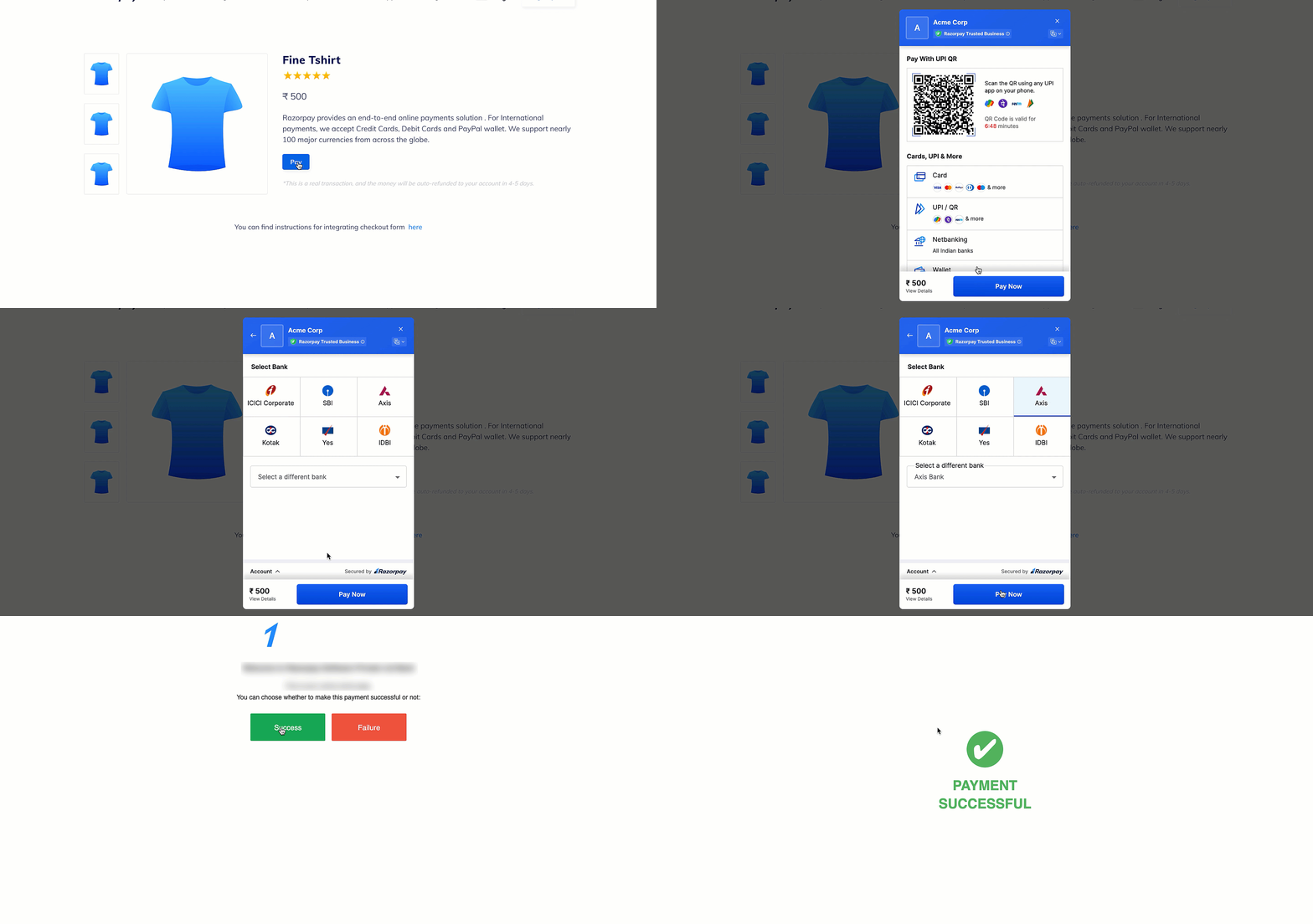 Click the button and make a test transaction to ensure the integration is working as expected. You can start accepting actual payments from your customers once the test is successful.
You can make test payments using one of the payment methods configured at the Checkout.
**Watch Out!**
This is a mock payment page that uses your test API keys, test card and payment details.
* Ensure you have entered only your [Test Mode API keys](/docs/payments/dashboard/account-settings/api-keys#generate-api-keys) in the Checkout code.
* Test mode features a mock bank page with **Success** and **Failure** buttons to replicate the live payment experience.
* No real money is deducted due to the usage of test API keys. This is a simulated transaction.
### Supported Payment Methods
Following are all the payment modes that the customer can use to complete the payment on the Checkout. Some of them are available by default, while others require approval from us. Raise a request from the Dashboard to enable such payment methods.
| Payment Method | Code | Availability |
| ------------------------------------------------------------------------------------------------------------------------------------------------------------------------------------------------------------------ | --------------- | ------------------------------------------------------------------ |
| [Debit Card](/docs/payments/payment-methods/cards) | `debit` | ✓ |
| [Credit Card](/docs/payments/payment-methods/cards) | `credit` | ✓ |
| [Netbanking](/docs/payments/payment-methods/netbanking) | `netbanking` | ✓ |
| [UPI](/docs/payments/payment-methods/upi) | `upi` | ✓ |
| EMI - [Credit Card EMI](/docs/payments/payment-methods/emi/credit-card-emi), [Debit Card EMI](/docs/payments/payment-methods/emi/debit-card-emi) and [No Cost EMI](/docs/payments/payment-methods/emi/no-cost-emi) | `emi` | ✓ |
| [Cardless EMI](/docs/payments/payment-methods/emi/cardless-emi) | `cardless_emi` | Requires [Approval](https://razorpay.com/support). |
| [Bank Transfer](/docs/payments/payment-methods/bank-transfer) | `bank_transfer` | Requires [Approval](https://razorpay.com/support) and Integration. |
| [Emandate](/docs/payments/recurring-payments/emandate/integrate) | `emandate` | Requires [Approval](https://razorpay.com/support) and Integration. |
| [Pay Later](/docs/payments/payment-methods/pay-later) | `paylater` | Requires [Approval](https://razorpay.com/support). |
### Netbanking
You can select any of the listed banks. After choosing a bank, Razorpay will redirect to a mock page where you can make the payment `success` or a `failure`. Since this is Test Mode, we will not redirect you to the bank login portals.
Check the list of [supported banks](/docs/payments/payment-methods/netbanking#supported-banks).
### UPI
You can enter one of the following UPI IDs:
* `success@razorpay`: To make the payment successful.
* `failure@razorpay`: To fail the payment.
Check the following lists:
* [Supported UPI Flows](/docs/payments/payment-methods/upi).
* [UPI Error Codes](/docs/errors/payments/upi).
**Handy Tips**
You can use **Test Mode** to test UPI payments, and **Live Mode** for UPI Intent and QR payments.
### Related Information
* [Webhooks](/docs/webhooks) (Recommended)
* [Error Codes](/docs/errors) (Recommended)
* [How Payment Gateway Works](/docs/payments/payment-gateway/how-it-works)
* [Payment States](/docs/payments/payments)
* [Settlements](/docs/payments/settlements)
* [Refunds](/docs/payments/refunds)
Click the button and make a test transaction to ensure the integration is working as expected. You can start accepting actual payments from your customers once the test is successful.
You can make test payments using one of the payment methods configured at the Checkout.
**Watch Out!**
This is a mock payment page that uses your test API keys, test card and payment details.
* Ensure you have entered only your [Test Mode API keys](/docs/payments/dashboard/account-settings/api-keys#generate-api-keys) in the Checkout code.
* Test mode features a mock bank page with **Success** and **Failure** buttons to replicate the live payment experience.
* No real money is deducted due to the usage of test API keys. This is a simulated transaction.
### Supported Payment Methods
Following are all the payment modes that the customer can use to complete the payment on the Checkout. Some of them are available by default, while others require approval from us. Raise a request from the Dashboard to enable such payment methods.
| Payment Method | Code | Availability |
| ------------------------------------------------------------------------------------------------------------------------------------------------------------------------------------------------------------------ | --------------- | ------------------------------------------------------------------ |
| [Debit Card](/docs/payments/payment-methods/cards) | `debit` | ✓ |
| [Credit Card](/docs/payments/payment-methods/cards) | `credit` | ✓ |
| [Netbanking](/docs/payments/payment-methods/netbanking) | `netbanking` | ✓ |
| [UPI](/docs/payments/payment-methods/upi) | `upi` | ✓ |
| EMI - [Credit Card EMI](/docs/payments/payment-methods/emi/credit-card-emi), [Debit Card EMI](/docs/payments/payment-methods/emi/debit-card-emi) and [No Cost EMI](/docs/payments/payment-methods/emi/no-cost-emi) | `emi` | ✓ |
| [Cardless EMI](/docs/payments/payment-methods/emi/cardless-emi) | `cardless_emi` | Requires [Approval](https://razorpay.com/support). |
| [Bank Transfer](/docs/payments/payment-methods/bank-transfer) | `bank_transfer` | Requires [Approval](https://razorpay.com/support) and Integration. |
| [Emandate](/docs/payments/recurring-payments/emandate/integrate) | `emandate` | Requires [Approval](https://razorpay.com/support) and Integration. |
| [Pay Later](/docs/payments/payment-methods/pay-later) | `paylater` | Requires [Approval](https://razorpay.com/support). |
### Netbanking
You can select any of the listed banks. After choosing a bank, Razorpay will redirect to a mock page where you can make the payment `success` or a `failure`. Since this is Test Mode, we will not redirect you to the bank login portals.
Check the list of [supported banks](/docs/payments/payment-methods/netbanking#supported-banks).
### UPI
You can enter one of the following UPI IDs:
* `success@razorpay`: To make the payment successful.
* `failure@razorpay`: To fail the payment.
Check the following lists:
* [Supported UPI Flows](/docs/payments/payment-methods/upi).
* [UPI Error Codes](/docs/errors/payments/upi).
**Handy Tips**
You can use **Test Mode** to test UPI payments, and **Live Mode** for UPI Intent and QR payments.
### Related Information
* [Webhooks](/docs/webhooks) (Recommended)
* [Error Codes](/docs/errors) (Recommended)
* [How Payment Gateway Works](/docs/payments/payment-gateway/how-it-works)
* [Payment States](/docs/payments/payments)
* [Settlements](/docs/payments/settlements)
* [Refunds](/docs/payments/refunds)