> ## Documentation Index
> Fetch the complete documentation index at: https://razorpay-881012b3.mintlify.site/llms.txt
> Use this file to discover all available pages before exploring further.
# Compensation
> Configure and manage CTC components, deductions, FBP allocations and perquisites in Payroll.
Available in
🇮🇳 India
Payroll provides comprehensive solutions for managing Cost to Company (CTC) components and various compensation elements. The system enables organisations to structure employee compensation effectively while ensuring compliance with statutory requirements and maintaining transparency in salary administration.
| Feature | Description | Example |
| ---------------------------- | ----------------------------------------------------------------------------------------------------- | -------------------------------------------------------------------------------------------------------------------------------------------------- |
| **CTC Component Management** | Comprehensive view and management of all salary components that constitute the total Cost to Company. | Centralised view of all components (basic, allowances, deductions, employer contributions and so on) replacing error-prone spreadsheet management. |
| **Recurring Deductions** | Add, edit or delete recurring deductions with proper authorisation and audit trails. | Systematic management of recurring deductions with clear categorisation. |
| **FBP Allocation** | Flexible Benefits Plan allocation based on employee eligibility and choices. | Employees can view and select benefits within FBP limits for tax optimisation. |
| **Perquisite Management** | Proper valuation and tax treatment of non-monetary benefits as per Income Tax rules. | Automatic perquisite valuation and tax calculation, ensuring compliance with Income Tax regulations. |
### Accessing Employee Compensation
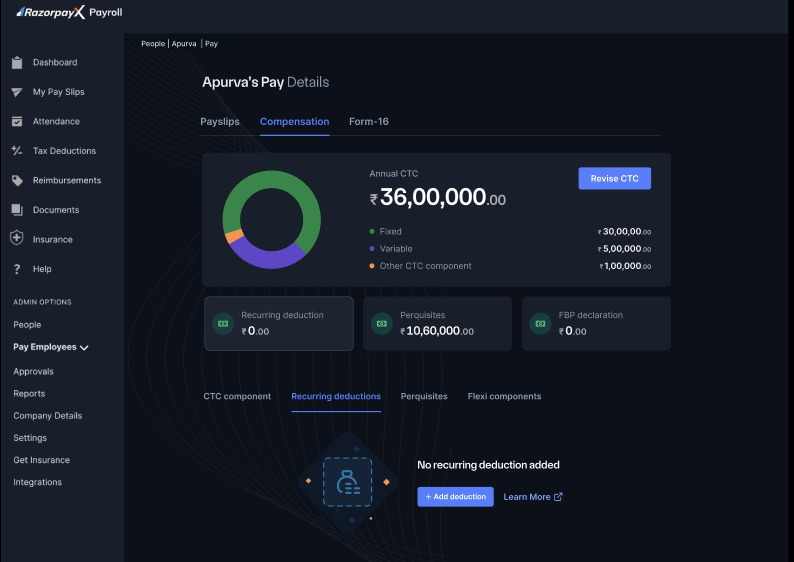
Navigate to **People → Employee's Name → Pay** to access an employee's compensation details. The compensation dashboard displays a complete overview of the employee's pay structure.
### Compensation Overview
The main compensation screen presents:
* **Annual CTC** - Total cost to company displayed prominently (₹36,00,000 in the example).
* **Visual Breakdown** - Pie chart showing the distribution between fixed, variable and other CTC components.
* **Key Metrics**:
* Recurring deduction amount
* Perquisites value
* Flexi components allocation
 ## Compensation Components
Manage all salary elements including fixed, variable and other CTC components that form the total compensation package. Configure basic salary, allowances, bonuses and employer contributions.
Understand why Special Allowance shows a negative value, how employer PF and ESI fit into the CTC, and how to fix a salary structure so payroll finalisation is not skipped.
Configure and track regular salary deductions such as loan EMIs, insurance premiums and facility charges. Set up automated deduction periods with proper audit trails.
Manage non-monetary benefits and their tax valuation including company cars, accommodation, stock options and other fringe benefits as per Income Tax regulations.
Allow employees to choose eligible benefit components within defined limits, improving tax efficiency while keeping compensation aligned with policy.
**Note**
All compensation changes take effect from the next payroll cycle. Historical records remain unchanged for audit and compliance purposes. Ensure proper authorisation before making any compensation modifications.
## Compensation Components
Manage all salary elements including fixed, variable and other CTC components that form the total compensation package. Configure basic salary, allowances, bonuses and employer contributions.
Understand why Special Allowance shows a negative value, how employer PF and ESI fit into the CTC, and how to fix a salary structure so payroll finalisation is not skipped.
Configure and track regular salary deductions such as loan EMIs, insurance premiums and facility charges. Set up automated deduction periods with proper audit trails.
Manage non-monetary benefits and their tax valuation including company cars, accommodation, stock options and other fringe benefits as per Income Tax regulations.
Allow employees to choose eligible benefit components within defined limits, improving tax efficiency while keeping compensation aligned with policy.
**Note**
All compensation changes take effect from the next payroll cycle. Historical records remain unchanged for audit and compliance purposes. Ensure proper authorisation before making any compensation modifications.