> ## Documentation Index
> Fetch the complete documentation index at: https://razorpay-881012b3.mintlify.site/llms.txt
> Use this file to discover all available pages before exploring further.
# CTC Components
> Configure and manage salary components including basic, allowances and employer contributions in Payroll.
Available in
🇮🇳 India
CTC Components form the foundation of employee compensation structure in Payroll. The system provides comprehensive management capabilities for all salary elements that constitute an employee's total compensation package, ensuring accurate salary calculation and compliance with statutory requirements.
| Feature | Description | Example |
| ---------------------------- | --------------------------------------------------------------------------------------- | ------------------------------------------------------------------------------------------------------------------ |
| **Component Categorisation** | Systematic organisation of salary components into fixed, variable and other categories. | Clear distinction between basic salary, performance bonus and employer PF contributions for accurate calculations. |
| **Real-time Calculations** | Automatic recalculation of annual CTC when components are modified. | Instant CTC updates when adding HRA or modifying special allowances. |
| **Compliance Integration** | Components automatically linked to statutory calculations like PF, ESI and PT. | Basic salary changes automatically update PF contribution calculations. |
| **Audit Trail** | Complete history of component changes with timestamps and authorisation. | Track when and who modified an employee's basic salary or allowances. |
### Accessing CTC Components
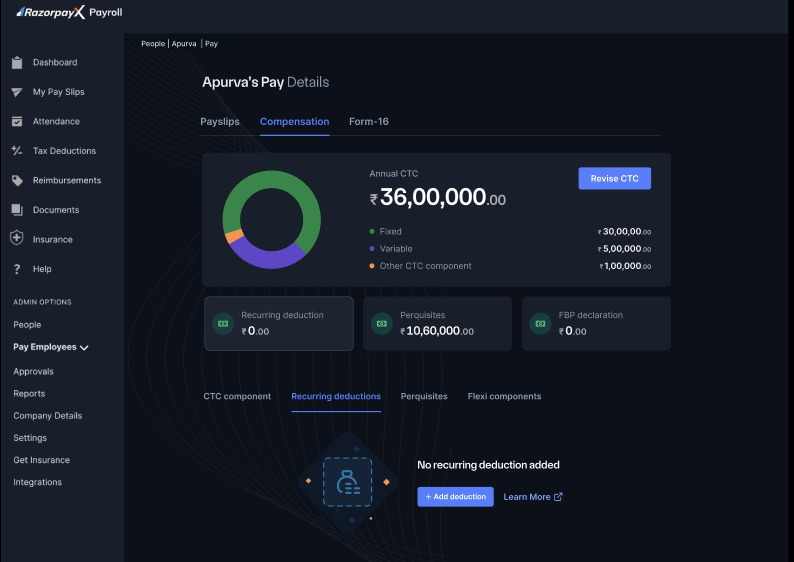
Navigate to **People → Employee's Name → Pay → CTC Components** to access the component management interface. The dashboard displays all active components with their monthly and annual values.
### Component Structure
The CTC components interface presents:
* **Component Categories** - Organised view of fixed, variable and other components.
* **Monthly & Annual Values** - Clear display of component amounts for both periods.
* **Component Actions** - Edit and delete options for each component.
* **Total CTC Calculation** - Real-time update of total compensation.
 ## Component Categories
Fixed components are regular monthly salary elements that remain constant throughout the employment period or until a revision occurs. These form the base of an employee's guaranteed compensation.
### Characteristics of Fixed Components
* **Guaranteed Payment** - Paid every month regardless of performance or company results.
* **Predictable Amount** - Employees can rely on these components for financial planning.
* **Statutory Base** - Often used as the basis for calculating statutory contributions like PF and gratuity.
* **Regular Disbursement** - Included in every payroll cycle without variation.
### Common Examples Include
* Basic Salary (core compensation component)
* House Rent Allowance (HRA)
* Dearness Allowance
* Conveyance Allowance
* Medical Allowance
* Special Allowance
### Purpose and Impact
Fixed components typically constitute the largest portion of an employee's CTC and are essential for:
* Meeting minimum wage requirements
* Calculating statutory deductions and contributions
* Providing income stability to employees
### Payroll Processing Impact
* Directly affect net salary calculation
* Form the base for statutory deductions
* Remain constant in payroll processing
Variable components are performance-based or conditional payments that may change based on individual achievement, company performance or specific criteria. These components motivate employees and align compensation with organisational goals.
### Characteristics of Variable Components
* **Performance-Linked** - Amount depends on achievement of predefined metrics or targets.
* **Conditional Payment** - May not be paid if conditions are not met.
* **Fluctuating Amount** - Can vary from period to period based on performance.
* **Discretionary Elements** - Often subject to management discretion and company policy.
### Typical Scenarios for Variable Components
* Performance bonuses linked to individual KPIs
* Sales incentives based on revenue targets
* Quarterly or annual bonuses tied to company performance
* Project completion bonuses
* Retention bonuses paid at specific milestones
* Commission-based payments
### Purpose and Benefits
Variable components serve to:
* Incentivise high performance
* Retain key talent
* Share company success with employees
* Provide flexibility in compensation management
### Payroll Processing Impact
* Require performance data integration
* May need approval workflows
* Affect month-to-month salary variations
Other CTC components include employer contributions and benefits that form part of the total cost to company but may not be directly received by the employee as cash. These components represent the company's investment in employee welfare and statutory compliance.
### Characteristics of Other CTC Components
* **Employer Contributions** - Amounts paid by the employer on behalf of the employee.
* **Statutory Benefits** - Mandatory contributions required by law.
* **Non-Cash Benefits** - Value provided to employees through insurance, retirement benefits and so on.
* **Indirect Compensation** - Benefits that have monetary value but are not paid as salary.
### Common Categories Include
**Statutory Contributions:**
* Employer's Provident Fund contribution
* Employer's ESI contribution
* Employer's contribution to gratuity
* Labour Welfare Fund contribution
**Insurance Benefits:**
* Group medical insurance premiums
* Group life insurance coverage
* Personal accident insurance
* Parental insurance coverage
**Retirement Benefits:**
* Superannuation contributions
* National Pension Scheme (NPS) contributions
* Additional retirement corpus funding
### Importance
These components are important because they:
* Ensure compliance with labour laws
* Provide social security to employees
* Enhance the total value proposition of employment
* May offer tax benefits under certain sections
### Payroll Processing Impact
* Influence total employment cost
* Affect company's statutory compliance
* Impact employee benefits and security
## Managing Components
CTC components for an employee are picked from the organisation's [Salary Component Library](/docs/payroll/component-library). Define, modify or disable component types (Earnings, Deduction, Non-Payable Benefit, Perquisite) in the Component Library — those changes flow into the dropdowns available here.
To adjust an employee's CTC:
1. On the CTC Components page, click **Add Component** and pick a component from the library.
2. Enter the **Monthly amount** and **Effective date** for that employee. Tax treatment and calculation rules are inherited from the library definition.
3. To change an existing component, click **Edit** beside it and update the amount or effective period; click the delete icon to remove it.
### Component Display Information
Each component in the CTC view displays:
* Component name
* Monthly amount
* Annual amount
* Action buttons for editing or deleting
**Note**
Changes to CTC components take effect from the next payroll cycle. Historical payslips remain unchanged for audit purposes. The specific components available in each category depend on your organisation's compensation policy and structure.
## Component Categories
Fixed components are regular monthly salary elements that remain constant throughout the employment period or until a revision occurs. These form the base of an employee's guaranteed compensation.
### Characteristics of Fixed Components
* **Guaranteed Payment** - Paid every month regardless of performance or company results.
* **Predictable Amount** - Employees can rely on these components for financial planning.
* **Statutory Base** - Often used as the basis for calculating statutory contributions like PF and gratuity.
* **Regular Disbursement** - Included in every payroll cycle without variation.
### Common Examples Include
* Basic Salary (core compensation component)
* House Rent Allowance (HRA)
* Dearness Allowance
* Conveyance Allowance
* Medical Allowance
* Special Allowance
### Purpose and Impact
Fixed components typically constitute the largest portion of an employee's CTC and are essential for:
* Meeting minimum wage requirements
* Calculating statutory deductions and contributions
* Providing income stability to employees
### Payroll Processing Impact
* Directly affect net salary calculation
* Form the base for statutory deductions
* Remain constant in payroll processing
Variable components are performance-based or conditional payments that may change based on individual achievement, company performance or specific criteria. These components motivate employees and align compensation with organisational goals.
### Characteristics of Variable Components
* **Performance-Linked** - Amount depends on achievement of predefined metrics or targets.
* **Conditional Payment** - May not be paid if conditions are not met.
* **Fluctuating Amount** - Can vary from period to period based on performance.
* **Discretionary Elements** - Often subject to management discretion and company policy.
### Typical Scenarios for Variable Components
* Performance bonuses linked to individual KPIs
* Sales incentives based on revenue targets
* Quarterly or annual bonuses tied to company performance
* Project completion bonuses
* Retention bonuses paid at specific milestones
* Commission-based payments
### Purpose and Benefits
Variable components serve to:
* Incentivise high performance
* Retain key talent
* Share company success with employees
* Provide flexibility in compensation management
### Payroll Processing Impact
* Require performance data integration
* May need approval workflows
* Affect month-to-month salary variations
Other CTC components include employer contributions and benefits that form part of the total cost to company but may not be directly received by the employee as cash. These components represent the company's investment in employee welfare and statutory compliance.
### Characteristics of Other CTC Components
* **Employer Contributions** - Amounts paid by the employer on behalf of the employee.
* **Statutory Benefits** - Mandatory contributions required by law.
* **Non-Cash Benefits** - Value provided to employees through insurance, retirement benefits and so on.
* **Indirect Compensation** - Benefits that have monetary value but are not paid as salary.
### Common Categories Include
**Statutory Contributions:**
* Employer's Provident Fund contribution
* Employer's ESI contribution
* Employer's contribution to gratuity
* Labour Welfare Fund contribution
**Insurance Benefits:**
* Group medical insurance premiums
* Group life insurance coverage
* Personal accident insurance
* Parental insurance coverage
**Retirement Benefits:**
* Superannuation contributions
* National Pension Scheme (NPS) contributions
* Additional retirement corpus funding
### Importance
These components are important because they:
* Ensure compliance with labour laws
* Provide social security to employees
* Enhance the total value proposition of employment
* May offer tax benefits under certain sections
### Payroll Processing Impact
* Influence total employment cost
* Affect company's statutory compliance
* Impact employee benefits and security
## Managing Components
CTC components for an employee are picked from the organisation's [Salary Component Library](/docs/payroll/component-library). Define, modify or disable component types (Earnings, Deduction, Non-Payable Benefit, Perquisite) in the Component Library — those changes flow into the dropdowns available here.
To adjust an employee's CTC:
1. On the CTC Components page, click **Add Component** and pick a component from the library.
2. Enter the **Monthly amount** and **Effective date** for that employee. Tax treatment and calculation rules are inherited from the library definition.
3. To change an existing component, click **Edit** beside it and update the amount or effective period; click the delete icon to remove it.
### Component Display Information
Each component in the CTC view displays:
* Component name
* Monthly amount
* Annual amount
* Action buttons for editing or deleting
**Note**
Changes to CTC components take effect from the next payroll cycle. Historical payslips remain unchanged for audit purposes. The specific components available in each category depend on your organisation's compensation policy and structure.