> ## Documentation Index
> Fetch the complete documentation index at: https://razorpay-881012b3.mintlify.site/llms.txt
> Use this file to discover all available pages before exploring further.
# Flexi Components
> Configure and manage Flexible Benefit Plan (FBP) allocations for tax optimisation in Payroll.
Available in
🇮🇳 India
Flexi Components in Payroll enable employees to structure their compensation through flexible benefit allocations, optimising tax liability while choosing benefits that suit their individual needs. The system provides comprehensive FBP management with real-time tax calculations and compliance tracking.
| Feature | Description | Example |
| ------------------------- | ------------------------------------------------------------------------- | ------------------------------------------------------------------------------------------- |
| **Tax Optimisation** | Real-time calculation of tax savings from FBP selections. | Selecting ₹50,000 LTA shows immediate tax saving of ₹15,600 based on employee's tax slab. |
| **Flexible Allocation** | Employees choose benefits within defined limits based on eligibility. | Employee can allocate between fuel, telephone, LTA within their ₹2,00,000 annual FBP limit. |
| **Declaration Tracking** | Systematic tracking of FBP declarations and proof submissions. | System tracks LTA declarations, reminds for proof submission and validates claims. |
| **Compliance Management** | Ensures FBP allocations comply with tax regulations and company policies. | Automatic validation that meal vouchers don't exceed ₹50 per meal as per tax rules. |
### Accessing Flexi Components
Navigate to **People → Employee's Name → Pay → Flexi Components** to access the FBP management interface. The dashboard displays available FBP amount and current allocations.
### FBP Overview
The flexi components screen presents:
* **Available FBP Amount** - Total flexible benefit limit for the employee.
* **Allocated Amount** - Currently allocated benefits.
* **Declared Amount** - Benefits declared by employee.
* **Remaining Balance** - Available amount for allocation.
## FBP Allocation and Declarations
### First Time Allocation
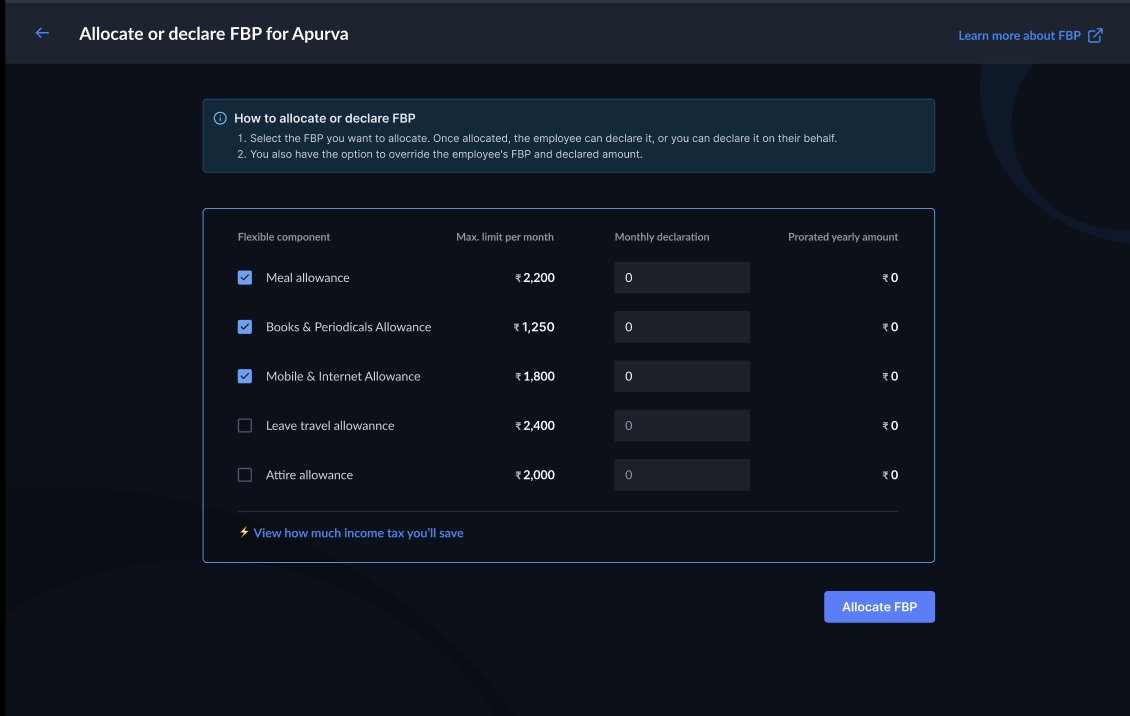
When allocating FBP for the first time, the system displays:
* Available FBP amount for the employee.
* Option to allocate or declare FBP components.
* Link to learn more about FBP allocation.
 ### FBP Workflows
The workflows section displays the allocation or declaration process for FBP components.
1. Select the FBP you wish to allocate.
2. The employee can declare it, or you can declare it on their behalf. FBP allocation affects the employee's FBP and declared amount.
### FBP Workflows
The workflows section displays the allocation or declaration process for FBP components.
1. Select the FBP you wish to allocate.
2. The employee can declare it, or you can declare it on their behalf. FBP allocation affects the employee's FBP and declared amount.
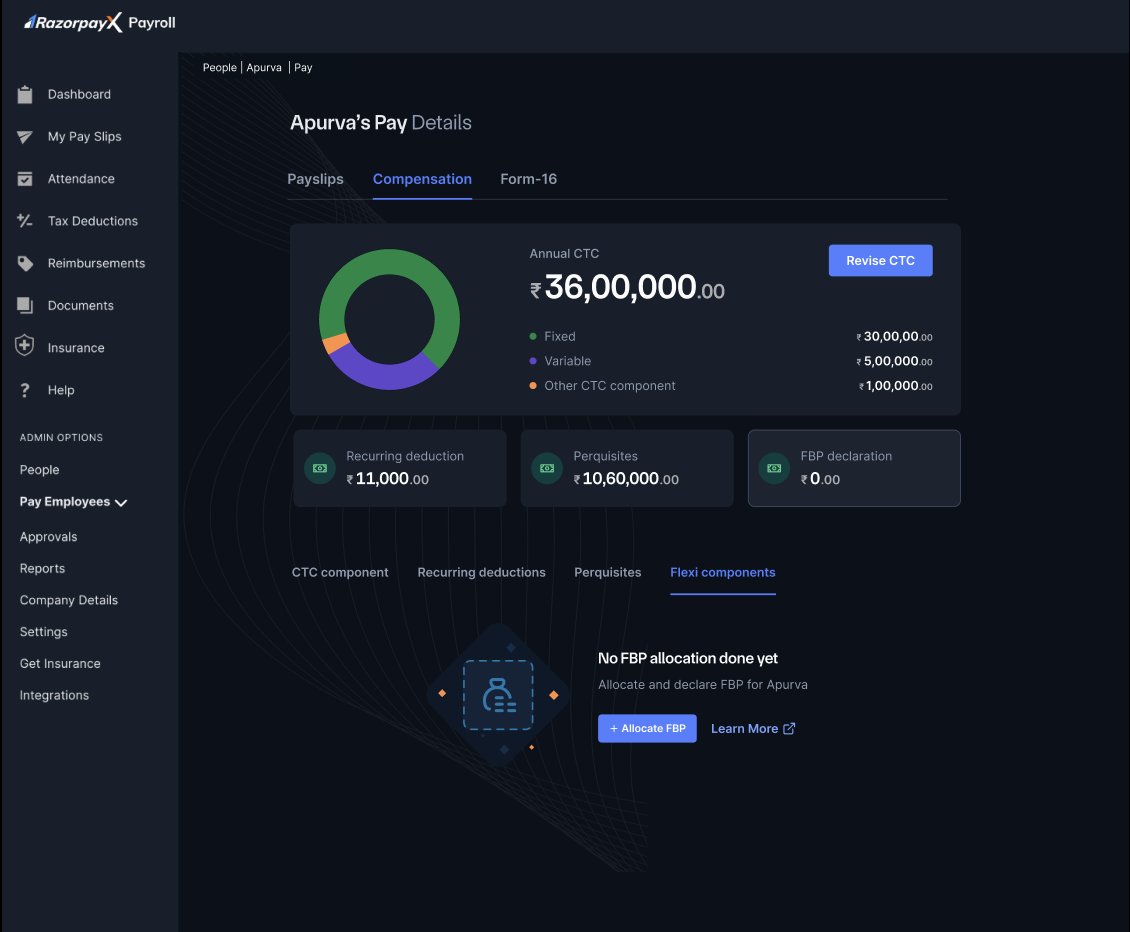 The workflow table displays:
* **Flexible Component** - Name of the benefit component.
* **Max. Limit per Month** - Maximum monthly allocation permitted.
* **Monthly Declaration** - Current declared amount.
* **Planned Yearly Amount** - Annual projection based on monthly declaration.
* Checkbox selection for each component.
#### Allocation Actions
Two options are available for processing FBP:
* **Allocate FBP** - Confirms the selected allocations without declaration.
* **Allocate & Declare FBP** - Allocates and immediately declares the components for tax benefits.
### Tax Optimisation
The system provides visibility into tax savings:
* Displays potential tax savings for each component.
* Calculates total tax benefit from FBP selections.
* Updates take-home salary based on allocations.
### Modifying FBP Allocations
To modify existing allocations:
1. Click **Modify FBP Allocation**.
2. Review current allocations.
3. Adjust component amounts:
* Increase within limits
* Decrease or remove
* Add new components
4. Check revised tax calculation.
5. Save modifications.
The workflow table displays:
* **Flexible Component** - Name of the benefit component.
* **Max. Limit per Month** - Maximum monthly allocation permitted.
* **Monthly Declaration** - Current declared amount.
* **Planned Yearly Amount** - Annual projection based on monthly declaration.
* Checkbox selection for each component.
#### Allocation Actions
Two options are available for processing FBP:
* **Allocate FBP** - Confirms the selected allocations without declaration.
* **Allocate & Declare FBP** - Allocates and immediately declares the components for tax benefits.
### Tax Optimisation
The system provides visibility into tax savings:
* Displays potential tax savings for each component.
* Calculates total tax benefit from FBP selections.
* Updates take-home salary based on allocations.
### Modifying FBP Allocations
To modify existing allocations:
1. Click **Modify FBP Allocation**.
2. Review current allocations.
3. Adjust component amounts:
* Increase within limits
* Decrease or remove
* Add new components
4. Check revised tax calculation.
5. Save modifications.