> ## Documentation Index
> Fetch the complete documentation index at: https://razorpay-881012b3.mintlify.site/llms.txt
> Use this file to discover all available pages before exploring further.

# Recurring Deductions

> Configure and manage regular salary deductions including loans and other periodic deductions in Payroll.

<div style={{display:"flex",flexWrap:"wrap",alignItems:"center",gap:"0.35rem 0.9rem",border:"1px solid rgba(128,128,128,0.28)",borderRadius:"0.5rem",padding:"0.45rem 0.75rem",margin:"0 0 1.25rem",fontSize:"0.875rem"}}>
  <span style={{fontWeight:600}}>Available in</span>
  <span>🇮🇳 India</span>
</div>

Recurring Deductions in Payroll enables systematic management of all regular deductions from employee salaries. The system provides comprehensive tools for adding, tracking and managing various types of deductions while maintaining complete audit trails and ensuring accurate salary calculations.

<AccordionGroup>
  <Accordion title="Features">
    | Feature                            | Description                                                                            | Example                                                                                              |
    | ---------------------------------- | -------------------------------------------------------------------------------------- | ---------------------------------------------------------------------------------------------------- |
    | **Automated Deduction Processing** | Automatic application of deductions in each payroll cycle without manual intervention. | Monthly loan EMI automatically deducted every month until loan tenure completion.                    |
    | **Flexible Deduction Periods**     | Configure deductions for specific periods with start and end dates.                    | Set insurance premium deduction for 12 months starting from January with automatic stop in December. |
    | **Multiple Deduction Types**       | Support for various deduction categories with different calculation methods.           | Handle loan EMIs, insurance premiums and facility charges simultaneously.                            |
    | **Audit Trail & Compliance**       | Complete history of deduction modifications with authorisation tracking.               | Track who approved a loan deduction change and when it was modified for compliance purposes.         |
  </Accordion>
</AccordionGroup>

### Accessing Recurring Deductions

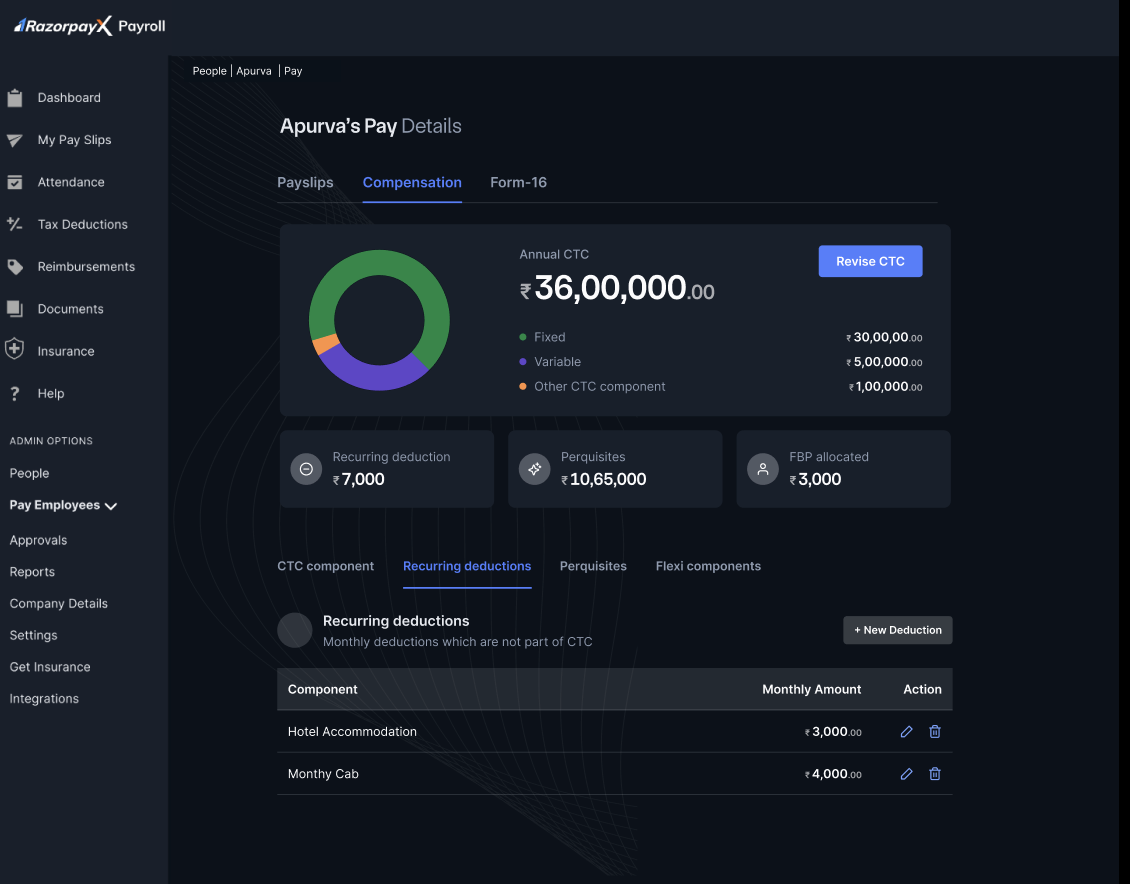
Navigate to **People → Employee's Name → Pay → Recurring Deductions** to access the deductions management interface. The dashboard displays all active deductions with their amounts and periods.

### Deductions Overview

The recurring deductions screen presents:

* **Active Deductions List** - All current deductions with monthly amounts.
* **Deduction Period** - Start and end dates for each deduction.
* **Total Monthly Deduction** - Aggregate of all active deductions.
* **Management Actions** - Add, edit and delete options.

<img src="https://razorpay.com/docs/build/browser/assets/images/compensation-page.jpg" alt="Compensation tab with Recurring deductions selected, listing active deductions and monthly amounts." width="800" />

## Managing Deductions

### Adding Recurring Deductions

To add a new recurring deduction:

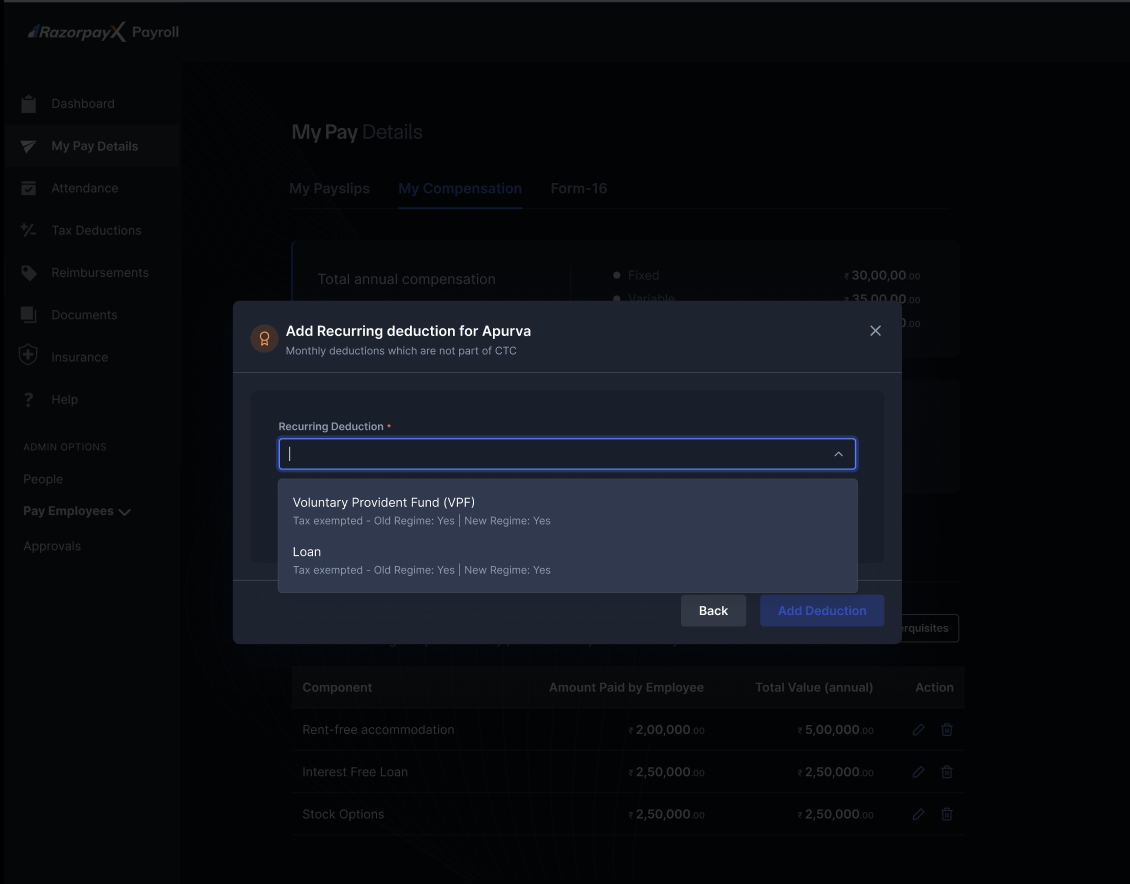
1. Click on **Add Deduction**.
<img src="https://razorpay.com/docs/build/browser/assets/images/add-deduction.jpg" alt="Add Recurring deduction dialog with Recurring Deduction dropdown open." width="800" />

2. Select the deduction type from the dropdown menu.
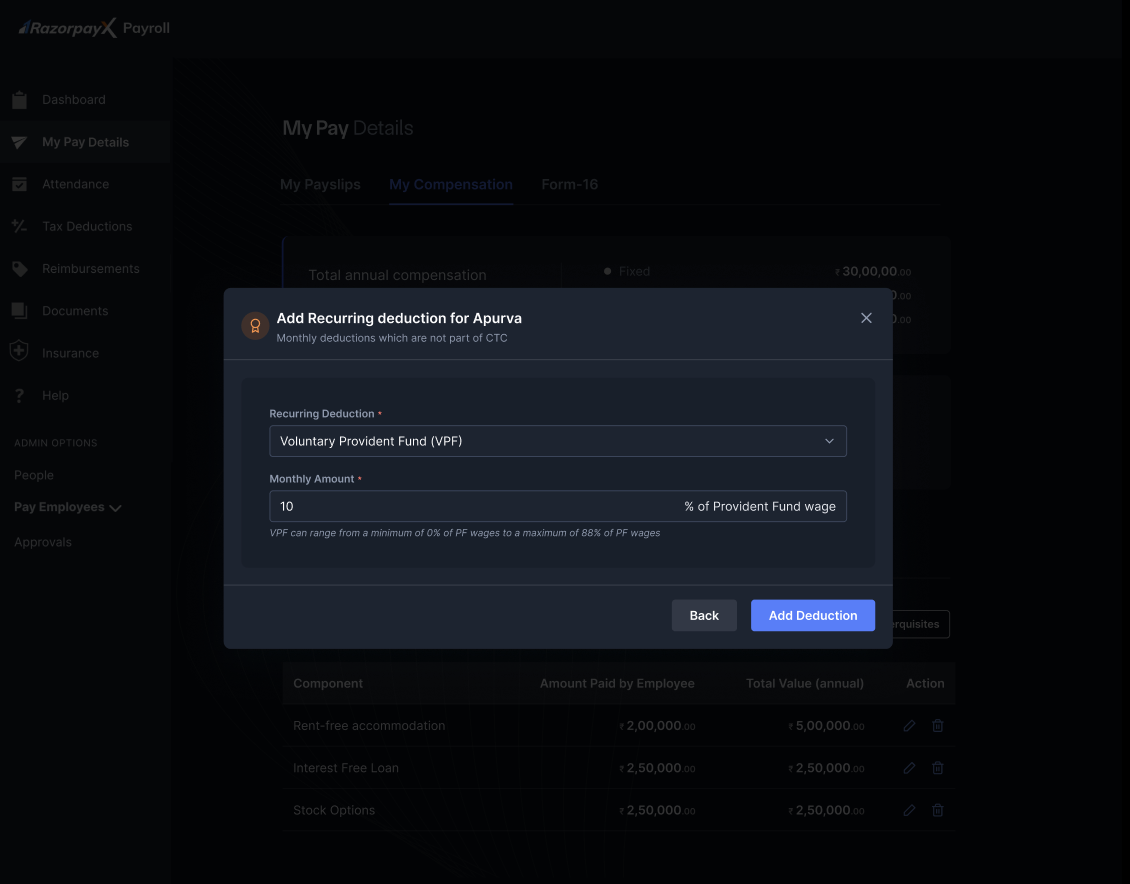
3. Enter the monthly amount.
4. Specify the deduction period.
5. Click **Add Deduction** to save.
<img src="https://razorpay.com/docs/build/browser/assets/images/add-deduction2.jpg" alt="Add Recurring deduction dialog with VPF selected and a monthly amount entered." width="800" />

### Editing Recurring Deductions

To modify an existing deduction:

1. Navigate to the deduction requiring modification.
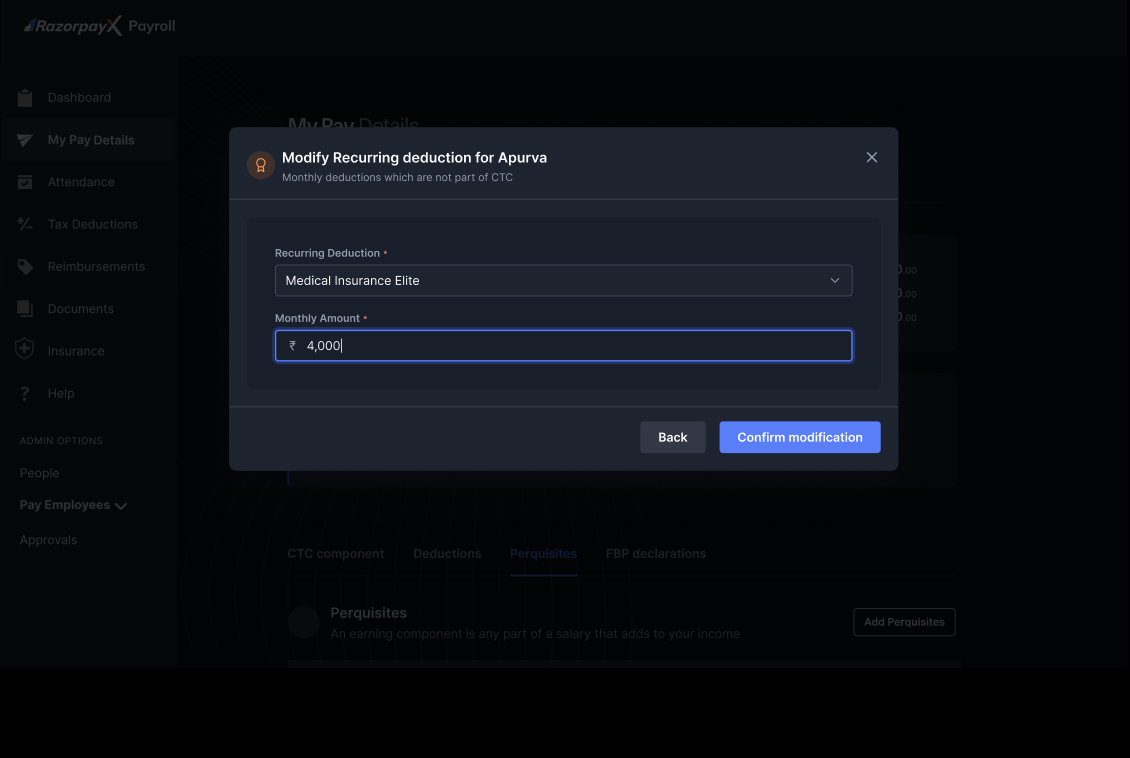
2. Click **Edit Deduction**.
<img src="https://razorpay.com/docs/build/browser/assets/images/edit-deduction.jpg" alt="Modify Recurring deduction dialog with the selected component and updated monthly amount." width="800" />

3. Update the amount or period as required.
4. Save the changes.

The modification dialogue allows you to:

* Change the monthly deduction amount
* Adjust the deduction period
* Update the end date

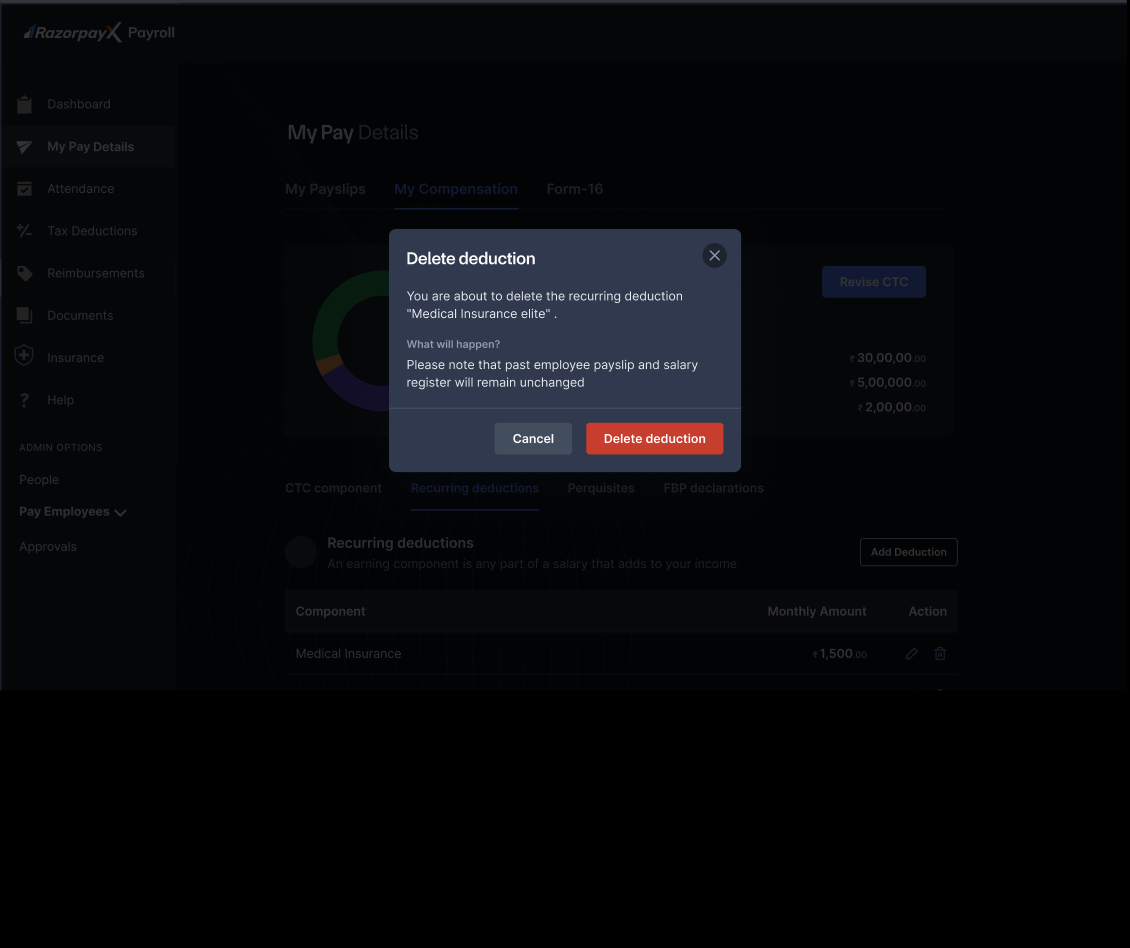
### Deleting Recurring Deductions

To remove a deduction:

1. Select **Delete deduction**.
<img src="https://razorpay.com/docs/build/browser/assets/images/delete-deduction.jpg" alt="Delete deduction confirmation dialog with deduction name and impact note." width="800" />

2. Review the confirmation message displaying the deduction details.
3. Click **Delete Deduction** to confirm removal.

### Common Recurring Deductions

* Hotel accommodation
* Monthly cab
* Medical insurance elite
* Loan EMI

### Bulk Deduction Management

For managing multiple deductions:

1. Use **Bulk Upload** for multiple employees.
2. Download deduction template.
3. Fill deduction details.
4. Upload and validate.
5. Process bulk deductions.

<Info>
  **Note**

  Deleting a recurring deduction only affects future payroll cycles. Historical payslips and salary registers remain unchanged for audit and compliance purposes.
</Info>
