> ## Documentation Index
> Fetch the complete documentation index at: https://razorpay-881012b3.mintlify.site/llms.txt
> Use this file to discover all available pages before exploring further.
# Special Allowance
> Understand why Special Allowance shows a negative value in RazorpayX Payroll, why it skips finalisation and how to fix the salary structure.
Available in
🇮🇳 India
In Payroll, **Special Allowance is a balancing component**, not a value you set directly. It is the amount left in the CTC after every other component and employer contribution is allocated:
**How Special Allowance is calculated**
Special Allowance = Annual CTC - (Basic + HRA + other fixed allowances + Employer PF + Employer ESI)
When the other components use up the entire CTC, nothing is left and Special Allowance turns negative. This makes the salary structure invalid. Payroll skips the affected employees during finalisation. You usually see this as: *"All employees are showing as skipped and I cannot finalise payroll."*
## Why is Special Allowance showing negative?
This usually happens in one of two situations:
| Cause | What happens |
| ---------------------------------------------------------------------- | ---------------------------------------------------------------------------------------------------------------------------------- |
| Fixed components total 100% of CTC (for example, Basic 50% + HRA 50%). | No room is left for Special Allowance, so employer contributions push it negative. |
| Employer PF/ESI is high. | Employer PF and ESI are carved out of the CTC before Special Allowance is calculated, so a larger contribution leaves less for it. |
**Employer PF/ESI and the CTC**
Employer PF and ESI are met from within the CTC in both Payroll's older system and Payroll 2.0. They are employer contributions, not employee earnings, so they do not appear in the Earnings section of the payslip and you do not need to add them as earning components.
## Payroll's older system vs Payroll 2.0
If a structure worked earlier and now shows an error, it is because of how each system handles a CTC overflow:
| When components exceed the CTC | Payroll's older system | Payroll 2.0 |
| ------------------------------ | --------------------------------------------------------------------------------------- | -------------------------------------------------------------------------- |
| What the system does | Silently lowers Basic or HRA to keep Special Allowance positive. | Flags a negative Special Allowance and skips the employee at finalisation. |
| Effect on statutory components | Basic/HRA could be reduced without your knowledge, risking minimum-wage non-compliance. | Basic/HRA are never changed automatically, keeping you compliant. |
| What you need to do | Nothing, the adjustment was hidden. | Rebalance the components once, as shown below. |
## How to fix it
Reduce how much of the CTC is locked into Basic, HRA and other fixed components so there is room for a positive Special Allowance. **The CTC stays the same.**
1. Go to **People → employee's profile → Compensation**.
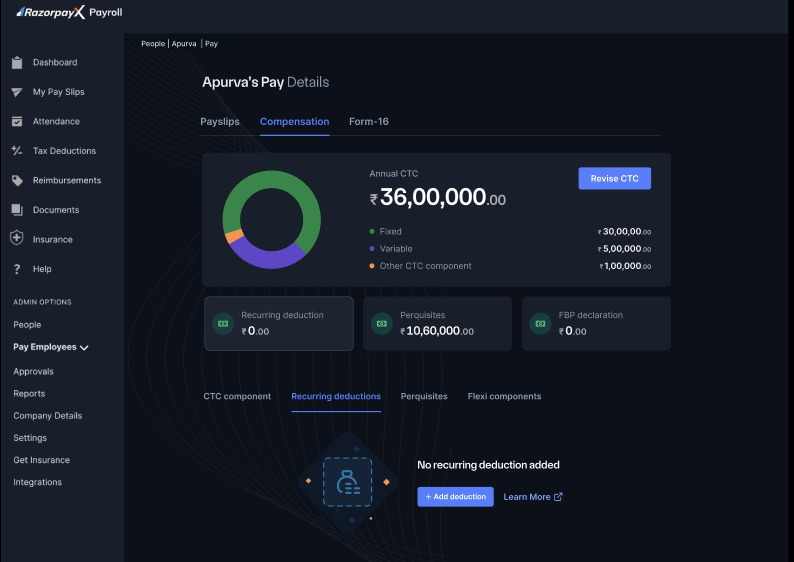 2. Assign a different salary structure for the same CTC, with a lower Basic/HRA allocation.
3. Save, then confirm Special Allowance is zero or positive.
4. Re-attempt finalisation.
1. Go to **Settings → Component Library → Salary Structures → Manage**.
2. Assign a different salary structure for the same CTC, with a lower Basic/HRA allocation.
3. Save, then confirm Special Allowance is zero or positive.
4. Re-attempt finalisation.
1. Go to **Settings → Component Library → Salary Structures → Manage**.
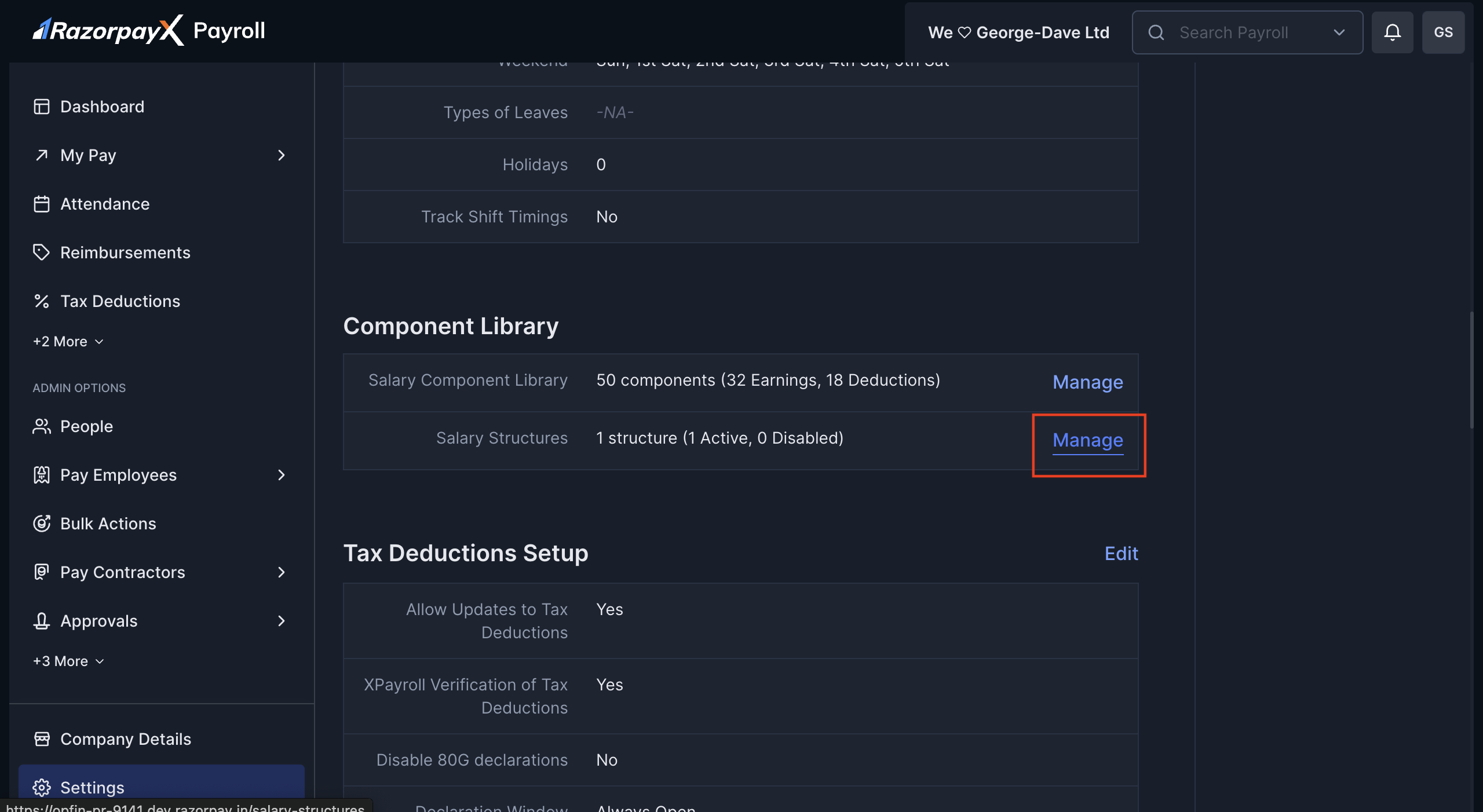 2. Edit the structure and lower the percentage allocated to Basic/HRA/other allowances. This corrects every employee on that structure at once.
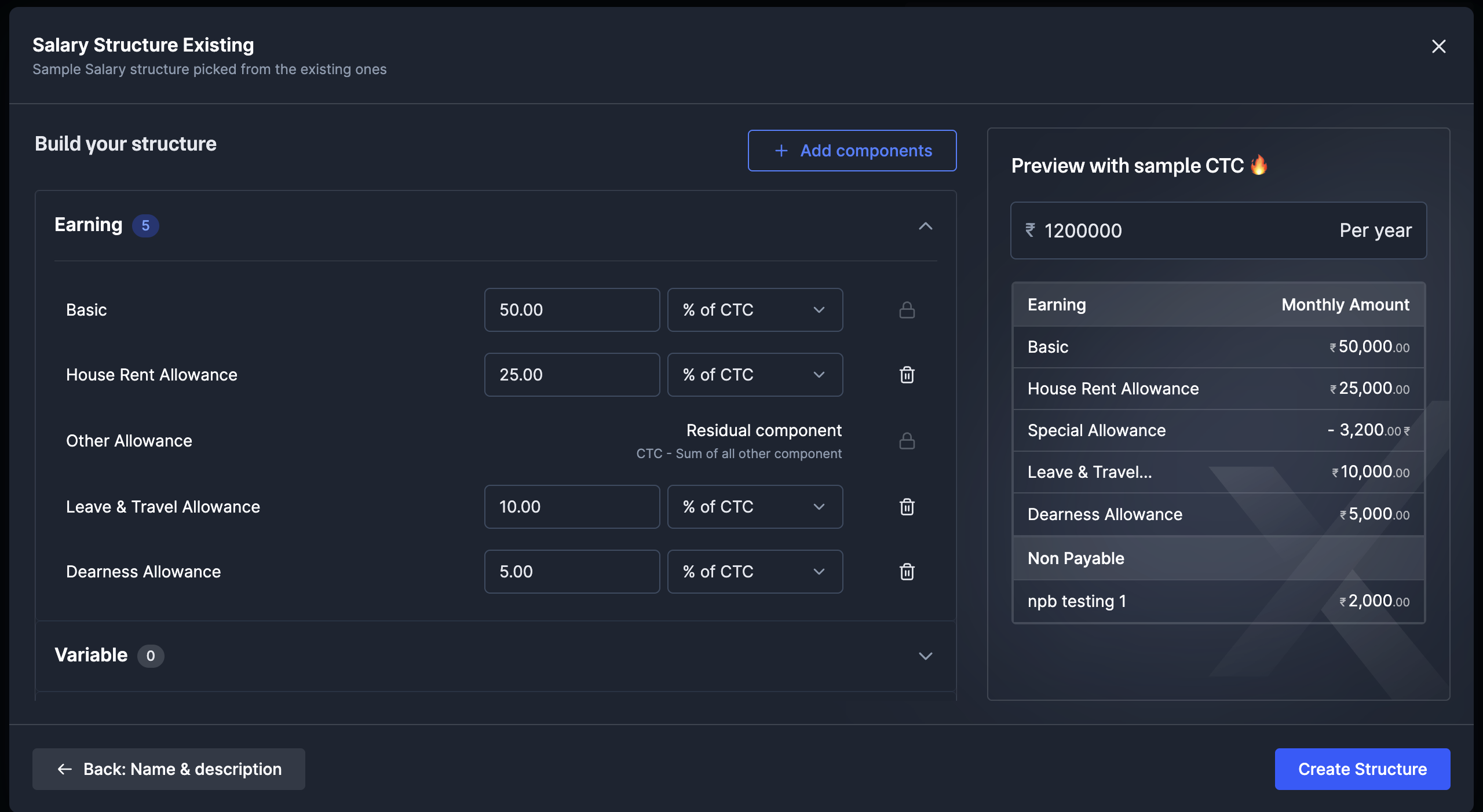 3. Save, then confirm Special Allowance is zero or positive.
4. Re-attempt finalisation.
Know more about [salary structures](/docs/payroll/multiple-salary-structure).
## Worked examples
Annual CTC ₹6,00,000. The only change in the fix is dropping HRA from 30% to 25%; the CTC stays the same.
| Component (₹/yr) | Before (negative) | After (fixed) |
| ---------------------------------- | ----------------- | --------------- |
| Annual CTC | ₹6,00,000 | ₹6,00,000 |
| Basic (60%) | ₹3,60,000 | ₹3,60,000 |
| HRA | ₹1,80,000 (30%) | ₹1,50,000 (25%) |
| Conveyance (fixed) | ₹50,000 | ₹50,000 |
| Employer PF (12% of Basic, capped) | ₹21,600 | ₹21,600 |
| **Special Allowance (residual)** | **-₹11,600 ✗** | **+₹18,400 ✓** |
Annual CTC ₹4,80,000. The only change in the fix is dropping HRA from 50% to 40%; the CTC stays the same.
| Component (₹/yr) | Before (negative) | After (fixed) |
| -------------------------------- | ----------------- | --------------- |
| Annual CTC | ₹4,80,000 | ₹4,80,000 |
| Basic (50%) | ₹2,40,000 | ₹2,40,000 |
| HRA | ₹2,40,000 (50%) | ₹1,92,000 (40%) |
| Employer PF | ₹21,600 | ₹21,600 |
| **Special Allowance (residual)** | **-₹21,600 ✗** | **+₹26,400 ✓** |
## Related information
* [CTC Components](/docs/payroll/compensation/ctc-components)
* [Salary Structures](/docs/payroll/multiple-salary-structure)
* [Special Allowance FAQs](/docs/payroll/faqs#special-allowance)
3. Save, then confirm Special Allowance is zero or positive.
4. Re-attempt finalisation.
Know more about [salary structures](/docs/payroll/multiple-salary-structure).
## Worked examples
Annual CTC ₹6,00,000. The only change in the fix is dropping HRA from 30% to 25%; the CTC stays the same.
| Component (₹/yr) | Before (negative) | After (fixed) |
| ---------------------------------- | ----------------- | --------------- |
| Annual CTC | ₹6,00,000 | ₹6,00,000 |
| Basic (60%) | ₹3,60,000 | ₹3,60,000 |
| HRA | ₹1,80,000 (30%) | ₹1,50,000 (25%) |
| Conveyance (fixed) | ₹50,000 | ₹50,000 |
| Employer PF (12% of Basic, capped) | ₹21,600 | ₹21,600 |
| **Special Allowance (residual)** | **-₹11,600 ✗** | **+₹18,400 ✓** |
Annual CTC ₹4,80,000. The only change in the fix is dropping HRA from 50% to 40%; the CTC stays the same.
| Component (₹/yr) | Before (negative) | After (fixed) |
| -------------------------------- | ----------------- | --------------- |
| Annual CTC | ₹4,80,000 | ₹4,80,000 |
| Basic (50%) | ₹2,40,000 | ₹2,40,000 |
| HRA | ₹2,40,000 (50%) | ₹1,92,000 (40%) |
| Employer PF | ₹21,600 | ₹21,600 |
| **Special Allowance (residual)** | **-₹21,600 ✗** | **+₹26,400 ✓** |
## Related information
* [CTC Components](/docs/payroll/compensation/ctc-components)
* [Salary Structures](/docs/payroll/multiple-salary-structure)
* [Special Allowance FAQs](/docs/payroll/faqs#special-allowance)