> ## Documentation Index
> Fetch the complete documentation index at: https://razorpay-881012b3.mintlify.site/llms.txt
> Use this file to discover all available pages before exploring further.
# Flexible Benefits
> Declare and reimburse flexible benefits your organisation provides on RazorpayX Payroll.
Available in
🇮🇳 India
Organisations provide [flexible benefits](https://razorpay.com/payroll/learn/flexible-benefit-plan-fbp-component/) for employees to customise their CTC. Employees can declare the list of benefits and upload proofs to claim reimbursement. After declaration, a portion of your CTC is allocated every month. This becomes the employee's flexible benefit plan.
Most flexible benefits are non-taxable, which employees can utilise to reduce tax liability.
Following is the list of tax-free benefits in both regimes.
| Flexible Benefit | Income tax Section | Old Regime | New Regime |
| ------------------------------------ | ------------------ | ---------- | ---------- |
| Meal/Food allowance | Section 17 | ✓ | ✓ |
| Books and Periodicals allowance | Section 10 | ✓ | x |
| Attire/Uniform allowance | Section 10 | ✓ | x |
| Learning and Development allowance | Section 10 | ✓ | x |
| Leave and Travel (LTA) allowance | Section 10 | ✓ | x |
| Conveyance allowance | Section 10 | ✓ | ✓ |
| Travel allowance | Section 10 | ✓ | ✓ |
| Daily allowance | Section 10 | ✓ | ✓ |
| Telecommunication or Phone allowance | Section 17 | ✓ | ✓ |
| Fuel allowance | Section 17 | ✓ | ✓ |
| Driver's salary | Section 17 | ✓ | ✓ |
| Gadget or Device allowance | Section 17 | ✓ | ✓ |
| Health and fitness allowance | Section 17 | ✓ | ✓ |
| Gift allowance | Section 17 | ✓ | ✓ |
## Claim Flexible Benefit Reimbursements
After declaring your flexible benefits, raise individual claims to get reimbursed for expenses you have incurred. Claims are submitted from the dedicated **Flexible Benefits Claims** page in the left navigation, where you can also track the status of every claim you have raised.
To raise a new flexi benefit claim:
1. Log in to the [Payroll Dashboard](https://payroll.razorpay.com/dashboard).
2. From the left navigation, click **Flexible Benefits Claims**.
3. On the **Flexi Reimbursement proof upload** page, use the **My Flexi Reimbursement** tab to see your claims and the **YTD summary** tab for the year-to-date view. Use the **All**, **Pending**, **Rejected** and **Approved** filters to narrow the list.
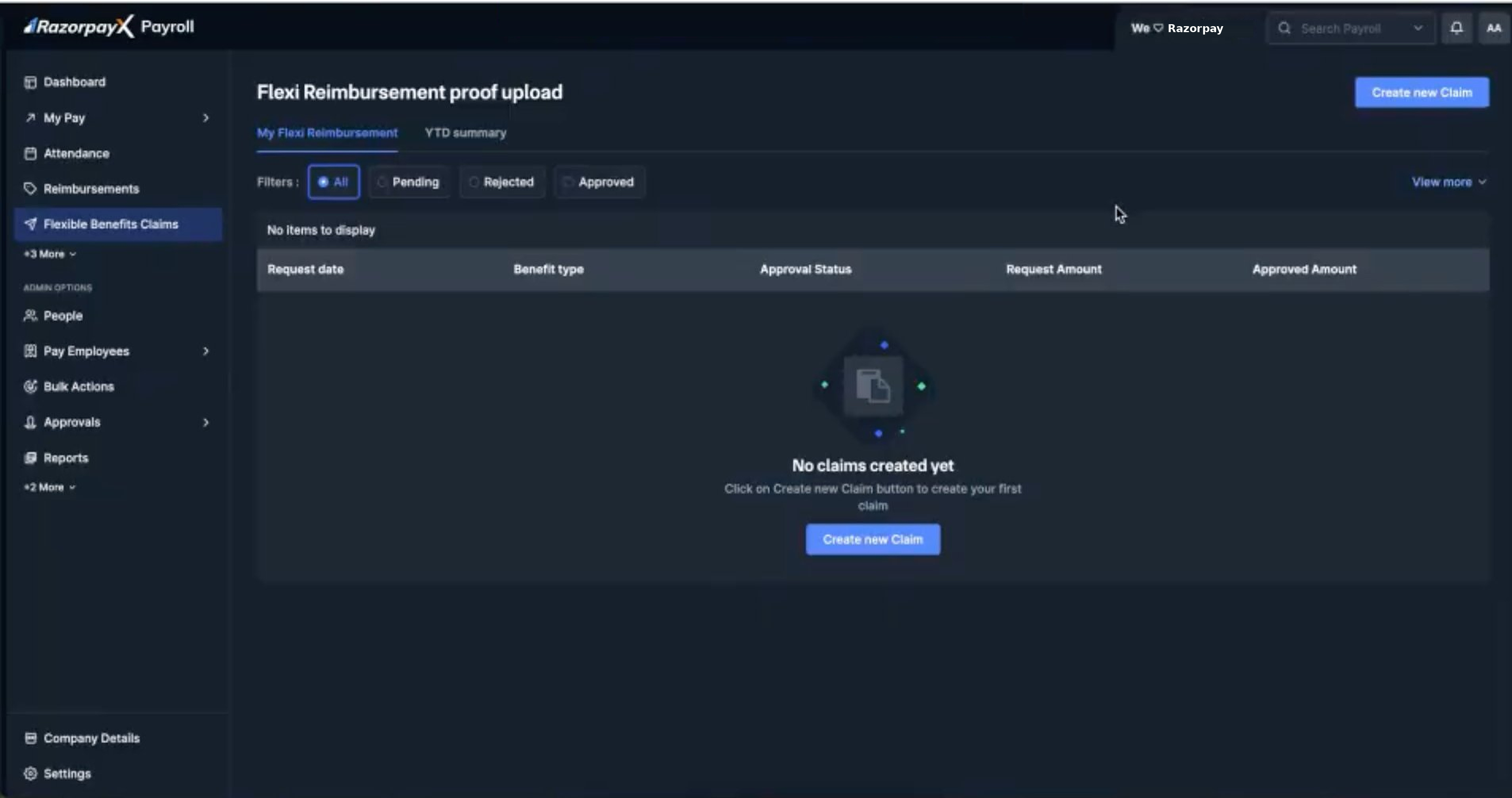 4. Click **Create new Claim** to open the **New Claim Upload** form.
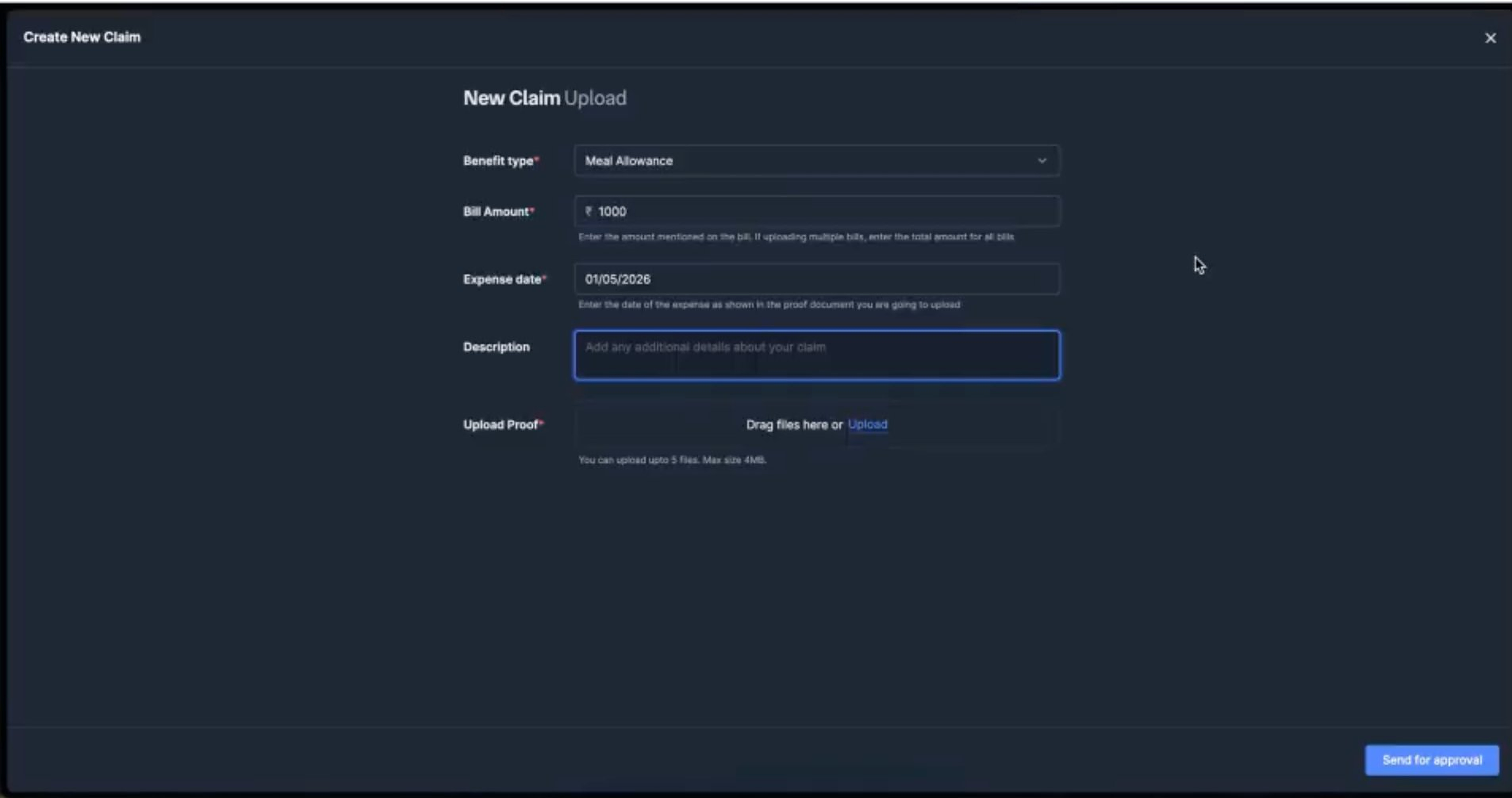
5. Fill in the claim details:
* **Benefit type:** select the flexi benefit you are claiming (for example, Meal Allowance). Only benefits you have declared are available.
* **Bill Amount:** enter the amount mentioned on the bill. If you are uploading multiple bills, enter the combined total for all bills.
* **Expense date:** enter the date of the expense as shown on the proof document, in DD/MM/YYYY format.
* **Description:** add any additional context about the claim. This field is optional.
* **Upload Proof:** drag the proof files into the upload area or click **Upload** to browse. You can upload up to **5 files** with a maximum size of **4 MB** each.
**Watch Out!**
Each claim is submitted independently and cannot be edited or withdrawn after **Send for approval**. Make sure the benefit type, amount, expense date and proof match the bill before submitting.
6. Click **Send for approval** to submit the claim.
4. Click **Create new Claim** to open the **New Claim Upload** form.
5. Fill in the claim details:
* **Benefit type:** select the flexi benefit you are claiming (for example, Meal Allowance). Only benefits you have declared are available.
* **Bill Amount:** enter the amount mentioned on the bill. If you are uploading multiple bills, enter the combined total for all bills.
* **Expense date:** enter the date of the expense as shown on the proof document, in DD/MM/YYYY format.
* **Description:** add any additional context about the claim. This field is optional.
* **Upload Proof:** drag the proof files into the upload area or click **Upload** to browse. You can upload up to **5 files** with a maximum size of **4 MB** each.
**Watch Out!**
Each claim is submitted independently and cannot be edited or withdrawn after **Send for approval**. Make sure the benefit type, amount, expense date and proof match the bill before submitting.
6. Click **Send for approval** to submit the claim.
 The claim moves to the **Pending** filter and appears in the claims list with its request date, benefit type, approval status, request amount and approved amount. Once your HR or Manager reviews it, the status updates to **Approved** or **Rejected** and the approved amount is reimbursed in your next payroll cycle.
## Revised FBP Limits
The following perquisite and allowance limits have been revised. These changes are applicable from FY 2026-27 onwards.
| Benefits | Old Limit | New Limit |
| ---------------------------- | --------------------------------------------------------------------------------------- | --------------------------------------------------------------------------------------------------- |
| Food/meals card | ₹50 per meal | ₹200 per meal |
| Child education allowance | ₹100 per month per child | ₹3,000 per month per child |
| Hostel expenditure allowance | ₹300 per month per child | ₹9,000 per month per child |
| HRA exemption | 50% of salary for 4 cities (Mumbai, Delhi, Kolkata, Chennai) | 50% of salary for 8 cities (Mumbai, Delhi, Kolkata, Chennai, Bengaluru, Hyderabad, Pune, Ahmedabad) |
| Transport allowance | 70% of allowance or ₹10,000 per month, whichever is lower | 70% of allowance or ₹25,000 per month, whichever is lower |
| Gift cards/coupons | ₹5,000 per year | ₹15,000 per year |
| Interest-free loans | Interest not taxable for loan below ₹20,000 | Interest not taxable for loan below ₹2,00,000 |
| Motor car perquisite | ₹1,800 per month for CC below 1.6L, ₹2,400 per month for CC above 1.6L, ₹900 for driver | ₹5,000 per month for CC below 1.6L, ₹7,000 per month for CC above 1.6L, ₹3,000 for driver |
### Related Information
* [IT Investments Declarations](/docs/payroll/employees/declarations)
* [New TDS/TCS Section Codes](/docs/payroll/tax-verifications/tax-codes)
* [Other benefits](/docs/payroll)
The claim moves to the **Pending** filter and appears in the claims list with its request date, benefit type, approval status, request amount and approved amount. Once your HR or Manager reviews it, the status updates to **Approved** or **Rejected** and the approved amount is reimbursed in your next payroll cycle.
## Revised FBP Limits
The following perquisite and allowance limits have been revised. These changes are applicable from FY 2026-27 onwards.
| Benefits | Old Limit | New Limit |
| ---------------------------- | --------------------------------------------------------------------------------------- | --------------------------------------------------------------------------------------------------- |
| Food/meals card | ₹50 per meal | ₹200 per meal |
| Child education allowance | ₹100 per month per child | ₹3,000 per month per child |
| Hostel expenditure allowance | ₹300 per month per child | ₹9,000 per month per child |
| HRA exemption | 50% of salary for 4 cities (Mumbai, Delhi, Kolkata, Chennai) | 50% of salary for 8 cities (Mumbai, Delhi, Kolkata, Chennai, Bengaluru, Hyderabad, Pune, Ahmedabad) |
| Transport allowance | 70% of allowance or ₹10,000 per month, whichever is lower | 70% of allowance or ₹25,000 per month, whichever is lower |
| Gift cards/coupons | ₹5,000 per year | ₹15,000 per year |
| Interest-free loans | Interest not taxable for loan below ₹20,000 | Interest not taxable for loan below ₹2,00,000 |
| Motor car perquisite | ₹1,800 per month for CC below 1.6L, ₹2,400 per month for CC above 1.6L, ₹900 for driver | ₹5,000 per month for CC below 1.6L, ₹7,000 per month for CC above 1.6L, ₹3,000 for driver |
### Related Information
* [IT Investments Declarations](/docs/payroll/employees/declarations)
* [New TDS/TCS Section Codes](/docs/payroll/tax-verifications/tax-codes)
* [Other benefits](/docs/payroll)