

Available in🇮🇳 India🇺🇸 United States
Post sign up, account activation and KYC verification you can start using APIs to make payouts. To make a payout, you must:
- Create a Contact
- Add a Fund Account for a contact.
- Create a Payout.
Handy TipsIt is assumed that you have already added funds to your business account. This action cannot be performed via APIs and has to be done before you can make a payout. Refer to the business account section to know how to add funds to your business account.
Payout APIs
You can try the Payout APIs on the Razorpay Postman Public Workspace. Know more about API parameters.
Test Mode
RazorpayX test mode is a replication of RazorpayX in a sandbox environment. It allows you to test all aspects of your integration before you go live. Actions taken in the test mode have no consequences in your live environment. Test mode has its own dummy balance. No real money is used in the test mode. Contacts, fund accounts and payouts created in the test mode do not appear in the live environment. You can create contacts and fund accounts using real-world or dummy data. For example, a contact created in the test mode does not carry over to the live mode and vice versa. Payouts made to a fund account in the test mode uses funds from the test account balance, which is not real money. Know more about Test Mode.API Gateway URL
For most of the Razorpay APIs, the Gateway URL ishttps://api.razorpay.com/v1. You need to include this before each API endpoint to make API calls. However, certain APIs are on V2. Hence, the gateway URL may differ for certain APIs.
Example
Example
Use the URL
https://api.razorpay.com/v1/payments to access payment resources.API Authentication
All our APIs are authenticated using Basic Auth. Basic auth requires the following:[YOUR_KEY_ID][YOUR_KEY_SECRET]
Generate API Key
Handy TipsIf you are an existing Razorpay merchant, you can use your existing API key with RazorpayX.
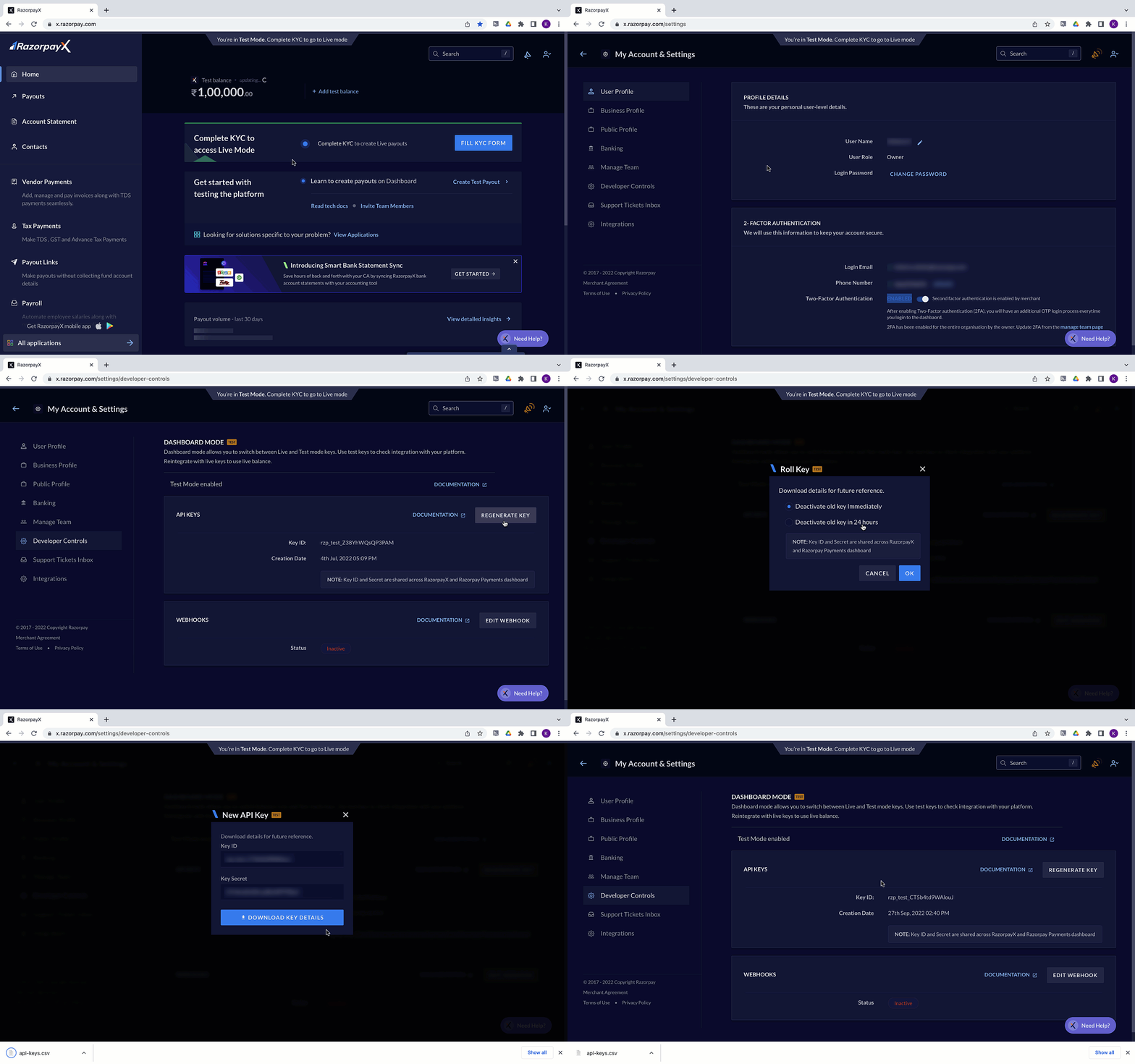
- Log in to your RazorpayX Dashboard.
- Navigate to the user icon on the top-right of the screen, and to My Account & Settings → Developer Controls.
- In the API Keys section, click GENERATE KEY, or REGENERATE KEY if you want to generate your API Keys again.
- API Keys are generated for your business account. Click Download Key Details to download your API Keys for future reference.
Rate Limits
Razorpay employs a request rate limiter that limits the number of requests received by the API within a time window. This is to maintain system stability in the event of unintentional high traffic loads. While integrating with APIs, watch forHTTP status code 429 and build the retry mechanism based on the requirement.
To make the best use of the limits, it is recommended to use an Exponential backoff/stepped backoff strategy to reduce request volume and stay within the limit. It is also recommended to have some randomization within the backoff schedule to avoid the thundering herd effect.