> ## Documentation Index
> Fetch the complete documentation index at: https://razorpay-881012b3.mintlify.site/llms.txt
> Use this file to discover all available pages before exploring further.
# Common Errors
> Check the list of common errors returned in the API responses from Razorpay and their solutions. Also, check the steps to view API errors.
Available in
🇮🇳 India
🇸🇬 Singapore
🇺🇸 United States
View the list of common errors and their solutions below:
**Cause**:
* Incorrect API method while calling the API.
* Feature required for the API call is not enabled on your account.
**Solution**:
- Check and use the correct API method.
```json Sample Error Response theme={null}
{
"error": {
"code": "BAD_REQUEST_ERROR",
"description": "The requested URL was not found on the server",
"source": "NA",
"step": "NA",
"reason": "NA",
"metadata": {}
}
}
```
**Cause**: Whitelisted IPs on your account.
**Solution**: to verify and confirm if any IPs are currently whitelisted on your account. If yes, remove the whitelisted IPs for both test and live modes.
```json Sample Error Response theme={null}
{
"error": {
"code": "BAD_REQUEST_ERROR",
"description": "Access Denied",
"source": "NA",
"step": "NA",
"reason": "NA",
"metadata": {}
}
}
```
**Cause**:
* Incorrect API key or secret used in the request.
* Test mode key used in live mode or vice versa.
* API key has been regenerated and the old key is still in use.
**Solution**:
* Verify that you are using the correct API key and secret from the [Dashboard](/docs/us/api/authentication).
* Ensure the key corresponds to the correct mode (test or live).
* If you have recently regenerated your API key, update it in your integration.
```json Sample Error Response theme={null}
{
"error": {
"code": "BAD_REQUEST_ERROR",
"description": "The api key provided is invalid",
"source": "NA",
"step": "NA",
"reason": "NA",
"metadata": {}
}
}
```
**Cause**:
* The entity ID (such as a payment ID, order ID or refund ID) passed in the request does not exist.
* The entity belongs to a different account than the one making the request.
* A test mode ID is used in live mode or vice versa.
**Solution**:
* Check that the ID is correct and belongs to the authenticated account.
* Ensure that the mode (test or live) matches the ID being used.
```json Sample Error Response theme={null}
{
"error": {
"code": "BAD_REQUEST_ERROR",
"description": "The id provided does not exist or access is unauthorised",
"source": "NA",
"step": "NA",
"reason": "NA",
"metadata": {}
}
}
```
**Cause**: One or more mandatory parameters were not included in the API request.
**Solution**:
* Review the API request and ensure all required parameters are included.
* Refer to the relevant API endpoint documentation to check which parameters are mandatory.
```json Sample Error Response theme={null}
{
"error": {
"code": "BAD_REQUEST_ERROR",
"description": "The amount field is required.",
"source": "business",
"step": "payment_initiation",
"reason": "input_validation_failed",
"metadata": {},
"field": "amount"
}
}
```
**Cause**:
* A parameter was passed with an incorrect data type, format or value (for example, a string passed where an integer is expected).
* A field value exceeds the allowed length or range.
**Solution**:
* Check the data type and format expected for each parameter in the API documentation.
* Ensure values fall within the allowed range or length limits.
```json Sample Error Response theme={null}
{
"error": {
"code": "BAD_REQUEST_ERROR",
"description": "The amount must be an integer.",
"source": "business",
"step": "payment_initiation",
"reason": "input_validation_failed",
"metadata": {},
"field": "amount"
}
}
```
**Cause**: Your integration has exceeded the allowed API request rate limit within a given time window.
**Solution**:
* Implement exponential backoff and retry logic in your integration.
* Reduce the frequency of API calls, particularly for polling-based implementations.
* Use webhooks instead of polling to receive real-time updates on payment and order events.
* To request a limit increase, contact [Razorpay Support](https://razorpay.com/support/). Requests are reviewed case-by-case and approved only for legitimate use cases.
```json Sample Error Response theme={null}
{
"error": {
"code": "BAD_REQUEST_ERROR",
"description": "Too many requests",
"source": "NA",
"step": "NA",
"reason": "NA",
"metadata": {}
}
}
```
**Cause**: An unexpected error occurred on the server while processing your request. This may be a transient issue.
**Solution**:
- Retry the request after a short delay.
- Ensure the request body does not contain unsupported characters such as emojis.
```json Sample Error Response theme={null}
{
"error": {
"code": "SERVER_ERROR",
"description": "We are facing some trouble completing your request at the moment. Please try again shortly.",
"source": "NA",
"step": "NA",
"reason": "NA",
"metadata": {}
}
}
```
**Handy Tips**
If you are using [our SDKs for integration](/docs/us/payments/server-integration), the error responses result in exceptions that need to be handled in your integration.
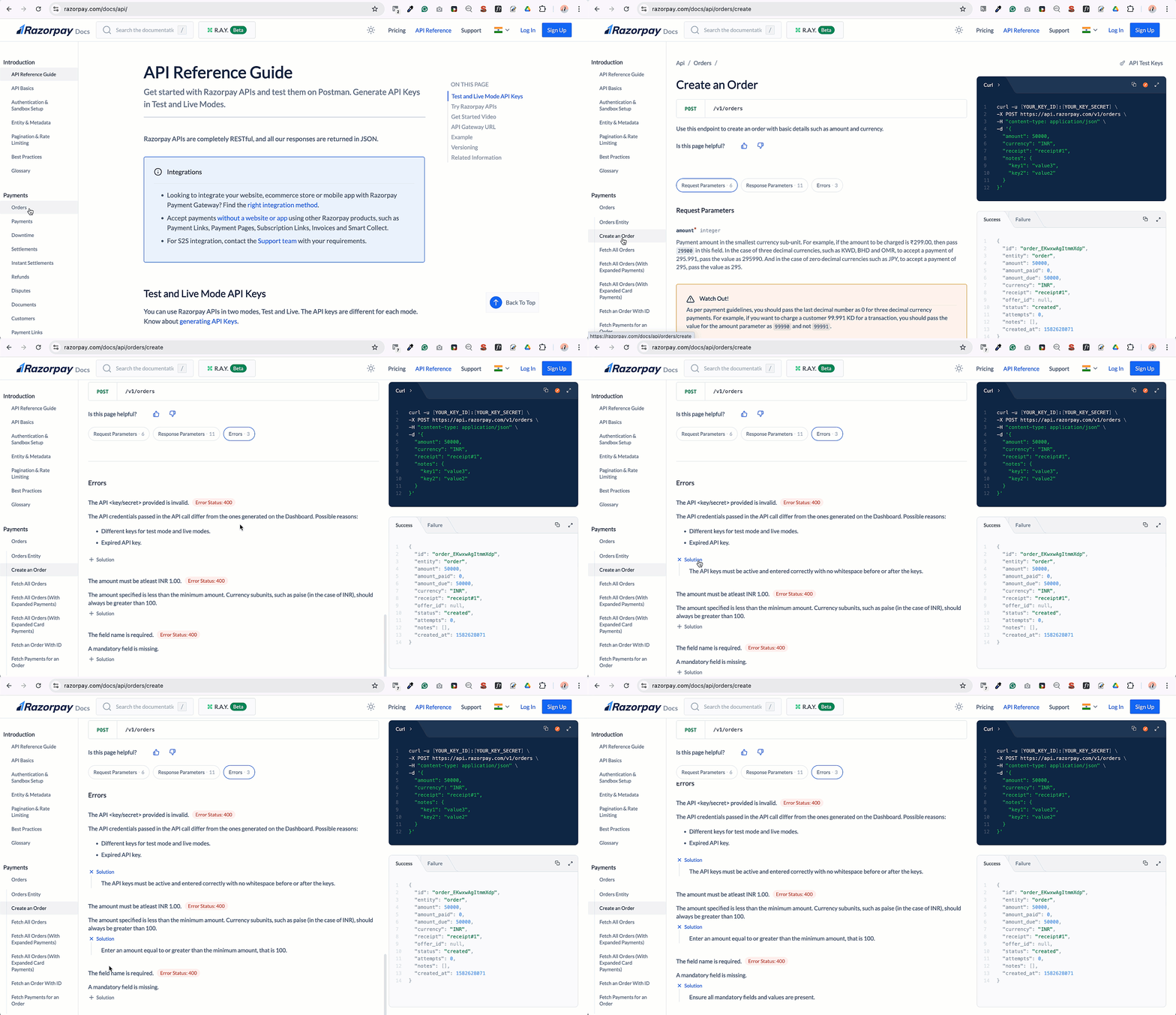
## Endpoint-Specific Errors
Each API endpoint page also lists errors specific to that operation — for example, errors you can only hit when creating an order, or when capturing a payment.
To view them:
1. Go to the relevant API endpoint page, such as [Create an Order](/docs/us/api/orders/create).
2. Click the **Errors** capsule. The list of errors is displayed.
 ### Related Information
* [Payment Error Codes](/docs/us/errors/payments/list)
* [UPI Errors](/docs/us/errors/payments/upi)
* [Card Errors](/docs/us/errors/payments/cards)
* [Payout Errors](/docs/us/errors/x)
### Related Information
* [Payment Error Codes](/docs/us/errors/payments/list)
* [UPI Errors](/docs/us/errors/payments/upi)
* [Card Errors](/docs/us/errors/payments/cards)
* [Payout Errors](/docs/us/errors/x)