> ## Documentation Index
> Fetch the complete documentation index at: https://razorpay-881012b3.mintlify.site/llms.txt
> Use this file to discover all available pages before exploring further.
# Frequently Asked Questions (FAQs)
> Find answers to frequently asked questions about Razorpay Subscriptions and Subscription links.
Available in
🇮🇳 India
🇸🇬 Singapore
🇺🇸 United States
## General
We support Subscriptions for a maximum duration of 100 years. The number of billing cycles depends if the subscription is billed daily, weekly, monthly or yearly.
You are unable to use the Add-Ons feature since it is deprecated.
## Plans
No. You cannot update or delete a Plan. You should create a new Plan. Alternatively, you can duplicate and modify an existing Plan as per your requirements.
To duplicate a Plan:
1. Log in to the Dashboard and click **Subscriptions** under **PAYMENT PRODUCTS** in the left menu.
2. Go to **Plans** and click on the required **Plan Id**.
3. Click the **Duplicate Plan** icon in the top-right corner of the pop-up, as shown in the screenshot below.
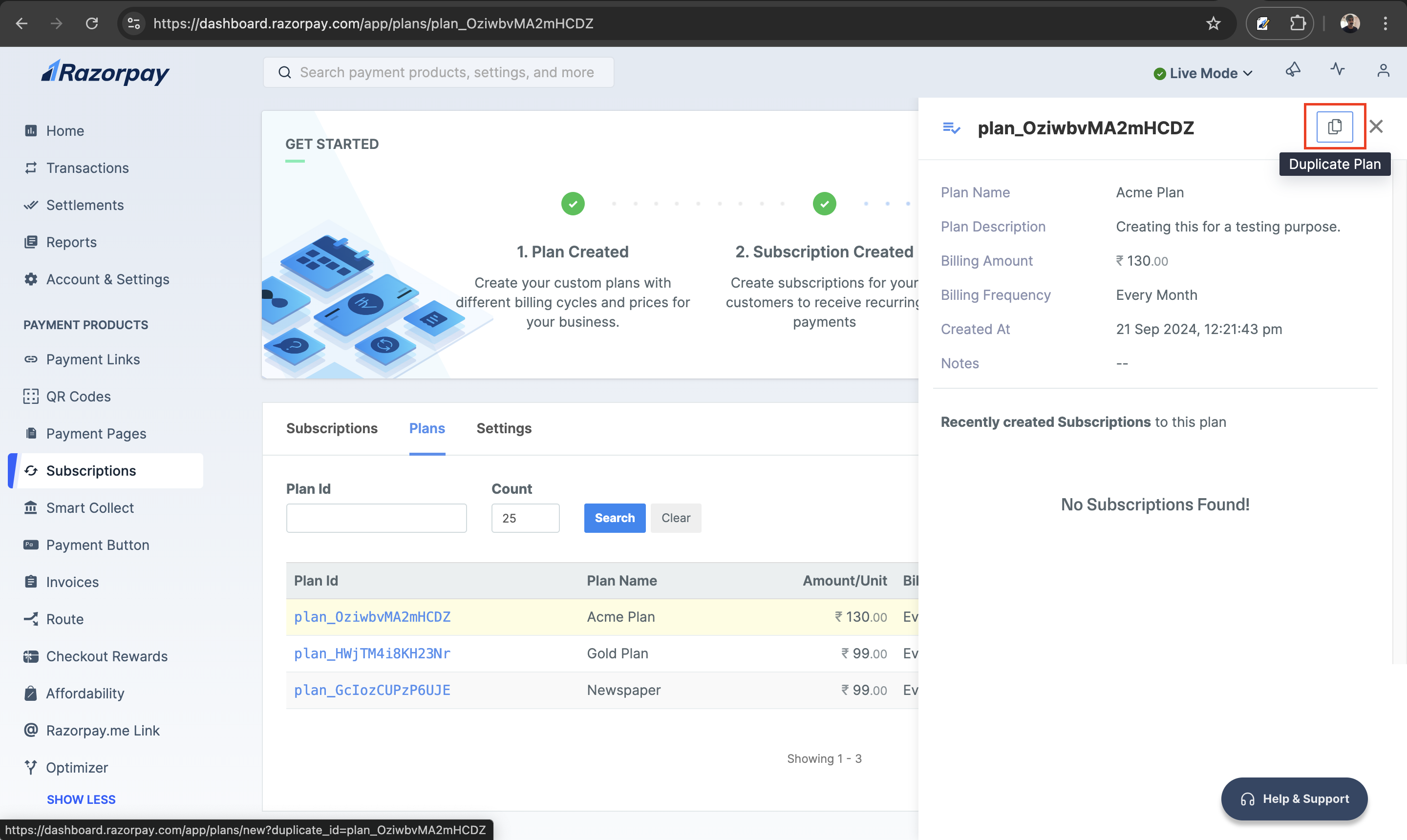 4. Edit the plan details as required and click **Create Plan**.
## Capture Payments
No. You do not need to capture the ₹5 token authorisation payment used to validate a customer's card . This amount is auto-refunded to the customer.
No. You do not need to capture payments made for a Subscription. Upfront amount and subsequent charges are auto-captured.
**Watch Out!**
The payment will not be captured if you cancel the Subscription before it gets authorised.
## Update Subscriptions
Yes. You can update details such as the plan amount, duration and quantity of a Subscription, even if it is live. Refer to the [Update Subscription section](/docs/us/payments/subscriptions/update) for more details.
**Watch Out!**
You can only update a Subscription authorised using cards and not via UPI and Emandate.
You can only update a Subscription when it is in `authenticated` and `active` states. There is no state change when you update a Subscription. Know about [Updating a Subscription](/docs/us/payments/subscriptions/update).
## Pause Subscriptions
Only the business can pause a subscription. Customers cannot pause it.
Subscriptions in the `active` state can be paused. You cannot pause a Subscription in any other state. Refer to the [life cycle](/docs/us/payments/subscriptions/states) section for more details.
You can pause a Subscription:
* [From the Dashboard](/docs/us/payments/subscriptions/pause-resume-cancel#pause-subscription-via-the-dashboard).
* [Using APIs](/docs/us/api/payments/subscriptions/pause-subscription).
## Resume Subscriptions
Only the business can resume subscriptions.
You can resume a Subscription:
* [From the Dashboard](/docs/us/payments/subscriptions/pause-resume-cancel#resume-subscription-via-the-dashboard).
* [Using APIs](/docs/us/api/payments/subscriptions/resume-subscription).
No. You cannot resume a Subscription paused by your customer. Only your customer can resume such Subscriptions.
## Cancel Subscriptions
Yes. You can cancel a Subscription:
* [From the Dashboard](/docs/us/payments/subscriptions/pause-resume-cancel).
* [Using APIs](/docs/us/api/payments/subscriptions/cancel-subscription).
You can set up the [subscription.cancelled](/docs/us/webhooks/subscriptions#subscription-cancelled) webhook event to get a notification when your customer cancels their Subscription. Know more about [subscribing to a webhook event](/docs/us/payments/subscriptions/subscribe-to-webhooks).
4. Edit the plan details as required and click **Create Plan**.
## Capture Payments
No. You do not need to capture the ₹5 token authorisation payment used to validate a customer's card . This amount is auto-refunded to the customer.
No. You do not need to capture payments made for a Subscription. Upfront amount and subsequent charges are auto-captured.
**Watch Out!**
The payment will not be captured if you cancel the Subscription before it gets authorised.
## Update Subscriptions
Yes. You can update details such as the plan amount, duration and quantity of a Subscription, even if it is live. Refer to the [Update Subscription section](/docs/us/payments/subscriptions/update) for more details.
**Watch Out!**
You can only update a Subscription authorised using cards and not via UPI and Emandate.
You can only update a Subscription when it is in `authenticated` and `active` states. There is no state change when you update a Subscription. Know about [Updating a Subscription](/docs/us/payments/subscriptions/update).
## Pause Subscriptions
Only the business can pause a subscription. Customers cannot pause it.
Subscriptions in the `active` state can be paused. You cannot pause a Subscription in any other state. Refer to the [life cycle](/docs/us/payments/subscriptions/states) section for more details.
You can pause a Subscription:
* [From the Dashboard](/docs/us/payments/subscriptions/pause-resume-cancel#pause-subscription-via-the-dashboard).
* [Using APIs](/docs/us/api/payments/subscriptions/pause-subscription).
## Resume Subscriptions
Only the business can resume subscriptions.
You can resume a Subscription:
* [From the Dashboard](/docs/us/payments/subscriptions/pause-resume-cancel#resume-subscription-via-the-dashboard).
* [Using APIs](/docs/us/api/payments/subscriptions/resume-subscription).
No. You cannot resume a Subscription paused by your customer. Only your customer can resume such Subscriptions.
## Cancel Subscriptions
Yes. You can cancel a Subscription:
* [From the Dashboard](/docs/us/payments/subscriptions/pause-resume-cancel).
* [Using APIs](/docs/us/api/payments/subscriptions/cancel-subscription).
You can set up the [subscription.cancelled](/docs/us/webhooks/subscriptions#subscription-cancelled) webhook event to get a notification when your customer cancels their Subscription. Know more about [subscribing to a webhook event](/docs/us/payments/subscriptions/subscribe-to-webhooks).