> ## Documentation Index
> Fetch the complete documentation index at: https://razorpay-881012b3.mintlify.site/llms.txt
> Use this file to discover all available pages before exploring further.
# Bulk Payouts Life Cycle
> Check the statuses that Payouts follow when they are made using the Bulk Upload feature.
Available in
🇮🇳 India
A payout created using the Bulk Upload feature can have the following statuses during its life cycle:
* `pending`
* `scheduled`
* `processing`
* `processed`
* `reversed`
* `cancelled`
* `rejected`
* `failed`
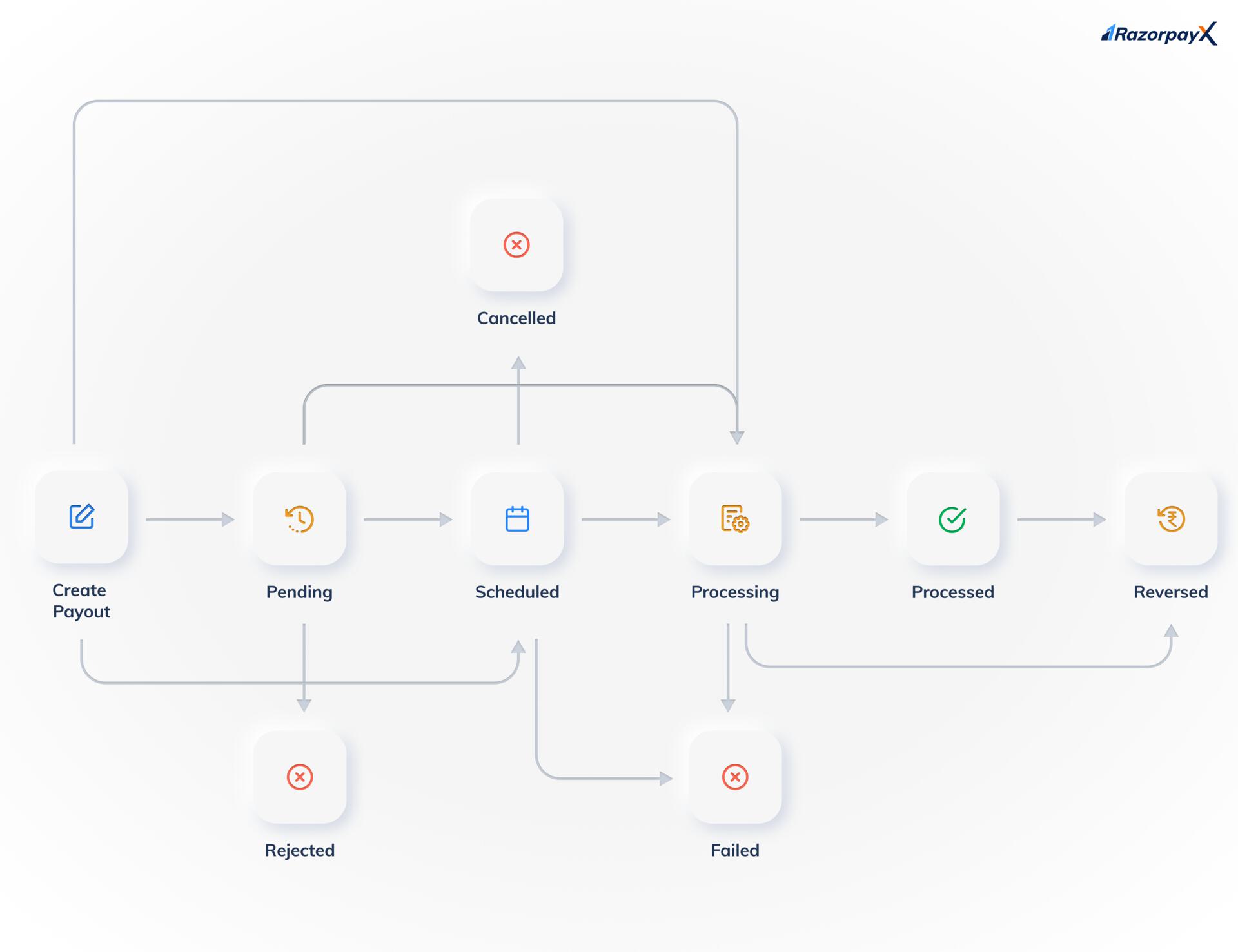 Know more about [payout life cycle and statuses](/docs/x/payouts/states-life-cycle).
**Handy Tips**
* Payouts created using the Bulk Upload feature are not queued. In case of insufficient balance, the payouts will fail.
* The `pending` and `rejected` statuses are available only if you have [Approval Workflow](/docs/x/manage-teams/approval-workflow) enabled on your account.
### Related Information
* [About Bulk Payouts](/docs/x/bulk-payouts)
* [Bulk Upload Status](/docs/x/bulk-payouts/uploads)
* [Bulk Upload Report](/docs/x/bulk-payouts/report)
Know more about [payout life cycle and statuses](/docs/x/payouts/states-life-cycle).
**Handy Tips**
* Payouts created using the Bulk Upload feature are not queued. In case of insufficient balance, the payouts will fail.
* The `pending` and `rejected` statuses are available only if you have [Approval Workflow](/docs/x/manage-teams/approval-workflow) enabled on your account.
### Related Information
* [About Bulk Payouts](/docs/x/bulk-payouts)
* [Bulk Upload Status](/docs/x/bulk-payouts/uploads)
* [Bulk Upload Report](/docs/x/bulk-payouts/report)