> ## Documentation Index
> Fetch the complete documentation index at: https://razorpay-881012b3.mintlify.site/llms.txt
> Use this file to discover all available pages before exploring further.
# Bulk Upload Report
> Download the Payouts Bulk Upload report for a summary of the Payouts, Contacts and Fund Accounts created, along with the failure reasons.
Available in
🇮🇳 India
Download the Bulk Upload report from the [RazorpayX Dashboard](https://x.razorpay.com/) after your bulk upload file gets [processed](/docs/x/bulk-payouts/uploads#bulk-upload-status).
## Fields in the Report
The report contains:
* A summary of the processed file.
* The Contacts, Fund Accounts and Payouts created and related information.
* Additional details as per the [fields populated in the Bulk Upload file](/docs/x/bulk-payouts#sample-template).
The report has the following additional coulmns you can use to check if the individual payouts were created and processed.
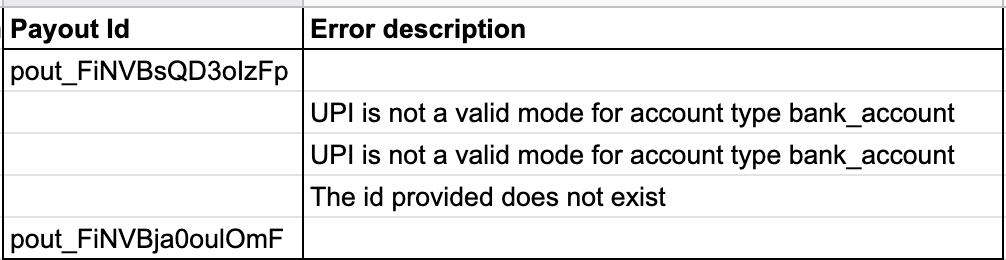 Payout Id and Error Description mention the reasons for when the payouts process has failed.
`Payout Id`
: `string` Unique identifier for the payout. Value is returned only if the payout is successfully created. For example, `pout_FMfjLUuRS9Hlzc`.
`Error Description`
: `string` The reason for the error. For example, `The id provided does not exist.`
To troubleshoot the errors that appear in the report, see [Bulk Uploads Error Codes](/docs/x/bulk-payouts).
### Related Information
* [About Bulk Payouts](/docs/x/bulk-payouts)
* [Bulk Payouts Life Cycle](/docs/x/bulk-payouts/life-cycle)
Payout Id and Error Description mention the reasons for when the payouts process has failed.
`Payout Id`
: `string` Unique identifier for the payout. Value is returned only if the payout is successfully created. For example, `pout_FMfjLUuRS9Hlzc`.
`Error Description`
: `string` The reason for the error. For example, `The id provided does not exist.`
To troubleshoot the errors that appear in the report, see [Bulk Uploads Error Codes](/docs/x/bulk-payouts).
### Related Information
* [About Bulk Payouts](/docs/x/bulk-payouts)
* [Bulk Payouts Life Cycle](/docs/x/bulk-payouts/life-cycle)