> ## Documentation Index
> Fetch the complete documentation index at: https://razorpay-881012b3.mintlify.site/llms.txt
> Use this file to discover all available pages before exploring further.
# Frequently Asked Questions (FAQs)
> Find answers to frequently asked questions about the RazorpayX Dashboard.
Available in
🇮🇳 India
## General
Unfortunately, we do not support freelancers/individuals on [RazorpayX](/docs/x) at the moment.
Downloadable reports are available in every section of the Dashboard. Currently only `.csv` and `.xls` based reports are available. Know more about [Reports](/docs/x/reports).
Navigate to Account Statement on the RazorpayX Dashboard to generate the report. Know more about [Account Statement](/docs/x/account-statement).
Yes, we provide monthly invoices. You can download the invoice from the Billing section of your Dashboard. Know more about [Billing reports](/docs/x/manage-teams/billing#billing-reports).
[RazorpayX](/docs/x) Insights help businesses analyse and manage their expenses better and empower them to take more informed and impactful business decisions.
No, [Razorpay](/docs/payments) and [RazorpayX](/docs/x) are different platforms. Transactions created on Razorpay will not show up on RazorpayX platform and vice versa, neither on dashboard nor reports.
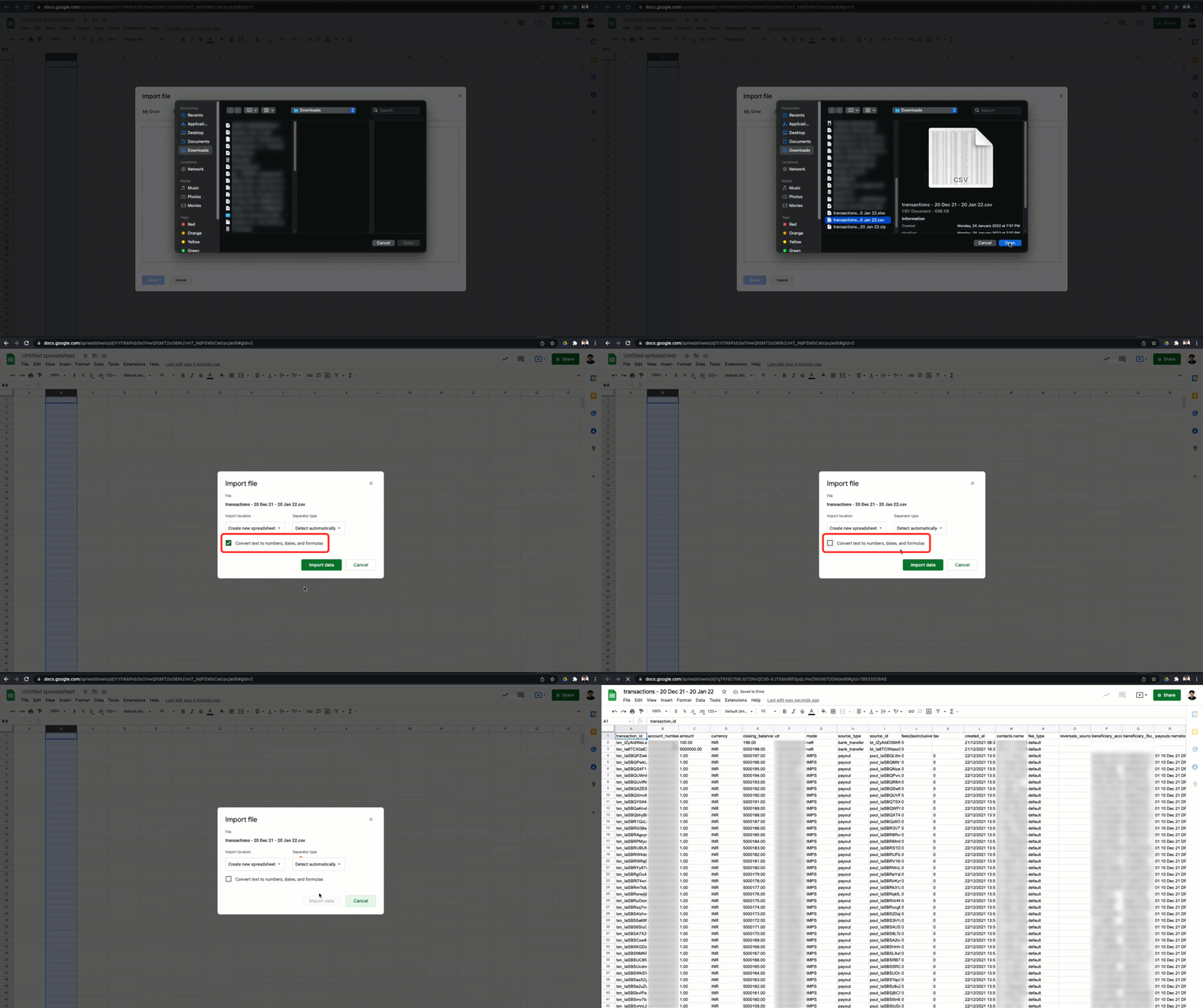
In some cases, Google Sheets/Microsoft Excel/other similar applications delete the zeros from account numbers or round off contact numbers. To avoid this, ensure your numbers are not scientifically formatted.
For example, in Google Sheets, you can unselect the **Convert text to numbers, dates and formulas** checkbox, as shown.
 You can visit our [support page](/docs/x/support) to reach out to our support team.
## Two-Factor Authentication
For security reasons, a user account gets locked when the user enters the wrong OTP 9 times. In such scenarios, the user should contact their respective account owner. The account owner can unlock the users' accounts.
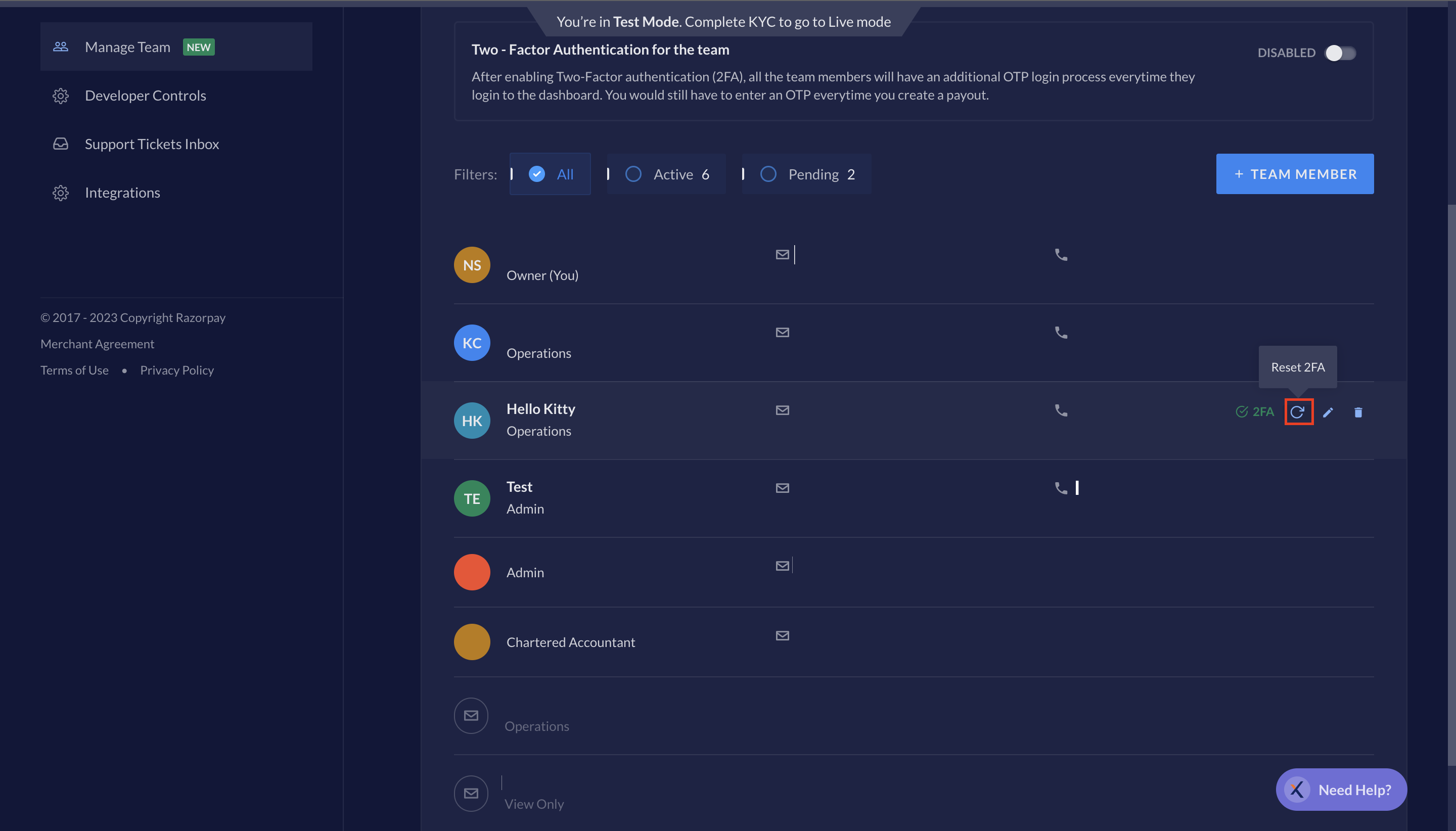
If a user loses the mobile device, the user should reach out to the respective account owner. The account owner can **Reset 2FA** for the user. The next time the user logs into the Dashboard, they user will be asked to enter the mobile number. Hover over the respective team member's name under manage team to find the Reset 2FA option.
You can visit our [support page](/docs/x/support) to reach out to our support team.
## Two-Factor Authentication
For security reasons, a user account gets locked when the user enters the wrong OTP 9 times. In such scenarios, the user should contact their respective account owner. The account owner can unlock the users' accounts.
If a user loses the mobile device, the user should reach out to the respective account owner. The account owner can **Reset 2FA** for the user. The next time the user logs into the Dashboard, they user will be asked to enter the mobile number. Hover over the respective team member's name under manage team to find the Reset 2FA option.
 If user account gets locked for security reasons, contact our [Support Team](/docs/x/support) to **Reset 2FA** for your account.
If an account owner has lost their mobile device, contact our [Support Team](/docs/x/support) to **Reset 2FA** for your account.
## Manage Teams
Yes, you can invite a new or existing user from your team on Razorpay. Once the invite is sent, if the invited member is already on your Razorpay team, they can log in to RazorpayX platform with their current login credentials. However, if the invited member is new, they will have to set up new login credentials by clicking on the confirmation link sent via email.
Yes, you can assign different set of roles to a team member as per your requirement to [manage your team](/docs/x/manage-teams).
Only the Owner will have access to RazorpayX account. However, you can add members and assign roles just as Razorpay PG.
If user account gets locked for security reasons, contact our [Support Team](/docs/x/support) to **Reset 2FA** for your account.
If an account owner has lost their mobile device, contact our [Support Team](/docs/x/support) to **Reset 2FA** for your account.
## Manage Teams
Yes, you can invite a new or existing user from your team on Razorpay. Once the invite is sent, if the invited member is already on your Razorpay team, they can log in to RazorpayX platform with their current login credentials. However, if the invited member is new, they will have to set up new login credentials by clicking on the confirmation link sent via email.
Yes, you can assign different set of roles to a team member as per your requirement to [manage your team](/docs/x/manage-teams).
Only the Owner will have access to RazorpayX account. However, you can add members and assign roles just as Razorpay PG.