> ## Documentation Index
> Fetch the complete documentation index at: https://razorpay-881012b3.mintlify.site/llms.txt
> Use this file to discover all available pages before exploring further.
# Downtime Alerts
> Get notified for partner and beneficiary bank downtimes via email & SMS and webhooks respectively via RazorpayX.
Available in
🇮🇳 India
When banks experience downtimes, payouts you initiate on the RazorpayX Dashboard may fail, that is, the payouts move to the `failed` or `deemed_duccess` state. Know more about [Payout States](/docs/x/payouts/states-life-cycle).
You can enable downtime alerts for partner banks (ICICI/Yes Bank/Axis) and for beneficiary banks (where the recipient receives the amount in their Fund account).
* [For partner banks](#enable-partner-bank-downtime-alerts), we send alerts about downtimes via SMS and email.
* [For beneficiary banks](#enable-beneficiary-bank-downtime-alerts), you can enable webhooks and get notified about downtimes.
## Partner Bank Downtime Alerts
To receive alerts for partner bank downtime via email and SMS, [contact support](/docs/x/support#razorpayx-users). We shall enable the feature for you in 2 days.
* Downtime notifications are sent for RazorpayX powered Current, Escrow and Lite accounts.
* We notify you of the partner bank downtimes in near real-time. This is usually within 15 minutes from when the downtime started.
## Beneficiary Bank Downtime Alerts
When you make payouts, it is possible that the recipient's bank/beneficiary bank is experiencing downtime. In such cases, your payouts can fail. To make a successful payout, you must retry the payout after the bank restores normalcy.
You can get notified about the beneficiary bank downtimes via [Payout Webhook](/docs/x/apis/subscribe) events. To enable downtime webhooks:
1. Follow the steps to [set up Payout Webhooks](/docs/webhooks/setup-edit-payouts#set-up-and-edit-webhooks).
1) Log in to the [RazorpayX Dashboard](https://x.razorpay.com/).
2) Go to the user profile icon → **My Account & Settings** → **Developer Controls** in the left menu.
3) Click **+ ADD WEBHOOK** if you are setting up webhooks for the first time. Otherwise, hover over the already added webhook and click **EDIT WEBHOOK**.
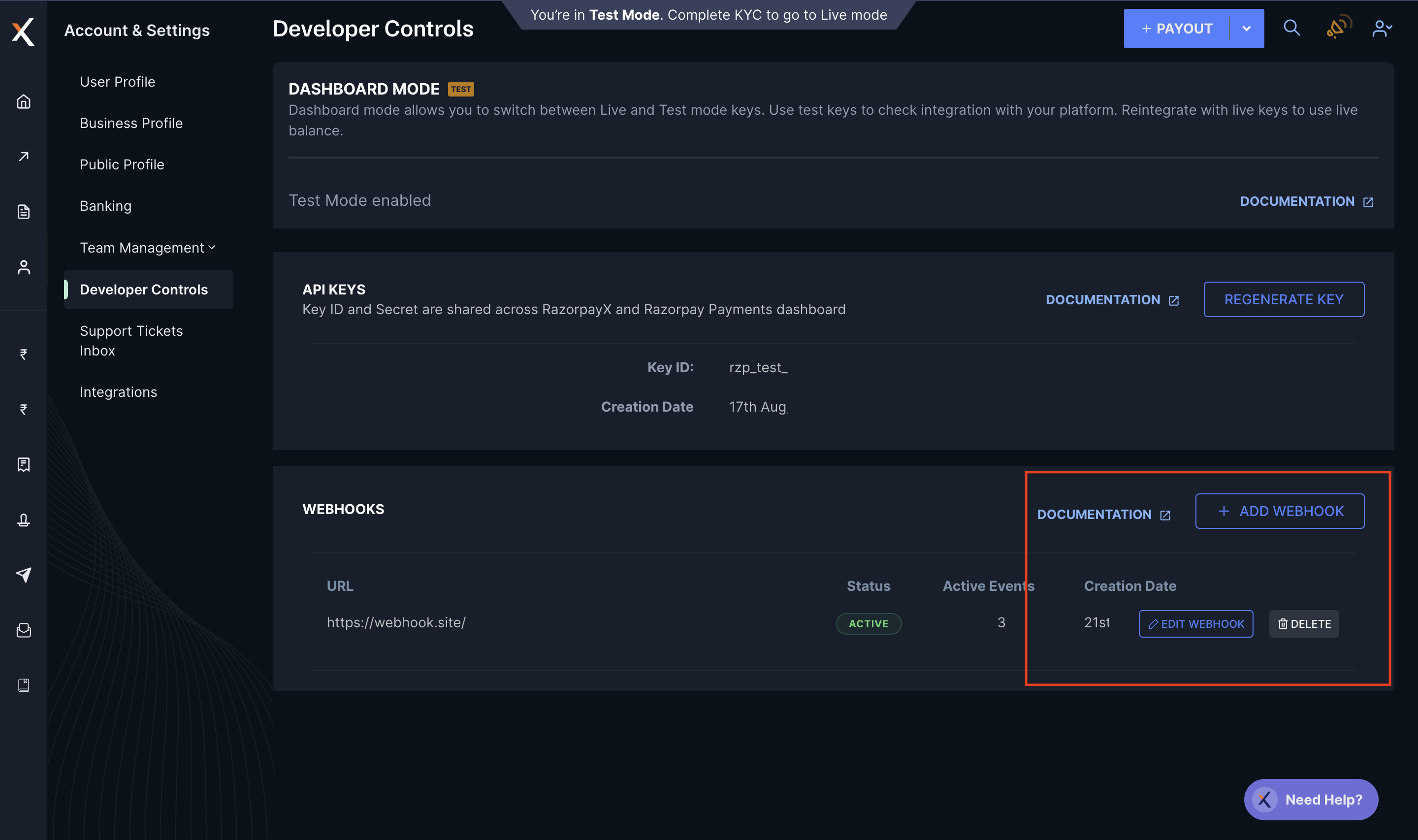 1. In the **Active Events** list on the RazorpayX Dashboard, select the following webhook events:
* payout.downtime.started
* payout.downtime.resolved
1. In the **Active Events** list on the RazorpayX Dashboard, select the following webhook events:
* payout.downtime.started
* payout.downtime.resolved
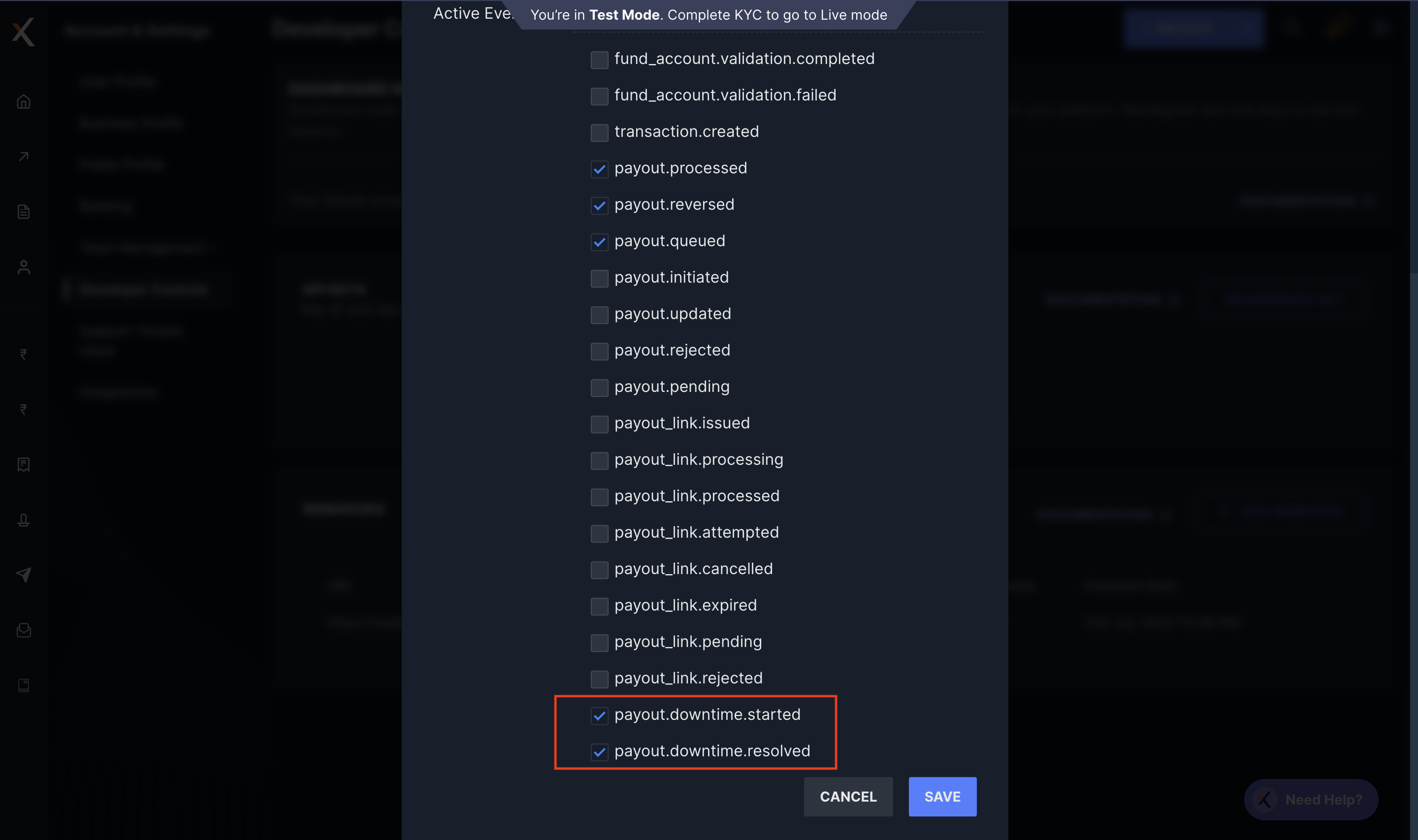 1. Click **SAVE**.
You have successfully enabled the downtime webhooks for beneficiary banks. Whenever your beneficiary banks experience downtimes, we notify you at the webhook URL you selected during [webhook setup](#enable-partner-bank-downtime-alerts).
### Downtime Webhooks
There are two downtime webhooks. Refer to the respective webhooks for the sample payloads and format.
* [payout.downtime.started](/docs/webhooks/payouts#payout-downtime-started): Triggered when the beneficiary bank downtime begins.
* [payout.downtime.resolved](/docs/webhooks/payouts#payout-downtime-resolved): Triggered when the beneficiary bank has resolved the downtime.
`id`
: The unique reference id created for each downtime alert. For example, `poutdown_F1Zppa6lcVheSE`.
`method`
: Contains the list of [payout modes/methods](/docs/x/payouts#payout-modes-and-tat) impacted. For example, `IMPS`, `UPI` and more.
`begin`
: Timestamp in Unix when the beneficiary bank downtime started.
`end`
: Timestamp in Unix when the beneficiary bank downtime ended.
1. Click **SAVE**.
You have successfully enabled the downtime webhooks for beneficiary banks. Whenever your beneficiary banks experience downtimes, we notify you at the webhook URL you selected during [webhook setup](#enable-partner-bank-downtime-alerts).
### Downtime Webhooks
There are two downtime webhooks. Refer to the respective webhooks for the sample payloads and format.
* [payout.downtime.started](/docs/webhooks/payouts#payout-downtime-started): Triggered when the beneficiary bank downtime begins.
* [payout.downtime.resolved](/docs/webhooks/payouts#payout-downtime-resolved): Triggered when the beneficiary bank has resolved the downtime.
`id`
: The unique reference id created for each downtime alert. For example, `poutdown_F1Zppa6lcVheSE`.
`method`
: Contains the list of [payout modes/methods](/docs/x/payouts#payout-modes-and-tat) impacted. For example, `IMPS`, `UPI` and more.
`begin`
: Timestamp in Unix when the beneficiary bank downtime started.
`end`
: Timestamp in Unix when the beneficiary bank downtime ended.
For **payout.downtime.started webhook**, this parameter response is `NULL`.
`status`
: The status of the downtime, whether it is ongoing or resolved. Possible values:
* `started`
* `resolved`
`scheduled`
: Contains whether the downtime was a scheduled downtime. Possible values:
* `true` (if the downtime was scheduled and informed)
* `false` (if the downtime is unscheduled)
`source`
: The source of the downtime. Possible value: `beneficiary`.
`instrument.bank`
: Four-digit alpha code of the beneficiary bank. For example, `SBI`.
## Alternate Payout Options
In case of downtimes, you can opt for Payouts Pro. You can either:
* Customise and route your payouts via other bank accounts using [Multi-bank Routing](/docs/x/payouts/multi-bank-routing).
* Let RazorpayX automatically queue and process your payouts via [Intelligent payouts](/docs/x/payouts/intelligent-payouts).
### Related Information
* [About Payouts](/docs/x/payouts)
* [Payout Best Practices](/docs/x/payouts/best-practices)
* [Check Payout Status Details](/docs/x/payouts/status-details)