> ## Documentation Index
> Fetch the complete documentation index at: https://razorpay-881012b3.mintlify.site/llms.txt
> Use this file to discover all available pages before exploring further.
# Scheduled Payouts
> Use the Scheduled payouts to set up payouts up to 3 months in advance.
Available in
🇮🇳 India
Use the RazorpayX Scheduled payouts to schedule payouts to your Contact's bank account or VPA, to be processed at a later time. For example, you can use Scheduled payouts to schedule salary payouts for your employees.
* Your account balance is not blocked when you create a Scheduled payout.
* You can schedule as many payouts as you like irrespective of your account balance. We check your account balance at the time of processing.
* You can schedule payouts up to 3 months in advance, thus allowing you to better plan the float in your account.
**Handy Tips**
* This feature is only available on the RazorpayX Dashboard. It is not available on APIs.
* You cannot schedule payouts to cards.
## How it Works
You can create Scheduled payouts via the RazorpayX Dashboard or using Bulk Upload.
The process to create a Scheduled payout is similar to how you create a regular payout.
1. Create a [Contact](/docs/x/dashboard/test-mode#contacts).
2. Create a [Fund account](/docs/x/contacts#fund-accounts) for the Contact.
3. Create a payout.
### Individual Payout
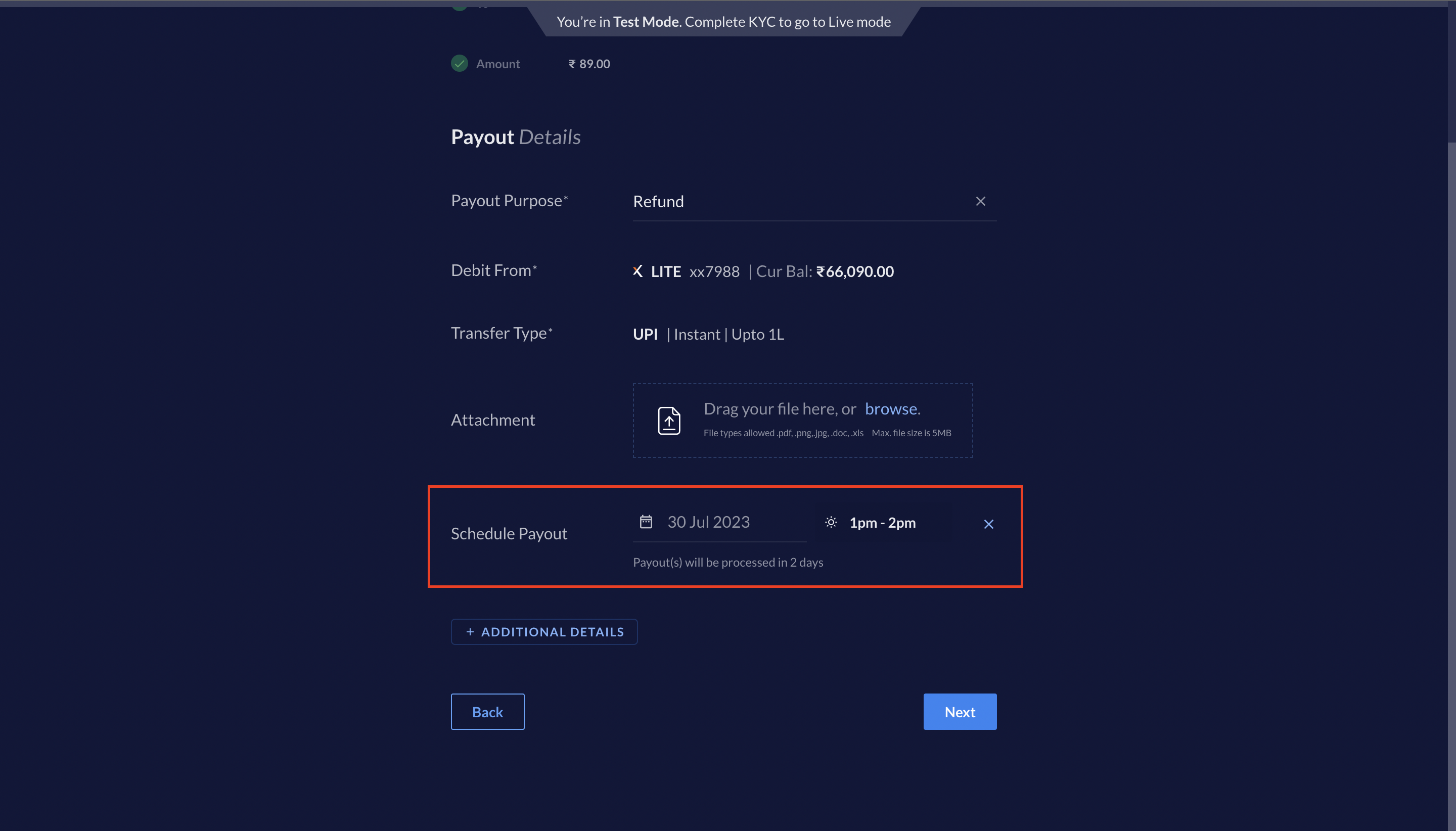
You can create a Scheduled payout via the RazorpayX Dashboard. To create a Scheduled payout, select the following options while creating a payout:
1. Select **Schedule the payout**.
2. Select a date when you want the payout to be processed. You can schedule payouts up to 3 months in advance.
3. Select a time slot when you want the payout to be processed. Following are the 4 slots available:
* 9 a.m. to 10 a.m.
* 1 p.m. to 2 p.m.
* 5 p.m. to 6 p.m.
* 9 p.m. to 10 p.m.
After a payout is created, it moves to the `pending` or `scheduled` state.
 ### Bulk Upload
You can create Scheduled payouts created using [Bulk Upload](/docs/x/contacts/bulk-uploads). Select the following options while uploading the bulk upload file:
1. Select **Schedule the payout**.
2. Select the date when you want the payout to be processed. You can schedule payouts up to 3 months in advance.
3. Select a time slot when you want the payout to be processed. Following are the 4 slots available:
* 9 a.m. to 10 a.m.
* 1 p.m. to 2 p.m.
* 5 p.m. to 6 p.m.
* 9 p.m. to 10 p.m.
After a bulk file is uploaded, it is picked up for processing immediately. Know more about [bulk payouts](/docs/x/bulk-payouts).
Payouts created via the bulk upload move to either the `pending` or `scheduled` state.
**Handy Tips**
You cannot use this feature to schedule when a bulk upload file is picked up for processing. Once uploaded, the bulk upload file is processed immediately. The individual payouts created are scheduled as per the selected options.
### Life Cycle
A scheduled payout can have the following statuses during its life cycle:
* `pending`
* `scheduled`
* `processing`
* `processed`
* `reversed`
* `cancelled`
* `rejected`
* `failed`
### Bulk Upload
You can create Scheduled payouts created using [Bulk Upload](/docs/x/contacts/bulk-uploads). Select the following options while uploading the bulk upload file:
1. Select **Schedule the payout**.
2. Select the date when you want the payout to be processed. You can schedule payouts up to 3 months in advance.
3. Select a time slot when you want the payout to be processed. Following are the 4 slots available:
* 9 a.m. to 10 a.m.
* 1 p.m. to 2 p.m.
* 5 p.m. to 6 p.m.
* 9 p.m. to 10 p.m.
After a bulk file is uploaded, it is picked up for processing immediately. Know more about [bulk payouts](/docs/x/bulk-payouts).
Payouts created via the bulk upload move to either the `pending` or `scheduled` state.
**Handy Tips**
You cannot use this feature to schedule when a bulk upload file is picked up for processing. Once uploaded, the bulk upload file is processed immediately. The individual payouts created are scheduled as per the selected options.
### Life Cycle
A scheduled payout can have the following statuses during its life cycle:
* `pending`
* `scheduled`
* `processing`
* `processed`
* `reversed`
* `cancelled`
* `rejected`
* `failed`
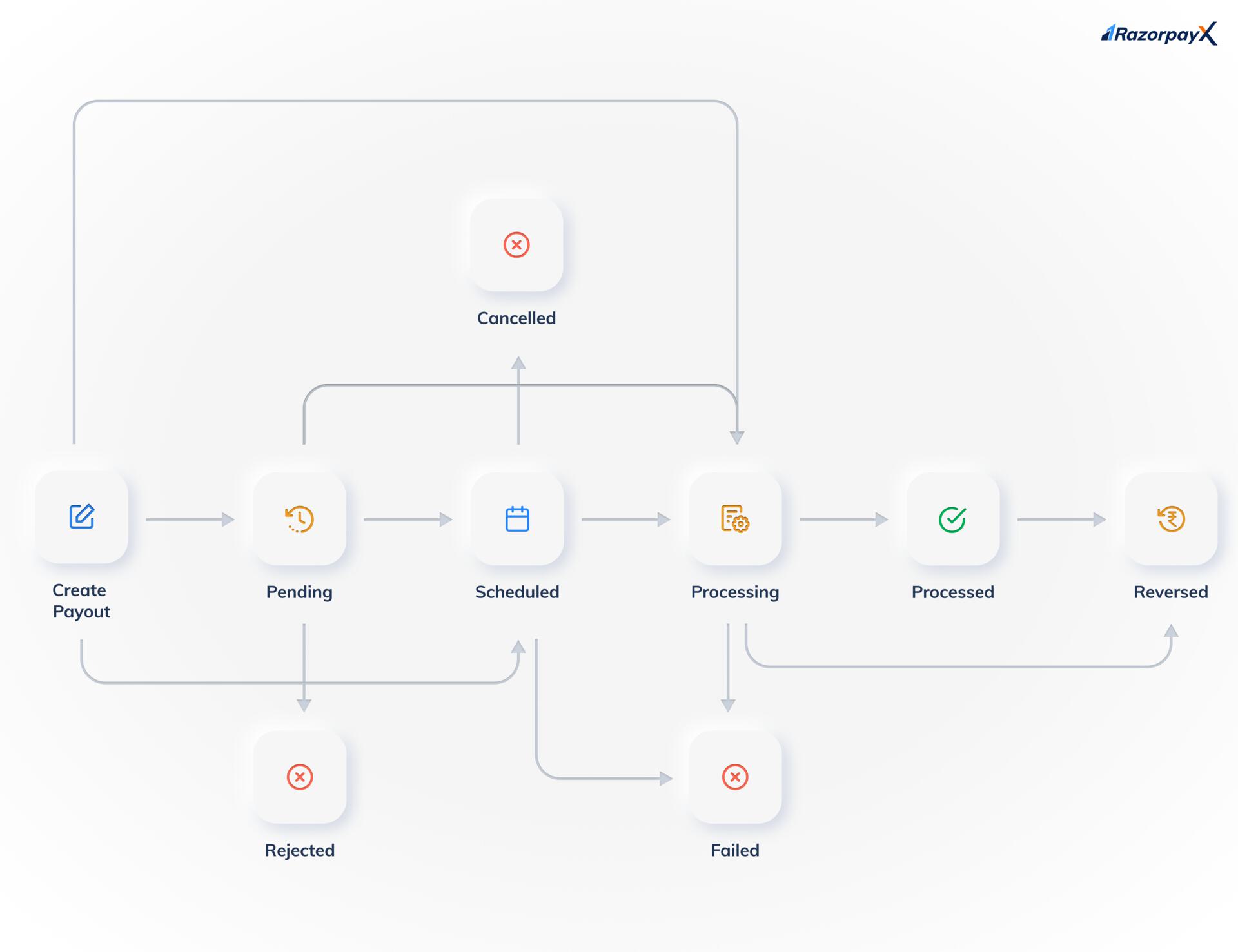 Know more about the [states and the life cycle of a payout](/docs/x/payouts/states-life-cycle).
**Handy Tips**
The `Pending` and `Rejected` states are available only if you have [Approval Workflow](/docs/x/manage-teams/approval-workflow) enabled on your account.
### Related Information
* [Payout Life Cycle and States](/docs/x/payouts/states-life-cycle)
* [Queued Payouts](/docs/x/payouts/queued)
* [Intelligent Payouts](/docs/x/payouts/intelligent-payouts)
* [Payouts to Cards](/docs/x/payouts/cards)
* [Payout Status Details](/docs/errors/x/payout-status-details)
* [Payout Best Practices](/docs/x/payouts/best-practices)
Know more about the [states and the life cycle of a payout](/docs/x/payouts/states-life-cycle).
**Handy Tips**
The `Pending` and `Rejected` states are available only if you have [Approval Workflow](/docs/x/manage-teams/approval-workflow) enabled on your account.
### Related Information
* [Payout Life Cycle and States](/docs/x/payouts/states-life-cycle)
* [Queued Payouts](/docs/x/payouts/queued)
* [Intelligent Payouts](/docs/x/payouts/intelligent-payouts)
* [Payouts to Cards](/docs/x/payouts/cards)
* [Payout Status Details](/docs/errors/x/payout-status-details)
* [Payout Best Practices](/docs/x/payouts/best-practices)