> ## Documentation Index
> Fetch the complete documentation index at: https://razorpay-881012b3.mintlify.site/llms.txt
> Use this file to discover all available pages before exploring further.
# Check Payout Status
> Check the status of payouts on the RazorpayX Dashboard.
Available in🇮🇳 India
Payout Status details are returned when a payout is created and moves to another state. Know more about [Payout States](/docs/x/payouts/states-life-cycle).
**Watch Out!**
The `failure_reason`, `queueing_details` and `cancellation_details` fields, along with the error object, would be deprecated from the API response. Please move to Payout status details to understand the status of your payout and share this information with your developers.
## About Status Details
Status details shows intermediate statuses (`pending`, `processing`, `queued`) and terminal states (`reversed` and `failed`) along with the payout clearance SLA. You can view the status of a payout in the following places:
* [RazorpayX Dashboard](#check-status-on-dashboard)
* [Fetch Payout API response](/docs/errors/x/payout-status-details)
* [Webhook Payloads](/docs/webhooks)
Status details also tells you why a payout is in the `processing` state. Some reasons include:
* [Deemed Success](https://razorpay.com/blog/business-banking/payout-processing-imps-upi-transactions-deemed-success-npci/)
* NEFT/RTGS off hours
* Partner bank or beneficiary bank issues
* Other bank or server issues
Whenever an attribute in the status details changes, we send a payout update webhook, which you can use to inform your beneficiaries.
## Check Status on Dashboard
You can check the status details of a payout in three ways on the RazorpayX Dashboard.
1. Log in to the [RazorpayX Dashboard](https://x.razorpay.com/auth).
2. Navigate to either of the following.
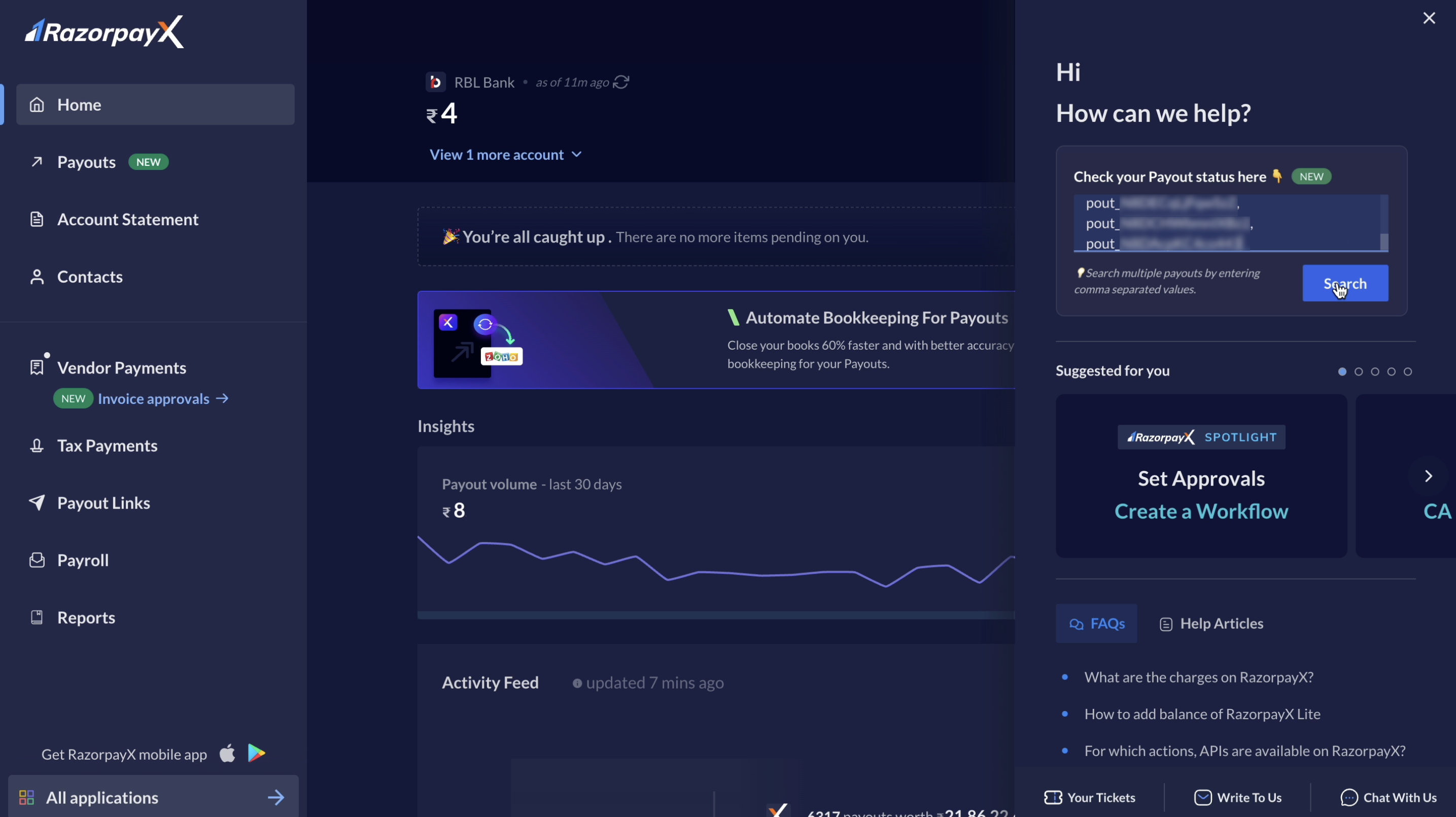
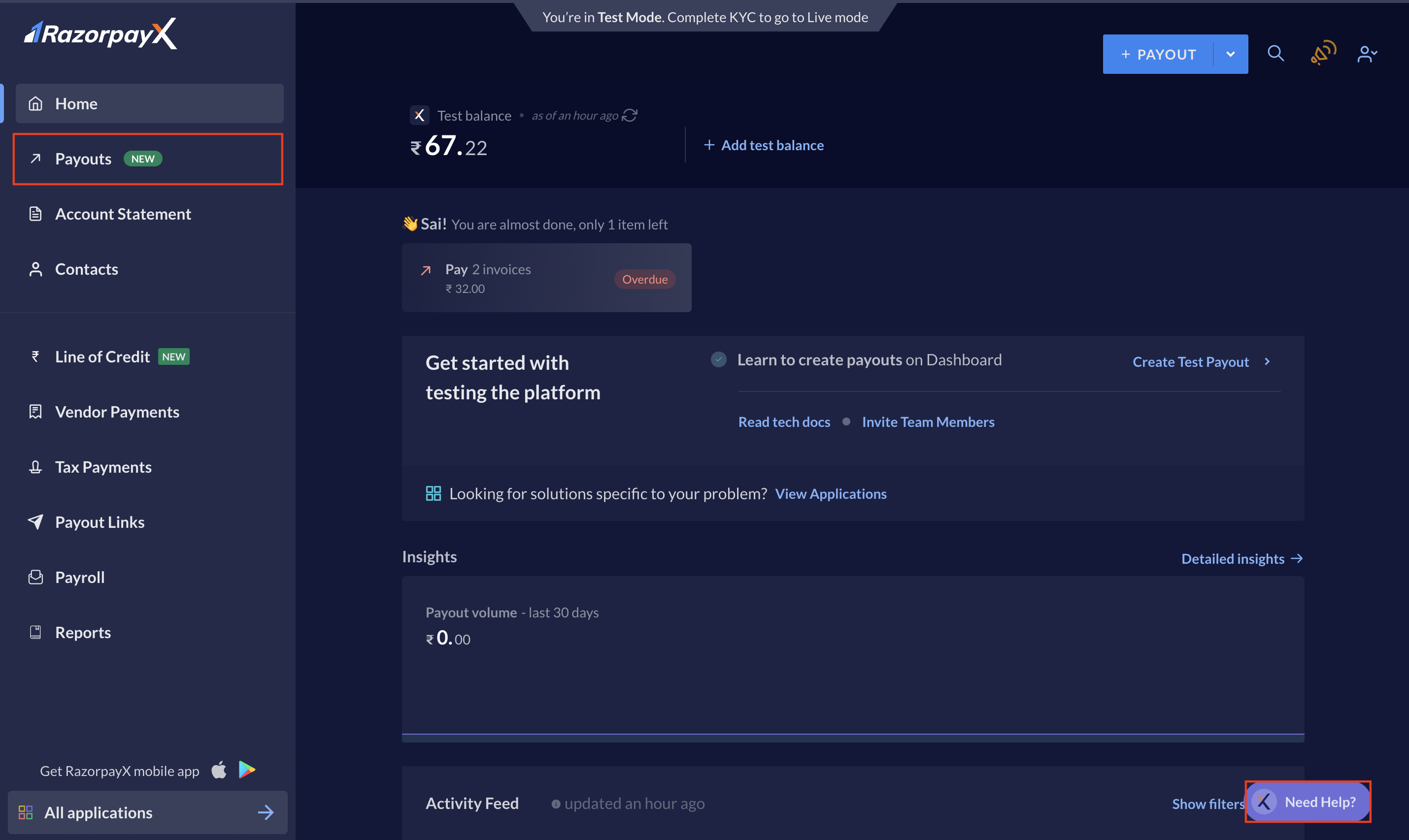
You can check the payout status using the **Need Help?** button at the bottom-right corner of the Dashboard. Watch the video below or read along.
1. Click the **Need Help?** widget.
2. In the right pane, use commas to enter multiple Payout IDs in the text box.
3. Click **Search**.
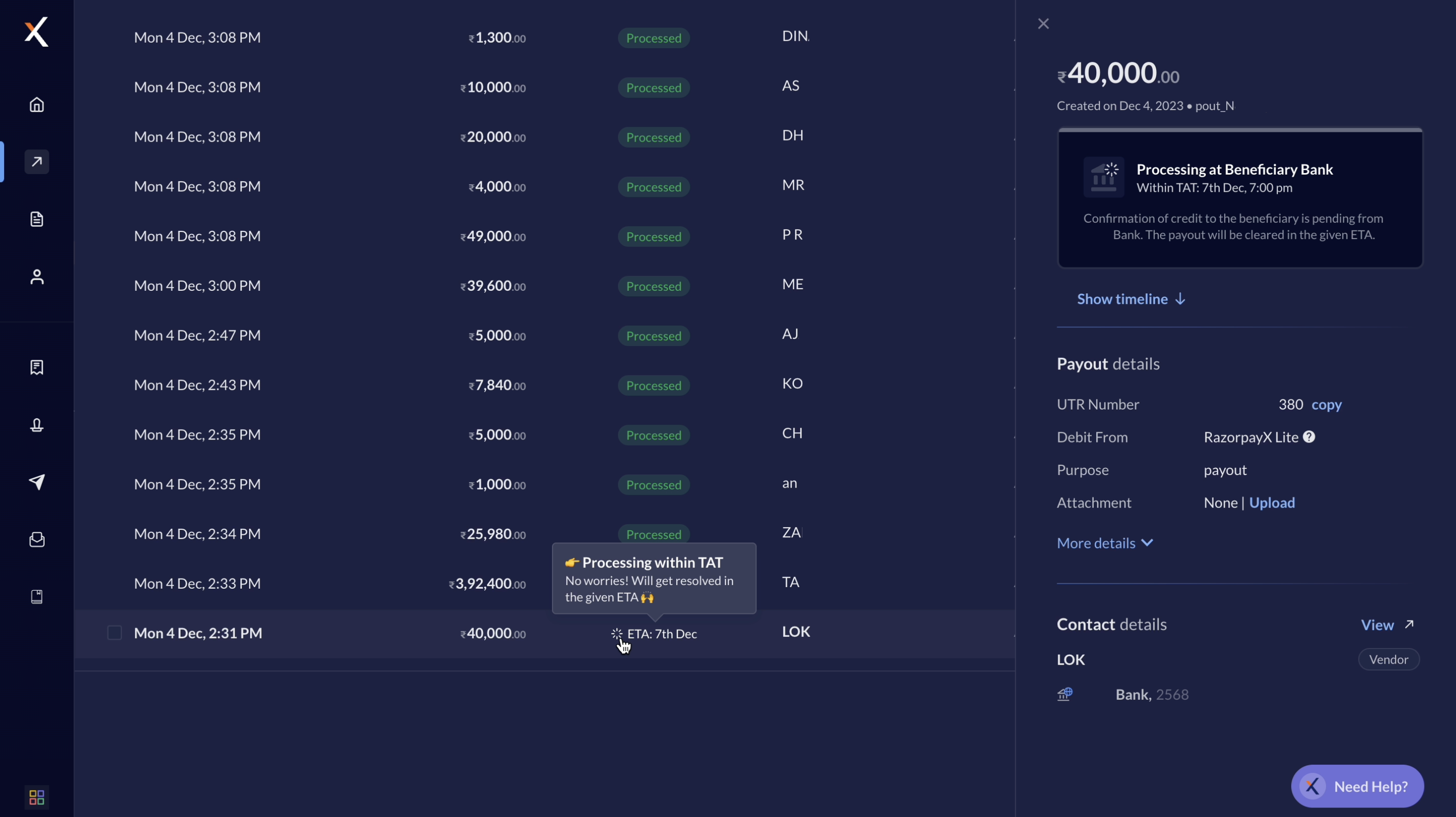
It opens a list view of the payouts along with their statuses. You can hover over the payout status or open the summary view for more information on the payout's status.
2. Navigate to **Payouts** from the left menu.
3. Select the particular payout to open the summary view in the right pane.
You can also subscribe to daily reports to receive a detailed document on the status, status and SLA for the payouts in the `processing` status.
To subscribe, [raise a support ticket](/docs/x/support) from the RazorpayX Dashboard with a list of recipient email IDs. We will enable the function for you in 3 working days.
## Payout Status Details
Find below an exhaustive list of payout statuses, their details and also possible steps you can take to proceed further.
* **Description**: Payout failed as the beneficiary account is closed. Please contact the beneficiary bank.
* **Source**: beneficiary\_bank
* **Next Steps**: NA
* **Description**: Payout failed as beneficiary account is frozen. Please contact the beneficiary bank.
* **Source**: beneficiary\_bank
* **Next Steps**: NA
* **Description**: Payout failed due to invalid beneficiary account details.
* **Source**: beneficiary\_bank
* **Next Steps**: NA
* **Description**: Payout failed as beneficiary account is dormat. Please contact the beneficiary bank.
* **Source**: beneficiary\_bank
* **Next Steps**: NA
* **Description**: Payout failed at the beneficiary bank due to a technical issue. Please retry after 30 min.
* **Source**: beneficiary\_bank
* **Next Steps**: Retry
* **Description**: Beneficiary bank systems are offline. Please retry after 30 min.
* **Source**: beneficiary\_bank
* **Next Steps**: Retry
* **Description**: Payout rejected by the beneficiary bank. Please contact the beneficiary bank.
* **Source**: beneficiary\_bank
* **Next Steps**: NA
* **Description**: Payout failed due to a technical issue at the beneficiary bank. Please retry after 30 min.
* **Source**: beneficiary\_bank
* **Next Steps**: Retry
* **Description**: Beneficiary PSP systems are offline. Please retry after 30 min.
* **Source**: beneficiary\_bank
* **Next Steps**: Retry
* **Description**: IMPS is not enabled on beneficiary account. Please retry with different mode.
* **Source**: beneficiary\_bank
* **Next Steps**: Retry with a different payment mode.
* **Description**: Payout failed as the IFSC code is invalid. Please correct the IFSC code and retry.
* **Source**: beneficiary\_bank
* **Next Steps**: Retry with correct IFSC code.
* **Description**: Temporary technical issue between NPCI and the beneficiary bank. Please retry after 30 min.
* **Source**: beneficiary\_bank
* **Next Steps**: Retry
* **Description**: Payout amount greater than the limit supported by the beneficiary account.
* **Source**: beneficiary\_bank
* **Next Steps**: NA
* **Description**: The NEFT 24\*7 limits for your account has been exhausted. Please retry after sometime.
* **Source**: business
* **Next Steps**: Retry
* **Description**: Payout failed due to invalid beneficiary account number.
* **Source**: business
* **Next Steps**: NA
* **Description**: UPI validation failed. If the UPI ID is valid, please retry after sometime.
* **Source**: business
* **Next Steps**: Ensure UPI ID is valid and retry.
* **Description**: Payout failed due to insufficient funds in your account.
* **Source**: business
* **Next Steps**: Add funds to your account and retry.
* **Description**: Customer account does not exist with the wallet provider for the given phone number.
* **Source**: business
* **Next Steps**: NA
* **Description**: Payout failed as the partner bank is facing technical issues. Please retry.
* **Source**: gateway
* **Next Steps**: Retry
* **Description**: Payout failed due to a temporary technical issue at the partner bank. Please retry after 30 min.
* **Source**: gateway
* **Next Steps**: Retry
* **Description**: Payout timed out at the partner bank. Please retry after 30 min.
* **Source**: gateway
* **Next Steps**: Retry
* **Description**: Payout failed. Contact support for help.
* **Source**: internal
* **Next Steps**: Contact support to find out the exact issue.
* **Description**: Payout failed due to temporary technical issue. Please retry.
* **Source**: internal
* **Next Steps**: Retry
* **Description**: Confirmation of credit to the beneficiary is pending from `beneficiary_bank`. Please check the status after (date,time).
* **Source**: beneficiary\_bank
* **Next Steps**: Inform the customer of the delay, reason for the same and by when it will be cleared.
* **Description**: The `mode` window for the day is closed. Please check the status after (date,time).
* **Source**: gateway
* **Next Steps**: Inform the customer of the delay, reason for the same and by when it will be cleared.
* **Description**: Payout is being processed by the partner bank. Please check the final status after (date,time).
* **Source**: gateway
* **Next Steps**: Inform the customer of the delay, reason for the same and by when it will be cleared.
* **Description**: The (mode) 24\*7 limits for your account has been exhausted. Please check the status after (date,time).
* **Source**: business
* **Next Steps**: Inform the customer of the delay, reason for the same and by when it will be cleared.
* **Description**: Payout is being processed by our partner bank. Please check the final status after (date,time).
* **Source**: internal
* **Next Steps**: Inform the customer of the delay, reason for the same and by when it will be cleared.
* **Description**: Payout is processed and the money has been credited into the beneficiary's account.
* **Source**: beneficiary\_bank
* **Next Steps**: NA
* **Description**: Workflow for the payout is pending approval from the approver(s).
* **Source**: business
* **Next Steps**: NA
* **Description**: Payout is queued as Partner bank systems are down.
* **Source**: gateway
* **Next Steps**: NA
* **Description**: Beneficiary bank's systems are not working. Payout will be processed after the system starts working else it will be failed after the pre-defined time limit.
* **Source**: gateway
* **Next Steps**: NA
* **Description**: Payout is queued as there is insufficient balance in your account to process the payout.
* **Source**: business
* **Next Steps**: NA
* **Description**: Payout is queued as your balance is being synced with the bank. Please check the status after some time.
* **Source**: gateway
* **Next Steps**: Check status after some time.
* **Description**: Payout is queued as you have a pending fee recovery payout. It will get processed after the fee recovery payout is cleared.
* **Source**: business
* **Next Steps**: NA
### Related Information
* [About Payouts](/docs/x/payouts)
* [Payout Best Practices](/docs/x/payouts/best-practices)
* [Status Details via API](/docs/errors/x/payout-status-details)
 3. Click **Search**.
It opens a list view of the payouts along with their statuses. You can hover over the payout status or open the summary view for more information on the payout's status.
3. Click **Search**.
It opens a list view of the payouts along with their statuses. You can hover over the payout status or open the summary view for more information on the payout's status.
 ## Payout Status Details
Find below an exhaustive list of payout statuses, their details and also possible steps you can take to proceed further.
## Payout Status Details
Find below an exhaustive list of payout statuses, their details and also possible steps you can take to proceed further.