

Available in🇮🇳 India
Using Razorpay, you can accept payments from Corporate Credit and Debit Cards by default. We support all types of Corporate Cards with different types of issuers and networks.
What is a Corporate Card
A Corporate Card often called a Business Card, is a card issued by a bank to a business. It helps create a seamless reimbursement experience for SaaS subscriptions, cloud services and marketing expenses. Corporate Cards make compliance and reporting much more effortless.How it Works
A Corporate Card works like any other card. It can be used to make online payments and purchases at a point of sale (PoS) machine. Corporate Cards usually have higher transaction limits (sometimes up to ₹50 lacs). This means they have a higher transaction processing fee. The default pricing for Corporate Cards is 3% per transaction. Contact your Razorpay Sales SPOC for more details.FAQs
How to enable Corporate Cards on my account?
How to enable Corporate Cards on my account?
Corporate cards are enabled by default. However, when testing your integration, if you see the error message Corporate Card is not allowed for this payment, contact Razorpay Support from the Dashboard.
How do I make an online payment using a Corporate Card? I do not see a Corporate Card option at my checkout.
How do I make an online payment using a Corporate Card? I do not see a Corporate Card option at my checkout.
There is no separate option for Corporate Cards. To make online payments using Corporate Cards, select the Card option at the checkout, enter your card details and proceed to make the payment.
How do I make an online payment using a Corporate Card? I do not see a Corporate Card option at my checkout.
How do I make an online payment using a Corporate Card? I do not see a Corporate Card option at my checkout.
There is no separate option for Corporate Cards. To make online payments using Corporate Cards, select the Card option at the checkout, enter your card details and proceed to make the payment.
What is the default pricing for Corporate Cards?
What is the default pricing for Corporate Cards?
The default pricing for Corporate Cards is 3% per transaction. Contact your Razorpay sales SPOC for more details.
What Corporate Card networks does Razorpay support?
What Corporate Card networks does Razorpay support?
Razorpay supports all types of Corporate Credit Cards with different types of issuers and networks. Generally, you will see Visa, Mastercard and American Express Corporate Cards.
How do I disable Corporate Cards on my account? I do not want to accept payments using Corporate Cards.
How do I disable Corporate Cards on my account? I do not want to accept payments using Corporate Cards.
You can disable payments from Corporate Cards if you want. Contact Razorpay Support from the Dashboard and ask them to disable Corporate Cards for your account.
How do I check if a payment was made using a Corporate Card or a regular card?
How do I check if a payment was made using a Corporate Card or a regular card?
You can check this on the Dashboard.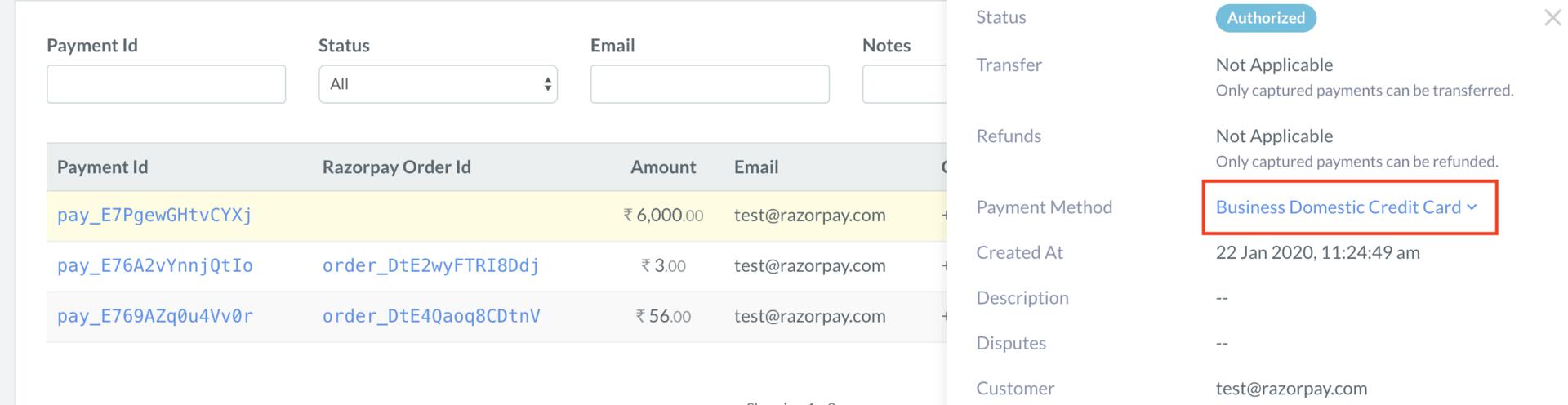
- Log in to the Dashboard.
- Navigate to Transactions → Payments.
- Click the Payment Id for which you want to check the details.
- Check the Payment Method in the right panel. If it says Business, it is a Corporate Card. If it says Consumer, it is a regular card.