

Available in🇮🇳 India
The Razorpay Android SDK for UPI Intent Flow enables support for UPI Intent payments on Android apps.
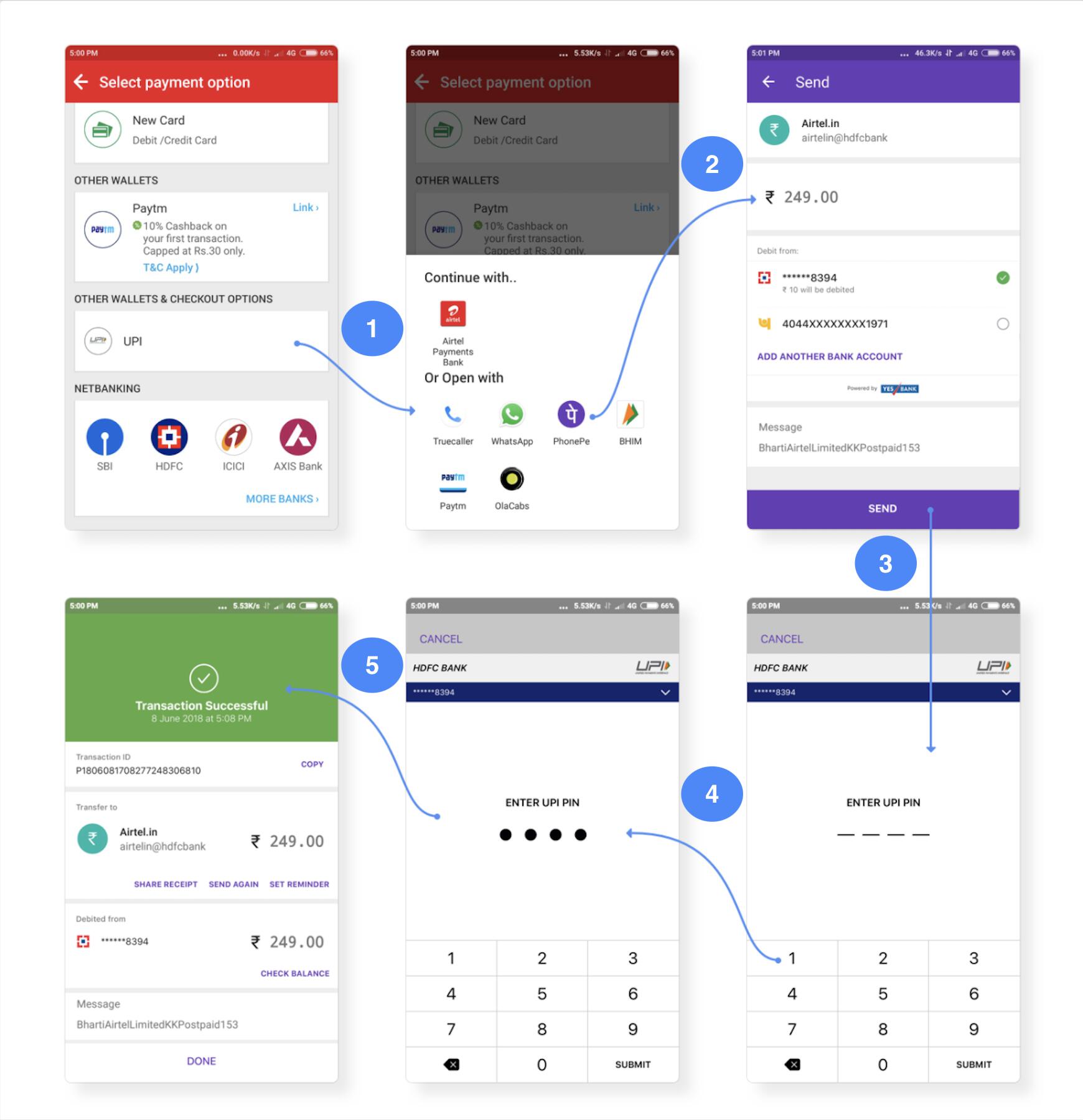
In this scenario, when UPI is selected as the payment method by the customers, they do not need to open the UPI app to make the payment. Instead, they can complete the payment right from their Android app, by entering the UPI pin in the WebView that appears within the app.
Integration Steps
1.1 Install Razorpay Android UPI Intent SDK.1.2 Initialise SDK by Adding API Key.
1.2 Pass Result to Razorpay.
1.1 Install Razorpay Android UPI Intent SDK
Download the jar file and include it in thelibs folder.
1.2 Initialise SDK by Adding API Key
To initiate the SDK, call the Razorpay class constructor in your project and pass Razorpay API Key ID as thekey and webView as the object that handles the payment flow.
1.3 Pass Result to Razorpay
When UPI is selected as the payment method, Razorpay invokes the Intent Flow page that lists all installed UPI apps on the customer’s phone that support intent flow. The customer can select an app and make the payment. Upon payment completion, the UPI app will return the result back to youractivity in onActivityResult method. This should be passed to Razorpay as shown below: