

Available in🇮🇳 India
You can use the Instant Settlement feature in Razorpay to settle your available balance to your bank account instantly, 24x7, for a small fee.
- Settle your available balance to your bank account in full, or choose to settle a portion of it. Note that there is a maximum daily withdrawable limit.
- The maximum daily withdrawable limit is a limit set for every Razorpay merchant for instant settlements that resets automatically at the beginning of each business day.
- By default, the settlement cycle is T+2 days for domestic payments and for international payments it is as per applicable law(s). T refers to the captured payment date. With Instant Settlements, you receive funds on a T+0 basis.
- You can use Instant Settlements to settle amounts < ₹5 Cr and Smart Settlements to settle amounts > ₹5 Cr and < ₹50 Cr.
Feature RequestThis is an on-demand feature. Please raise a request with our Support team to get this feature activated on your Razorpay account.
How it Works
- Amounts up to ₹5 Lakhs are settled instantly through Instant Settlements. Instant Settlements are routed through the IMPS channel.
- Smart Settlements option also is enabled when the entered amount is between ₹5 Lakhs to ₹5 Crores. You can choose between Instant or Smart Settlements here.
- With Smart Settlements, the settlement amount will reflect as a single credit in your bank statement since it uses the RTGS channel.
- With Instant Settlement, the amount will show as multiple credits in your bank statement as IMPS channel has an upper limit of ₹5 Lakhs per transaction.
- Amounts between ₹5 Crores to ₹50 Crores are settled only through Smart Settlements.
Instant Vs Smart Settlements
- Instant Settlement
- Smart Settlements
- Instant Settlement Vs Smart Settlements
Benefits of Instant Settlement are:
- Easy and instant access to your money.
- Increased cash flows enabling better payment cycles.
- Better management of inventory and stock.
Initiate Instant Settlements
Settle amounts up to ₹5 Crores through Instant Settlement feature via Dashboard and API:- On the Dashboard
- Using APIs
Create Instant Settlements from the Dashboard.
- Log in to the Dashboard.
- Navigate to Settlements.
- Click Settle Now to go to the Instant Settlements window.
-
Your current balance, maximum daily withdrawal limit and the current withdrawable amount are displayed. Enter the amount you want to settle to your bank account.
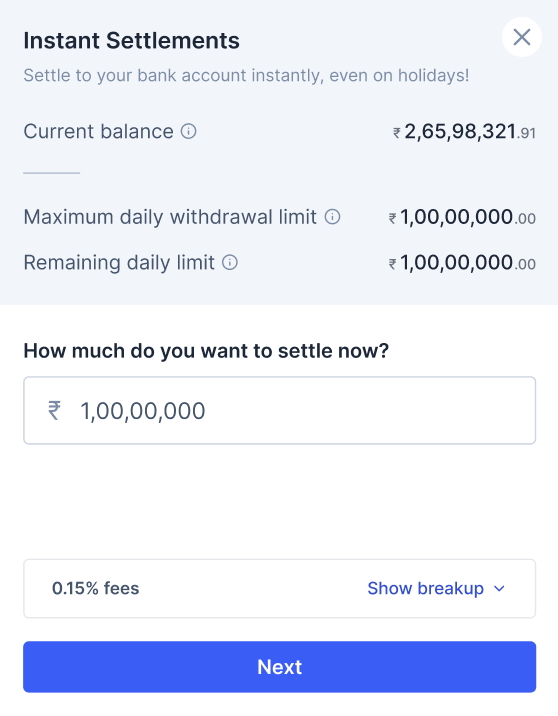
- Click Next. A pop-up showing Instant Settlement opens. The fees + tax for the Instant Settlement and the net amount that will be credited to your account will be displayed in the pop up.
- Click Settle Now to settle instantly.
Initiate Smart Settlements
Use the Smart Settlements feature to settle amounts between ₹5 Lakhs to ₹50 Crores in a single shot within a time span of 1 hour.- Log in to the Dashboard.
- Navigate to Settlements.
- Click Settle Now to go to the Instant Settlements window.
- Your current balance, maximum daily withdrawal limit and the current withdrawable amount are displayed. Enter the amount you want to settle to your bank account.
- Click Next. A pop-up showing Instant Settlement and Smart Settlements opens. The pop-up displays the total fees plus tax for the Instant Settlement, along with the exact net amount that will be credited to your account.
-
For amounts more than ₹5 Lakhs, the recommended option is Smart Settlements.
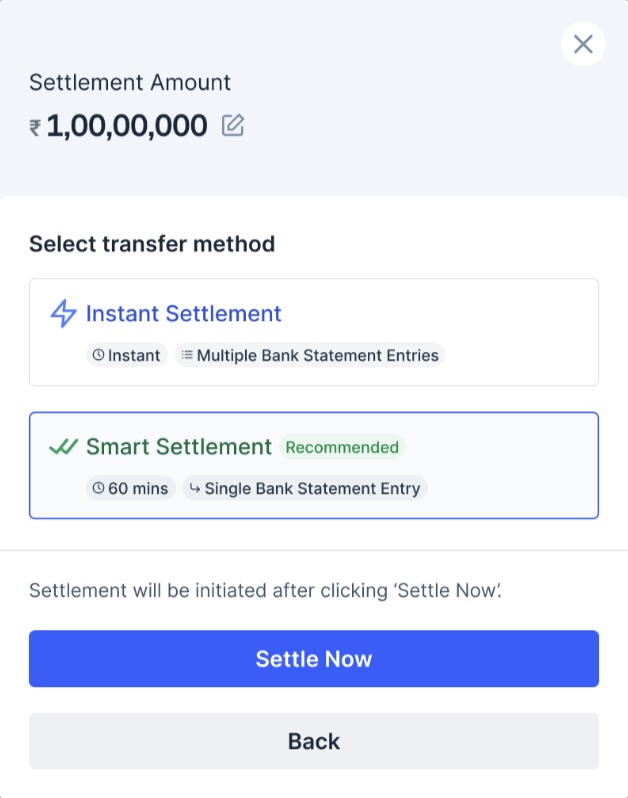
- Click Settle Now after selecting Smart Settlements.