

Available in🇮🇳 India🇸🇬 Singapore🇺🇸 United States
If you do not have a website or app, you can still create and send subscriptions to customers using a link. When the customer opens the link, they are taken to a checkout page hosted by Razorpay, where they make the authorisation payment. You can also use this feature to create and send custom subscriptions to customers.
Subscription Links can be created from the Dashboard or using APIs.
Subscriptions via Links Flow
Below is a high-level overview of Subscriptions via links.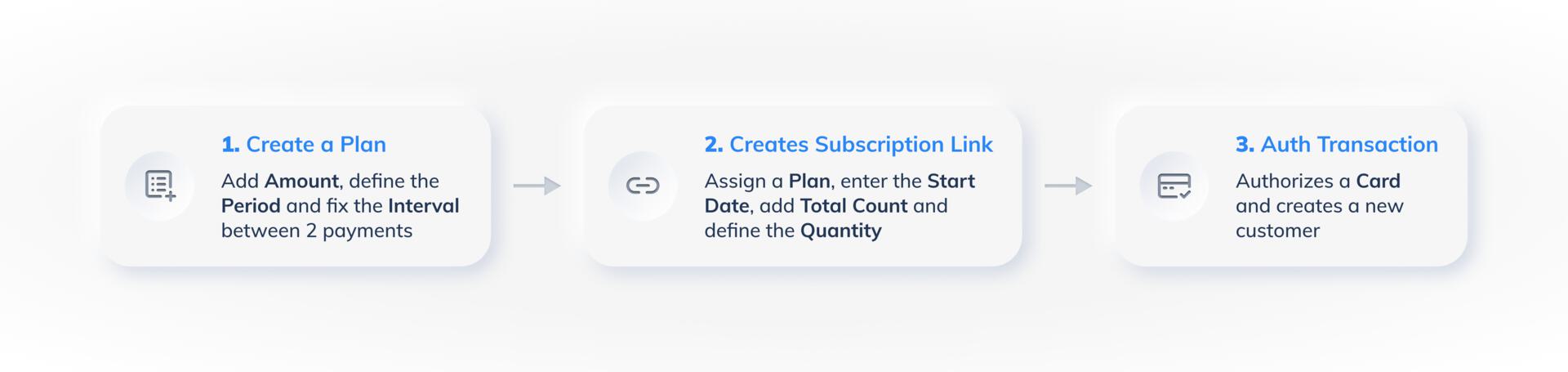 To create a Subscriptions link from the Dashboard, you need to:
Create a Subscription Link From Dashboard
Watch this video to see how to create Subscription Links.To create a Subscription Link:
To create a Subscription Link:
- Log in to the Dashboard and click Subscriptions under PAYMENT PRODUCTS in the left menu.
- Click + Create New Subscription. The Create Subscription screen displays.
- Select the required plan from the Select Plan drop-down list.
- Select the Subscription Start Date.
Trial PeriodTo create a trial period for your customers, all you need to provide is a future start date. The actual billing cycle automatically starts at the specified date, essentially creating a trial period.
- Enter the Total Count. This defines how many times the customer should be charged (the number of billing cycles).
Handy TipsYou can create a Subscription for a maximum of 30 years, and the Total Count differs depending on the selected plan. For example, If you select a monthly plan, the Total Count is calculated as per the below formula:Monthly=>(Number of months in a year(12) * Number of Years supported (30)) / Interval (1 as every month in this example)As per this formula, the Total Count for the monthly Subscription should be, (12 * 30)/1 = 1200
- Select the required offer from the Offer drop-down and click Next.
- Select I want to add an upfront amount.
- Click the drop-down and click +Create New Item. The Add Upfront Amount screen appears in a pop-out window.
- Add the following details and click Save.
- Name
- Rate per unit
- Description (optional)
- You can add additional items using the Add New Item option.
- Click Next once you have added all items tagged as upfront amount.
Handy Tips
- All the created add-on items display in the Select Item to Add drop-down.
- The upfront amount and add-ons will have the same currency as the plan.
- Enter the customer’s mobile number and/or email address.
- Select the Notify Customer check box if you want Razorpay to automatically send the Subscription Link to the customer via email to make the authorisation payment.
- Set an expiry date for the link.
- Add internal notes, if required.
- Click Next once you have entered all the required details.
Handy TipsIf the Notify Customer check box is not selected, Razorpay does not send the customer the Subscription Link to make the authorisation payment.
- Review the details and click Create Subscription Link to send the link to the customer.