

Available in🇮🇳 India
You can now create an order along with a payment using a single API for netbanking, cards and UPI. Given below are details and examples for all three payment methods followed by steps to integrate S2S JSON API and accept payments using netbanking, cards and UPI.
Netbanking
Netbanking
Create an order along with payment using the consolidated order and payment API. This single API call combines order and payment creation, resulting in a more efficient and faster transaction process.Create a order along with payment by:
- Making a single API call to Razorpay, combining order and payment creation.
- Authenticating using the provided credentials, ensuring access to the consolidated payment API.
- Manually integrating the API sample codes on your server.
netbanking as the payment method:Request Parameters
amount mandatory
: integer The amount for which the order was created in currency subunits. For example, for an amount of ₹295.00, enter 29500. The same amount will be used for the payment creation. For the partial payment scenario, we will use the amount specified in the payment request object in case.currency mandatory
: string The currency in which the transaction should be made. See the list of supported currencies. Length must be of 3 characters.receipt optional
: string Receipt number that corresponds to this order. Can have a maximum length of 40 characters and has to be unique.partial_payment optional
: boolean Indicates whether the customer can make a partial payment. Possible values:true: The customer can make partial payments.false(default): The customer cannot make partial payments.
first_payment_min_amount optional
: integer Minimum amount that must be paid by the customer as the first partial payment. For example, if an amount of ₹7,000 is to be received from the customer in two installments of #1 - ₹5,000, #2 - ₹2,000, then you can set this value as 500000. This parameter should be passed only if partial_payment is true.customer_id optional
: string Unique identifier of the customer.transfers optional
: json object Details regarding the transfer.account
: string The recipient account ID for fund transfer.amount optional
: string The amount of the transfer.currency mandatory
: string The currency in which the transaction should be made. See the list of supported currencies. Length must be of 3 characters.notes optional
: json object Key-value pair that can be used to store additional information about the entity. Maximum 15 key-value pairs, 256 characters (maximum) each. For example, "note_key": "Beam me up Scotty".linked_account_notes optional
: string Notes associated with the linked account.on_hold mandatory
: boolean Indicates whether the account settlement for transfer is on hold. Possible values:true: Puts the settlement on hold.false: Releases the settlement.
on_hold_until mandatory
: integer Timestamp until which the transfer amount is on hold.bank_account optional
: json object Details of the bank account that the customer provides at the time of registration.account_number optional
: string Account number of the customers bank account.name optional
: string The name associated with the bank account.ifsc optional
: string The IFSC code of the bank.payment_config optional
: array Payment capture settings for the payment. The options sent here override the account level auto-capture settings configured using the Dashboard.capture mandatory
: string Option to automatically capture payment. Possible values:automatic: Payments are auto-captured according to the configurations specified in thecapture_optionsarray.manual: You have to manually capture payments using our Capture API or from the Dashboard.
capture_options optional
: array Use this array to determine the expiry period for automatic and manual capture of payments and the refund speed in the case of non-capture.automatic_expiry_period mandatory if capture = automatic
: integer Time in minutes till when payments in the authorized state should be auto-captured.
Minimum value 12 minutes. This parameter is mandatory only if the value of capture parameter is automatic.manual_expiry_period optional
: integer Time in minutes till when you can manually capture payments in the authorized state.- Must be equal to or greater than the
automatic_expiry_periodvalue. - Default value
7200minutes. - Maximum value
7200minutes. - Payments in the
authorizedstate after themanual_expiry_periodare auto-refunded.
refund_speed mandatory
: string Refund speed for payments that were not captured (automatically or manually). Possible values:optimum: We try to process the refund instantly. We charge a small fee for this. If it is not possible to process an instant refund, we will process a normal refund in 5-7 working days. Learn more about instant refunds.normal: The refund is processed in 5-7 working days.
If no value is passed, the refund is processed using the default speed set on the Dashboard.
payment mandatory
: object Details of the payment.amount optional
: integer The amount for which the order was created in currency subunits. For example, for an amount of ₹295.00, enter 29500. The same amount will be used for the payment creation. For the partial payment scenario, we will use the amount specified in the payment request object in case.email mandatory
: string Email address of the customer.contact mandatory
: integer Contact number of the customer.ip mandatory
: string The customer’s IP address.method mandatory
: string Name of the payment method (example, netbanking, cards and upi).bank mandatory
: string Name of the bank.description mandatory
: string Description of the payment.Descriptions for the response parameters are present in the Response parameter table.Cards
Cards
The following API will create a payment with
cards as the payment method:Request Parameters
amount mandatory
: integer The amount for which the order was created in currency subunits. For example, for an amount of ₹295.00, enter 29500. The same amount will be used for the payment creation. For the partial payment scenario, we will use the amount specified in the payment request object in case.currency mandatory
: string The currency in which the transaction should be made. See the list of supported currencies. Length must be of 3 characters.receipt optional
: string Receipt number that corresponds to this order. Can have a maximum length of 40 characters and has to be unique.partial_payment optional
: boolean Indicates whether the customer can make a partial payment. Possible values:true: The customer can make partial payments.false(default): The customer cannot make partial payments.
first_payment_min_amount optional
: integer Minimum amount that must be paid by the customer as the first partial payment. For example, if an amount of ₹7,000 is to be received from the customer in two installments of #1 - ₹5,000, #2 - ₹2,000, then you can set this value as 500000. This parameter should be passed only if partial_payment is true.customer_id optional
: string Unique identifier of the customer.transfers optional
: json object Details regarding the transfer.account
: string The recipient account ID for fund transfer.amount optional
: string The amount of the transfer.currency mandatory
: string The currency in which the transaction should be made. See the list of supported currencies. Length must be of 3 characters.notes optional
: json object Key-value pair that can be used to store additional information about the entity. Maximum 15 key-value pairs, 256 characters (maximum) each. For example, "note_key": "Beam me up Scotty".linked_account_notes optional
: string Notes associated with the linked account.on_hold mandatory
: boolean Indicates whether the account settlement for transfer is on hold. Possible values:true: Puts the settlement on hold.false: Releases the settlement.
on_hold_until mandatory
: string Timestamp until which the transfer amount is on hold.payment_config optional
: array Payment capture settings for the payment. The options sent here override the account level auto-capture settings configured using the Dashboard.capture mandatory
: string Option to automatically capture payment. Possible values:automatic: Payments are auto-captured according to the configurations specified in thecapture_optionsarray.manual: You have to manually capture payments using our Capture API or from the Dashboard.
capture_options optional
: array Use this array to determine the expiry period for automatic and manual capture of payments and the refund speed in the case of non-capture.automatic_expiry_period mandatory if capture = automatic
: integer Time in minutes till when payments in the authorized state should be auto-captured.
Minimum value 12 minutes. This parameter is mandatory only if the value of capture parameter is automatic.manual_expiry_period optional
: integer Time in minutes till when you can manually capture payments in the authorized state.- Must be equal to or greater than the
automatic_expiry_periodvalue. - Default value
7200minutes. - Maximum value
7200minutes. - Payments in the
authorizedstate after themanual_expiry_periodare auto-refunded.
refund_speed mandatory
: string Refund speed for payments that were not captured (automatically or manually). Possible values:optimum: We try to process the refund instantly. We charge a small fee for this. If it is not possible to process an instant refund, we will process a normal refund in 5-7 working days. Learn more about instant refunds.normal: The refund is processed in 5-7 working days.
If no value is passed, the refund is processed using the default speed set on the Dashboard.
payment mandatory
: object Details of the payment.amount optional
: integer The amount for which the order was created in currency subunits. For example, for an amount of ₹295.00, enter 29500. The same amount will be used for the payment creation. For the partial payment scenario, we will use the amount specified in the payment request object in case.email mandatory
: string Email address of the customer.contact mandatory
: integer Contact number of the customer.method mandatory
: string Name of the payment method (example, netbanking, cards and upi).card mandatory
: object Details of the payment.number mandatory
: integer Details associated with the card.expiry_month mandatory
: string Expiry month for the card in MM format.name mandatory
: string Name of the cardholder.expiry_year mandatory
: string Expiry year for the card in YY format.cvv mandatory
: integer CVV printed on the back of the card.ip mandatory
: string The customer’s IP address.referrer optional
: string Referrer header passed by the client’s browser.user-agent mandatory
: string The User-Agent header of the user’s browser. The default value will be passed by Razorpay if not provided by you.authentication mandatory
: object Details of the authentication method used for the payment.authentication_channel mandatory
: string Specifies the channel through which authentication is performed. In this example, it’s set to browser.browser mandatory
: object Information regarding the customer’s browser. This parameter need not be passed when authentication_channel=app.java_enabled mandatory
: boolean Indicates whether the customer’s browser supports Java. Obtained from the navigator HTML DOM object.javascript_enabled mandatory
: boolean Indicates whether the customer’s browser can execute JavaScript.Obtained from the navigator HTML DOM object.timezone_offset mandatory
: integer Time difference between UTC time and the cardholder’s browser local time. Obtained from the getTimezoneOffset() method applied to the Date object.color_depth mandatory
: integer Obtained from the payer’s browser using the screen.colorDepth HTML DOM property.screen_width mandatory
: integer Total width of the payer’s screen in pixels. Obtained from the screen.width HTML DOM property.screen_height mandatory
: integer Obtained from the navigator HTML DOM object.Descriptions for the response parameters are present in the Response parameter table.UPI
UPI
The following API will create a payment with
UPI as the payment method:Request Parameters
amount mandatory
: integer The amount for which the order was created in currency subunits. For example, for an amount of ₹295.00, enter 29500. The same amount will be used for the payment creation. For the partial payment scenario, we will use the amount specified in the payment request object in case.currency mandatory
: string The currency in which the transaction should be made. See the list of supported currencies. Length must be of 3 characters.method optional
: string The payment method for the order. Possible values:netbankingupicard
receipt optional
: string Receipt number that corresponds to this order. Can have a maximum length of 40 characters and has to be unique.partial_payment optional
: boolean Indicates whether the customer can make a partial payment. Possible values:true: The customer can make partial payments.false(default): The customer cannot make partial payments.
first_payment_min_amount optional
: integer Minimum amount that must be paid by the customer as the first partial payment. For example, if an amount of ₹7,000 is to be received from the customer in two installments of #1 - ₹5,000, #2 - ₹2,000, then you can set this value as 500000. This parameter should be passed only if partial_payment is true.customer_id optional
: string Unique identifier of the customer.transfers optional
: json object Details regarding the transfer.account
: string The recipient account ID for fund transfer.amount optional
: string The amount of the transfer.currency mandatory
: string The currency in which the transaction should be made. See the list of supported currencies. Length must be of 3 characters.notes optional
: json object Key-value pair that can be used to store additional information about the entity. Maximum 15 key-value pairs, 256 characters (maximum) each. For example, "note_key": "Beam me up Scotty".linked_account_notes optional
: string Notes associated with the linked account.on_hold mandatory
: boolean Indicates whether the account settlement for transfer is on hold. Possible values:true: Puts the settlement on hold.false: Releases the settlement.
on_hold_until mandatory
: string Timestamp until which the transfer amount is on hold.bank_account optional
: json object Details of the bank account that the customer provides at the time of registration.account_number optional
: string Account number of the customers bank account.name optional
: string The name associated with the bank account.ifsc optional
: string The IFSC code of the bank.payment_config optional
: array Payment capture settings for the payment. The options sent here override the account level auto-capture settings configured using the Dashboard.capture mandatory
: string Option to automatically capture payment. Possible values:automatic: Payments are auto-captured according to the configurations specified in thecapture_optionsarray.manual: You have to manually capture payments using our Capture API or from the Dashboard.
capture_options optional
: array Use this array to determine the expiry period for automatic and manual capture of payments and the refund speed in the case of non-capture.automatic_expiry_period mandatory if capture = automatic
: integer Time in minutes till when payments in the authorized state should be auto-captured.
Minimum value 12 minutes. This parameter is mandatory only if the value of capture parameter is automatic.manual_expiry_period optional
: integer Time in minutes till when you can manually capture payments in the authorized state.- Must be equal to or greater than the
automatic_expiry_periodvalue. - Default value
7200minutes. - Maximum value
7200minutes. - Payments in the
authorizedstate after themanual_expiry_periodare auto-refunded.
refund_speed mandatory
: string Refund speed for payments that were not captured (automatically or manually). Possible values:optimum: We try to process the refund instantly. We charge a small fee for this. If it is not possible to process an instant refund, we will process a normal refund in 5-7 working days. Learn more about instant refunds.normal: The refund is processed in 5-7 working days.
If no value is passed, the refund is processed using the default speed set on the Dashboard.
payment mandatory
: object Details of the payment.amount optional
: integer The amount for which the order was created in currency subunits. For example, for an amount of ₹299. The same amount will be used for the payment creation. For the partial payment scenario, we will use the amount specified in the payment request object in case.email mandatory
: string Email address of the customer. The maximum length supported is 40 characters.contact mandatory
: integer Phone number of the customer. The maximum length supported is 15 characters, inclusive of country code.ip mandatory
: string The customer’s IP address.method mandatory
: string Name of the payment method (example, netbanking, cards and upi).description mandatory
: string Description of the payment.referrer optional
: string Referrer header passed by the client’s browser.upi mandatory
: json object Details of the UPI payment received. Only applicable if method is upi.flow
: string The type of UPI flow. Possible value intent.vpa
: string The customer’s VPA (Virtual Payment Address) or UPI id used to make the payment. For example, gauravkumar@exampleupi. Required when flow is collect.user_agent optional
: string The User-Agent header of the user’s browser. The default value will be passed by Razorpay if not provided by you.Descriptions for the response parameters are present in the Response parameter table.Response Parameters
Response Parameters
Response Parameters
If the payment request is valid, the response contains the following fields.receipt
: string Receipt number that corresponds to this order. Can have a maximum length of 40 characters and has to be unique.status
: string Status of the order. Possible values:attempted: An order moves fromcreatedtoattemptedstate when a payment is first attempted on it. It remains in theattemptedstate till one payment associated with that order is captured.created: When you create an order it is in thecreatedstate. It stays in this state till a payment is attempted on it.paid: After the successful capture of the payment, the order moves to thepaidstate. No further payment requests are permitted once the order moves to thepaidstate. The order stays in thepaidstate even if the payment associated with the order is refunded.
id
: string The unique identifier of the order.amount
: integer The amount for which the order was created, in currency subunits. For example, for an amount of ₹295.00, enter 29500.created_at
: integer Indicates the Unix timestamp when this order was created.amount_paid
: integer Indicates the amount paid for the order.amount_due
: integer Indicates the amount due for the order.currency
: string The currency in which the transaction was made. See the list of supported currencies. Length must be of 3 characters.offer_id
: string The unique identifier of the created offer.attempts
: string The number of payment attempts, successful and failed, that have been made against this order.transfers
: string Details regarding the transfer.notes
: object Key-value pair that can be used to store additional information about the entity. Maximum 15 key-value pairs, 256 characters (maximum) each.payment_workflow
: array Details regarding the payment.id
: string Unique identifier of the payment.next
: array A list of action objects available to you to continue the payment process. Present when the payment requires further processing.action
: string An indication of the next step available to you to continue the payment process. Possible values:otp_generate: Use this URL to allow the customer to generate OTP and complete the payment on your webpage.redirect: Use this URL to redirect the customer to submit the OTP on the bank page.
url
: string URL endpoint where Razorpay will submit the final payment status.1 Handle Payment Success and Error Events
1 Handle Payment Success and Error Events
Once a customer completes the payment, a Given below is a sample error code you will receive when the payment fails.The following error occurs when the order was processed, payment was created in Razorpay but failed at gateway level.
POST request is made to the callback_url provided in the payment request. The data contained in this request will depend on whether the payment was a success or a failure.Success Callback
If the payment made by the customer is successful, the following fields are sent:razorpay_payment_idrazorpay_order_idrazorpay_signature
Callback Example
Failure Callback
If the payment has failed, the callback will contain details of the error. Refer to Errors for details.Given below is a sample error code you will receive when the order fails.Order Create Failure Example
Payment Create Failure Example
Gateway Processing Error Example
2 Retry/Re-Attempt Request
2 Retry/Re-Attempt Request
Use the following sample code example to make a retry request using
Order id and Receipt in the request.3 Verify Payment Signature
3 Verify Payment Signature
Signature verification is a mandatory step to ensure that the callback is sent by Razorpay. The
razorpay_signature contained in the callback can be regenerated by your system and verified as follows.Create a string to be hashed using the razorpay_payment_id contained in the callback and the Order ID generated in the first step, separated by a |. Hash this string using SHA256 and your API Secret.Generate Signature on your Server
4 Integrate Payments Rainy Day Kit
4 Integrate Payments Rainy Day Kit
Use Payments Rainy Day kit to overcome payments exceptions such as:
5 Verify Payment Status
5 Verify Payment Status
Handy TipsOn the Razorpay Dashboard, ensure that the payment status is
captured. Refer to the payment capture settings page to know how to capture payments automatically.You can track the payment status in three ways:
You can track the payment status in three ways:
- Verify Status from Dashboard
- Subscribe to Webhook Events
- Poll APIs
To verify the payment status from the Razorpay Dashboard: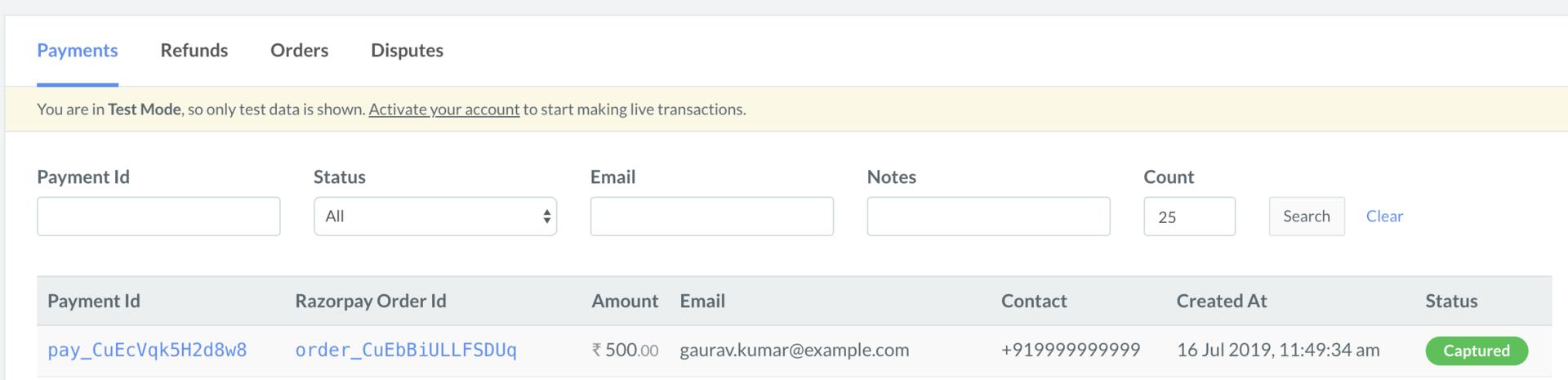
- Log in to the Razorpay Dashboard and navigate to Transactions → Payments.
- Check if a Payment Id has been generated and note the status. In case of a successful payment, the status is marked as Captured.