Available in🇮🇳 India🇸🇬 Singapore
You can enable or disable Non-3D secure international card payments using your Dashboard..
Prerequisites
Following are the prerequisites to enable/disable Non-3D secure international card payments:- You must have an active Razorpay account with KYC verification completed.
- You must have international payments enabled for your account.
Enable/Disable Support for Non-3D Secure Transactions
To enable/disable Non-3D Secure transactions, follow these steps:- Enable
- Disable
- Log in to the Dashboard.
- Navigate to Account & Settings → Payment Methods.
- Select International Payments and click Request besides Support for Non-3D Secure transactions under International Cards.
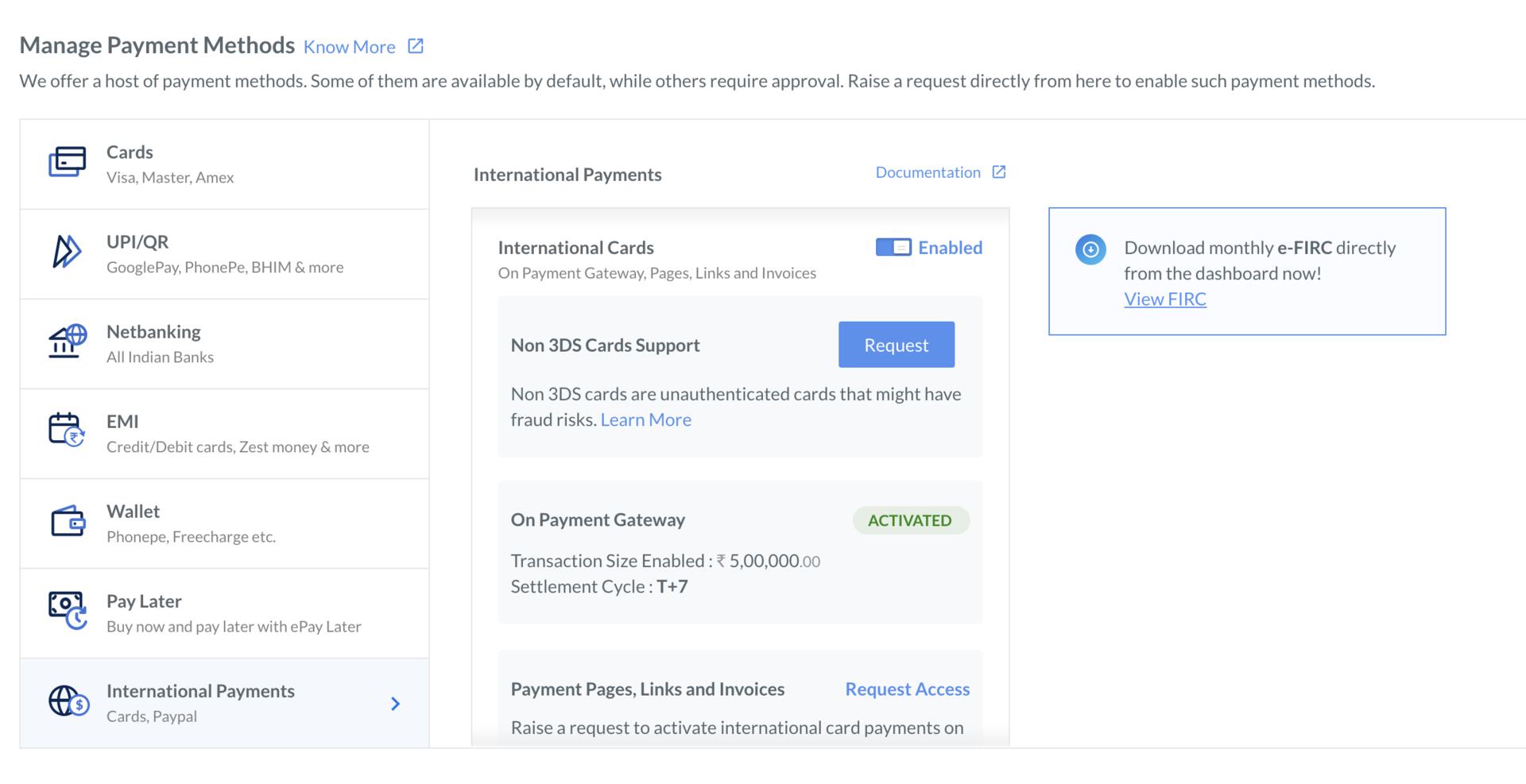
- A request pop-up is displayed to confirm if you want to enable the support for Non-3D Secure transactions. Click request.
Feature Enablement
- The Razorpay Risk team analyses your request for support on Non-3D Secure transactions. The team can either accept or reject your request based on certain parameters.
- Non-3DS cards are processed without second-factor authentication. These international card payments are prone to a higher risk of fraud and chargebacks. In case of any fraud or service-related chargeback, Razorpay does not take the responsibility and the liability lies with the seller.