

Available in🇮🇳 India
You can integrate with Razorpay APIs to start accepting card payments. Razorpay APIs support the latest 3DS2 authentication protocol.
Handy TipsIf you are an existing Razorpay user, that is, you integrated with our S2S APIs before October 15, 2022, you need to make certain integration changes to migrate to the 3DS2 flow.
3DS2 Authentication
3DS2 is an authentication protocol, the successor of 3DS1, that enables businesses and payment providers to send additional information (such as customer device or browser data) to verify the transaction’s authenticity. Razorpay integration is compliant with the 3DS2 protocol. Know more: Razorpay supports 3DS2 transactions.Handy Tips
- Integration does not differ for the challenge flow or frictionless flow.
- Frictionless flow is not applicable for payments on cards issued in India.
Integration Steps
Follow the steps below to integrate S2S JSON API with browser flow and accept payments using cards. 1.1 Create an Order.1.2 Create a Payment.
1.3 Handle Payment Success and Error Events.
1.4 Verify Payment Signature.
1.5 Integrate Payments Rainy Day Kit.
1.6 Verify Payment Status.
1.1 Create an Order
Order is an important step in the payment process.- An order should be created for every payment.
- You can create an order using the Orders API. It is a server-side API call. Know how to authenticate Orders API.
- The
order_idreceived in the response should be passed to the checkout. This ties the order with the payment and secures the request from being tampered.
- Using the sample code on the Razorpay Postman Public Workspace.
- By manually integrating the API sample codes on your server.
Razorpay Postman Public Workspace
You can use the Postman workspace below to create an order:
Handy TipsUnder the Authorization section in Postman, select Basic Auth and add the Key Id and secret as the Username and Password, respectively.
API Sample Code
Use this endpoint to create an order using the Orders API.POST /orders
Request Parameters
Request Parameters
amount mandatory
: integer Payment amount in the smallest currency subunit. For example, if the amount to be charged is ₹299, then pass 29900 in this field. In the case of three decimal currencies, such as KWD, BHD and OMR, to accept a payment of 295.991, pass the value as 295990. And in the case of zero decimal currencies such as JPY, to accept a payment of 295, pass the value as 295.currency mandatory
: string The currency in which the transaction should be made. See the list of supported currencies. Length must be 3 characters.Handy TipsRazorpay has added support for zero decimal currencies, such as JPY and three decimal currencies, such as KWD, BHD and OMR, allowing businesses to accept international payments in these currencies. Know more about Currency Conversion (May 2024).
receipt optional
: string Your receipt id for this order should be passed here. Maximum length is 40 characters.notes optional
: json object Key-value pair that can be used to store additional information about the entity. Maximum 15 key-value pairs, 256 characters (maximum) each. For example, "note_key": "Beam me up Scotty”.partial_payment optional
: boolean Indicates whether the customer can make a partial payment. Possible values:true: The customer can make partial payments.false(default): The customer cannot make partial payments.
first_payment_min_amount optional
: integer Minimum amount that must be paid by the customer as the first partial payment. For example, if an amount of ₹7000 is to be received from the customer in two installments of #1 - ₹5000, #2 - ₹2000 then you can set this value as 500000. This parameter should be passed only if partial_payment is true.Know more about Orders API.Response Parameters
Response Parameters
Descriptions for the response parameters are present in the Orders Entity parameters table.
Error Response Parameters
Error Response Parameters
The error response parameters are available in the API Reference Guide.
1.2 Create a Payment
After the order is created, your next step is to create a payment. The following API will create a payment withcard as the payment method. The browser parameters capture the customer’s browser details, which are sent to the banks to aid their risk analysis.
Sample Code
Handy TipsThe payment request and response would remain the same for both frictionless and challenge scenarios.
Request Parameters
Request Parameters
amount mandatory
: integer Payment amount in the smallest currency sub-unit. For example, if the amount to be charged is ₹299, then pass 29900 in this field. In the case of three decimal currencies, such as KWD, BHD and OMR, to accept a payment of 295.991, pass the value as 295990. And in the case of zero decimal currencies such as JPY, to accept a payment of 295, pass the value as 295.currency mandatory
: string Currency code for the currency in which you want to accept the payment. For example, INR. Refer to the list of supported currencies. The length must be 3 characters.Handy TipsRazorpay has added support for zero decimal currencies, such as JPY, and three decimal currencies, such as KWD, BHD, and OMR, allowing businesses to accept international payments in these currencies. Know more about Currency Conversion (May 2024).
order_id mandatory
: string Unique identifier of the Order generated in the first step.email mandatory
: string Email address of the customer. The maximum length supported is 40 characters.contact mandatory
: string Phone number of the customer. The maximum length supported is 15 characters, inclusive of country code.method mandatory
: string Name of the payment method. Possible value is card.card mandatory
: object Details associated with the card.number
: string Unformatted card number.name
: string Name of the cardholder.expiry_month
: string Expiry month for the card in MM format.expiry_year
: string Expiry year for the card in YY format.cvv
: string CVV printed on the back of the card.Handy Tips
- CVV is not required by default for tokenised cards across all networks.
- CVV is optional for tokenised card payments. Do not pass dummy CVV values.
- To implement this change, skip passing the
cvvparameter entirely, or pass anullor empty value in the CVV field. - We recommend removing the CVV field from your checkout UI/UX for tokenised cards.
- If CVV is still collected for tokenised cards and the customer enters a CVV, pass the entered CVV value to Razorpay.
user-agent mandatory
: string The User-Agent header of the user’s browser. The default value will be passed by Razorpay if not provided by you.ip mandatory
: string The customer’s IP address.authentication optional
: object Details of the authentication channel.authentication_channel
: string The authentication channel for the payment. Possible values:browser(default)app
browser mandatory
: object Information regarding the customer’s browser. This parameter need not be passed when authentication_channel=app.java_enabled
: boolean Indicates whether the customer’s browser supports Java. Obtained from the navigator HTML DOM object. Possible values:true: Customer’s browser supports Java.false: Customer’s browser does not support Java.
javascript_enabled
: boolean Indicates whether the customer’s browser can execute JavaScript. Obtained from the navigator HTML DOM object. Possible values:true: Customer’s browser can execute JavaScript.false: Customer’s browser cannot execute JavaScript.
timezone_offset
: integer Time difference between UTC time and the cardholder’s browser local time. Obtained from the getTimezoneOffset() method applied to the Date object.screen_width
: integer Total width of the payer’s screen in pixels. Obtained from the screen.width HTML DOM property.screen_height
: integer Obtained from the navigator HTML DOM object.color_depth
: integer Obtained from the payer’s browser using the screen.colorDepth HTML DOM property.language
: string Obtained from the payer’s browser using the navigator.language HTML DOM property. Maximum limit of 8 characters.notes optional
: object Key-value object used for passing tracking info. Refer to Notes for more details.callback_url optional
: string URL endpoint where Razorpay will submit the final payment status.referrer optional
: string Referrer header passed by the client’s browser.Response Parameters
Response Parameters
If the payment request is valid, the response contains the following fields.
razorpay_payment_id
: string Unique identifier of the payment. Present for all responses.next
: array A list of action objects available to you to continue the payment process. Present when the payment requires further processing.action
: string An indication of the next step available to you to continue the payment process. Possible values:otp_generate: Use this URL to allow the customer to generate OTP and complete the payment on your webpage.redirect: Use this URL to redirect the customer to submit the OTP on the bank page.
url
: string URL to be used for the action indicated.OTP Generation
If you would like the customer to enter the OTP on your website instead of the bank page, use theotp_generate URL. When this URL is triggered, you get the following response:
Path Parameter
id mandatory
: string Unique identifier of the payment.
Response Parameters
If the payment request is valid, the response contains the following fields.razorpay_payment_id
: string Unique identifier of the payment. Present for all responses.
next
: array A list of action objects available to you to continue the payment process. Present when the payment requires further processing.
action
: string An indication of the next step available for payment processing. Possible values:
opt_submit- Use this URL to allow the customer to submit OTP and complete the payment on your webpage.opt_resend- Use this URL to resend OTP to the customer.
url
: string URL to be used for the action indicated.
If the customer faces any latency issues, you can choose to cancel this request and redirect the customer to the bank page to enter the OTP and complete the payment. Thus, you can avoid payment failure by switching the customer to the bank page payment flow.
Response on Submitting OTP
Razorpay sends the respective success or failure response after the customer submits the OTP on your page. The following endpoint submits the OTP:POST payments/:id/otp/submit
callback_url of the request, and can then be verified.
1.3 Handle Payment Success and Error Events
Once the payment is completed by the customer, aPOST request is made to the callback_url provided in the payment request. The data contained in this request will depend on whether the payment was a success or a failure.
Success Callback
If the payment made by the customer is successful, the following fields are sent:razorpay_payment_idrazorpay_order_idrazorpay_signature
Callback Example
Failure Callback
If the payment has failed, the callback will contain details of the error. Refer to Errors for details.1.4 Verify Payment Signature
Signature verification is a mandatory step to ensure that the callback is sent by Razorpay. Therazorpay_signature contained in the callback can be regenerated by your system and verified as follows.
Create a string to be hashed using the razorpay_payment_id contained in the callback and the Order ID generated in the first step, separated by a |. Hash this string using SHA256 and your API Secret.
Generate Signature on your Server
Sample code
Sample code
1.5 Integrate Payments Rainy Day Kit
Use Payments Rainy Day kit to overcome payments exceptions such as:1.6 Verify Payment Status
Handy TipsOn the Razorpay Dashboard, ensure that the payment status is
captured. Refer to the payment capture settings page to know how to capture payments automatically.You can track the payment status in three ways:
You can track the payment status in three ways:
- Verify Status from Dashboard
- Subscribe to Webhook Events
- Poll APIs
To verify the payment status from the Razorpay Dashboard: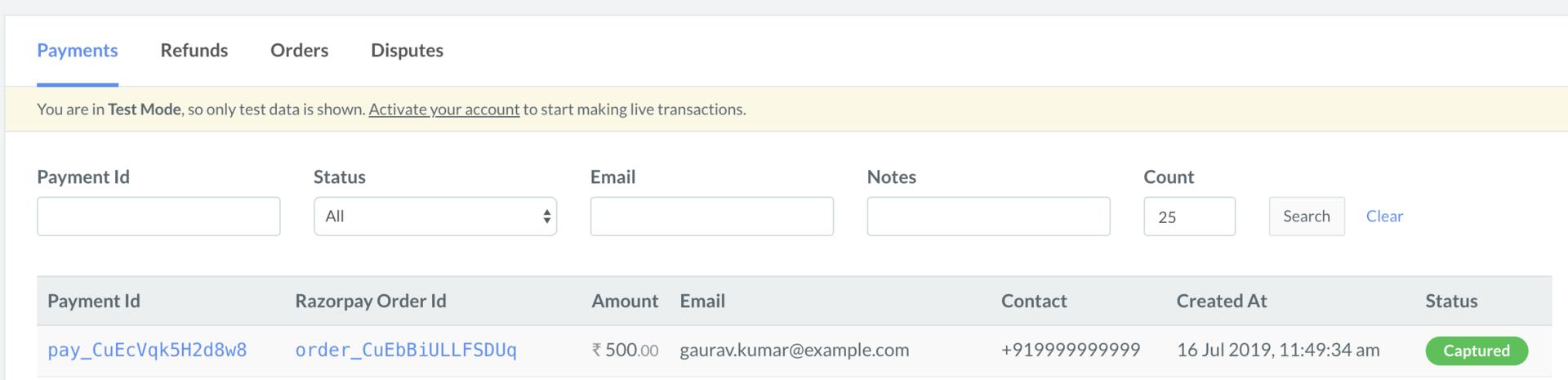
- Log in to the Razorpay Dashboard and navigate to Transactions → Payments.
- Check if a Payment Id has been generated and note the status. In case of a successful payment, the status is marked as Captured.