

Available in🇮🇳 India
Razorpay’s Native OTP feature supports one-time passwords (OTPs) in the Checkout form, without redirecting customers to the ACS page of the respective issuing banks.
This enables you to extend a simple and efficient OTP flow to your customers, reduce payment failures due to low internet speeds and avoid failures due to redirects to bank pages.
Shown below is a sample OTP input screen:
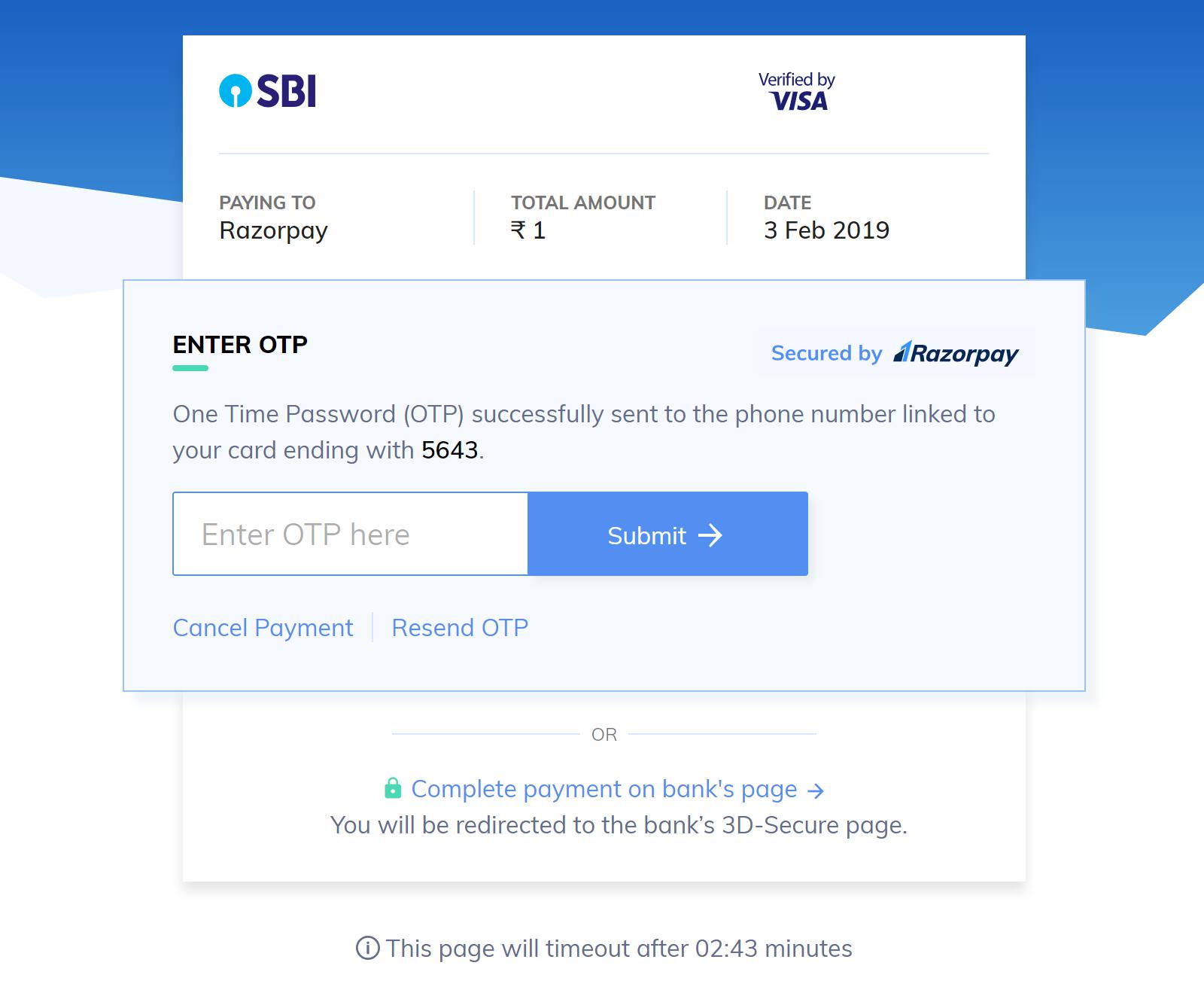
Feature RequestThis is an on-demand feature. Please raise a request with our Support team to get this feature activated on your Razorpay account.
Prerequisites
Before implementing the Native OTP feature, ensure that the following requirements are met:- Verify that you are PCI compliant to accept and process customer’s card details at your end. Learn more about PCI compliance. The compliance certificate should be updated as per the yearly renewal cycle.
- Familiarize yourselves with the payment flow.
Workflow for Native OTP
- Create a Razorpay order
- Validate Authentication Type
- Create a Payment
- OTP Authentication
- Payment Verification
API AuthenticationRazorpay APIs are authenticated using Basic Auth method where your
key_id is the Username and key_secret is the Password. You can access your API keys from the Dashboard.1. Create a Razorpay Order
A Razorpay Order creates an order ID that corresponds to the unique transaction ID or checkout ID created at your end. The Order ID is tied to all the payments made against that particular order.POST /orders
Order is an important step in the payment process.
- An order should be created for every payment.
- You can create an order using the Orders API. It is a server-side API call. Know how to authenticate Orders API.
- The order_id received in the response should be passed to the checkout. This ties the Order with the payment and secures the request from being tampered.
API Sample Code
The following is a sample API request and response for creating an order:Request Parameters
Here is the list of parameters and their description for creating an order:amount mandatory
: integer Payment amount in the smallest currency sub-unit. For example, if the amount to be charged is ₹299, then pass 29900 in this field. In the case of three decimal currencies, such as KWD, BHD and OMR, to accept a payment of 295.991, pass the value as 295990. And in the case of zero decimal currencies such as JPY, to accept a payment of 295, pass the value as 295.
currency mandatory
: string The currency in which the transaction should be made. See the list of supported currencies. Length must be 3 characters.
Handy TipsRazorpay has added support for zero decimal currencies, such as JPY and three decimal currencies, such as KWD, BHD and OMR, allowing businesses to accept international payments in these currencies. Know more about Currency Conversion (May 2024).
receipt optional
: string Your receipt id for this order should be passed here. Maximum length is 40 characters.
notes optional
: json object Key-value pair that can be used to store additional information about the entity. Maximum 15 key-value pairs, 256 characters (maximum) each. For example, "note_key": "Beam me up Scotty”.
partial_payment optional
: boolean Indicates whether the customer can make a partial payment. Possible values:
true: The customer can make partial payments.false(default): The customer cannot make partial payments.
id mandatory
: string Unique identifier of the customer. For example, cust_1Aa00000000004.
Know more about Orders API.
Response Parameters
Descriptions for the response parameters are present in the Orders Entity table.Error Response Parameters
The error response parameters are available in the API Reference Guide.2. Validate Authentication Type
Validating the authentication type is critical. This will help you to set the value ofauth_type in payment creation. If the value of auth_type is sent as otp for a BIN which is not validated successfully, the transaction will fail.
The following API endpoint will enable Razorpay to verify the OTP-based authentication flow for a specific card:
POST /payment/flows
3. Create a Payment
After the Order ID is created, create a payment for the Order ID. The API endpoint for creating a payment is given below:POST /payments/create/redirect
Request Parameters
currency mandatory
: string The currency of the transaction as passed in Orders. See the list of supported currencies.
amount mandatory
: integer The transaction amount, expressed in the smallest currency unit such as paise. For example, for an actual amount of ₹299.35, the value of this field should be 29935.
order_id mandatory
: string The unique identifier of the order created using in Step 1.
email mandatory
: string The customer’s email address. For example, gaurav.kumar@example.com.
contact mandatory
: string The customer’s contact number. For example, 9123456780.
method mandatory
: string The payment method selected by the customer. Here, the value must be card.
card
: The attributes associated with a card.
number mandatory
: integer Unformatted card number. This field is required if value of method is card. Use one of our test cards to try out the payment flow.
name mandatory
: string The name of the cardholder.
expiry_month mandatory
: integer The expiry month of the card in MM format. For example, 01 for January and 12 for December.
expiry_year mandatory
: integer Expiry year for card in YY format. For example, 2025 will be in format 25.
cvv mandatory
: integer CVV printed on the back of the card.
Handy Tips
- CVV is not required by default for tokenised cards across all networks.
- CVV is optional for tokenised card payments. Do not pass dummy CVV values.
- To implement this change, skip passing the
cvvparameter entirely, or pass anullor empty value in the CVV field. - We recommend removing the CVV field from your checkout UI/UX for tokenised cards.
- If CVV is still collected for tokenised cards and the customer enters a CVV, pass the entered CVV value to Razorpay.
notes optional
: object Set of key-value pairs used to store additional information about the entity. It can hold a maximum of 15 key-value pairs, each 256 characters long (maximum).
ip mandatory
: string The client’s IP address.
referer mandatory
: string The client’s referer URL.user_agent mandatory
: string The client’s User-Agent.auth_type mandatory
: string Indicates the authentication type for this integration method.
Defaults to 3ds. Upon successful validation, pass auth_type=otp.
Response Parameters
razorpay_payment_id
: string Unique identifier of a payment.
razorpay_order_id string
: string Unique identifier of an Order.
razorpay_signature string
: string Unique alpha-numeric identifier used for verifying a payment.
next
: array Lists the subsequent payment actions available:
otp_submitotp_resend
Learn more aboutnextactions.
NoteThe payment data is passed in
form-urlencoded format which ensures that nested keys are correctly passed.4. OTP Authentication
After entering the OTP, the customer can perform either of the two actions, as described in thenext parameter:
next
: array This array specifies the available actions as a comma-separated list. It can have the following predefined values:
-otp_submit
-otp_resendIn cases where two-factor authentication is not required or not available, the
next object will not be returned in the response.
otp_submit
: string This value is consumed to display otp submit option.otp_resend
: string This value is consumed as a retry option for OTP submission. If the parameter is not present, the OTP resend option cannot be shown to the customers. The resend option may be unavailable after a certain number of retries. The number of retries is determined by the bank and not by Razorpay.
OTP Submit
OTP submission is a part of the payment authentication process from the customer’s end where an OTP received is submitted through your application’s frontend. For card payments, customers receive the OTP via their preferred notification medium - SMS or email.NoteDo not perform any validation on the length of the OTP since this can vary across banks. However, the OTP should not be blank.
POST payments/:id/otp/submit
Path Parameter
id mandatory
: string Unique identifier of the payment.
Request Parameter
otp mandatory
: integer The OTP received by the customer.
OTP Resend
There could be situations when the customer has to re-enter the OTP. The number of retries that the user is allowed is determined by the issuing bank.POST payments/:id/otp/resend
Path Parameter
id mandatory
: string Unique identifier of the payment.
5. Verify the Payment
Once the payment process is completed, Razorpay will make aPOST request to the callback_url on whether the payment was a success or a failure.
You can easily verify the payment signature using our SDKs:
razorpay_payment_id is returned, the payment is successfully created and verified.
Post-processingA successful transaction results in the creation of the
razorpay_order_id in your database. You can mark the corresponding transaction at your end as paid and notify the customer of the same.Failure Scenario
An exception is thrown in the event of unsuccessful signature verification. If therazorpay_payment_id field is missing in the API request, the following error is displayed in the corresponding response body:
Response