

Common
How can I revoke the consent to pull my bureau report through Razorpay and partner?
How can I revoke the consent to pull my bureau report through Razorpay and partner?
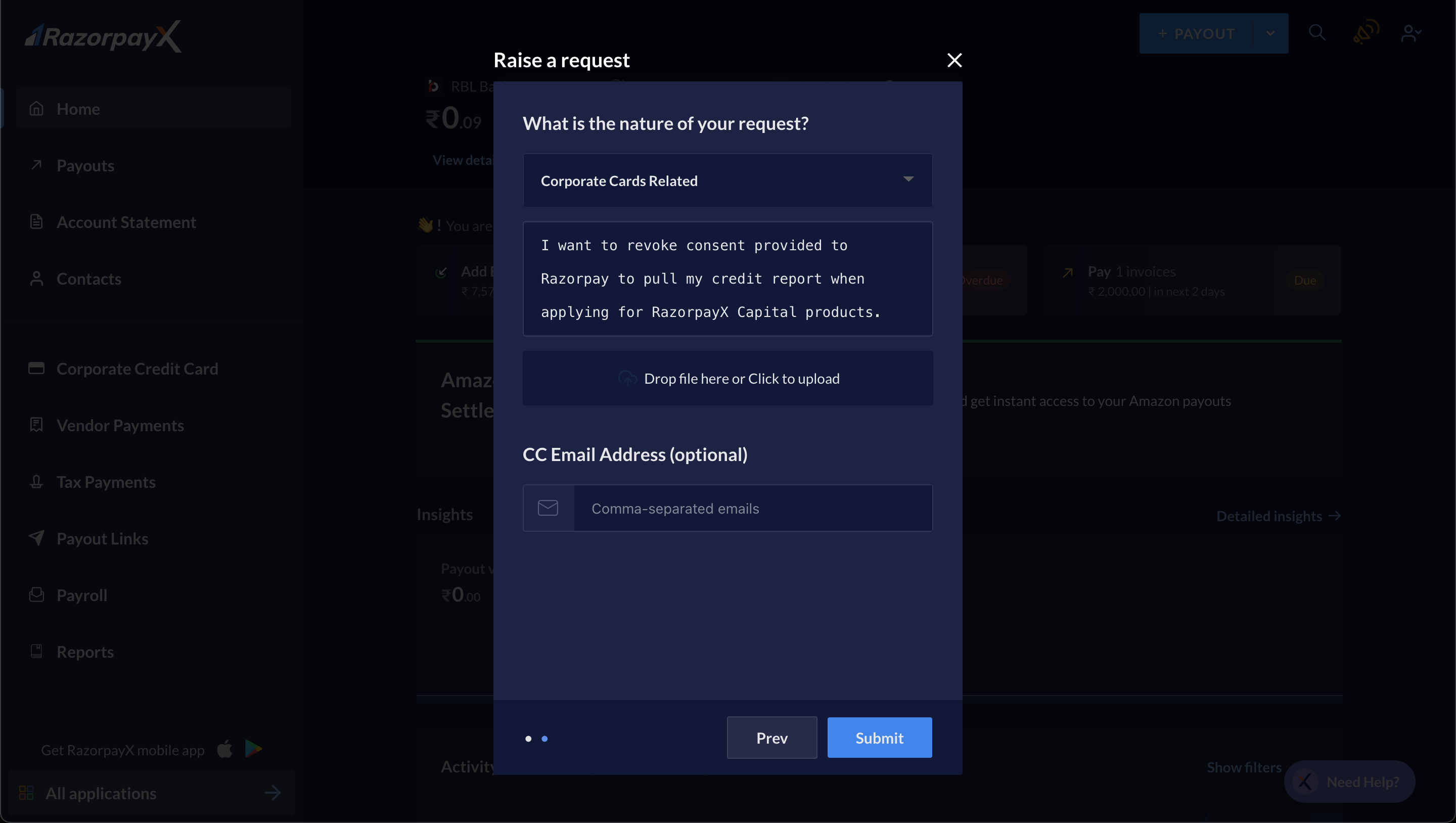
- Navigate to Need Help? in the bottom-right corner of the Dashboard.
- Click Write To Us and choose Raise a new request.
- Select Corporate Cards Related from the listed categories.
- Mention your request to revoke consent in the text box. For example, “I want to revoke the consent provided to Razorpay to pull my credit report when applying for RazorpayX Capital products.”
- Click Submit.
Corporate Credit Card
How can I get a RazorpayX Corporate Card for my business?
How can I get a RazorpayX Corporate Card for my business?
How do I check the status of my application?
How do I check the status of my application?
- Finishing a credit bureau check.
- Uploading your bank statements’ PDFs using the perfios portal.
Should I upload bank statements to get a RazorpayX Corporate Card?
Should I upload bank statements to get a RazorpayX Corporate Card?
You can safely upload your details via perfios portal or upload pdfs on the Corporate cards portal.
I am unable to enter my OTP or upload bank statements. What should I do?
I am unable to enter my OTP or upload bank statements. What should I do?
My request got rejected when I tried to avail a RazorpayX Corporate Card. Why? When can I apply again?
My request got rejected when I tried to avail a RazorpayX Corporate Card. Why? When can I apply again?
How do I get Add-on Cards for my team members?
How do I get Add-on Cards for my team members?
How can I increase my credit limit on RazorpayX Corporate Card?
How can I increase my credit limit on RazorpayX Corporate Card?
How do I change, enable or disable the auto-payment schedule for RazorpayX Corporate Card?
How do I change, enable or disable the auto-payment schedule for RazorpayX Corporate Card?
How do I pay my bill manually with net-banking or UPI?
How do I pay my bill manually with net-banking or UPI?
My credit is low and I want to spend more. What can I do to increase it?
My credit is low and I want to spend more. What can I do to increase it?
Factors that can naturally increase your credit limit include
- Increasing volume of payments on Razorpay payment gateway.
- Continuous usage of your card for at least three months.
- Timely repayments of your generated bill.
Instant Settlements
What are On-demand Instant Settlements and Same-day Scheduled Settlements?
What are On-demand Instant Settlements and Same-day Scheduled Settlements?
- Instant settlements were previously called On-demand Instant Settlements. Razorpay processes these settlements within 10 seconds of capturing the payment. You can choose the amount required to settle instantly for a small fee.
- Same-day scheduled settlements are settled with a T+0 cycle at specific hours of the day by Razorpay.
What is the settlement schedule for Same-day Settlements?
What is the settlement schedule for Same-day Settlements?
- For transactions successfully completed on any day between 09:00 hours to 16:59 hours, subject to the funds being captured during any bank working day, the settlements shall be initiated to the Merchant at 17:00 hours on the same bank working day.
- For transactions successfully completed on any day between 17:00 pm hrs to 09:59 am (next day), subject to the funds being captured during any bank working day, the settlements shall be initiated to the Merchant at 09:00 am on the same bank working day.
As a merchant, where and how do I find On-demand Instant Settlements, Same-day Settlements and pricing charged for them?
As a merchant, where and how do I find On-demand Instant Settlements, Same-day Settlements and pricing charged for them?
Which transactions get settled on the same-day after enabling Scheduled Same-day Settlements?
Which transactions get settled on the same-day after enabling Scheduled Same-day Settlements?
How to enable Scheduled Same-day Settlements/Early Settlements/Automatic Settlements?
How to enable Scheduled Same-day Settlements/Early Settlements/Automatic Settlements?
Are there any limits to Instant Settlements or Same-day Settlements?
Are there any limits to Instant Settlements or Same-day Settlements?
How to remove the limit on Instant Settlements and make it unlimited?
How to remove the limit on Instant Settlements and make it unlimited?
How long does it take for Instant settlements to become active for my account once I sign up?
How long does it take for Instant settlements to become active for my account once I sign up?
Where are the settlement charges deducted from?
Where are the settlement charges deducted from?
Is there an opt-out option for Same-day Settlements, i.e., can I switch back to my old settlement schedule?
Is there an opt-out option for Same-day Settlements, i.e., can I switch back to my old settlement schedule?
As a merchant, where and how do I find if a payment was settled early?
As a merchant, where and how do I find if a payment was settled early?
payment initiated timings and settled timings for further information.