

Available in🇮🇳 India
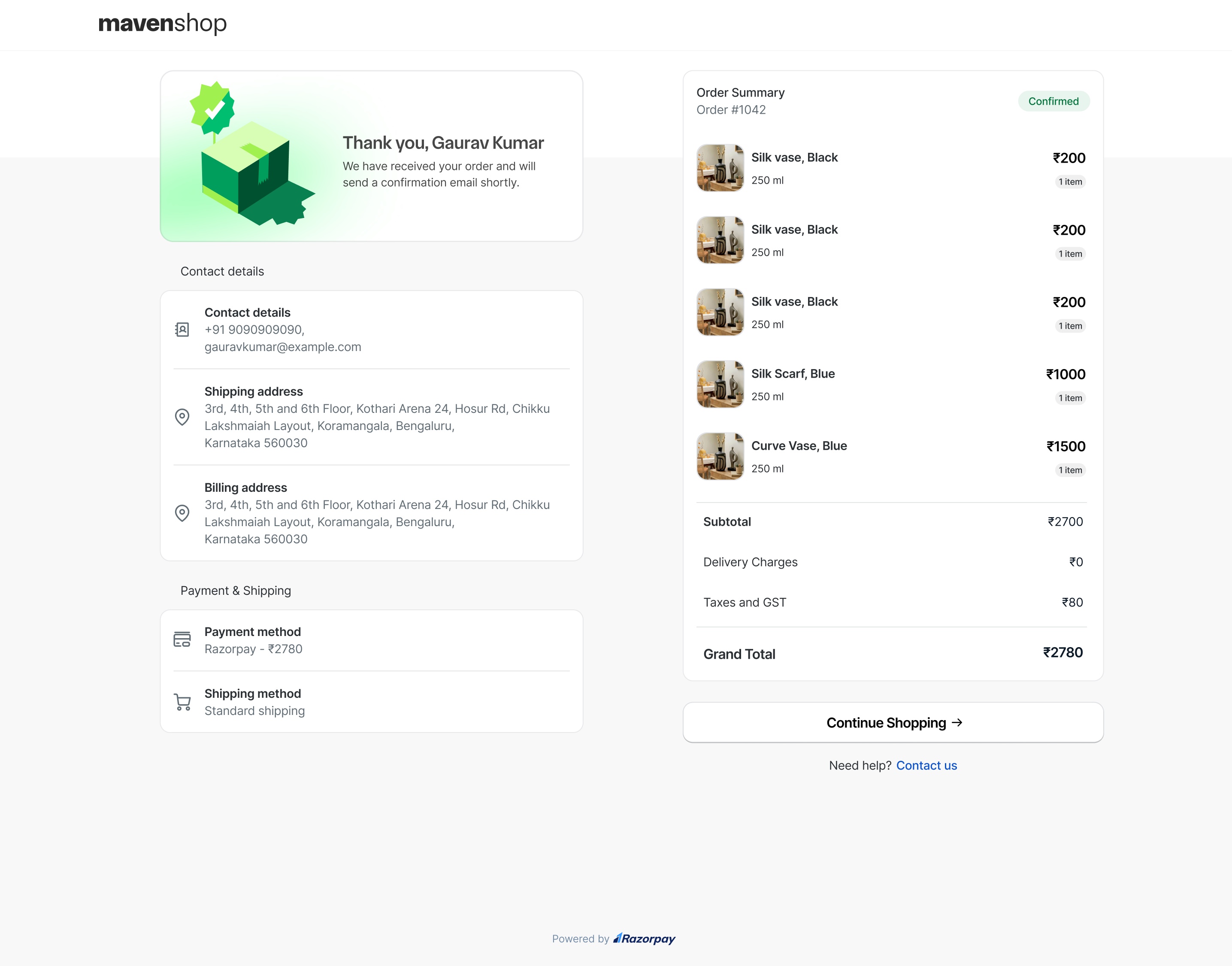
If your store is on the Shopify Basic plan, your buyers now land on a Razorpay-hosted order confirmation (thank you) page after every successful order, instead of Shopify’s native order status page. This page is on by default and needs no setup or configuration from your end.
What Changed
What the Page Shows the Buyer
- Personalised order confirmation header containing a greeting with your customer’s name.
- Full order summary with your Shopify order number, listing every item ordered, along with quantities, unit prices and the order total.
- Shipping and payment methods used for the order.
- Shipping address and contact details exactly as the buyer entered them at checkout, so they can verify the details.
- Your store’s brand logo, pulled from your Magic Checkout Dashboard configuration.
- A Continue Shopping button to return to your store.
- A Contact Us link to reach out for help with the order.
 For any queries, write to us at magic-checkout-support@razorpay.com.
Frequently Asked Questions
Why do my buyers now see a Razorpay-hosted confirmation page?
Why do my buyers now see a Razorpay-hosted confirmation page?
Earlier, Shopify hosted its own native order status page, and after a buyer paid, Magic Checkout redirected them to it using the Order status page URL that Shopify provided. Shopify now classifies the URL as protected customer data and restricts access to it for stores on the Basic plan. As Shopify moves all apps to its new API standard, the URL can no longer be accessed for stores on the Basic plan. To make sure your buyers still see a clear confirmation after they pay, Magic Checkout now renders its own order confirmation page automatically.
Which stores are affected by this change?
Which stores are affected by this change?
This change is specific to stores on the Shopify Basic plan. Stores on higher Shopify plans are not affected and can continue to use the legacy order status page method.
I am not on the Shopify Basic plan. Does this change affect me?
I am not on the Shopify Basic plan. Does this change affect me?
No. Stores on higher Shopify plans can continue to use Shopify’s native order status page. To set it up, add the order status page additional script as described in the Shopify Dashboard integration step. To compare plans or upgrade, see Shopify Pricing.
Do I need to enable or configure this page?
Do I need to enable or configure this page?
No. The page is on by default for all affected Basic plan stores and needs no setup, dashboard toggle, or configuration from your end. Your brand logo is pulled automatically from your Magic Checkout Dashboard configuration.
Will my third-party Shopify apps still work on this page?
Will my third-party Shopify apps still work on this page?
Third-party Shopify apps that display on the native order status page, such as review request, loyalty point, or post-purchase upsell apps, do not carry over to the Razorpay-hosted page, as they rely on Shopify’s native thank you page. If these integrations are critical for your store, consider upgrading your Shopify plan. To compare plans, see Shopify Pricing.
Can I switch back to Shopify's native order status page?
Can I switch back to Shopify's native order status page?
On the Basic plan, Shopify enforces this restriction and it cannot be changed at the app level. If the native order status page or its third-party app integrations are critical for your store, consider upgrading your Shopify plan. For any queries, write to us at magic-checkout-support@razorpay.com.