

Available in🇮🇳 India
You can integrate with Razorpay APIs to start accepting international card payments.
Razorpay Chargeback Guarantee Program on international cards safeguards businesses from fraud chargeback. Businesses provide additional category-specific details to enhance our risk model’s ability to detect risky transactions. Razorpay uses this information to enhance risk assessment for international cards, aiming to achieve the highest success rate while minimising fraud.
Integration Steps
Follow the steps given below to integrate S2S JSON API with browser flow and accept payments using cards. 1.1 Integrate Razorpay Shield JS1.2 Create Order and Payment
1.3 Handle Payment Success and Error Events
1.4 Verify Payment Signature
1.5 Integrate Payments Rainy Day Kit
1.6 Verify Payment Status
1.1 Integrate Razorpay Shield JS
Integrate SHIELD JS and pass session_id in Create Order and Payment.1.2 Create Order and Payment
This step demonstrates creating an Order and processing a Payment using Razorpay APIs. Depending on your integration type, you can choose between:Consolidated Order and Payment API
Consolidated Order and Payment API
Create an order along with payment using the consolidated order and payment API. This single API call combines order and payment creation, resulting in a more efficient and faster transaction process.Create an order along with payment by:
- Making a single API call to Razorpay, combining order and payment creation.
- Authenticating using the provided credentials, ensuring access to the consolidated payment API.
- Manually integrating the API sample codes on your server.
card as the payment method:POST /ordersRequest Parameters
Request Parameters
Payment amount in the smallest currency sub-unit. For example, if the amount to be charged is ₹299, then pass
29900 in this field. In the case of three decimal currencies, such as KWD, BHD and OMR, to accept a payment of 295.991, pass the value as 295990. And in the case of zero decimal currencies such as JPY, to accept a payment of 295, pass the value as 295.The currency in which the transaction should be made. View the list of supported currencies. The length must be 3 characters.
Handy TipsRazorpay has added support for zero decimal currencies, such as JPY, and three decimal currencies, such as KWD, BHD, and OMR, allowing businesses to accept international payments in these currencies. Know more about Currency Conversion (May 2024).
Indicates whether the customer can make a partial payment. Possible values:
true: The customer can make partial payments.false(default): The customer cannot make partial payments.
The customer’s phone number. A maximum length of 15 characters, including country code. For example, +919000090000.
Your company’s passenger classification, such as with a frequent flyer program. In this case, you might use values such as:
standardgoldplatinum
To share if the user is an agent, corporate, or individual. Possible values:
agentcorporateindividual
To denote if the buyer is on guest checkout or has logged into the account. Possible values:
true: If the user is logged into the account.false: If the user is on guest checkout.
UNIX timestamp when the customer account was created with the merchant. For example, 1234567890.
Latitude of the position expressed in decimal degrees (WSG 84), for example, 6.244203. A positive value denotes the northern hemisphere or the equator, and a negative value denotes the southern hemisphere. The number of digits represents the precision of the coordinate.
Longitude of the position expressed in decimal degrees (WSG 84), for example, -75.581211. A positive value denotes east longitude or the prime meridian, and a negative value denotes west longitude. The number of digits represents the precision of the coordinate.
Defines the category type. Possible values:
travelhotele_commercedigital_servicesmutual_fund
Offer price of the product. The offer price can be lower than the price if the business is running any discount on the product.
Tax amount that needs to be added to the product. In case the offer_price is tax-inclusive, keep it blank.
The sub-type of the line item. Possible values:
staybreakfastdinnerlunchearly_checkinlate_chechoutothers
Represents an ISO 8601-encoded date string. For example, September 7, 2019 is represented as
2019-07-16.Represents an ISO 8601-encoded date string. For example, September 7, 2019 is represented as
2019-07-16.Represents the type of the property. Possible values:
resorthostelhotelinnlodgemotelapartmentbed_and_breakfasttentvilla
Latitude of the position expressed in decimal degrees (WSG 84), for example, 6.244203. A positive value denotes the northern hemisphere or the equator, and a negative value denotes the southern hemisphere. The number of digits represents the precision of the coordinate.
Longitude of the position expressed in decimal degrees (WSG 84), for example, -75.581211. A positive value denotes east longitude or the prime meridian, and a negative value denotes west longitude. The number of digits represents the precision of the coordinate.
Payment capture settings for the payment. The options sent here override the account level auto-capture settings configured using the Dashboard.
Option to automatically capture payment. Possible values:
automatic: Payments are auto-captured according to the configurations specified in thecapture_optionsarray.manual: You have to manually capture payments using our Capture API or from the Dashboard.
Use this array to determine the expiry period for automatic and manual capture of payments and the refund speed in the case of non-capture.
Time in minutes till when payments in the
authorized state should be auto-captured.
Minimum value 12 minutes. This parameter is mandatory only if the value of capture parameter is automatic.Time in minutes till when you can manually capture payments in the
authorized state.- Must be equal to or greater than the
automatic_expiry_periodvalue. - Default value
7200minutes. - Maximum value
7200minutes. - Payments in the
authorizedstate after themanual_expiry_periodare auto-refunded.
Refund speed for payments that were not captured (automatically or manually). Possible values:
optimum: We try to process the refund instantly. We charge a small fee for this. If it is not possible to process an instant refund, we will process a normal refund in 5-7 working days. Learn more about instant refunds.normal: The refund is processed in 5-7 working days.
If no value is passed, the refund is processed using the default speed set on the Dashboard.
Key-value pair that can be used to store additional information about the entity. Maximum 15 key-value pairs, 256 characters (maximum) each. For example,
"note_key": "Beam me up Scotty”.Phone number of the customer. The maximum length supported is 15 characters, inclusive of country code.
CVV printed on the back of the card.
Handy Tips
- CVV is not required by default for tokenised cards across all networks.
- CVV is optional for tokenised card payments. Do not pass dummy CVV values.
- To implement this change, skip passing the
cvvparameter entirely, or pass anullor empty value in the CVV field. - We recommend removing the CVV field from your checkout UI/UX for tokenised cards.
- If CVV is still collected for tokenised cards and the customer enters a CVV, pass the entered CVV value to Razorpay.
Information regarding the customer’s browser. This parameter need not be passed when
authentication_channel=app.Indicates whether the customer’s browser supports Java. Obtained from the
navigator HTML DOM object. Possible values:true: Customer’s browser supports Java.false: Customer’s browser does not support Java.
Indicates whether the customer’s browser can execute JavaScript. Obtained from the
navigator HTML DOM object. Possible values:true: Customer’s browser can execute JavaScript.false: Customer’s browser cannot execute JavaScript.
Time difference between UTC time and the cardholder’s browser local time. Obtained from the
getTimezoneOffset() method applied to the Date object.Total width of the payer’s screen in pixels. Obtained from the
screen.width HTML DOM property.The User-Agent header of the user’s browser. The default value will be passed by Razorpay if not provided by you.
Response Parameters
Response Parameters
The transaction amount, expressed in the currency subunit. For example, for an actual amount of ₹299.35, the value of this field should be
29935.The number of payment attempts, successful and failed, that have been made against this order.
The currency in which the transaction should be made. View the list of supported currencies. Length must be of 3 characters.
Key-value pair that can be used to store additional information about the entity. Maximum 15 key-value pairs, 256 characters (maximum) each. For example,
"note_key": "Beam me up Scotty”.A list of action objects available to continue the payment process. Present when the payment requires further processing.
Indicates the next step to continue the payment process. Possible values:
otp_generate: Use this URL to allow the customer to generate OTP and complete the payment on your webpage.redirect: Use this URL to redirect the customer to submit the OTP on the bank page.
The status of the order. Possible values:
created: When you create an order, it is in thecreatedstate. It stays in this state till a payment is attempted on it.attempted: An order moves fromcreatedtoattemptedstate when a payment is first attempted on it. It remains in theattemptedstate till one payment associated with that order is captured.paid: After the successful capture of the payment, the order moves to thepaidstate. No further payment requests are permitted once the order moves to thepaidstate. The order stays in thepaidstate even if the payment associated with the order is refunded.
Error Response Parameters
Error Response Parameters
The error response parameters are available in the API Reference Guide.
Separate Order and Payment APIs
Separate Order and Payment APIs
If you are using separate APIs to create Order and process Payment, follow the steps given below:
Step 1: Create an Order
Step 1: Create an Order
Use the Orders API to create an order before initiating a payment.
POST /ordersRequest Parameters
Request Parameters
Payment amount in the smallest currency sub-unit. For example, if the amount to be charged is ₹299, then pass
29900 in this field. In the case of three decimal currencies, such as KWD, BHD and OMR, to accept a payment of 295.991, pass the value as 295990. And in the case of zero decimal currencies such as JPY, to accept a payment of 295, pass the value as 295.The currency in which the transaction should be made. View the list of supported currencies. The length must be 3 characters.
Handy TipsRazorpay has added support for zero decimal currencies, such as JPY, and three decimal currencies, such as KWD, BHD, and OMR, allowing businesses to accept international payments in these currencies. Know more about Currency Conversion (May 2024).
Indicates whether the customer can make a partial payment. Possible values:
true: The customer can make partial payments.false(default): The customer cannot make partial payments.
The customer’s phone number. A maximum length of 15 characters, including country code. For example, +919000090000.
Your company’s passenger classification, such as with a frequent flyer program. In this case, you might use values such as:
standardgoldplatinum
To share if the user is an agent, corporate, or individual. Possible values:
agentcorporateindividual
To denote if the buyer is on guest checkout or has logged into the account. Possible values:
true: If the user is logged into the account.false: If the user is on guest checkout.
UNIX timestamp when the customer account was created with the merchant. For example, 1234567890.
Latitude of the position expressed in decimal degrees (WSG 84), for example, 6.244203. A positive value denotes the northern hemisphere or the equator, and a negative value denotes the southern hemisphere. The number of digits represents the precision of the coordinate.
Longitude of the position expressed in decimal degrees (WSG 84), for example, -75.581211. A positive value denotes east longitude or the prime meridian, and a negative value denotes west longitude. The number of digits represents the precision of the coordinate.
Defines the category type. Possible values:
travelhotele_commercedigital_servicesmutual_fund
Offer price of the product. The offer price can be lower than the price if the business is running any discount on the product.
Tax amount that needs to be added to the product. In case the offer_price is tax-inclusive, keep it blank.
The sub-type of the line item. Possible values:
staybreakfastdinnerlunchearly_checkinlate_chechoutothers
Represents an ISO 8601-encoded date string. For example, September 7, 2019 is represented as
2019-07-16.Represents an ISO 8601-encoded date string. For example, September 7, 2019 is represented as
2019-07-16.Represents the type of the property. Possible values:
resorthostelhotelinnlodgemotelapartmentbed_and_breakfasttentvilla
Latitude of the position expressed in decimal degrees (WSG 84), for example, 6.244203. A positive value denotes the northern hemisphere or the equator, and a negative value denotes the southern hemisphere. The number of digits represents the precision of the coordinate.
Longitude of the position expressed in decimal degrees (WSG 84), for example, -75.581211. A positive value denotes east longitude or the prime meridian, and a negative value denotes west longitude. The number of digits represents the precision of the coordinate.
Payment capture settings for the payment. The options sent here override the account level auto-capture settings configured using the Dashboard.
Option to automatically capture payment. Possible values:
automatic: Payments are auto-captured according to the configurations specified in thecapture_optionsarray.manual: You have to manually capture payments using our Capture API or from the Dashboard.
Use this array to determine the expiry period for automatic and manual capture of payments and the refund speed in the case of non-capture.
Time in minutes till when payments in the
authorized state should be auto-captured.
Minimum value 12 minutes. This parameter is mandatory only if the value of capture parameter is automatic.Time in minutes till when you can manually capture payments in the
authorized state.- Must be equal to or greater than the
automatic_expiry_periodvalue. - Default value
7200minutes. - Maximum value
7200minutes. - Payments in the
authorizedstate after themanual_expiry_periodare auto-refunded.
Refund speed for payments that were not captured (automatically or manually). Possible values:
optimum: We try to process the refund instantly. We charge a small fee for this. If it is not possible to process an instant refund, we will process a normal refund in 5-7 working days. Learn more about instant refunds.normal: The refund is processed in 5-7 working days.
If no value is passed, the refund is processed using the default speed set on the Dashboard.
Response Parameters
Response Parameters
The transaction amount, expressed in the currency subunit. For example, for an actual amount of ₹299.35, the value of this field should be
29935.The number of payment attempts, successful and failed, that have been made against this order.
The currency in which the transaction should be made. View the list of supported currencies. Length must be of 3 characters.
Key-value pair that can be used to store additional information about the entity. Maximum 15 key-value pairs, 256 characters (maximum) each. For example,
"note_key": "Beam me up Scotty”.The status of the order. Possible values:
created: When you create an order, it is in thecreatedstate. It stays in this state till a payment is attempted on it.attempted: An order moves fromcreatedtoattemptedstate when a payment is first attempted on it. It remains in theattemptedstate till one payment associated with that order is captured.paid: After the successful capture of the payment, the order moves to thepaidstate. No further payment requests are permitted once the order moves to thepaidstate. The order stays in thepaidstate even if the payment associated with the order is refunded.
Error Response Parameters
Error Response Parameters
The error response parameters are available in the API Reference Guide.
Step 2: Create a Payment
Step 2: Create a Payment
Once the order is created, pass the
order_id from the Orders API response to the Payments API.POST /payments/create/jsonRequest Parameters
Request Parameters
Payment amount in the smallest currency sub-unit. For example, if the amount to be charged is ₹299, then pass
29900 in this field. In the case of three decimal currencies, such as KWD, BHD and OMR, to accept a payment of 295.991, pass the value as 295990. And in the case of zero decimal currencies such as JPY, to accept a payment of 295, pass the value as 295.Currency code for the currency in which you want to accept the payment. For example, INR. Refer to the list of supported currencies. The length must be 3 characters.
Handy TipsRazorpay has added support for zero decimal currencies, such as JPY, and three decimal currencies, such as KWD, BHD, and OMR, allowing businesses to accept international payments in these currencies. Know more about Currency Conversion (May 2024).
Phone number of the customer. The maximum length supported is 15 characters, inclusive of country code.
CVV printed on the back of the card.
Handy Tips
- CVV is not required by default for tokenised cards across all networks.
- CVV is optional for tokenised card payments. Do not pass dummy CVV values.
- To implement this change, skip passing the
cvvparameter entirely, or pass anullor empty value in the CVV field. - We recommend removing the CVV field from your checkout UI/UX for tokenised cards.
- If CVV is still collected for tokenised cards and the customer enters a CVV, pass the entered CVV value to Razorpay.
The User-Agent header of the user’s browser. The default value will be passed by Razorpay if not provided by you.
Information regarding the customer’s browser. This parameter need not be passed when
authentication_channel=app.Indicates whether the customer’s browser supports Java. Obtained from the
navigator HTML DOM object. Possible values:true: Customer’s browser supports Java.false: Customer’s browser does not support Java.
Indicates whether the customer’s browser can execute JavaScript. Obtained from the
navigator HTML DOM object. Possible values:true: Customer’s browser can execute JavaScript.false: Customer’s browser cannot execute JavaScript.
Time difference between UTC time and the cardholder’s browser local time. Obtained from the
getTimezoneOffset() method applied to the Date object.Total width of the payer’s screen in pixels. Obtained from the
screen.width HTML DOM property.Obtained from the payer’s browser using the
navigator.language HTML DOM property. Maximum limit of 8 characters.Key-value object used for passing tracking info. Refer to Notes for more details.
Response Parameters
Response Parameters
A list of action objects available to continue the payment process. Present when the payment requires further processing.
Indicates the next step to continue the payment process. Possible values:
otp_generate: Use this URL to allow the customer to generate OTP and complete the payment on your webpage.redirect: Use this URL to redirect the customer to submit the OTP on the bank page.
Error Response Parameters
Error Response Parameters
The error response parameters are available in the API Reference Guide.
1.3 Handle Payment Success and Error Events
Once the payment is completed by the customer, aPOST request is made to the callback_url provided in the payment request. The data contained in this request will depend on whether the payment was a success or a failure.
Success Callback
If the payment made by the customer is successful, the following fields are sent:razorpay_payment_idrazorpay_order_idrazorpay_signature
Callback Example
Failure Callback
If the payment has failed, the callback will contain details of the error. Refer to Errors for details.1.4 Verify Payment Signature
Signature verification is a mandatory step to ensure that the callback is sent by Razorpay. Therazorpay_signature contained in the callback can be regenerated by your system and verified as follows.
Create a string to be hashed using the razorpay_payment_id contained in the callback and the Order ID generated in the first step, separated by a |. Hash this string using SHA256 and your API Secret.
Generate Signature on your Server
Sample code
Sample code
1.5 Integrate Payments Rainy Day Kit
Use Payments Rainy Day kit to overcome payments exceptions such as:1.6 Verify Payment Status
Handy TipsOn the Razorpay Dashboard, ensure that the payment status is
captured. Refer to the payment capture settings page to know how to capture payments automatically.You can track the payment status in three ways:
You can track the payment status in three ways:
- Verify Status from Dashboard
- Subscribe to Webhook Events
- Poll APIs
To verify the payment status from the Razorpay Dashboard: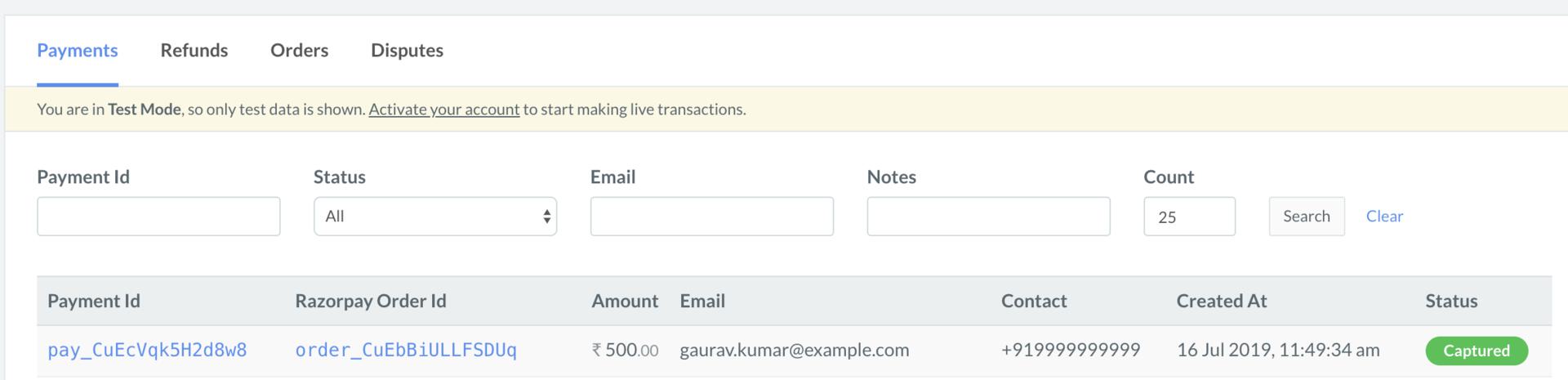
- Log in to the Razorpay Dashboard and navigate to Transactions → Payments.
- Check if a Payment Id has been generated and note the status. In case of a successful payment, the status is marked as Captured.