

Available in🇮🇳 India
Organisations provide flexible benefits to allow employees to customise their CTC. On the Payroll Dashboard, you can declare and avail flexible benefits via Zaggle, only if it is enabled for your organisation.
With the Zaggle integration, you no longer need to submit proof of expenses on the Dashboard. You can use your Zaggle card to make expenses, which are automatically recorded. This simplifies the reimbursement process.
How Zaggle Works
How Zaggle Works
FBP via Zaggle provides the declaration benefits via dedicated wallets. After you declare the amounts, your organisation credits the declared and approved funds to the selected wallets on the Zaggle card.The following wallets are available on your card:
- Food wallet: Can be spent on Swiggy, Zomato, BigBasket and more.
- Fuel wallet: Valid at all petrol pumps in India.
- Telecom wallet: Applicable for online phone bill payments and recharges.
- Books and periodicals: Applicable across books and periodicals purchases from Amazon, Flipkart and other online and offline stores.
How it Works
- Select the flexible benefits to declare on the Payroll Dashboard.
- Update personal infromation and complete KYC.
- Receive the Zaggle card at the specified address.
Setup & Declare Benefits
There are three steps to declare flexible benefits on Zaggle.Declare Benefits
Declare Benefits
Once your organisation has set up flexible benefits plan via Zaggle, you can declare your benefits on the Payroll Dashboard.
- Log in to the Payroll Dashboard.
- Navigate to Tax Deductions in the left menu and go to Flexible benefits plan in right pane.
- Click START DECLARING.
- On the Flexible Benefits page, select the check boxes for the benefits you want to avail.
- Enter the monthly amount to declare. The amount you declare must be between the minimum and maximum allocated limits.
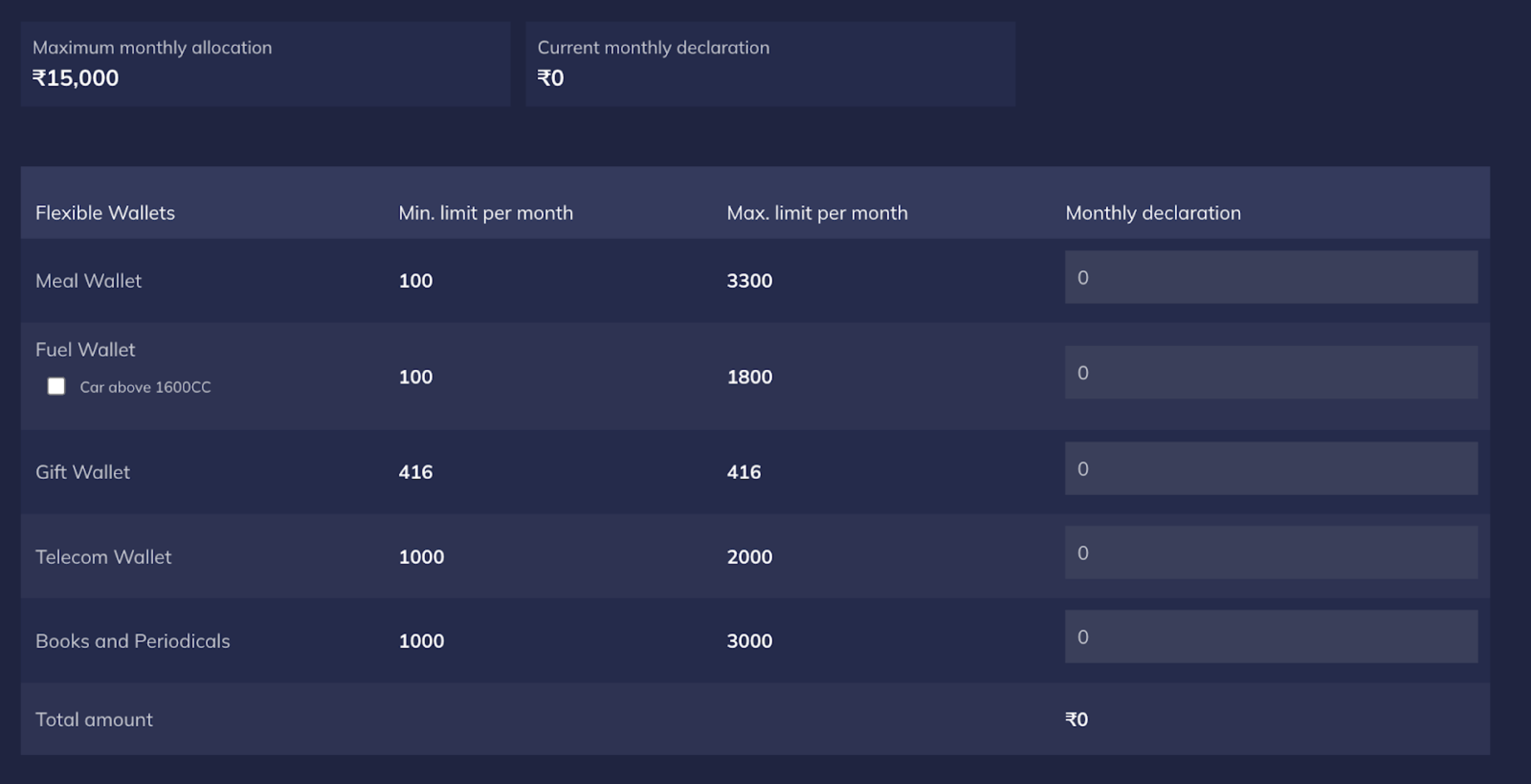
- Click CONTINUE.
- To change FBP, select or clear the respective check boxes. The updated flexible benefits plan is effective starting the upcoming month.
- You can change your flexible benefits plan throughout the month until your organisation finalises the monthly payroll.
Update Personal Information
Update Personal Information
You must verify your identity to receive your Zaggle card.Enter your details such as the Name, Phone number, Date of Birth and PAN and click VERIFY & CONTINUE.
Receive Card at Address
Receive Card at Address
Your organisation can choose to either:
- Deliver cards to your home address/doorstep
- Deliver cards to your office headquarters