

Manage Tax Proofs Verifications
2FA on PF Payments
2FA on Karnataka PT Payments
TDS Filing
Challans
TDS Charges
Payroll APIs
To view the APIs, follow the links.General Payroll APIs
Payroll Partners APIs
Quick Links
Explore the quick links as available on the Payroll Dashboard.How do I setup a Custom Salary Structure?
How do I setup a Custom Salary Structure?
- Custom salary structure for the organisation.
- Custom salary structure for a specific employee.
Are there any best practices to note before I execute payroll?
Are there any best practices to note before I execute payroll?
How can I make one-time payments?
How can I make one-time payments?
Can I revise salaries in bulk?
Can I revise salaries in bulk?
How do I upload additions, deductions and Loss of Pay in bulk?
How do I upload additions, deductions and Loss of Pay in bulk?
When will Payroll pay my ESIC/PT/PF/TDS dues?
When will Payroll pay my ESIC/PT/PF/TDS dues?
Account & Settings
Why was my Payroll account deactivated?
Why was my Payroll account deactivated?
Can I reactivate my Payroll account?
Can I reactivate my Payroll account?
Is it mandatory to use the core payroll module in Payroll?
Is it mandatory to use the core payroll module in Payroll?
Can I use supplementary modules without using core payroll?
Can I use supplementary modules without using core payroll?
How do I provide additional permissions to my HR/Operations/Finance team members?
How do I provide additional permissions to my HR/Operations/Finance team members?
Human Resource, configure permissions for the user role and assign it to employees. The assigned employee/s start to have access to the permitted Payroll modules.Know how to create, edit and manage user roles. Navigate to Settings → User Roles on the Dashboard.How can I create approval workflows for one-time payments and reimbursements?
How can I create approval workflows for one-time payments and reimbursements?
Payroll Payouts
We processed the salaries and the payments are still In Progress. What do we do now?
We processed the salaries and the payments are still In Progress. What do we do now?
In Progress, it means that Payroll is awaiting payment confirmation status from the bank.Please wait for confirmation from the bank. You can also check the status in the Ledger on the Payroll Dashboard. Know more about the payment status and the Payout modes and TAT.We processed the salaries. The payment status is successful but is yet to be credited to my employees. What to do now?
We processed the salaries. The payment status is successful but is yet to be credited to my employees. What to do now?
How long does Payroll take to process payments? By when should we prepare the monthly payroll for execution?
How long does Payroll take to process payments? By when should we prepare the monthly payroll for execution?
Can we reverse salary payments after execution?
Can we reverse salary payments after execution?
How long does it take for employees to receive their salary post execution?
How long does it take for employees to receive their salary post execution?
How can I reverse one-time payments?
How can I reverse one-time payments?
Fund Loading, Transfer, Account Balance
Transferring funds to your Payroll account updates your Payroll balance. Know more about fund transfer and payroll payouts in Payroll.When will Payroll update my account balance after I transfer funds?
When will Payroll update my account balance after I transfer funds?
How do I know if my fund transfer transaction is unsuccessful? Why was it unsuccessful and how do I resolve it?
How do I know if my fund transfer transaction is unsuccessful? Why was it unsuccessful and how do I resolve it?
- You transferred the funds on a non-working day such as on bank holidays or Sundays.
- You transferred funds from a non-whitelisted bank account source. Fund transfer is only possible via validated accounts.
- Your bank account details could be incorrect.
We transferred funds to the Payroll account today and the payroll execution date is tomorrow. Will my transactions be successful?
We transferred funds to the Payroll account today and the payroll execution date is tomorrow. Will my transactions be successful?
Can we process salary on non-working days or banking holidays?
Can we process salary on non-working days or banking holidays?
Is there minimum or a maximum limit when transferring funds to my Payroll account?
Is there minimum or a maximum limit when transferring funds to my Payroll account?
We are unable to transfer the funds from our Axis account to Payroll's Axis account available on the Dashboard. The account number says it is invalid. How to resolve this?
We are unable to transfer the funds from our Axis account to Payroll's Axis account available on the Dashboard. The account number says it is invalid. How to resolve this?
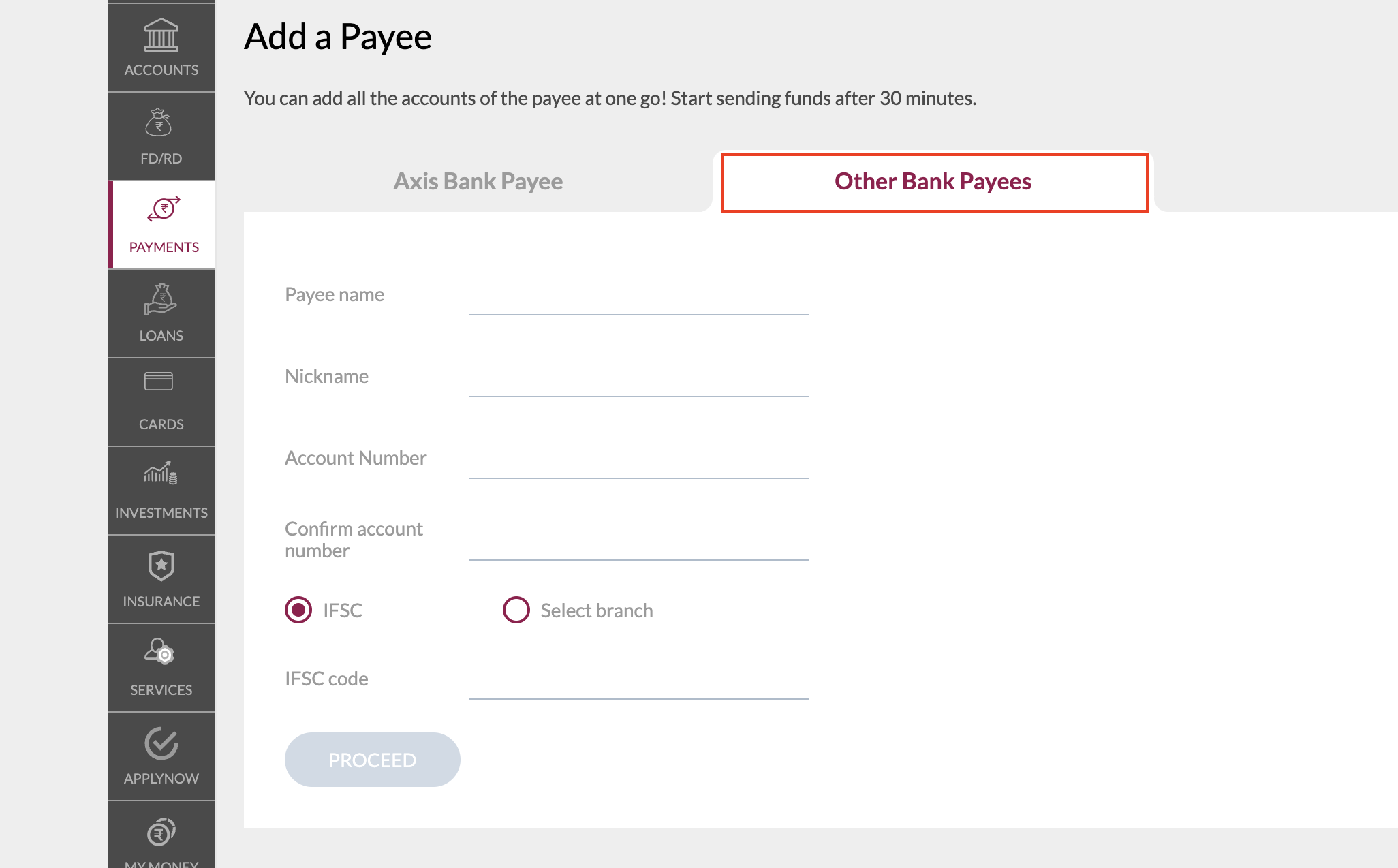
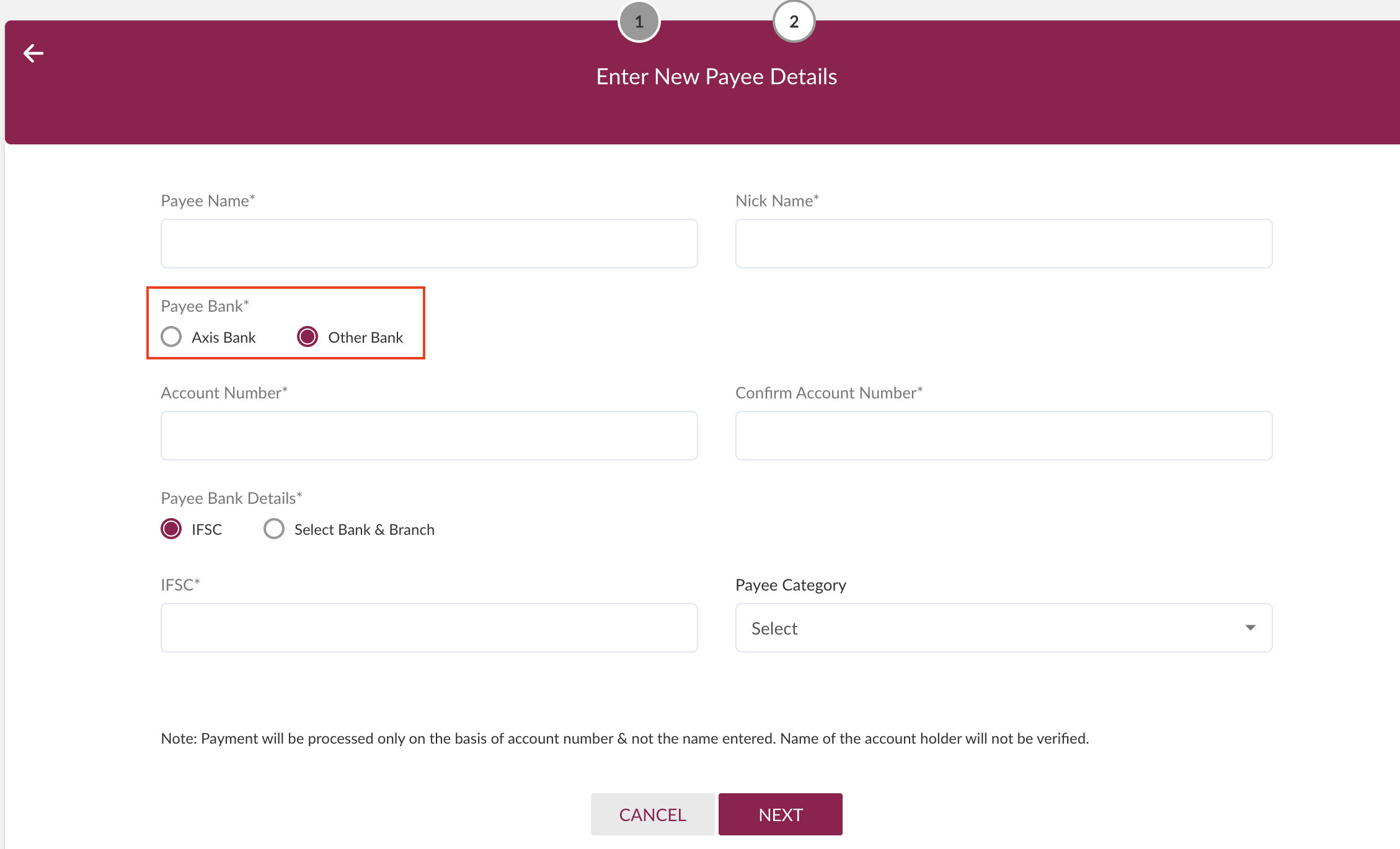
- On this Axis netbanking portal:
- Select Other Bank Payees instead of Axis Payees if you use Axis Bank’s Corporate Banking portal.
- Select Other Bank under Payee if you use Axis Bank’s Retail Banking portal.
- Select Other Bank Payees instead of Axis Payees if you use Axis Bank’s Corporate Banking portal.
- Enter the account number and IFSC available on the Money Transfer page to add funds. You can transfer the funds to your Axis account between 1:30 am-9:30 pm. Know more about fund transfer.
Compliance Payments
Following are the frequently asked questions about compliance payments.What happens when I disable compliance payments settings on the Payroll Dashboard?
What happens when I disable compliance payments settings on the Payroll Dashboard?
- The ESI deduction continues to appear on the employee’s payslip to maintain payroll and payslip accuracy.
- Payroll does not deduct the ESI contribution when you execute payroll.
- You must pay the statutory dues to the respective compliance departments (ESIC here) manually and externally.
Where can I modify the compliance payments settings for my organisation?
Where can I modify the compliance payments settings for my organisation?
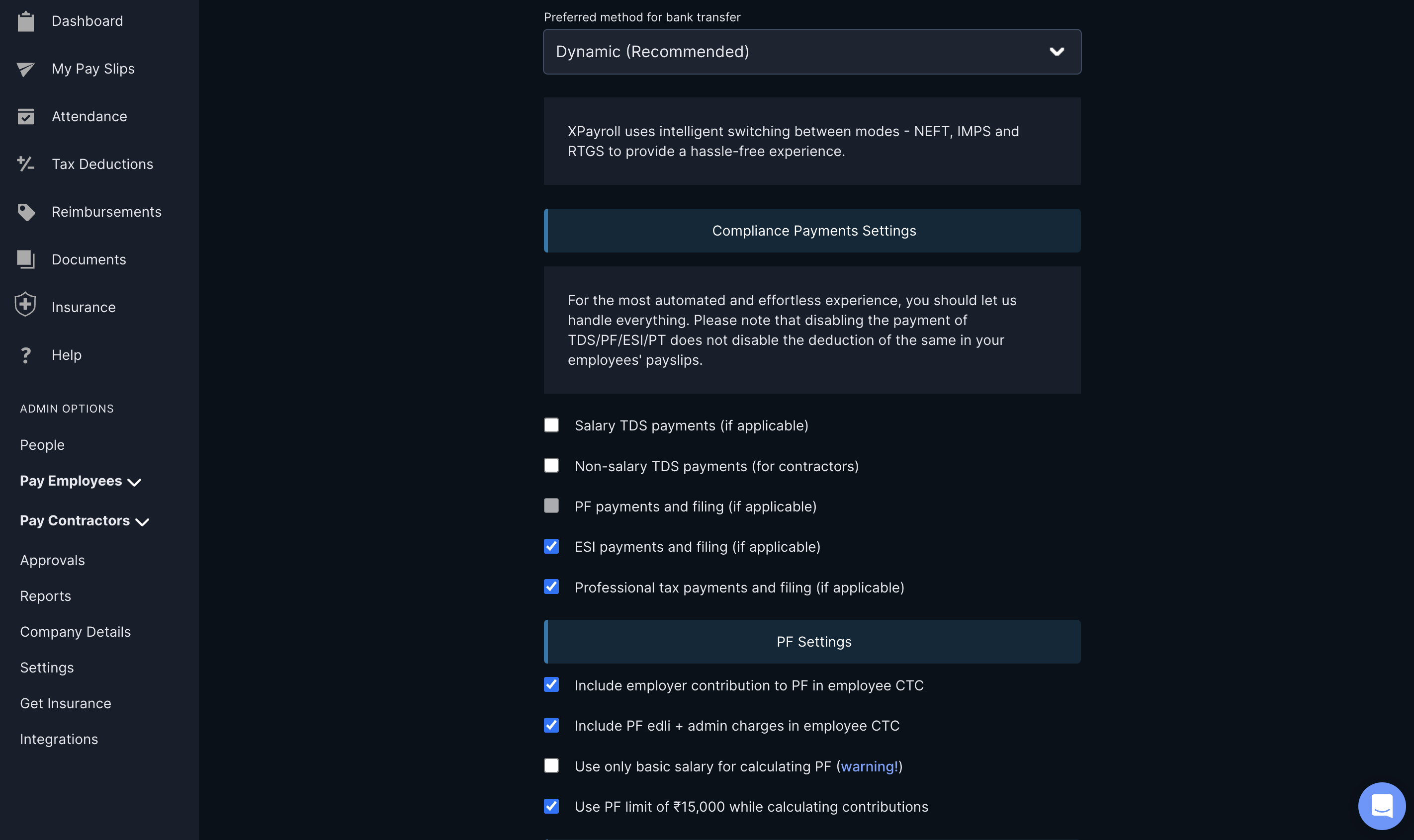
- Log in to the Payroll Dashboard.
- Navigate to ADMIN OPTIONS → Settings → Payments & Compliance Setup → Edit.
-
Clear the relevant check boxes in the Compliance Payments Settings section.
Due to PF 2FA applicability, Provident Fund (PF) is automatically cleared.
I have disabled compliance payments for my organisation. Does Payroll deduct the money required to make compliance payments from my account balance?
I have disabled compliance payments for my organisation. Does Payroll deduct the money required to make compliance payments from my account balance?
Why do compliance payments deductions appear in my employees' payslips even after I have disabled them on the Dashboard?
Why do compliance payments deductions appear in my employees' payslips even after I have disabled them on the Dashboard?
Professional Tax
Why has Payroll temporarily paused automated Professional Tax payments for Karnataka employees?
Why has Payroll temporarily paused automated Professional Tax payments for Karnataka employees?
Does the PT 2FA rule apply to employees not located in Karnataka?
Does the PT 2FA rule apply to employees not located in Karnataka?
Will Payroll continue to make TDS and ESIC payments?
Will Payroll continue to make TDS and ESIC payments?
Do I need to register employees on the PT portal?
Do I need to register employees on the PT portal?
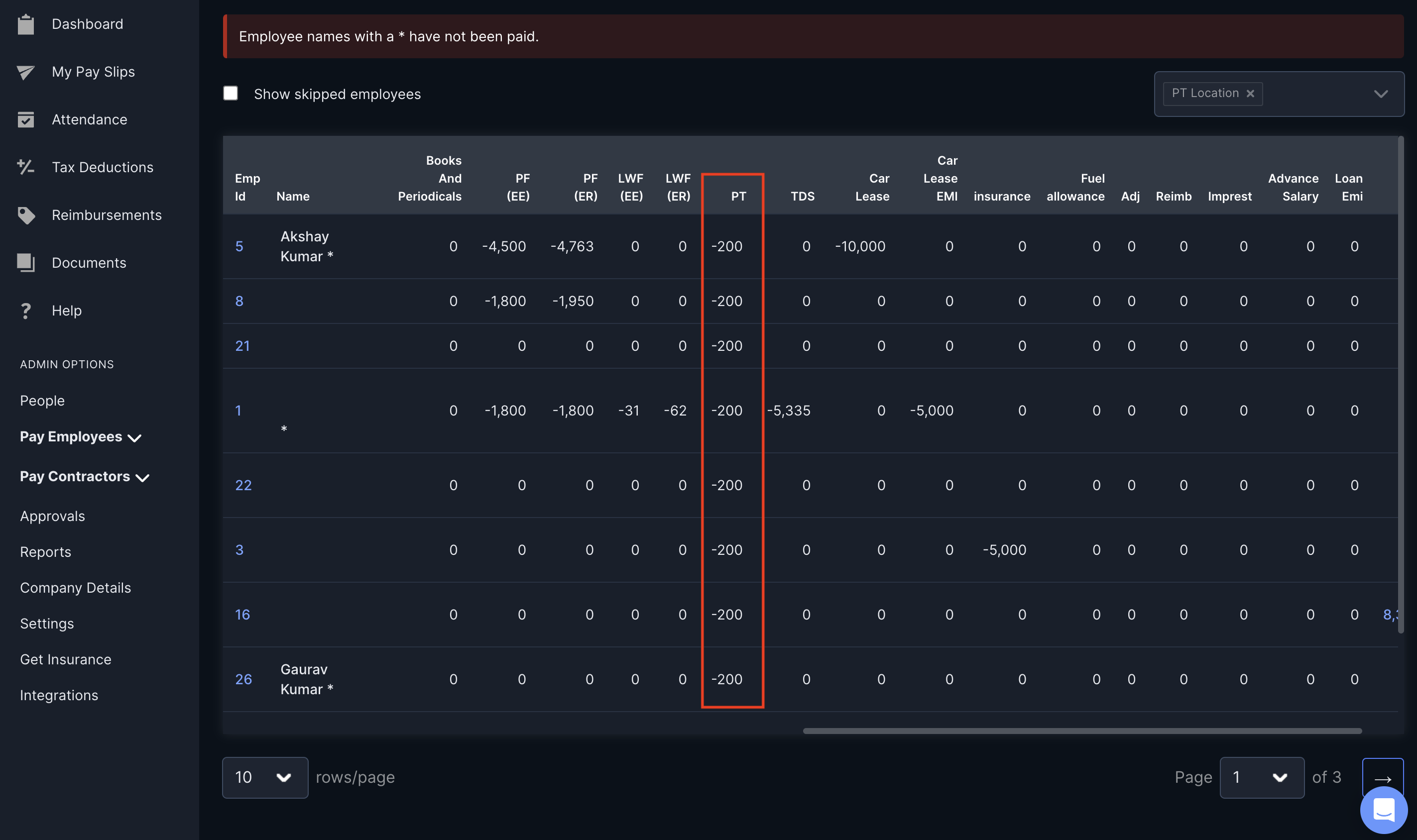
How can I check the amount I must pay as Professional Tax?
How can I check the amount I must pay as Professional Tax?
- Log in to the Payroll Dashboard.
- Navigate to ADMIN OPTIONS → Reports in the left menu.
- Click Salary Register.
- Use the PT Location filter to list the employees whose PT payments you must make.
- Scroll horizontally against the employees’ names to view the PT amounts.
I have already executed the payroll for the month. Will Payroll process my PT payments for Karnataka-based employees?
I have already executed the payroll for the month. Will Payroll process my PT payments for Karnataka-based employees?
By when must I make the Professional Tax payments?
By when must I make the Professional Tax payments?
How can I make the PT payments for my employees based in Karnataka?
How can I make the PT payments for my employees based in Karnataka?
PF Payments
When is Payroll resuming automated PF payments?
When is Payroll resuming automated PF payments?
How is the payroll amount calculated for PF since the 2FA rule change is in effect?
How is the payroll amount calculated for PF since the 2FA rule change is in effect?
- You can load ₹900 (multiplied by the total number of employees) into your Payroll wallet to process the monthly payroll.
- You must remit the ₹100 to the EPFO (due to Payroll temporarily pausing automated PF payments). Follow the steps to make PF Payments via EPFO.
Why was automatic PF payments via Payroll Dashboard temporarily paused?
Why was automatic PF payments via Payroll Dashboard temporarily paused?
How do I make PF payments for my employees?
How do I make PF payments for my employees?
- PF ECR files are available on the Payroll Dashboard from the 5th of the following month.
- Navigate to Run Payroll and click here in the Urgent: PF payment is pending warning.
What is the due date for PF payments?
What is the due date for PF payments?
Where can I download the PF ECR file?
Where can I download the PF ECR file?
ESIC
Why did ESIC registration for some of my employees fail? Where can I check the failure reasons and next steps?
Why did ESIC registration for some of my employees fail? Where can I check the failure reasons and next steps?
- Log in to the Payroll Dashboard.
- Navigate to ADMIN OPTIONS → ESIC Registration Report.
- On the ESIC Registration Report page, check the Remarks column to understand the failure reasons.
Challans
Where can I download my ESIC, PF, PT challans from?
Where can I download my ESIC, PF, PT challans from?
- Log in to the Payroll Dashboard.
- Navigate to ADMIN OPTIONS → Reports → Provident Fund, ESI & Professional Tax.
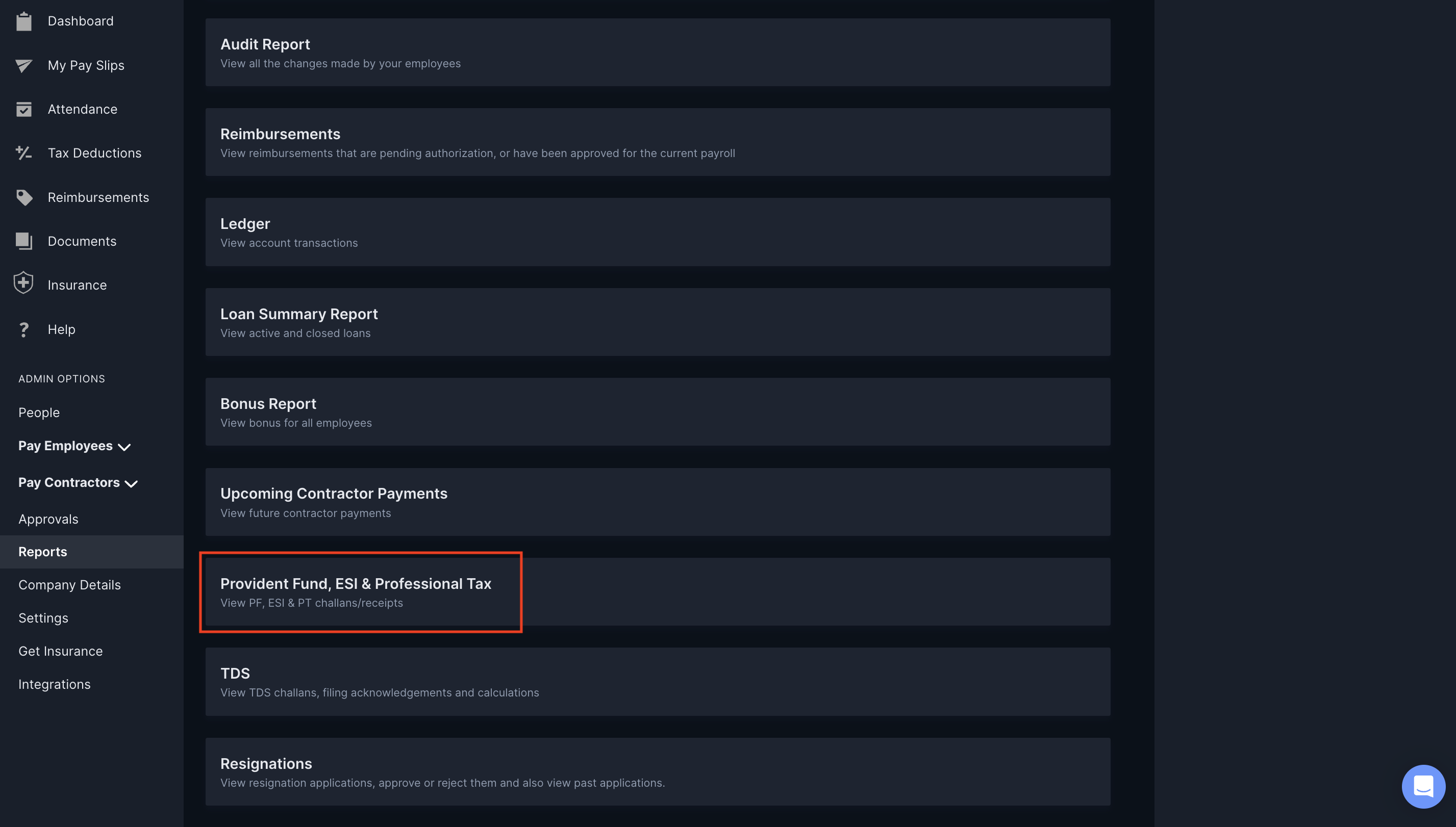
- On the Compliance Documents page, click the attachments under the respective compliance columns to download them.
Where can I view my TDS challans on the Payroll Dashboard?
Where can I view my TDS challans on the Payroll Dashboard?
When are the challans for compliance payments available on the Payroll Dashboard?
When are the challans for compliance payments available on the Payroll Dashboard?
I am unable to view my TDS challans on the Dashboard. How do I resolve this?
I am unable to view my TDS challans on the Dashboard. How do I resolve this?
TDS & charges
What is the TDS impact on the Razorpay charges we paid?
What is the TDS impact on the Razorpay charges we paid?
Will my TDS deduction increase if I pay bonus to my employees?
Will my TDS deduction increase if I pay bonus to my employees?
We received a notice from TRACES with the subject 'Regular Statement filed is processed with defaults and/or PAN errors u/s 200A.' Why did we receive this and what needs to be done?
We received a notice from TRACES with the subject 'Regular Statement filed is processed with defaults and/or PAN errors u/s 200A.' Why did we receive this and what needs to be done?
Form 16
When will my employees get the Form 16?
When will my employees get the Form 16?
Where do we see the Employees Form 16 once it is available?
Where do we see the Employees Form 16 once it is available?
Do we get the Contractors Form 16A through Payroll?
Do we get the Contractors Form 16A through Payroll?
- The Contractor’s name and PAN.
- The quarter for which you need the Form 16A.
Bonus
How can I pay bonuses to my employees?
How can I pay bonuses to my employees?
- Use the Bonus module.
- Make One-time payments for bonus payouts.
- Add bonus as an addition to the monthly salary.
How can I pay an instant bonus to employees?
How can I pay an instant bonus to employees?
Can I make bonus payments in bulk?
Can I make bonus payments in bulk?
- If the bonus does not have a clawback rule, you can use the bulk additions template.
- If the bonus has a clawback rule, you cannot make bonus payments in bulk.
If I pay a bonus to my employees, will it affect PF, ESI, PT or TDS calculations?
If I pay a bonus to my employees, will it affect PF, ESI, PT or TDS calculations?
- Bonuses are not included in PF wage calculations, so paying a bonus will not affect PF deductions. Even if you process the bonus as a one-time payment or as an addition to monthly salary, it will still not impact PF unless the structure of Basic + DA changes.
- ESI is calculated on gross earnings, including fixed salary and certain allowances. By default, bonus payments (whether one-time or as an addition) do not affect ESI deductions.
-
However, if you want bonuses to be included in ESI wage calculations:
- Log in to the Payroll Dashboard.
- Navigate to Settings → Payments & Compliance Setup → ESI Setup in the left menu.
- Check the option Include Payroll Additions & One-Time Payments in ESI Wages.
- If this setting is enabled, the bonus will be included in ESI wages, which may increase the ESI deduction.
- PT is calculated based on state-specific salary slabs. Since PT is derived from gross salary, adding a bonus (as a one-time payment or monthly addition) can increase the gross salary, which may push the employee into a higher PT slab, leading to a higher PT deduction.
- The impact of bonuses on PT varies from state to state, so it’s essential to check the PT rules applicable in the respective state.
- TDS is deducted on bonuses as per tax slabs, and it can increase the employee’s overall tax liability.
Leaves
Our leaves are carried forward to the next financial year even if we did not configure that. Why?
Our leaves are carried forward to the next financial year even if we did not configure that. Why?
New TDS/TCS Section Codes
What is changing with the new TDS/TCS section codes and when did it take effect?
What is changing with the new TDS/TCS section codes and when did it take effect?
How does this impact payroll processing?
How does this impact payroll processing?
Do I need to update my TDS challan filing process?
Do I need to update my TDS challan filing process?
Will Form 16 and Form 24Q reflect the new section codes?
Will Form 16 and Form 24Q reflect the new section codes?
What is the difference between Section 392 and Section 393?
What is the difference between Section 392 and Section 393?
What about TCS (Tax Collected at Source) - does it affect payroll?
What about TCS (Tax Collected at Source) - does it affect payroll?
Where can I find the complete list of new section codes?
Where can I find the complete list of new section codes?
Salary
Payroll's Loss of Pay calculation is not matching with our calculation. Why?
Payroll's Loss of Pay calculation is not matching with our calculation. Why?
Is my employee's personal email address necessary when processing Full and final settlement?
Is my employee's personal email address necessary when processing Full and final settlement?
What are the supported payment modes to process an employee's FNF?
What are the supported payment modes to process an employee's FNF?
Is it possible to revise salary in bulk?
Is it possible to revise salary in bulk?
Special Allowance
Why is Special Allowance showing a negative value and why is my payroll being skipped?
Why is Special Allowance showing a negative value and why is my payroll being skipped?
I didn't face this issue last month. Why did this start now?
I didn't face this issue last month. Why did this start now?
Why don't I see Employer PF/ESIC in the Earnings section of the payslip?
Why don't I see Employer PF/ESIC in the Earnings section of the payslip?
Do I have to fix every employee one by one?
Do I have to fix every employee one by one?