

Available in🇮🇳 India
CTC Components form the foundation of employee compensation structure in Payroll. The system provides comprehensive management capabilities for all salary elements that constitute an employee’s total compensation package, ensuring accurate salary calculation and compliance with statutory requirements.
Features
Features
Accessing CTC Components
Navigate to People → Employee’s Name → Pay → CTC Components to access the component management interface. The dashboard displays all active components with their monthly and annual values.Component Structure
The CTC components interface presents:- Component Categories - Organised view of fixed, variable and other components.
- Monthly & Annual Values - Clear display of component amounts for both periods.
- Component Actions - Edit and delete options for each component.
- Total CTC Calculation - Real-time update of total compensation.
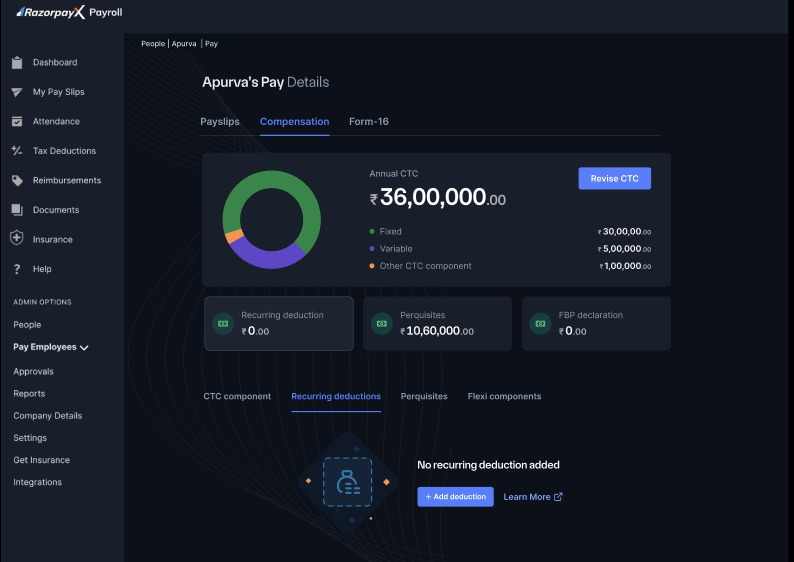
Component Categories
- Fixed Components
- Variable Components
- Other CTC Components
Fixed components are regular monthly salary elements that remain constant throughout the employment period or until a revision occurs. These form the base of an employee’s guaranteed compensation.
Characteristics of Fixed Components
- Guaranteed Payment - Paid every month regardless of performance or company results.
- Predictable Amount - Employees can rely on these components for financial planning.
- Statutory Base - Often used as the basis for calculating statutory contributions like PF and gratuity.
- Regular Disbursement - Included in every payroll cycle without variation.
Common Examples Include
- Basic Salary (core compensation component)
- House Rent Allowance (HRA)
- Dearness Allowance
- Conveyance Allowance
- Medical Allowance
- Special Allowance
Purpose and Impact
Fixed components typically constitute the largest portion of an employee’s CTC and are essential for:- Meeting minimum wage requirements
- Calculating statutory deductions and contributions
- Providing income stability to employees
Payroll Processing Impact
- Directly affect net salary calculation
- Form the base for statutory deductions
- Remain constant in payroll processing
Managing Components
CTC components for an employee are picked from the organisation’s Salary Component Library. Define, modify or disable component types (Earnings, Deduction, Non-Payable Benefit, Perquisite) in the Component Library — those changes flow into the dropdowns available here. To adjust an employee’s CTC:- On the CTC Components page, click Add Component and pick a component from the library.
- Enter the Monthly amount and Effective date for that employee. Tax treatment and calculation rules are inherited from the library definition.
- To change an existing component, click Edit beside it and update the amount or effective period; click the delete icon to remove it.
Component Display Information
Each component in the CTC view displays:- Component name
- Monthly amount
- Annual amount
- Action buttons for editing or deleting
NoteChanges to CTC components take effect from the next payroll cycle. Historical payslips remain unchanged for audit purposes. The specific components available in each category depend on your organisation’s compensation policy and structure.